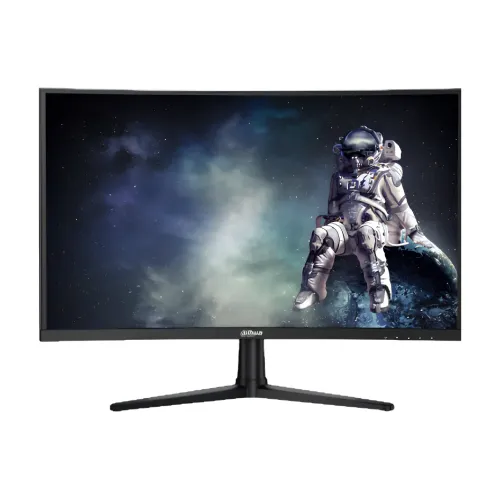
The Dahua DHI-LM27-E240C is a 27-inch Full HD gaming monitor with a VA panel and a 1500R curve. Its 1920 × 1080 resolution uses the familiar 16:9 format, and the headline performance specification is a maximum 240Hz refresh rate. This combination is aimed at users who want fast motion on a large desktop screen while keeping the graphics workload lower than QHD or 4K gaming. The curved panel bends gently toward the viewer, which can make a centered position feel more enveloping during games and video. It remains a standard widescreen display, so it also fits ordinary browser, office and study tasks. Verify the full DHI-LM27-E240C model marking: similarly named Dahua monitors can have different panel sizes and refresh rates.
A 27-inch curved Full HD gaming monitor
The Dahua DHI-LM27-E240C is a 27-inch Full HD gaming monitor with a VA panel and a 1500R curve. Its 1920 × 1080 resolution uses the familiar 16:9 format, and the headline performance specification is a maximum 240Hz refresh rate. This combination is aimed at users who want fast motion on a large desktop screen while keeping the graphics workload lower than QHD or 4K gaming. The curved panel bends gently toward the viewer, which can make a centered position feel more enveloping during games and video. It remains a standard widescreen display, so it also fits ordinary browser, office and study tasks. Verify the full DHI-LM27-E240C model marking: similarly named Dahua monitors can have different panel sizes and refresh rates.
A curved screen does not suit every desk or every viewing position. It is most useful when one person sits in front of the display at a reasonably consistent distance. People viewing from the side may see a different perspective, and users who prefer a flat panel for drawing, shared presentations or straight-line design work may prefer another model. The 1500R figure describes the curvature radius, not a guarantee that the monitor will feel equally curved to every viewer. Sit centered and allow enough desk depth to position the screen comfortably. Dahua lists a 27-inch screen area with a Full HD pixel grid; at this size, the image is less dense than QHD, so users who work with fine text or detailed imagery should consider their preferred viewing distance and scaling before purchase.
VA panel, contrast and image quality
The manufacturer specifies VA LCD technology with ELED backlighting. The official page lists a 4000:1 contrast ratio, which can produce darker blacks than many conventional IPS panels under suitable viewing conditions. This can help games and films with dark scenes look more dimensional. The published viewing angle is 178 degrees horizontally and vertically, but VA panels may show changes in contrast or color when viewed far off-axis. For the most consistent picture, sit in front of the screen and adjust its tilt toward eye level. Dahua lists typical brightness at 350 cd/m², 8-bit display color and 85% NTSC gamut. These figures describe the panel’s stated capabilities, not factory color calibration for specialist editing.
For gaming, streaming and daily use, the specified color support and contrast provide a broad general-purpose set of capabilities. Color-critical photography, print proofing or broadcast workflows need a calibrated display and independent verification; the product page does not claim that this monitor is factory calibrated to a professional standard. The 16:9 aspect ratio is compatible with common PC games, console video and streaming formats. The panel surface is listed as Haze 25%, 3H, and the manufacturer lists a screen-to-body ratio of at least 85%. Surface treatment can reduce some reflections, but it cannot remove bright-window glare in every room. Set brightness for the environment and avoid placing a strong light source directly opposite the panel.
240Hz refresh rate and 1ms MPRT
Dahua specifies a maximum 240Hz refresh rate and a 1ms MPRT response rating. At 240Hz, the display can refresh up to 240 times each second when a compatible signal is selected. This can make motion and aiming feel smoother in fast games compared with a conventional 60Hz display, especially when the PC can render a high and steady frame rate. The monitor does not generate extra frames: the graphics card, processor, game, settings and connection all affect the rate actually delivered. Some games may run well below 240 frames per second. Choose settings that balance image quality with stable performance, then confirm the display mode in the operating system or graphics settings.
MPRT is a motion-picture response measurement; it is not a universal promise that every pixel changes color in exactly one millisecond under every condition. Real perceived blur can depend on frame rate, overdrive, game content and individual vision. A very fast panel rating will not remove all motion artifacts. Adaptive Sync is listed and can coordinate compatible source frame delivery with display refresh behavior to reduce tearing in supported conditions. Features and variable refresh behavior depend on the graphics hardware, driver and cable. The datasheet lists both HDMI 2.0 and DisplayPort 1.4 as supporting 1920 × 1080 at 240Hz. The full signal path must also support that mode; adapters, docks, older graphics outputs and cable quality can restrict available refresh rates.
HDR10, flicker-free and low blue light
HDR10 support is listed for this model. The result depends on compatible content, operating system settings, application support and source hardware. HDR10 branding by itself does not specify local dimming or guarantee the visual impact of a high-end HDR television. The official typical brightness is 350 cd/m², so users should keep expectations aligned with the published panel specification. For standard SDR content, adjust brightness, contrast and color mode for a comfortable picture. Dahua also lists flicker-free technology and software blue-light protection. These features can be useful for long sessions, but comfort varies by person and does not replace breaks, good ambient lighting or a suitable viewing posture.
The manufacturer’s specifications list Haze 25%, 3H surface treatment and a 30,000-hour lifespan rating. The lifespan figure is a rated specification rather than a guarantee that every monitor component will operate for exactly that duration. Avoid pressing or tapping the LCD surface, and clean it only according to Dahua’s instructions with a soft cloth. Do not spray liquid directly onto the panel. The listed 8-bit color and 85% NTSC gamut are suitable to describe the model’s published color specifications, but they should not be turned into unsupported claims about exact sRGB coverage or calibration. If color consistency is important, confirm whether a calibration profile is available for the specific unit and measure it for the intended workflow.
Ports, cable choice and audio
The monitor includes one HDMI 2.0 input, one DisplayPort 1.4 input and one audio-out port. The manufacturer specifies Full HD at up to 240Hz on both video inputs. A gaming PC can generally connect through DisplayPort or HDMI, while the correct connection for a console depends on the console’s supported output modes. Check the source device’s specifications and select the compatible refresh rate after connecting. A port label alone does not ensure a particular mode if the graphics device, adapter or cable is a limiting link. The audio-out connection can feed headphones or external speakers. The official specification does not list built-in speakers, so do not plan on sound coming directly from the monitor without an external audio device.
A DisplayPort cable is listed among the package accessories on Dahua’s product page, along with a power adapter, wall-mount bracket, user manual and regulatory information. Package contents can vary by region or seller, so inspect the carton and confirm what is included with the Bangladeshi seller before buying. Use the supplied power adapter where possible. The manufacturer specifies 12V DC at 4A. If an adapter must be replaced, voltage, polarity, connector and current capability all matter; use an approved compatible replacement. Route the signal and power cables so they are not sharply bent or pulled when adjusting the monitor. Disconnect power before cleaning or moving the display.
Curve, stand, mounting and desk space
Dahua lists a 1500R curved screen and a tilt range from -5 to +20 degrees. The product page does not list height adjustment, swivel or pivot rotation, so those movements should not be assumed for the included stand. A compatible VESA mount uses a 100 × 100mm pattern. Check the monitor arm or wall bracket for VESA compatibility, weight capacity, correct screw length and clearance before installation. The listed dimensions without the base are 613 × 365.2 × 98.7mm; the package measures 691 × 452 × 160mm. These measurements are useful for planning desk or transport space, but remember to include the stand, cable bends and room to position the curved screen.
Net weight is specified as 3.85kg, and gross packaged weight as 5.05kg. The casing color is black. Dahua lists the frame widths at 3.4mm on the top, left and right and 18mm at the bottom. Desk fit should be checked with the actual base attached, because the official without-base dimensions do not describe the full footprint. The listed control uses five buttons and a status indicator light. Position the monitor on a stable, level surface and keep ventilation openings unobstructed. If mounting it on an arm, use an installation method that supports the curve without twisting the panel. For a shared desk, confirm that the screen angle and viewing position are comfortable for the primary user.
Power, environment and care
The official specifications list power supply at 12V DC, 4A; power use at 19.2W basic, 26.4W typical and 42W maximum; and standby consumption below 0.5W. Actual consumption changes with brightness, refresh mode, connected equipment and operating conditions. Keep the external adapter in an open, ventilated location and do not cover it with fabric or paper. The specified operating range is 0 to +40 degrees Celsius and 10% to 85% relative humidity. Storage is listed as -20 to +60 degrees Celsius and 5% to 90% relative humidity. Storage limits are not a recommendation to operate the display outside its operating range. Protect the monitor from moisture, condensation, impact and strong heat.
Dahua lists CE EMC, CE LVD and CE ERP certifications. The 30,000-hour lifespan is manufacturer-listed and should be understood as a specification rather than a warranty duration. The warranty shown by local sellers is three years, subject to each seller’s terms and required documentation. Keep the purchase invoice, warranty card and packaging if the shop requires the box for claims. If the screen arrives with damage, document it and contact the seller promptly before installation. Do not open the display or power adapter; repairs should be handled through the seller or authorized service channel. Product prices, stock and warranty processes can change, so confirm the current conditions at checkout and on the invoice.
Bangladesh availability and buying checklist
PQS showed the exact DHI-LM27-E240C listing at ৳23,000 cash price, with ৳25,300 listed as the regular price for its six-month EMI option, and marked the product In Stock during the browser check. It showed a three-year warranty. Ultra Technology listed the exact model at ৳23,000 but explicitly showed Out Of Stock; Star Tech displayed ৳23,500 and also Out Of Stock in the search result. Only the in-stock PQS listing is treated as a current purchasable offer. The out-of-stock listings are retained as evidence of availability and price display, not used to claim an active cross-shop market range. Reconfirm stock, delivery, warranty provider and final payment price before ordering.
The model is a strong fit for a buyer who values 240Hz Full HD gaming, a curved VA panel, high published contrast, Adaptive Sync and a standard HDMI/DisplayPort setup. It may be a weaker fit for someone who prioritizes QHD resolution, built-in speakers, a height-adjustable stand, broad off-axis color stability or verified professional calibration. Those needs should be compared against the official specification before purchase. Confirm that the computer can provide Full HD at 240Hz through the selected output. Verify that a console’s desired refresh mode is supported rather than assuming it will use the monitor’s maximum PC refresh rate. Match the model suffix on the product label, order page and warranty document to avoid confusion with similar Dahua display models.
Key features
- 27-inch VA LCD with ELED backlight
- 1500R curved panel
- 1920 × 1080 Full HD, 16:9
- Up to 240Hz refresh over HDMI 2.0 or DP 1.4
- 1ms MPRT rating
- 4000:1 contrast ratio, 350 cd/m² typical brightness
- HDR10, Adaptive Sync and flicker-free technology
- Software blue-light protection
- HDMI 2.0, DisplayPort 1.4 and audio out
- 100 × 100mm VESA mount
Advantages
- 240Hz ceiling for compatible PC gaming
- VA panel with manufacturer-listed 4000:1 contrast
- 1500R curve for a centered immersive setup
- Adaptive Sync and flicker-free features are listed
- Both HDMI 2.0 and DP 1.4 support the specified FHD 240Hz signal
Points to consider
- Full HD on 27 inches is less pixel-dense than QHD alternatives
- No built-in speakers are listed
- Stand height, swivel and pivot adjustment are not specified
- Curved screen is less suited to off-axis shared viewing than some flat displays
- Only one exact-model seller was in stock during research; inventory can change
Frequently asked questions
What resolution does the LM27-E240C use?
It uses native Full HD 1920 × 1080 resolution with a 16:9 aspect ratio.
How large is the screen?
The monitor has a 27-inch curved screen using a 1500R curve.
What refresh rate is supported?
Dahua specifies up to 240Hz at Full HD over HDMI 2.0 or DisplayPort 1.4, subject to source compatibility.
Which panel technology is used?
The manufacturer specifies a VA LCD panel with ELED backlighting.
What response time is specified?
The datasheet lists a 1ms MPRT response rating; real motion clarity varies with source and settings.
Does it support HDR10?
Yes, HDR10 is listed. The result depends on content, software, source hardware and the monitor’s published brightness capability.
What is the contrast ratio?
Dahua lists a 4000:1 contrast ratio for this VA panel.
Does it include Adaptive Sync?
Yes, Adaptive Sync is listed. Check the graphics device and driver for compatible variable refresh behavior.
Does it have built-in speakers?
Built-in speakers are not listed. The monitor has an audio-out port for external headphones or speakers.
What ports are available?
It has one HDMI 2.0 input, one DisplayPort 1.4 input and one audio output.
Can it be VESA mounted?
Yes, Dahua specifies a 100 × 100mm VESA mount pattern; check bracket and screw compatibility.
What are the price and warranty in Bangladesh?
PQS showed ৳23,000 cash price, in-stock availability and three-year warranty during the check. Confirm the live offer and terms before purchase.
Specifications are taken from Dahua product documentation. Local prices, inventory and warranty processes may change; confirm the exact DHI-LM27-E240C model and the current seller terms at checkout.