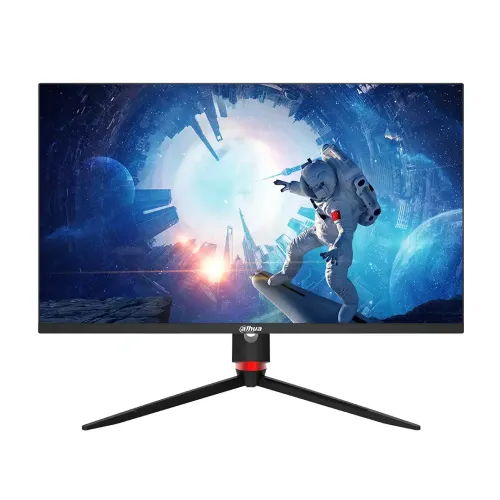
Exact model overview
The Dahua DHI-LM27-E331A is a 27-inch QHD IPS gaming monitor. Dahua’s exact-model specification and E331-series user manual list 2560 × 1440 resolution, 180Hz maximum refresh, 1000:1 typical contrast, 178-degree horizontal and vertical viewing angles, and 16.7 million colors. The manual distinguishes the E331A model from DHI-LM27-E331: the E331A version includes a lifting base with height adjustment, swivel and pivot. It also lists integrated speakers. Use this exact model number when checking ports, stand features, warranty and replacement parts.
27-inch QHD screen
The display has a 27-inch diagonal and 16:9 aspect ratio with 2560 × 1440 pixels. QHD offers more workspace and finer detail than Full HD at a comparable screen size. Set the computer to native resolution for sharp pixel mapping; use operating-system scaling if text is too small. Rendering games at QHD takes more GPU power than Full HD. A high refresh rating does not guarantee that a PC can render a matching number of frames: the result depends on GPU, CPU, game and graphics settings.
IPS panel and viewing angles
Dahua identifies the panel as IPS and specifies 178° horizontal and 178° vertical viewing angles. Wide viewing angles can help keep the image more consistent when viewed off-center, although the best image is generally obtained from a centered seating position. The typical contrast ratio is 1000:1. The cited specification does not establish independent color calibration or uniformity for each unit. For color-critical design, calibrate the monitor and use a managed workflow. The screen is a flat display; do not infer curved-screen characteristics from another gaming model.
180Hz refresh rate
The official E331A specification lists a maximum refresh rate of 180Hz. To select it, connect a compatible computer using a supported digital input, set 2560 × 1440 and choose an available refresh rate in the display settings. The cable, graphics output, driver and input timing can constrain the available modes. If 180Hz is missing, check the manual’s signal table and test a direct cable connection. The refresh rate is the display’s update capacity; the actual game frame rate is set by the computer and software.
Adaptive-Sync and gaming motion
Dahua describes Adaptive-Sync support for this model. When compatible with the graphics card, input and software, variable refresh can coordinate screen updates with changing frame output and reduce tearing in supported conditions. It does not increase rendering performance or eliminate every source of stutter. Enable the feature in the monitor and graphics settings if required. Compatibility depends on the selected timing and driver. If flicker appears, test a stable frame-rate range or refresh mode and check the manual.
Response time and realistic expectations
Dahua product materials describe a 1ms fast response figure, while exact measurement conditions can vary by mode and marketing method. Response time is different from input lag and refresh rate. Pixel transitions are not all identical, and aggressive overdrive can create bright or dark overshoot. Choose the response setting that looks clean in moving scenes instead of assuming the lowest-numbered mode is best. Consult the exact E331A manual for available response controls and operating combinations.
Brightness, contrast and color
Dahua lists 300 nits typical brightness, 1000:1 typical contrast and 85% NTSC color gamut for the E331A. These are manufacturer specifications, not a unit-specific calibration certificate. Brightness depends on picture mode and conditions; set it to a comfortable level for the room. Gamut percentages use standards that may not compare directly with sRGB or DCI-P3 coverage. For photo, video or print work, calibrate the individual panel and check the color workflow.
Color depth and image modes
The official product specification lists 16.7 million colors. Do not describe this as a verified 10-bit panel. Color appearance also depends on the selected picture mode, source signal and operating-system settings. For everyday gaming and media, choose a mode that preserves shadow detail and avoids excessive saturation. For creative work, use a calibrated profile and a color-managed application. Published gamut coverage describes range, not necessarily accuracy, grayscale tracking or factory calibration for the particular unit.
Inputs and bandwidth
Dahua’s E331A materials list two HDMI 2.1 inputs, two DisplayPort 1.4 inputs, one USB port used only for upgrade and an audio output. Check the official manual’s timing table for the resolution and refresh combination available through each port. A USB upgrade port is not a general-purpose hub or video input. Docks and adapters can limit bandwidth, variable refresh or maximum refresh. Connect the computer directly when diagnosing a missing mode, then verify the selected input and driver settings.
Built-in speakers and audio output
The E331-series manual explicitly lists a speaker for the E331A. The monitor also has an audio output listed by Dahua. Built-in speakers can provide basic playback, but buyers seeking stronger sound may prefer dedicated speakers or headphones. When no audio plays, check the computer’s selected playback device, monitor volume and mute settings. The audio output can route sound to compatible external equipment; it is not a microphone input. Confirm the delivered regional unit and package contents if external audio accessories matter.
Stand, height and movement
The E331A lifting base supports a 90mm height range, approximately ±20° swivel, ±90° pivot and tilt from about -3° forward to -20° backward as detailed in Dahua documentation. This model-specific stand is different from the E331 non-A version. Set the height and tilt for a relaxed viewing position, and make sure the base is on a stable surface. Leave cable slack before rotating or raising the screen. Exact angle conventions can be easy to misread, so consult the manual drawings when configuring the stand.
VESA mount and installation
Dahua documentation lists a 100 × 100mm VESA pattern for the LM27-E331A. Before using a third-party arm, check its load rating, screw length and compatibility with the rear recess. Install the monitor according to the manual and support the panel while fitting the bracket. Keep the stand or mount stable and route cables so that pivot and height adjustments do not pull on connectors. The manual also distinguishes this A model from the E331 model, which has a different stand configuration.
Dimensions and weight
Dahua lists the E331A without-base dimensions as 616 × 57.5 × 364.3mm and the with-base dimensions as 780 × 180 × 485mm. The cited manual lists gross weight at about 6.6kg; product pages may vary in how they report net and packaged weight. Measure desk width, depth, height and rear clearance before purchase. Leave room for the larger lifting base and for cables. Use package dimensions for shipping or shelf planning only when confirmed on the local box.
Power and operating environment
The manufacturer materials list a DC 12V, 2.5A adapter, standard consumption at or below 54W and standby below 0.5W. Use the adapter supplied for the correct regional product and do not select a replacement solely by connector shape. Dahua specifies an operating temperature range of 0°C to 40°C and non-condensing humidity conditions in the manual. Keep ventilation unobstructed, avoid liquids near electrical connections and disconnect power before moving or cleaning the monitor.
Eye comfort and surface care
Dahua materials for this model describe anti-blue-light design, while the product page emphasizes IPS viewing and gaming use. Eye comfort also depends on brightness, ambient lighting, viewing distance and text size. Adjust the screen for the room and take regular breaks during long sessions. Color-shifting modes may change image appearance and may not suit color evaluation. Clean the panel using a soft cloth and follow the supplied care instructions; do not spray cleaner directly on the display.
Advantages and trade-offs
The DHI-LM27-E331A combines a 27-inch QHD IPS panel, 180Hz maximum refresh, Adaptive-Sync, a full-adjustment lifting base and built-in speakers. Official documentation identifies two HDMI 2.1 inputs, two DisplayPort 1.4 inputs, upgrade-only USB and VESA 100 × 100mm. Trade-offs include the need for a capable PC to drive QHD at high frame rates, a 1000:1 typical contrast ratio and color specifications that do not replace calibration. Confirm the local warranty and exact delivered package with the seller.
Bangladesh warranty and purchase terms
Dahua’s specification page establishes model features but does not determine the warranty for the Bangladesh serial sold through BiponiBD. The existing catalog says three years; verify it with the seller and authorized service channel before ordering. Ask when coverage starts, whether service is local, which panel defects qualify and what invoice or serial evidence is needed. Current price, stock, delivery, payment and return terms are seller-specific and can change. Check the live offer at checkout and retain the invoice, serial details and packaging.
Setup and troubleshooting
Connect the correct supplied power adapter and a compatible HDMI or DisplayPort cable. Select 2560 × 1440, then choose the highest refresh mode exposed by both monitor and computer. If 180Hz is unavailable, check the input, cable, graphics output, driver and manual timing table. For tearing, enable Adaptive-Sync where the GPU and chosen timing support it. If sound is missing, check the selected playback device and monitor volume. If the screen is unstable, use a lower supported refresh and contact service with the model and serial.
Who should consider this monitor
This model can suit a PC gamer who wants QHD workspace, IPS viewing, a 180Hz ceiling and more ergonomic adjustment than a basic tilt stand. The lifting base and integrated speakers can reduce the need for a separate arm or basic desktop audio. Ensure that the graphics system can render the games you play at the desired QHD rate. Buyers doing color-critical work should budget for calibration, while users needing guaranteed pixel coverage or special warranty terms should confirm them with the seller before purchase.
Specification summary
Dahua DHI-LM27-E331A: 27-inch IPS, 16:9, 2560 × 1440 QHD, maximum 180Hz, 1000:1 typical contrast, 16.7 million colors and 178°/178° viewing angles. Dahua lists 300 nits typical brightness, 85% NTSC, Adaptive-Sync, 1ms response claim, HDMI 2.1 × 2, DisplayPort 1.4 × 2, upgrade-only USB × 1 and audio out. The E331A manual lists built-in speakers, 90mm height adjustment, swivel, pivot, tilt and 100 × 100mm VESA mounting. Verify serial-specific Bangladesh warranty and live offer.