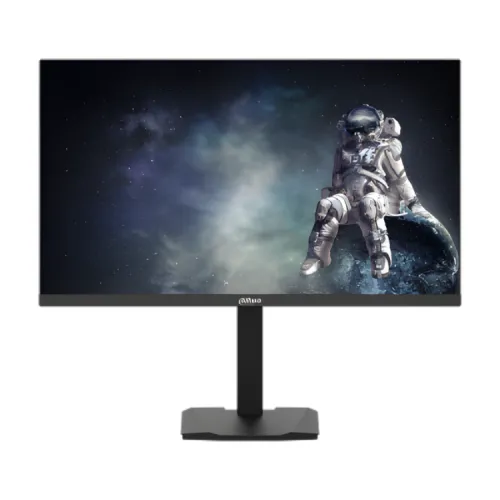
Dahua DHI-LM27-E331AY overview
Dahua DHI-LM27-E331AY is a 27-inch QHD gaming monitor with an IPS panel, 2560 × 1440 resolution and a 200Hz refresh rate. Dahua specifies 300 cd/m² typical brightness, 1000:1 contrast, 95% DCI-P3 coverage, delta E below 2 color accuracy, 1.07 billion colors using 8-bit + FRC and 1ms MPRT. Connectivity includes two HDMI 2.1 ports, two DisplayPort 1.4 ports and one audio output. Dahua lists HDR10, FreeSync, flicker-free and hardware low-blue-light features. HDMI supports QHD up to 144Hz; DisplayPort supports QHD up to 200Hz. This description covers the exact E331AY variant and its 110mm adjustable stand.
Resolution, size and pixel detail
The screen is 27 inches with a native 2560 × 1440 QHD resolution and a 16:9 aspect ratio. Dahua lists a viewing area of 596.74 × 335.66mm, pixel pitch of 0.2331mm and 108.79 pixels per inch. QHD provides more workspace and image detail than Full HD at the same diagonal, while requiring more graphics processing to reach high frame rates. Select the native resolution for the clearest image and set scaling to suit your viewing distance. Verify that the connected PC or console supports the desired QHD timing over the chosen input.
IPS panel and color
Dahua identifies an IPS panel with ELED backlight, 178° horizontal and vertical viewing angles, 1000:1 typical contrast and 300 cd/m² typical brightness. It lists 95% DCI-P3 color gamut and delta E below 2 color accuracy, with 1.07 billion colors using an 8-bit + FRC configuration. These are manufacturer-stated figures; color appearance can differ between units and modes. For color-sensitive editing, verify the selected color preset and use a measured profile if needed. Anti-glare surface treatment is listed as 25% haze and 3H hardness; avoid direct light sources for best visibility.
200Hz refresh and port-specific limits
Dahua specifies 200Hz maximum refresh. Its exact model specification states two HDMI 2.1 ports support 2560 × 1440 at up to 144Hz, while two DisplayPort 1.4 inputs support QHD at up to 200Hz. Therefore, use a compatible DisplayPort source and cable to target the full refresh mode. “HDMI 2.1” alone does not mean this monitor accepts QHD 200Hz on HDMI. Graphics hardware, driver, cable, adapter, operating system and chosen timing determine the actual signal. After setup, confirm QHD and refresh in the system display settings and monitor OSD.
Response time and motion
The manufacturer lists 1ms MPRT. MPRT is a motion-picture response measurement and should not be treated as the same measurement as gray-to-gray transition time. The on-screen menu offers overdrive levels and MPRT controls; aggressive settings can change image brightness or cause overshoot depending on frame rate. Compare the modes with fast-moving content and select one that looks clear without distracting artifacts. Actual motion clarity depends on frame rate, refresh, pixel behavior and selected settings, not solely on the headline response figure.
FreeSync and variable refresh
Dahua lists FreeSync support. The manual shows a FreeSync/G-Sync OSD toggle; that menu option does not itself prove a separate NVIDIA G-SYNC certification. Variable refresh operation depends on the graphics card, driver, frame rate, port and configuration. Use a compatible AMD Radeon graphics device for AMD FreeSync and check the current driver if the feature is unavailable. Keep the supported range and behavior subject to the exact source settings; no adaptive-sync range was published in the product page data reviewed here.
HDR10 and brightness
Dahua specifies HDR10 and 300 cd/m² typical brightness. HDR operation requires compatible content, source hardware, connection and operating-system settings. HDR10 compliance does not establish a VESA DisplayHDR certification or local-dimming system; neither is stated in the cited exact-model information. Contrast is listed as 1000:1. Compare HDR and SDR output using supported content and use the image mode that looks right to you. Do not infer high peak-HDR performance solely from the HDR10 label.
HDMI and DisplayPort connections
The rear panel has two HDMI 2.1 inputs and two DisplayPort 1.4 inputs. Dahua’s port-specific table lists HDMI at QHD up to 144Hz and DP at QHD up to 200Hz. The monitor also has an audio output for connecting headphones or external sound equipment. The USB port is marked for firmware upgrade only; it is not a hub or data connection for peripherals. Connect the source to the correct input, select it in the OSD and use a cable rated for the needed mode.
Audio and USB clarification
Dahua lists one audio output, which can connect an external audio device. The product information does not list built-in speakers. The physical USB port is for firmware upgrades only according to the manual; it is not a USB hub, USB-C port or laptop docking input. Plan for separate speakers or headphones. Audio routing depends on the source connection and system output settings. If you intend to update firmware, follow the official manual and avoid disconnecting power during the process.
Stand adjustment and ergonomics
For the E331AY variant, Dahua specifies height adjustment of 110mm, tilt from -5° to +15°, left/right rotation from -20° to +20° and vertical pivot up to +90°. The flat panel supports a 100 × 100mm VESA mount. Product dimensions without the wall-mount bracket are 613.8 × 362.5 × 70.7mm and net weight is 5.6kg. Use the stock stand on a stable surface, leave enough cable slack for adjustment and confirm a monitor arm’s VESA pattern and load rating before mounting.
Power and operating conditions
The monitor uses an external 12V DC, 4A power adapter. Dahua lists 26W basic consumption, 28W typical and 30W maximum, with standby consumption below 0.5W. Use the supplied adapter for the exact model and keep ventilation openings clear. Dahua specifies operation between 0°C and +40°C and storage from -20°C to +60°C, with humidity ranges stated in its technical table. Typical and maximum power values describe different conditions; actual consumption varies with brightness, refresh and usage.
Eye comfort and on-screen tools
Dahua lists flicker-free technology and hardware blue-light protection. The OSD includes brightness, contrast, black equalization, picture presets, color temperature, FreeSync/G-Sync toggle, overdrive, MPRT, HDR, game timer, crosshair and FPS counter. These settings provide control over the image but do not guarantee comfort for every person. Adjust room lighting, brightness, posture and breaks. Some combinations may be unavailable together or may alter brightness and color; consult the manual and review one setting at a time.
Gaming and system compatibility
The 200Hz maximum can serve a gaming PC capable of producing high frame rates at QHD. Many games will run below 200 frames per second depending on the graphics card and quality settings. Dahua’s connection table identifies DisplayPort 1.4 for QHD up to 200Hz and HDMI 2.1 up to QHD 144Hz. Consoles and adapters may have different output limits. Check the graphics card, cable, driver and game settings before purchase if a specific refresh target matters. Adaptive sync can help when frame rates vary, if the source supports it.
Package contents
Dahua lists the monitor, base, bracket, power adapter, DisplayPort cable, user manual by QR code, legal/regulatory information and energy label as accessories. The exact box contents can vary by market. The cited package data does not list an HDMI cable, USB data cable or external speakers. Confirm the sealed Bangladesh package and seller invoice before ordering, especially if the computer uses HDMI only. Keep packaging and serial labels during the return period.
Warranty and Bangladesh offer
The existing catalog lists three years, and a Dahua support listing can identify model warranty by region, but current BiponiBD serial eligibility was not verified in this review. Ask the seller for the authorized local service provider, serial-registration steps, panel/dead-pixel coverage, warranty start date, repair/exchange terms and invoice requirements in writing. No current BiponiBD price or stock was independently confirmed. Verify the total price, delivery charge and return policy before checkout; prices and availability change.
Advantages and trade-offs
The E331AY combines QHD, 200Hz maximum refresh, IPS viewing angles, 95% DCI-P3, HDR10, FreeSync, four digital video inputs, an adjustable stand and 100 × 100mm VESA mounting. The most important setup limitation is that HDMI supports QHD up to 144Hz while DisplayPort is specified for 200Hz. The audio output is not a built-in speaker, and the USB port is upgrade-only rather than a hub. QHD at high frame rates also needs capable PC hardware. Match these details to the intended desk and gaming setup.
First-time setup and troubleshooting
Place the monitor on a stable desk, attach the supplied stand and connect the power adapter before connecting the video cable. For QHD at 200Hz, use a compatible DisplayPort 1.4 output and choose 2560 × 1440 with the highest supported refresh in the operating system. For an HDMI connection, expect the manufacturer-listed maximum of QHD 144Hz. Select the active input in the OSD. If the screen reports no signal, check that the computer is awake, the cable is fully seated and the correct input is selected. If the image flickers, try the alternate supported refresh timing and review the graphics driver. Keep the adapter ventilated and avoid pulling cables while rotating the stand.
Buyer checklist
Confirm the exact rear label reads DHI-LM27-E331AY, not E331A or E331. Ask which cable is supplied and connect through DisplayPort 1.4 if targeting QHD 200Hz; HDMI is listed up to QHD 144Hz. Verify the GPU and driver support the mode, then select 2560 × 1440 and confirm refresh in the OSD. Check FreeSync with a compatible GPU, use the audio output with external equipment if needed and do not expect USB hub functionality. Obtain local serial warranty, dead-pixel and return terms in writing.
Summary
Dahua DHI-LM27-E331AY is a 27-inch QHD 2560 × 1440 IPS gaming monitor with 200Hz maximum refresh, 1ms MPRT, 300 cd/m² typical brightness, 1000:1 contrast, 95% DCI-P3, delta E below 2, HDR10 and FreeSync. It has two HDMI 2.1 ports limited by Dahua to QHD 144Hz, two DP 1.4 ports specified up to QHD 200Hz and one audio output. Its stand offers 110mm height, tilt, swivel and pivot with 100 × 100mm VESA. USB is upgrade-only. Confirm local serial warranty and current offer before purchase.