Verified model overview
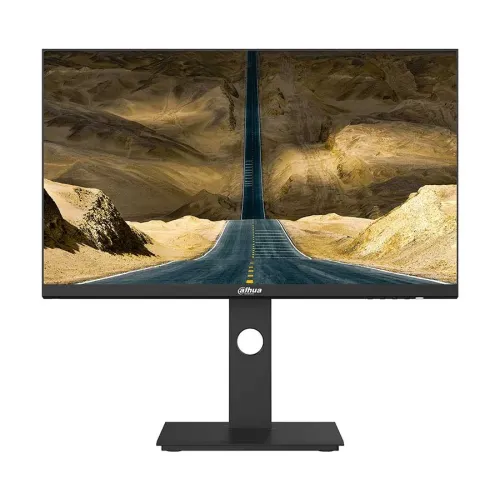
The Dahua DHI-LM27-P301A is a 27-inch QHD IPS monitor for office and professional desktop use. Dahua’s current product specification lists 2560 × 1440 resolution, 100Hz refresh, 350 cd/m² maximum brightness, 1000:1 contrast, 99% sRGB typical and 5ms overdrive response. It has HDMI 2.0, DisplayPort 1.4 and USB-C with 65W power delivery, plus audio out. Dahua also lists PIP/PBP, hardware low-blue-light protection, a height-adjustable and pivoting stand, and 75 × 75mm VESA mounting. Older datasheet figures differ, so check exact regional revision.
27-inch QHD workspace
The 27-inch panel has native QHD resolution of 2560 × 1440 in a 16:9 layout. Dahua lists a 596.74 × 335.66mm viewing area, 0.2331mm pixel pitch and 108.79 pixels per inch. This resolution gives clear text and more desktop space than Full HD at the same size, useful for documents, spreadsheets and multiple windows. Use the native resolution for sharp mapping and operating-system scaling if interface text is too small. Productivity at QHD does not require a gaming-class computer, although smooth high-refresh gaming depends on GPU performance.
IPS panel and viewing angles
Dahua specifies an IPS panel with 178-degree horizontal and vertical viewing angles. The panel is intended for broad desktop viewing, including when the user shifts position or shares a screen. Typical IPS contrast is listed at 1000:1; room lighting and brightness affect perceived black levels. The surface has Haze 25%, 3H treatment, and the screen-to-body ratio is listed at 90% or higher. Position the panel to reduce reflections and do not treat wide viewing angles as a guarantee of calibrated color from every direction.
Refresh rate and response
The current Dahua product page lists a 100Hz refresh rate and 5ms overdrive response. This is a general desktop monitor rather than a high-refresh gaming model. A 100Hz mode can make scrolling and pointer movement appear smoother than 60Hz when the computer supports it. Set the native QHD resolution and refresh in the operating system, then check the selected input and cable. Dahua’s older 2022 model datasheet lists 75Hz, which conflicts with the current page; verify the delivered revision and do not assume every regional unit supports 100Hz.
USB-C connection and 65W power
Dahua highlights USB-C connectivity with up to 65W reverse charging, which can carry display signal and power to a compatible laptop through one cable. Charging depends on the laptop’s USB-C power requirements and the monitor’s supported USB-C profile; it may not replace a higher-wattage adapter for every computer. Confirm USB-C video support on the host and use a suitable full-featured cable. One-cable setup can reduce desk cabling, but the monitor specification does not claim data-dock features beyond those listed.
HDMI and DisplayPort inputs
The monitor lists one HDMI 2.0 input, one DisplayPort 1.4 input, one USB-C input and one audio output. Dahua’s current page shows QHD 100Hz alongside input notes that reference 1920 × 1080 at 100Hz for HDMI and DisplayPort; the older 2022 datasheet gives different interface details. Because published timing details conflict, verify the exact port, cable and delivered revision before planning a particular refresh mode. Connect directly to the laptop or graphics card and choose the correct input source.
PIP and PBP multi-source display
Dahua lists Picture-in-Picture (PIP) and Picture-by-Picture (PBP), which allow compatible video sources to appear together on the screen. PIP places a smaller source view over the main image, while PBP divides the available display area between sources. These modes are useful when comparing documents or monitoring a second device. Each source still has its own resolution and timing limits, and the available layouts may reduce the image area per source. Consult the on-screen menu and manual for supported combinations.
Color range and practical accuracy
Dahua lists 99% sRGB as typical on its current product page and advertises wider gamut claims on the marketing summary. Its 2022 datasheet lists 100% sRGB, 102% NTSC, 98% DCI-P3 and 92% Adobe RGB. Gamut figures vary by source/revision and are not the same as factory calibration accuracy. For ordinary office work, choose a natural mode. For design or photography, verify the exact revision and calibrate the individual screen using color-managed software before relying on it for critical color decisions.
Brightness, contrast and text clarity
Dahua lists 350 cd/m² maximum brightness and 1000:1 contrast for the current page, with an E-LED backlight. Brightness helps visibility in a lit workspace, but actual output varies with picture mode and unit. Adjust it to the room rather than using maximum brightness by default. QHD at 27 inches provides approximately 108.79 pixels per inch for fine text and graphics. Screen scaling can balance readability and workspace. The specification does not publish a VESA HDR certification or an HDR mode for this product.
Ergonomic stand movement
The stand provides around 120mm of height adjustment, tilt from about -5 to +20 degrees, swivel from -45 to +45 degrees and pivot from -90 to +90 degrees according to the current Dahua specification. Adjust height for a comfortable seated eye line, tilt for reflection control and pivot when portrait orientation is useful. Leave enough cable slack through the full movement range. The actual delivered package and range may differ by region or revision, so compare the model label and stand instructions after delivery.
VESA mount and physical fit
Dahua lists a 75 × 75mm VESA mount and a monitor weight around 5.9kg on the current page. The 2022 datasheet gives dimensions without stand of approximately 613.3 × 367 × 57.2mm and package dimensions 915 × 454 × 163mm. Check the exact stand-installed dimensions and included bracket before close-fit placement. For an arm, confirm VESA size, screw length and load rating. Support the monitor while mounting and make sure cables do not pull when the screen pivots or swivels.
Power, USB-C charging and consumption
The monitor has a built-in power supply rated for 100–240V AC, 50/60Hz. Dahua lists 35W typical and maximum figures that vary across specification versions; the 2022 datasheet lists 38W typical and 135W maximum, while the current page shows 35W typical and 140W maximum. The large maximum may include USB-C charging output. Standby is listed at 0.5W or less. Use a grounded supply and verify the exact revision label. Avoid interpreting typical monitor consumption as the total energy draw of a USB-C laptop.
Low-blue-light and flicker-free features
Dahua lists hardware blue-light protection and flicker-free technology. These display functions can change the picture profile and are not medical claims. Eye comfort also depends on brightness, lighting, viewing distance, text scale and breaks. Use low-blue-light mode if it suits the task, and switch to a neutral preset when color appearance matters. The non-glare surface can reduce reflections but cannot eliminate direct light sources. Set the monitor at a comfortable height and avoid an excessively bright image in a dark room.
USB-C workstation use
With compatible USB-C video and 65W reverse charging, the LM27-P301A can simplify a laptop desk setup by combining display output and charging over a single cable. Confirm that the laptop supports DisplayPort Alt Mode or another compatible video mode over USB-C and that 65W meets its power needs. Dahua also lists HDMI and DisplayPort for other computers. No integrated speakers are specified; use external audio through the audio output or computer. Do not assume USB-C alone provides Ethernet, USB hub ports or dock functions not listed.
Strengths and practical trade-offs
This model offers a QHD IPS screen, USB-C with up to 65W charging, PIP/PBP and a flexible stand with lift, tilt, swivel and pivot. Its product role is general productivity rather than high-refresh gaming. Dahua’s current page lists 100Hz, while the older datasheet lists 75Hz and differs on gamut and maximum power; the local SKU should be confirmed. It has no listed integrated speakers, and its VESA pattern is 75 × 75mm rather than the more common 100 × 100mm.
Bangladesh warranty and seller terms
Dahua product documentation describes features but does not verify local coverage for a particular Bangladesh serial number. The existing listing says three years; ask the seller to confirm serial eligibility, warranty start date, authorized service location and panel defect rules. Check the exact model revision on the carton and compare its regional specification with the listing, especially refresh, USB-C charging and color gamut. Current price, stock, delivery, returns and payment terms can change; confirm them at checkout and keep the invoice.
Setup and troubleshooting
Connect the monitor with USB-C, HDMI or DisplayPort, choose the matching input and set QHD resolution. For USB-C charging, use a compatible laptop and full-featured cable; confirm that the host supports video over USB-C. If the image or refresh mode is missing, test another input, direct cable, GPU output and driver. For PIP/PBP, connect two supported sources and select the layout in the monitor menu. Adjust the stand for height and orientation. Route sound through external equipment because speakers are not specified.
Who should consider this monitor
The DHI-LM27-P301A can suit an office user who wants 27-inch QHD, an IPS panel, flexible stand movement and a USB-C cable that can provide up to 65W charging to a compatible laptop. PIP/PBP can help compare two connected sources. Check that 65W is sufficient for the computer, that the laptop supports video over USB-C and that the exact regional revision matches the desired refresh rate. Gamers seeking a high refresh rate or buyers needing integrated speakers, a 100mm VESA mount or certified HDR should compare those details.
Specification summary and revision note
Dahua DHI-LM27-P301A: 27-inch IPS E-LED, QHD 2560 × 1440, 16:9, 178° viewing angles, 1000:1 contrast, 350 cd/m² maximum, 5ms OD, 99% sRGB typical on the current product page. Current page lists 100Hz, while the 2022 datasheet lists 75Hz and different gamut/power figures. Inputs: HDMI 2.0, DP 1.4, USB-C up to 65W, audio out. PIP/PBP; 120mm lift, tilt, swivel and pivot; VESA 75 × 75mm. Verify revision before purchase.