Verified model overview
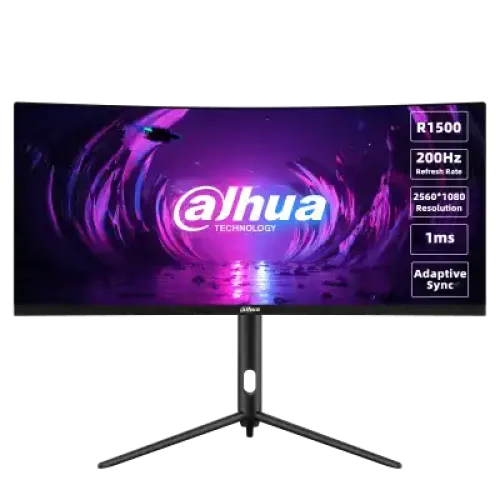
The Dahua DHI-LM30-E330CA is a 30-inch 21:9 curved gaming monitor with a VA panel and 1500R curvature. Dahua specifies 2560 × 1080 WFHD resolution, maximum 200Hz refresh, 1ms MPRT, 250-nit typical brightness and 3000:1 typical contrast. Other features include Adaptive-Sync, Gameplus tools, DCR processing and rear lighting. It has two HDMI 2.0 inputs listed up to 180Hz, two DisplayPort 1.2 inputs up to 200Hz and an audio output. The included stand adjusts height, tilt and swivel; speakers are not listed.
30-inch ultrawide WFHD
The 30-inch monitor uses a 21:9 aspect ratio and 2560 × 1080 resolution. The wide layout can show more horizontal space for game interfaces, timelines, spreadsheets and side-by-side applications than a conventional 16:9 Full HD screen. It has fewer vertical pixels than QHD 2560 × 1440, so compare the intended workload and viewing distance. Set the computer to the native resolution and use scaling or application layout controls to keep text comfortable. Ultrawide support varies by game and video source.
1500R curvature and viewing position
Dahua specifies a 1500R curve, which brings the sides of the wide screen toward the viewer. Whether it feels immersive or too pronounced depends on desk depth, seating distance and preference. Center the panel in front of the user and leave enough room for its width and stand. The manufacturer lists 178-degree horizontal and vertical viewing angles, but angle, reflections and room light still affect perceived image quality. The curvature does not change the monitor’s native aspect ratio or resolution.
VA panel and contrast
The LM30-E330CA uses a VA panel with 3000:1 typical contrast according to Dahua. Higher typical contrast can make dark scenes appear deeper than many IPS displays, though black levels depend on ambient light, settings and panel uniformity. VA pixel transitions can vary by color pair, so response behavior is not identical in every scene. GIGABYTE or a different Dahua model may use different panel specifications; use the exact DHI-LM30-E330CA model details when comparing products.
200Hz refresh rate
Dahua lists a maximum refresh rate of 200Hz, with QHD-like native WFHD resolution of 2560 × 1080. The official specifications list DisplayPort 1.2 up to 200Hz and HDMI 2.0 up to 180Hz. A high refresh rate can make fast motion look smoother when the game and GPU deliver enough frames. Select native resolution and the desired refresh in display settings. If the mode is unavailable, check the GPU output, cable, selected input and driver. The monitor cannot create extra game frames.
1ms MPRT and motion handling
Dahua specifies 1ms MPRT, a moving-picture response metric that relates to perceived blur. It is not input lag and does not mean all pixel transitions always finish in one millisecond. The monitor also lists response-time controls, Gameplus and Adaptive-Sync. Choose the image mode based on visible trails, overshoot and stability in actual content. If the fastest response option introduces artifacts, try a less aggressive setting. Motion clarity also depends on refresh, frame rate, contrast and the behavior of the individual unit.
Adaptive-Sync and variable frame rate
Adaptive-Sync is listed as a feature to reduce image tearing and improve visual fluency with compatible source devices. Use a supported graphics card, cable and driver, then enable the feature in both the monitor menu and graphics software. Variable refresh can help synchronize display updates with changing frame output within a supported range, but does not improve GPU performance. If flicker or instability appears, test a different frame-rate range, refresh mode or cable and compare with Adaptive-Sync switched off.
Color gamut and color depth
Dahua lists 120% sRGB, 85% NTSC, 90% DCI-P3 and 83% Adobe RGB, plus 16.7 million colors. Gamut percentage figures can use different coverage or area conventions and should not be read as color accuracy scores. For gaming and video, choose a profile that looks natural. For photo editing, print or design, verify the delivered revision and calibrate the individual display with color-managed software. A wide saturation figure by itself does not guarantee factory calibration or consistent unit-to-unit color.
Brightness and DCR processing
Typical brightness is listed as 250 nits and typical contrast as 3000:1. Dahua also describes DCR intelligent processing. Brightness and dynamic contrast behavior can vary with picture mode and content; use settings that preserve detail in both dark and bright scenes. The specification does not list a VESA DisplayHDR certification. Adjust brightness to room conditions and compare any dynamic processing with a neutral mode if highlights or shadow detail appear unnatural.
HDMI, DisplayPort and audio output
The rear connections include two HDMI 2.0 inputs listed for 180Hz, two DisplayPort 1.2 inputs listed for 200Hz and one audio output. Use DisplayPort for the specified maximum refresh mode. A computer’s output, cable quality, adapter or dock can impose lower timing limits. Connect directly to the graphics card when troubleshooting. The audio jack can feed compatible headphones or powered speakers; Dahua’s product information and manual specify no built-in speakers.
No integrated speakers listed
Dahua lists no built-in speakers for the E330CA. Plan to use headphones, external speakers or a separate audio system. The audio-out connection can route sound to compatible gear when the source sends audio to the display through HDMI or DisplayPort. Select the correct playback device on the computer and check monitor volume if sound is missing. Do not assume that an audio jack means that speakers or a microphone are integrated.
Adjustable stand
The stand provides 115mm ±5mm of height adjustment, tilt around -5 to +20 degrees and rotation around ±25 degrees according to the manual and datasheet. Pivot for portrait orientation is not listed. Adjust the height and angle for a comfortable posture and reduce screen reflections. Keep enough cable slack as the monitor moves, and make sure the base rests on a stable surface. The exact adjustment tolerances are approximate and can vary by unit; follow the supplied assembly guide.
VESA mounting and desk dimensions
Dahua lists a 75 × 75mm VESA mounting pattern. The product dimensions in the official datasheet are 701.1 × 317.6 × 121.7mm, and package dimensions are 817 × 450 × 248mm. Net weight is listed at 6.5kg and gross package weight at 9kg. Confirm whether the product dimension includes the stand before close-fit planning, and check the arm’s load rating, screw length and compatibility. This ultrawide screen needs more desk width than a typical 27-inch 16:9 monitor.
Power adapter and consumption
The monitor uses an external 12V, 4A power adapter. Dahua lists 48W typical and 55W maximum consumption, with standby below 0.5W. Use the adapter and power cable supplied with the exact regional unit; do not replace it based only on a matching voltage. Keep the adapter ventilated and away from liquids, and disconnect it before moving or cleaning the monitor. Operating conditions are listed as 0–40°C and 10–85% relative humidity.
Gameplus and rear lighting
Dahua lists Gameplus functions for popular game scenes and a lighting effect on the rear of the monitor. The user manual describes on-screen modes including game presets, Adaptive-Sync, shadow balance, response time, refresh-rate display and game crosshair. These are optional display aids; they do not change the game’s rendering or competitive rules. Use the on-screen menu to choose a mode and compare it with standard picture settings. Rear lighting is an appearance feature and should not be mistaken for screen backlight technology.
Eye comfort and screen care
Dahua lists low-blue-light support in the existing product data; the manufacturer datasheet emphasizes visual and gaming features but may vary by region. These settings are display functions and are not medical claims. Comfort also depends on brightness, ambient lighting, text size, distance and breaks. The curved panel can make reflections behave differently across its width, so adjust the monitor and room light. Clean with a soft appropriate cloth and keep liquids away from the screen, controls and power adapter.
Strengths and practical trade-offs
The LM30-E330CA offers an immersive 30-inch 21:9 curve, WFHD resolution, a 200Hz DisplayPort mode, Adaptive-Sync and an adjustable stand. HDMI is listed up to 180Hz, while the DP mode supports the maximum refresh. The 250-nit typical brightness may be less suitable for a very bright room. It has no listed built-in speakers, uses a 75 × 75mm VESA pattern and needs an external power adapter. Buyers should also confirm that their games and applications handle 21:9 correctly.
Bangladesh warranty and seller terms
The manufacturer specifications do not verify warranty coverage for a particular Bangladesh serial. The catalog currently says three years; ask the seller to confirm local eligibility, serial coverage, warranty start, authorized service location and panel-defect terms. Confirm which adapter, cables and stand parts are included for the regional package. Price, stock, delivery, return and payment details can change, so review the live offer before checkout and retain the invoice and packaging.
Setup and troubleshooting
Connect the external adapter, then connect the PC by DisplayPort for QHD 200Hz or HDMI for up to the listed QHD 180Hz. Set 2560 × 1080 and a supported refresh in the operating system. If 200Hz is missing, check DisplayPort cable, GPU output, driver, input selection and adapters. Enable Adaptive-Sync if tearing occurs. For audio, route HDMI/DP sound to the monitor and use the audio out with headphones or speakers. Adjust the stand without pulling on connected cables.
Who should consider this monitor
The Dahua DHI-LM30-E330CA can suit a gamer who wants an ultrawide 21:9 view, a 1500R curve and high refresh, or a desktop user who benefits from a wide horizontal workspace. Verify that the GPU and games support 2560 × 1080 and that the desk fits a 30-inch curved display. Consider external speakers, the 75mm VESA pattern and power-adapter placement. Users who need portrait pivot, HDR certification, integrated speakers or a 16:9 screen should compare those requirements first.
Specification summary
Dahua DHI-LM30-E330CA: 30-inch curved VA LED, 1500R, 21:9, 2560 × 1080 WFHD, 200Hz maximum, 1ms MPRT, 250-nit typical brightness, 3000:1 contrast, 16.7M colors and listed gamut 120% sRGB / 85% NTSC / 90% DCI-P3 / 83% Adobe RGB. Adaptive-Sync, DCR and Gameplus. 2 × HDMI 2.0 (up to 180Hz), 2 × DP 1.2 (up to 200Hz), audio out. Stand lift 115mm, tilt and ±25° rotation; VESA 75 × 75mm; external 12V/4A adapter.