Pros
- Ultrawide 21:9 format gives extra horizontal workspace.
- 200Hz refresh and Adaptive Sync target smooth compatible gaming.
- VA panel offers a listed 3000:1 contrast ratio.
- Adjustable stand includes height and tilt movement.

All categories
 New condition
Monitors
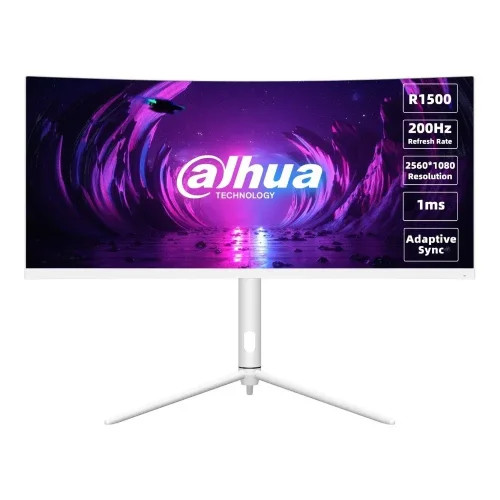
Dahua · DHI-LM30-E330CW 30-inch 200Hz WFHD Curved
30-inch R1500 curved WFHD VA gaming monitor with 200Hz, 1ms MPRT and Adaptive Sync.
Price unavailable
Price range updating
No verified price is available yet. Store offers will appear when merchants publish them.
Compare store prices
No live offers for this variant
Offers will appear when merchants publish them.
Loading history…
Product story
Dahua’s DHI-LM30-E330CW is a 30-inch curved gaming monitor with a VA panel, 21:9 aspect ratio and 2560 × 1080 WFHD resolution. The official datasheet lists a 200Hz refresh rate, 1ms MPRT, 3000:1 contrast and up to 250 cd/m² brightness. It supports Adaptive Sync and includes a height-adjustable stand with tilt, swivel and pivot. The model code matters: do not assume E330CW shares every detail with similarly named E330CA variants. Verify exact connections and local serial warranty with the seller.
The native resolution is 2560 × 1080 pixels in a 21:9 ultra-wide format. The extra horizontal space can place two application windows side by side and widen compatible games and films. It has fewer vertical pixels than a 2560 × 1440 QHD display, so compare both dimensions when choosing. Use native resolution and check that the graphics card can render the games you play at this wide aspect ratio.
Dahua identifies a VA panel with an R1500 curve. The curve wraps the edges slightly toward the viewer and can make a 30-inch wide screen feel more cohesive from a centered desk position. VA panels typically provide stronger native contrast than IPS, while response and color behavior depend on the individual panel and settings. The listed viewing angles are 178 degrees horizontally and vertically, but for best results sit near the center.
The maximum refresh rate is 200Hz. Smoothness depends on the computer delivering enough frames and the connection supporting the selected timing. Set the display to 2560 × 1080 and 200Hz in the operating system or GPU settings; confirm the active signal mode. An adapter, cable or game setting can restrict refresh. A 200Hz panel does not make a game render at 200 frames per second automatically.
Dahua lists 1ms MPRT. MPRT is a motion-picture response measurement and should not be confused with gray-to-gray response or input lag. Motion clarity depends on frame rate, refresh, pixel transitions and any motion-reduction settings. The specification does not give a comparable GtG figure in this datasheet. Test the available overdrive and motion settings, since aggressive modes can introduce artifacts or reduce brightness.
The official description lists Adaptive Sync to help reduce tearing when refresh follows compatible GPU output. Compatibility depends on graphics card, driver, connection, frame-rate range and selected settings. Enable the feature on the monitor and source, then test the games you use. Variable refresh helps synchronize output; it does not increase rendering performance or guarantee that all frame rates remain tear-free.
Dahua lists 3000:1 contrast, up to 250 cd/m² brightness, typical 99% sRGB and 85% NTSC. The contrast figure is static panel contrast; dynamic processing is a separate feature. Brightness is a maximum rating rather than a recommendation to use the screen at full output. Gamut coverage does not establish calibration accuracy. For design work, use a calibrated profile and color-managed software.
The 21:9 ratio can provide a wider field of view in games that support ultrawide rendering, but some titles may use side bars or crop the image. Streaming video and older content commonly use 16:9 and may show bars at the sides. Check game menus for 2560 × 1080 support and ensure your GPU has the required output. The monitor cannot change how a game or video was authored.
The official product listing and datasheet should be used to confirm the exact port set for this model; retailer descriptions and videos can mix E330CW with E330CA variants. Inspect the rear-panel diagram and unit label before purchase, especially if you need multiple HDMI or DisplayPort inputs. Use a cable and GPU output rated for 2560 × 1080 at 200Hz. The included accessories may vary by market.
The datasheet lists height adjustment up to 115mm, tilt from approximately -5 to +20 degrees and left/right rotation of -25 to +25 degrees. It also lists stand orientation/rotation information; consult the manual for safe adjustment and supported configurations. Position the screen at a comfortable height and distance. If using a VESA arm, check the exact mounting specification and arm load support for this unit before installation.
Dahua advertises GamePlus functions that provide game-oriented overlays or scene options. The exact on-screen menu depends on firmware. Use the controls to select input, picture mode, refresh-related settings and Adaptive Sync. Treat overlays as optional aids; crosshairs or timers do not improve game performance. Confirm that any picture enhancement does not introduce artifacts or unwanted latency for your use.
The monitor uses an ELED backlight and a screen treatment listed as 25% haze and 3H hardness. Dahua gives a 30,000-hour lifespan figure under its measurement conditions. This is a rated specification and does not promise every panel will have identical longevity or uniformity. Keep the screen away from impact and clean it with a soft cloth following the manual; do not spray liquid directly onto the panel.
The monitor uses an external 12V, 4A power adapter. Dahua lists 26W basic, 36W typical and 40W maximum consumption, with standby below 0.5W. Use the supplied adapter with the correct model rating and a suitable local outlet. Do not substitute a power unit based only on the plug size. Power use changes with brightness, refresh, USB or other features and operating state.
The assembled product measures about 701.1 × 536.3 × 269.3mm according to the datasheet, including the stand configuration. Package dimensions are larger. Leave sufficient desk depth and clearance for the curved panel, stand base and adjustment range. At 30 inches and 21:9, check that the desk and viewing distance fit the wide display. Handle the monitor by its frame, not by pressing the LCD.
The official datasheet lists a power adapter and DisplayPort cable among package accessories, along with user documentation and regulatory information. Regional packaging can change, so confirm the included cable and power adapter before planning the setup. Keep the package and invoice while checking the unit for transport damage and matching its model and serial labels.
This monitor combines 200Hz refresh, Adaptive Sync and an ultrawide 21:9 canvas for compatible PC games. It is most compelling when the graphics system can sustain useful frame rates at 2560 × 1080. It can also support productivity through side-by-side windows. Its 250-nit brightness rating is modest for bright rooms and HDR is not listed in the official datasheet; consider room lighting and use case.
WFHD is wider than Full HD but has fewer vertical pixels than QHD. Brightness is listed at up to 250 nits, and the official datasheet does not specify HDR certification. Ultrawide support varies by game and video service. Response is given as MPRT rather than GtG. Confirm ports, mounting, speakers and package details from the exact regional specification before purchase instead of relying on specifications for a neighboring model code.
The official global datasheet does not confirm the warranty for a particular Bangladesh serial number. Ask the seller for the warranty length, service location, panel/dead-pixel policy and authorized channel status. Match the full model and serial on the monitor, carton and invoice. Confirm current price, availability, included adapter and cable at checkout. Keep proof of purchase for any warranty claim.
Place the monitor on a stable surface, connect DisplayPort or the verified supported input, then choose 2560 × 1080 and the desired refresh in the GPU settings. If 200Hz is unavailable, check the cable, source output, adapter, monitor input and driver. For Adaptive Sync, enable the matching GPU option and test supported games. If image edges appear stretched, select the native resolution and correct aspect ratio.
Compare the 21:9 format with standard 16:9 monitors based on your games, work software and desk. Confirm whether the titles you use support 2560 × 1080 and whether your GPU can drive 200Hz in those titles. The curve is suited to a centered position, while a shared workstation may favor a flatter panel. Review port needs, brightness, mounting and local after-sales support together with refresh rate. Consider the physical width and viewing distance before buying: windows may need resizing and some older applications do not use the full canvas efficiently. If multiple devices will be connected, count the verified inputs and plan cable routing in advance. Compare published contrast and brightness values using the same measurement method, and remember that panel ratings do not guarantee identical appearance between units. For a buyer in Bangladesh, validate the exact model suffix, serial warranty, return terms and package contents directly with the seller. These checks help make sure the high refresh and ultrawide features match the computer and daily workflow rather than relying on the model family name alone.
Helpful answers
Product-specific answers maintained with the catalog information.
2560 × 1080 WFHD in a 21:9 aspect ratio.
The monitor uses a 30-inch curved VA panel.
Dahua lists up to 200Hz.
Yes, Adaptive Sync is listed by Dahua.
The listed 1ms figure is MPRT; GtG is not specified in this datasheet.
Dahua specifies an R1500 curved screen.
HDR certification is not listed in the official datasheet.
Confirm the regional port set from the exact model label and rear-panel specification.
Ask the seller to confirm serial-specific local warranty and service terms.
Customer community
Become a merchant
Join BiponiBD, publish accurate offers and start free.