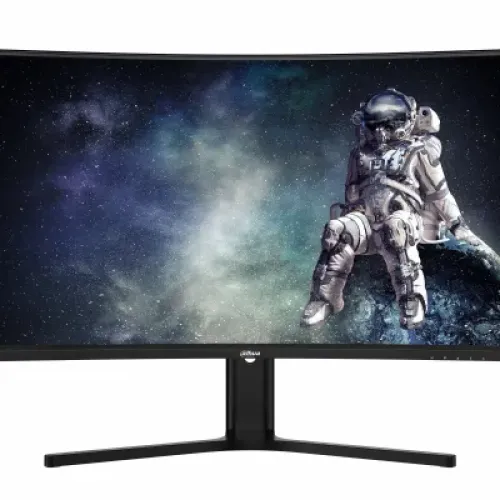
Verified model overview
The Dahua DHI-LM32-E330CA is a 31.5-inch QHD curved gaming monitor. Dahua lists a VA panel, 1500R curvature, 2560 × 1440 resolution, 180Hz refresh, 3000:1 typical contrast, 300 cd/m² typical brightness, 85% NTSC color gamut and 1ms MPRT. HDR10, adaptive sync and flicker-free technology are listed. Inputs include two HDMI 2.0 ports rated up to QHD 144Hz and two DisplayPort 1.4 ports rated up to QHD 180Hz, plus audio out. It has a height-adjustable stand and 100 × 100mm VESA mounting.
31.5-inch QHD curved screen
The 31.5-inch display uses a 16:9 aspect ratio and native 2560 × 1440 pixels. Dahua lists a 697.344 × 392.256mm viewing area, 0.2724mm pixel pitch and 93.2 pixels per inch. QHD resolution offers finer detail than Full HD while keeping a large desktop area for games, media and multitasking. Set the computer to native resolution for sharp text and graphics; use operating system scaling if needed. Smooth gaming at high resolution and frame rates depends on the graphics card and selected connection.
1500R curvature and viewing
The screen has a 1500R curve, intended to bring the sides of the wide 31.5-inch panel toward the viewer. Whether the curve feels natural depends on desk distance, seating position and personal preference. Dahua lists 178-degree horizontal and vertical viewing angles, but image perception still varies with angle and ambient light. Sit near the center for a balanced view and position the monitor to limit reflections. The curved panel is not a substitute for measuring available desk width and depth.
VA panel and contrast
Dahua identifies a VA panel with a 3000:1 typical contrast ratio. This higher native contrast can help dark scenes look deeper than many conventional IPS displays, while actual black level depends on room lighting and panel settings. VA response behavior can vary between pixel transitions, so motion clarity may differ by scene and overdrive configuration. The specification does not guarantee perfect uniformity or calibration on each unit. For mixed work and gaming, adjust brightness and color controls to suit the room.
180Hz refresh rate
The display is rated for 180Hz, and Dahua specifies QHD at 180Hz through its DisplayPort 1.4 inputs. A high refresh rate can make motion appear smoother when the game and computer deliver enough frames. Select 2560 × 1440 and 180Hz in the graphics settings, then verify the game’s frame rate. Use a suitable DisplayPort cable and direct GPU output to avoid adapter limitations. HDMI is specified for QHD up to 144Hz, so do not expect 180Hz over HDMI based on the port label alone.
1ms MPRT and motion clarity
Dahua lists 1ms MPRT. MPRT describes a motion-picture response technique and should not be confused with input lag or a guarantee that all pixel transitions complete in one millisecond. The monitor also lists adaptive sync, which may help reduce tearing with compatible sources. Tune monitor response settings carefully: aggressive processing can introduce artifacts, and real motion depends on game frame rate, refresh configuration and scene contrast. Evaluate settings in the games you play rather than selecting a mode from a number alone.
Adaptive sync
Dahua lists adaptive sync technology to improve visual fluency and reduce image quality loss during changing frame output. Use a compatible graphics card, connection and driver, then enable the supported variable refresh option in both display and system settings. Adaptive sync can reduce tearing within its supported range, but it does not increase GPU performance or guarantee a stable frame rate. If the image flickers or behaves irregularly, test another refresh setting, cable or driver and compare the result with adaptive sync disabled.
HDR10 support
The specification lists HDR10. The monitor can accept compatible HDR content, but Dahua does not list a VESA DisplayHDR certification tier on the model page. HDR appearance depends on the source, software, settings, brightness and content; HDR10 support alone does not promise local dimming or a particular peak brightness. Compare familiar material in SDR and HDR modes and use the mode that looks accurate in the room. Dahua’s specified typical brightness is 300 cd/m².
Color gamut and bit depth
Dahua lists 85% NTSC color gamut and 8-bit display color. This coverage figure describes the gamut range and is not a factory calibration or color accuracy score. For normal games and video, select a natural picture preset and avoid oversaturated settings if skin tones or product colors look exaggerated. For photo or design work, use a calibrated display and color-managed applications; the published gamut alone does not certify professional accuracy. Screen settings and content can change the visible result.
HDMI and DisplayPort connections
The monitor has two HDMI 2.0 inputs rated for QHD at 144Hz, two DisplayPort 1.4 inputs rated for QHD at 180Hz, and one audio output. Use DisplayPort when aiming for the specified 180Hz QHD mode. Supported timing can still depend on the computer’s output, cable and driver. If a mode is missing, connect directly to the graphics card, select the correct monitor input and check display settings. The 3.5mm output is for compatible headphones or powered speakers, not a microphone.
No built-in speakers listed
Dahua’s official specification does not list integrated speakers. Plan to use a headset, external speakers or another audio system. Audio can be routed from a computer directly or through the monitor’s 3.5mm output when supported by the video connection and selected source. If no audio is heard, verify the playback device, cable path and operating system output setting. Do not assume that a monitor with an audio jack also has its own speakers.
Adjustable stand and ergonomics
The included stand supports 100mm of height adjustment, tilt from -5 to +15 degrees and left/right rotation from -35 to +35 degrees. Dahua specifies no pivot movement for portrait orientation. Adjust height and tilt for a comfortable seated position and reduce glare; check the stand’s full range before placing objects near the base. Keep video and power cables slack as the monitor moves. If using a separate arm, check VESA compatibility and supported load.
VESA mounting, size and weight
The model supports a 100 × 100mm VESA mount. Dahua lists the panel without base at 717.7 × 422.4 × 118.3mm and a net weight of 7.0kg; package size is 954 × 523 × 183mm and gross weight 9.1kg. Confirm arm load capacity and mounting screw requirements before installation. The large curved display needs adequate desk width, viewing distance and rear clearance. Secure the screen during mounting and follow the included instructions.
Power and operating conditions
Dahua lists a 19V DC, 3.42A power adapter, 46.5W typical consumption, 72W maximum and less than 0.5W standby. The official specifications also give 32W basic consumption. Use the supplied adapter and confirm its label and plug match the delivered unit; do not substitute a power supply based only on voltage. The operating range is 0 to 40°C with 10–85% relative humidity. Keep ventilation clear and avoid liquids around the display and power connections.
Eye comfort features
Dahua lists flicker-free technology and software-based blue-light protection. These are display features and should not be treated as medical claims. Viewing comfort also depends on brightness, ambient light, distance, text size and breaks. Adjust blue-light settings if the image feels more comfortable, while noting that color appearance may change. Use an appropriate neutral mode for tasks where color matters. Set brightness to match the room instead of leaving a bright screen in a dim environment.
Strengths and practical trade-offs
The LM32-E330CA offers a large 31.5-inch curved QHD VA screen, 180Hz over DisplayPort, 1ms MPRT, adaptive sync, HDR10 and a 100mm lift stand. Dual HDMI and dual DisplayPort connections allow several wired sources. Consider the 1500R curve and large footprint, and note that the published brightness is 300 cd/m² typical. HDMI is limited to the specified QHD 144Hz while 180Hz QHD is listed over DisplayPort. Built-in speakers are not specified; Bangladesh serial warranty and offer terms need seller confirmation.
Bangladesh warranty and seller terms
The Dahua model specification describes hardware features but does not verify warranty coverage for a particular serial in Bangladesh. The existing listing says three years; ask the seller to confirm serial-specific coverage, service location, start date, panel defect terms and whether an invoice is required. Check current price, stock, delivery, return and payment details at checkout because offers can change. Keep the original invoice and packaging for any service request.
Setup and troubleshooting
Use the supplied adapter and connect the computer to DisplayPort for QHD at up to the listed 180Hz. HDMI is specified for QHD up to 144Hz. Set native resolution and refresh in the operating system. If 180Hz is missing, check the graphics output, cable, driver, selected input and adapter or dock limits. Enable adaptive sync where supported if you see tearing. For sound, connect external speakers or headphones to the audio output and verify the source routes audio to the monitor.
Who should consider this monitor
The Dahua DHI-LM32-E330CA can suit someone seeking a large 31.5-inch curved QHD gaming display with a 180Hz DisplayPort mode, VA contrast and flexible inputs. It can also serve media and desktop use when the curved form and footprint fit the desk. Confirm the computer has a suitable DisplayPort output, decide whether a 1500R curve suits your viewing distance, and plan for external audio. Buyers needing verified local warranty, integrated speakers, USB-C docking or VESA-certified HDR should compare those requirements carefully.
Specification summary
Dahua DHI-LM32-E330CA: 31.5-inch curved VA ELED, 1500R, 2560 × 1440 QHD, 16:9, 180Hz, 1ms MPRT, 300 cd/m² typical, 3000:1 typical contrast, 85% NTSC, 8-bit, HDR10, adaptive sync and flicker-free technology. Inputs: 2 × HDMI 2.0 (QHD 144Hz), 2 × DP 1.4 (QHD 180Hz); audio out. Stand: 100mm lift, -5°/+15° tilt, ±35° rotation. VESA 100 × 100mm; 19V/3.42A adapter; no built-in speakers listed.