Pros
- Large QHD IPS panel for office and multitasking.
- USB-C 65W can support a compatible laptop over one cable.
- Multiple display inputs include DP 1.4 and HDMI 2.1.
- Manufacturer lists broad color-space coverage.

All categories
 New condition
Monitors
Dahua · DHI-LM32-P301A
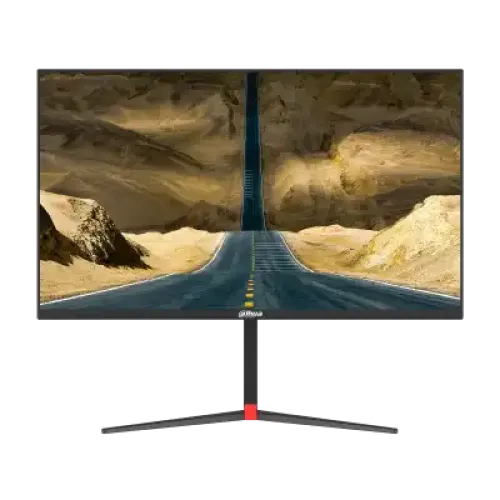
31.5-inch QHD IPS monitor with 75Hz, USB-C 65W power delivery, HDMI 2.1 and DisplayPort 1.4.
Price unavailable
Price range updating
No verified price is available yet. Store offers will appear when merchants publish them.
Compare store prices
No live offers for this variant
Offers will appear when merchants publish them.
Loading history…
Product story
The Dahua DHI-LM32-P301A is a 31.5-inch QHD commercial monitor for office and general display use. Its manufacturer datasheet lists an IPS panel, 2560 × 1440 resolution, 75Hz refresh, HDMI 2.1, DisplayPort 1.4 and USB-C with 65W power delivery. The Type-C connection can carry compatible display video and provide laptop power up to its rated output. Confirm exact host compatibility, regional power adapter and local warranty before purchase.
The 31.5-inch panel has 2560 × 1440 QHD resolution and a 16:9 aspect ratio. It offers a large work area for documents, dashboards, spreadsheets and media. QHD has more pixels than Full HD, though at this diagonal the preferred scaling and viewing distance depend on eyesight and application. The datasheet gives a 718.59 × 422.07mm chassis dimension without the stand. Measure desk width and depth before ordering.
Dahua specifies an IPS panel with 178-degree horizontal and vertical viewing angles. The datasheet reports a typical 1200:1 contrast ratio and 350-nit brightness. IPS supports broad viewing angles for shared desktop viewing, while contrast and uniformity can vary across the image and between units. The display uses E-LED backlighting. Its business-oriented specification does not certify color calibration or uniformity for professional proofing work.
The manufacturer datasheet lists 75Hz maximum refresh. This is designed for office work, browsing, video and general display tasks rather than high-refresh esports. Smoothness depends on the source and operating system, and the source must output a supported timing. Select 2560 × 1440 at up to 75Hz where available. Do not use the 180Hz figures from unrelated gaming monitors or imply that this model is a 144Hz display.
Dahua lists a 4ms overdrive response specification. Response figures depend on the measurement method and overdrive setting, and they are not the same as input lag. The monitor is not designed around high-refresh competitive gaming. Choose a suitable picture mode for desktop work and verify that moving content looks acceptable. If an overdrive option creates visible trails or artifacts, return to a more neutral setting.
The datasheet reports 99% sRGB, 100% NTSC, 95% DCI-P3 and 92% Adobe RGB. These color-space figures use different standards and should not be compared as interchangeable percentages. Dahua lists 16.7 million colors. The monitor may be suitable for general content and productivity, but the figures alone do not prove calibration accuracy. For design or print workflows, calibrate the display and validate colors on intended output devices.
The manufacturer lists one USB Type-C port with 65W power delivery. With a compatible laptop and cable, USB-C can simplify the desk by carrying a display signal and charging power. Actual charging depends on the laptop’s USB-C/DisplayPort support and power requirements; 65W may not sustain every high-performance laptop under load. Use a cable rated for video and power, and retain the laptop’s adapter if the host requires more wattage.
The interface list includes one HDMI 2.1, one DisplayPort 1.4, one USB-C 65W port and one audio output. The manufacturer sheet names port versions but does not provide detailed maximum timing for every input. Check the monitor manual and host specifications for supported QHD refresh, color depth and USB-C video behavior. Select the intended input in the OSD and verify the mode in the computer’s display settings.
The Dahua manufacturer datasheet lists an audio output but does not specify built-in speakers. The catalog’s prior entry also marked the speaker field unavailable. Plan to use external speakers or headphones if audio is required, and confirm whether the audio jack works from the selected input. Do not assume audio is provided by USB-C or HDMI in every computer configuration; set the correct output device on the host.
The existing seller specification describes tilt, swivel, pivot and height adjustment, while the manufacturer datasheet confirms that a stand and base are included but does not detail every ergonomic range. Verify the exact stand version against the user manual and delivered package before relying on particular adjustments. Position the screen with the top edge near eye level. If the stand lacks a needed movement, a compatible VESA mount can be considered after confirming the pattern.
The Dahua datasheet specifies a 75 × 75mm VESA pattern. Check the arm’s load rating and screw length before installation. The stand base and monitor should rest on a level, stable surface. Keep the power adapter and connector clearance in mind when mounting close to a wall. Retain the original stand, screws and packing materials until the monitor has passed inspection and return periods.
Typical brightness is listed as 350 nits. The display is intended for ordinary indoor use; strong sunlight or bright reflections can still reduce legibility. Adjust brightness to the room, and avoid placing the screen directly opposite a window or task light. Do not interpret the 350-nit rating as an HDR peak, because the datasheet does not specify an HDR mode or certification for this product.
The existing product record lists low-blue-light support, and commercial monitors often provide eye-comfort options. Confirm the exact menu feature in the supplied manual. Such settings can alter color temperature and do not replace suitable brightness, posture or rest breaks. Place the screen at a comfortable distance and angle, and use normal ambient lighting. If a warmer picture is distracting during color work, choose a neutral preset or turn the feature off.
For a single-cable laptop setup, confirm that the computer USB-C port supports DisplayPort Alt Mode and that 65W is enough for the laptop’s needs. Some machines require a higher-wattage charger, and USB-C connectors can support data or charging without video. Desktop users can connect via DisplayPort or HDMI and use USB-C only where the host supports video. Check the source’s output resolution and refresh limits before changing cables.
The 31.5-inch QHD canvas gives space for multi-window tasks, spreadsheets, monitoring dashboards and media. A USB-C power/display connection can reduce cable clutter for compatible laptops. The 75Hz refresh and 4ms overdrive specification suit routine desktop workflows. For professional media production, verify calibration and color uniformity independently. For gaming, this model should be described by its actual 75Hz specification and not marketed as a high-refresh esports display.
The product record specifies a DC 19V 7.89A adapter. Use the adapter supplied for the exact monitor or a manufacturer-approved replacement with matching electrical ratings. Verify the local AC power cord and plug. Keep the adapter ventilated, dry and free from covering material. Disconnect the monitor from power before cleaning and avoid connecting or removing cables with wet hands.
Dahua lists a standard HDMI cable, power cable, adapter, stand and base. Package contents can change by market, shipment or seller. Confirm that the delivered box includes all promised components, especially the USB-C cable if one is expected; it is not included in the datasheet’s standard accessory list. Inspect the stand hardware, screen and ports before discarding packaging. Keep documentation and invoice for warranty service.
The datasheet says specifications and imagery are reference information and may differ from the actual product. It identifies QHD at 75Hz, IPS, 350-nit brightness and 65W Type-C. Retailer pages may describe stand movements or local warranty terms beyond the datasheet. Confirm these claims for the serial in hand. Do not infer HDR support, speakers, a USB hub, exact Type-C timing or a 4K signal from the connector names alone.
The catalog’s existing three-year warranty wording is not proof that a particular Bangladesh serial is covered. Ask the seller for the warranty provider, term, service location, dead-pixel policy and invoice requirements. Match the serial on the display, carton and sales document. Confirm whether local service includes the monitor and adapter. Warranty terms can vary by importer and sales channel, so request them in writing before ordering.
Before checkout, confirm current stock, price, delivery, return period and the exact model DHI-LM32-P301A. Verify included HDMI cable, stand/base, adapter, power cord and the expected regional warranty. At delivery, inspect panel condition, connect QHD output over HDMI/DP/USB-C, check Type-C charging with a compatible laptop, test audio output and verify the stand. Record faults during the seller’s return window.
The Dahua DHI-LM32-P301A suits users who want a large QHD IPS desktop screen with USB-C video and up to 65W laptop power for office work and general use. Its 75Hz refresh is not a high-refresh gaming specification. It may not suit a laptop that needs more than 65W, users requiring built-in speakers, or color-critical workflows without calibration. Check the exact interface, stand and warranty before purchase.
Helpful answers
Product-specific answers maintained with the catalog information.
The manufacturer datasheet specifies 2560 × 1440 QHD.
Dahua lists 75Hz maximum refresh.
The USB-C port is rated for 65W power delivery; host video support and laptop power needs must be checked.
Dahua lists HDMI 2.1, DisplayPort 1.4, USB-C 65W and audio out.
The manufacturer datasheet does not specify integrated speakers.
It is a 31.5-inch IPS monitor.
HDR certification or HDR performance is not specified in the manufacturer datasheet.
The datasheet lists 75 × 75mm.
Confirm serial-specific local warranty and service terms with the seller.
Customer community
Become a merchant
Join BiponiBD, publish accurate offers and start free.