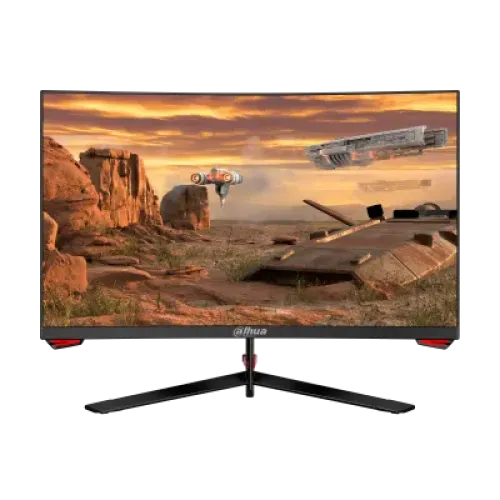
The Dahua DHI-LM27-E230C is a 27-inch curved VA gaming monitor with Full HD resolution and a manufacturer-listed maximum refresh rate of 180Hz. Dahua’s datasheet specifies R1500 curvature, Adaptive-Sync, two HDMI 1.4 inputs and one DisplayPort 1.2 input. The detailed guide below separates manufacturer specifications from Bangladesh seller observations.
Model identity and intended use
Dahua identifies the model as DHI-LM27-E230C, a 27-inch Full HD gaming monitor. The datasheet specifies a 16:9 curved VA screen, 1920 × 1080 resolution and R1500 curvature. This makes it a large desktop display with a familiar Full HD workspace; shoppers comparing 27-inch screens should consider their viewing distance and text sharpness preference.
The model name is kept distinct from similar Dahua monitor numbers. Before ordering, compare DHI-LM27-E230C on the product label, seller invoice and carton so a neighboring model or variant is not substituted. The product page name uses the full model code and core display characteristics to make this particular configuration easier to identify.
Resolution, panel and curve
The native resolution is 1920 × 1080 pixels in a 16:9 aspect ratio. Full HD can suit standard desktop tasks and many games, and it places less rendering load on a graphics card than higher-resolution modes. On a 27-inch panel, however, individual pixels are more visible at close viewing distances than on a smaller Full HD monitor or a 27-inch QHD monitor. Consider text scaling, seating distance and your typical content before choosing.
Dahua specifies a VA panel and R1500 curvature. VA panels are often selected for strong contrast, while the curved shape brings the panel edges toward the viewer. Curvature is a shape specification, not a guarantee of immersion or a substitute for viewing the screen in your actual desk setup.
The manufacturer lists 178° horizontal and vertical viewing angles. These are specification values; perceived contrast and color may still shift when looking from an oblique angle. The screen uses E-LED backlighting.
Refresh rate and motion
The maximum refresh rate is 180Hz according to the manufacturer datasheet. When a compatible PC produces enough frames and the display is configured correctly, a higher refresh rate can make camera movement and pointer motion appear smoother than at 60Hz. The graphics card, game, selected interface, cable and software settings all contribute to the final mode.
Dahua lists 1ms MPRT. MPRT and GtG are different measurement methods and should not be combined into a claim of 1ms GtG. Motion clarity also depends on frame pacing, overdrive behavior, refresh rate and the content being displayed. This description uses the datasheet’s metric without implying a measured response in every mode.
Adaptive-Sync is listed to reduce tearing and stutter with supported sources. Exact support can vary by graphics hardware, driver, firmware, cable and connection. Check the relevant GPU and manual compatibility before relying on variable refresh; the presence of Adaptive-Sync alone does not promise a specific vendor certification.
Brightness, contrast and color
The datasheet lists 250 cd/m² brightness and a 4000:1 contrast ratio. A Bangladesh retailer page instead shows 3000:1, so there is a source discrepancy. The product specifications use the manufacturer datasheet as the primary source and retain the discrepancy in the field notes. If contrast is a deciding factor, ask the seller to confirm the exact regional model and printed documentation.
Dahua states color support of 16.7 million (8-bit) and coverage figures of 99% sRGB, 85% NTSC, 90% DCI-P3 and 84% Adobe RGB. Gamut figures describe color-space coverage and do not by themselves prove calibration, uniformity or color accuracy. For photo/video production or print matching, use a color-managed workflow and calibrate the actual unit.
The monitor is suited to mixed gaming, media and everyday use according to its listed specifications, but these numbers are not a hands-on test. Ambient lighting, panel settings, source content and unit variation can affect what a buyer sees. No independent colorimeter or response-time measurement is claimed.
Connections and multi-device setup
The input list is two HDMI 1.4 ports and one DisplayPort 1.2 port, plus one audio output. The additional HDMI connection can be useful when alternating between a PC and another HDMI source without repeatedly moving a cable. A source must still provide the target resolution and refresh rate over the selected port.
Dahua’s datasheet is the authoritative source for port count and interface version. Use suitable cables and connect directly where possible when diagnosing a missing 180Hz mode. A dock, adapter, long cable or older source can restrict refresh rate, resolution or color output. Consult the source device’s own specifications and the monitor’s user manual for supported timing combinations.
An audio output is listed, but built-in speakers are not stated. External speakers or headphones may be needed. The datasheet does not list USB-C video, USB data hub, Ethernet, integrated webcam or microphone; do not assume these are included.
Stand, ergonomics and mounting
The manufacturer specifies tilt from -5° ± 2° to 15° ± 2°. Height adjustment, swivel and portrait pivot are not listed. If these ergonomic movements are important, plan to use a compatible monitor arm or riser and check the desk’s available depth.
The VESA pattern is 75 × 75 mm. This differs from the common 100 × 100 mm pattern, so check bracket compatibility before purchase. The datasheet gives a net weight of 4 kg; verify the arm’s load range and mounting hardware, and follow installation instructions to avoid damaging the panel.
A 1500R curved monitor may need a little extra front-to-back desk space depending on seating position. Measure the stand footprint and cable clearance with the seller because the official datasheet dimensions provided here are without the stand, not a full stand footprint.
Dimensions, package and power
Dahua lists the monitor without stand as 613.03 mm wide, 365.18 mm high and 79.57 mm deep. Net weight is 4 kg and gross weight is 5.1 kg. The package measures 737 × 218 × 495 mm. Use the carton measurements when checking elevator, doorway or transport access; the product-only figures do not represent the size of the retail box.
Standard power consumption is listed at 31W and standby consumption at no more than 0.5W. The power supply is DC 12V/3A. Use the adapter supplied for the specific unit or an approved replacement with the correct rating and polarity. Keep ventilation unobstructed and avoid routing cables where they can be pinched by the stand or wall mount.
The specified work environment is 0–40°C and 10–85% humidity. These are manufacturer operating limits, not a recommendation to expose electronics to condensation, liquids or direct heat. Follow the manual for cleaning and installation.
Included items and setup checks
Dahua lists a base, 1.5 m DisplayPort cable, manual and adapter as standard accessories. Package contents can vary by region, seller or bundle. Confirm that the exact seller’s unit includes these items, especially if the listing is refurbished, open-box or imported.
For setup, assemble the base according to the manual, connect the power adapter, then select HDMI or DisplayPort to match the source. Set 1920 × 1080 and the highest supported refresh rate in the operating system or graphics driver. If 180Hz is unavailable, verify that the source supports it, update the driver, check the cable and input, and remove any bandwidth-limiting adapter or dock during diagnosis.
Enable Adaptive-Sync only when supported by the chosen source and connection. A variable-refresh setting may be named differently across graphics drivers. The manufacturer provides a specification, not a promise that all devices share the same menu or compatibility.
Choosing this model for gaming, work and media
For gaming, the 180Hz maximum and Adaptive-Sync are the central motion features. To benefit, the computer must produce a suitable frame rate at Full HD and the selected interface must carry the mode. A fast screen cannot raise a game’s frame rate on its own. The 1ms MPRT rating is a manufacturer figure and not an independent input-lag measurement.
For office use, the 27-inch size can show large documents and multiple windows, while Full HD yields fewer pixels than QHD at the same screen size. Users who work with fine text or detailed design may prefer higher pixel density. For media, the curved VA panel and stated color gamut are useful comparison points; the listed audio output can connect external listening equipment.
The listed gamut percentages do not make the monitor a calibrated professional reference display. For color-critical work, verify measurement results, calibration controls and warranty support for the actual model. The product should be compared on its published facts and the buyer’s use case, not unsupported claims about universal image quality.
Care, warranty and buying checks
Dahua lists CE certification and specifies an operating temperature and humidity range. Keep the monitor dry, provide ventilation and follow the manufacturer manual for cleaning. Do not press on the LCD surface or use liquid directly on the screen. Secure the stand or VESA mount before moving the monitor.
Bangladesh retailers observed for this review displayed different prices: TechLand BD showed ৳23,100 and In Stock; CSI displayed ৳26,200 and In Stock. A price or availability shown by another retailer can change and does not establish a BiponiBD offer. Confirm the seller’s live cart price, stock, delivery conditions and return process before ordering.
Both observed Bangladesh retailer pages stated a three-year warranty. The manufacturer datasheet reviewed here does not define the local warranty provider, serial eligibility, dead-pixel policy or covered parts. Ask the actual seller for the warranty issuer, service locations, required documents and exclusions. This listing does not claim a BiponiBD warranty.
Technical differences and cautions
The manufacturer datasheet says contrast is 4000:1, while one Bangladesh retailer listing says 3000:1. The official figure is used as the source-backed specification, and the conflict is retained so it is not silently hidden. A seller may list a different region or unit revision; check the label/manual if the distinction matters.
One seller lists the response as 1ms OD, but Dahua’s datasheet specifies 1ms MPRT. This page follows the manufacturer metric. OD (overdrive), MPRT and GtG are not interchangeable labels. Similarly, the manufacturer lists Adaptive-Sync but does not certify every GPU implementation in the datasheet reviewed.
The product name and description avoid calling this a QHD monitor: the native mode is Full HD 1920 × 1080. They also avoid claiming USB-C, built-in speakers, height adjustment or 100 × 100 VESA compatibility because those are not in the reviewed datasheet.
Key features
- 27-inch R1500 curved VA panel with Full HD 1920 × 1080 resolution and 16:9 aspect ratio.
- Maximum 180Hz refresh rate for smoother motion when the computer can output the selected mode.
- 1ms MPRT response time is the manufacturer-listed method; it is not the same as GtG response time.
- Dahua specifies 250 cd/m² brightness and 4000:1 contrast; a Bangladesh seller page states 3000:1, so regional unit/seller documentation should be checked.
- Manufacturer-stated gamut coverage: 99% sRGB, 85% NTSC, 90% DCI-P3 and 84% Adobe RGB.
- Adaptive-Sync is specified to reduce tearing/stutter with compatible source devices; exact GPU compatibility should be verified.
- Three video inputs: two HDMI 1.4 and one DisplayPort 1.2; a separate audio output is also listed.
- The -5° ± 2° to 15° ± 2° tilt range helps adjust viewing angle; no height or swivel range is specified in the datasheet.
- 75 × 75 mm VESA mounting supports compatible arms or brackets.
- Dahua lists 31W standard and up to 0.5W standby power consumption.
- The datasheet lists an external 12V/3A adapter, base, DP cable, manual and adapter as standard accessories.
- 1500R curvature wraps the 27-inch display toward the viewer; desk distance and personal preference affect comfort.
Pros
- 180Hz maximum refresh and Adaptive-Sync can provide smoother motion with a compatible PC and appropriate frame rate.
- A 27-inch curved panel provides a broad viewing area for games, media and general desktop tasks.
- Three video inputs allow multiple connected sources, with two HDMI ports and one DisplayPort.
- Manufacturer-stated gamut coverage and 4000:1 contrast are useful published reference figures for comparing displays.
- VESA mounting and an audio output give flexibility for alternative mounting and external audio.
Cons and trade-offs
- Full HD spread across 27 inches is less dense than QHD at the same size; text and fine details may look less sharp at close distance.
- The stand adjustments are tilt-only in the available manufacturer datasheet; height, swivel and pivot are not specified.
- The datasheet specifies 75 × 75 mm VESA, which is smaller than common 100 × 100 patterns; confirm bracket compatibility.
- Dahua states 4000:1 typical contrast, while CSI lists 3000:1; verify the regional unit label/manual if that figure is decisive.
- Current seller stock and three-year warranty statements do not establish a BiponiBD offer or local serial eligibility.
Technical specifications
- Brand: Dahua
- Model: DHI-LM27-E230C
- Display: 27-inch curved VA, E-LED backlight
- Curvature: R1500 (1500R)
- Resolution: Full HD (1920 × 1080)
- AspectRatio: 16:9
- RefreshRate: 180Hz maximum
- ResponseTime: 1ms MPRT (manufacturer stated)
- Brightness: 250 cd/m²
- ContrastRatio: 4000:1 (Dahua datasheet; some retailer listings differ)
- ColorSupport: 16.7 million (8-bit)
- ColorGamut: 99% sRGB, 85% NTSC, 90% DCI-P3, 84% Adobe RGB (manufacturer stated)
- ViewingAngle: 178° horizontal / 178° vertical
- AdaptiveSync: Adaptive-Sync
- Backlight: E-LED
- Inputs: 2 × HDMI 1.4; 1 × DisplayPort 1.2
- AudioOutput: 1 × audio out
- PowerSupply: DC 12V / 3A
- PowerConsumption: 31W standard; ≤0.5W standby
- Tilt: -5° ± 2° / 15° ± 2°
- VesaMount: 75 × 75 mm
- DimensionsWithoutStand: 613.03 × 365.18 × 79.57 mm (W × H × D)
- NetWeight: 4 kg
- GrossWeight: 5.1 kg
- PackageDimensions: 737 × 218 × 495 mm (W × H × D)
- IncludedAccessories: Datasheet lists base, 1.5 m DP cable, manual and adapter; verify seller box contents
- OperatingEnvironment: 0–40°C; 10–85% humidity
- Certification: CE
- WarrantyMarketObservation: Retailer pages state 3 years; local provider and unit serial eligibility must be confirmed.
Frequently asked questions
What resolution does the DHI-LM27-E230C use?
Dahua specifies Full HD 1920 × 1080 in a 16:9 format.
How large is its screen and what is its curvature?
The datasheet lists a 27-inch screen with R1500 curvature, commonly described as 1500R.
Does it support 180Hz?
Yes. Dahua lists a maximum refresh rate of 180Hz. The source device, selected port, cable and settings must also support the desired mode.
What does 1ms MPRT mean?
It is a motion-picture response-time measurement. MPRT is not interchangeable with gray-to-gray (GtG) response time.
Which ports are included?
The datasheet lists two HDMI 1.4 inputs, one DisplayPort 1.2 input and one audio output.
Does it support Adaptive-Sync?
Dahua lists Adaptive-Sync. Confirm the exact graphics-card compatibility and supported operating mode with the device and regional manual.
What is the contrast ratio?
Dahua’s datasheet lists 4000:1. A Bangladesh seller listing shows 3000:1, so treat the manufacturer datasheet as the specification source and confirm the exact unit if the difference matters.
Can the monitor be mounted on an arm?
The datasheet lists a 75 × 75 mm VESA pattern. Check that the arm supports this size and the display’s weight.
Can its stand adjust height?
The datasheet specifies tilt angles of -5° ± 2° and 15° ± 2°. It does not list height, swivel or pivot adjustment.
Does the monitor have built-in speakers?
The datasheet lists an audio output but does not list built-in speakers. Plan to use headphones or external speakers.
What power supply does it need?
The datasheet lists DC 12V/3A. Use the supplied or manufacturer-approved adapter for the unit.
What are the Bangladesh price and warranty?
At review time, TechLand showed ৳23,100 in stock and CSI showed ৳26,200 in stock. Both seller pages state three-year warranty, but seller prices/stock and warranty provider can change. These listings are not a BiponiBD offer.
Source note: Technical specifications are based on Dahua’s DHI-LM27-E230C datasheet. Local seller pages are market snapshots only; no hands-on testing, BiponiBD offer or locally verified warranty is claimed.