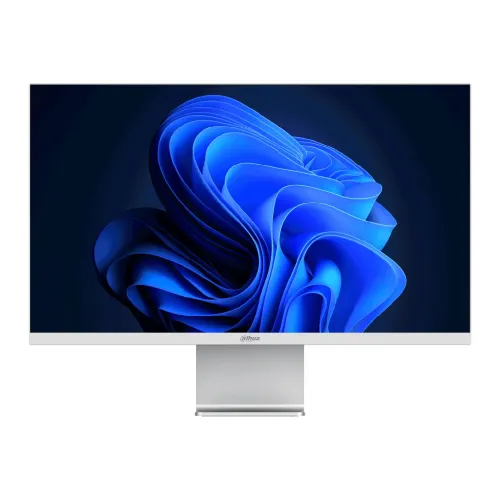
Dahua LM27-P501 overview
Dahua LM27-P501 is a 27-inch commercial display with a 5K 5120 × 2880 resolution, IPS LCD panel and E-LED backlight. Dahua lists 60Hz refresh, 98% DCI-P3 color gamut, 400 cd/m² maximum brightness and 65W USB-C power delivery. The combination is intended for detailed desktop work, design review and high-resolution content where a dense image and broad color range are useful. Manufacturer specifications describe supported capabilities; the actual result depends on the connected computer, cable, operating system and selected settings. Price, stock, package and serial-specific warranty in Bangladesh must be confirmed by the seller.
Confirm the exact model and 5K resolution
Check the full LM27-P501 model code on the box and rear label. Similar Dahua display names can describe different sizes, panel resolutions and refresh rates. The manufacturer calls this product a 27-inch 5K monitor; it is not a 4K model, nor a high-refresh gaming display. Confirm the included power adapter, stand, cables and local warranty terms with the seller. Manufacturer specifications describe supported capabilities; the actual result depends on the connected computer, cable, operating system and selected settings. Price, stock, package and serial-specific warranty in Bangladesh must be confirmed by the seller.
27-inch IPS panel and pixel density
The 16:9 IPS panel measures 27 inches diagonally and resolves 5120 × 2880 pixels. At this size the pixel density is about 218 pixels per inch, so text and fine interface details can appear very sharp when the operating system is configured for comfortable scaling. A 5K desktop also offers room for large canvases and multiple windows, although application scaling and GPU support affect usable workspace. Manufacturer specifications describe supported capabilities; the actual result depends on the connected computer, cable, operating system and selected settings. Price, stock, package and serial-specific warranty in Bangladesh must be confirmed by the seller.
Color coverage for creative and office work
Dahua specifies 98% DCI-P3 coverage and 8-bit plus FRC color output. This broad gamut is useful for viewing and editing wide-gamut material, but coverage alone does not establish factory calibration, color accuracy or a reference grade workflow. For color-critical delivery, check calibration reports, use a suitable colorimeter and manage color profiles in the operating system and creative applications. Manufacturer specifications describe supported capabilities; the actual result depends on the connected computer, cable, operating system and selected settings. Price, stock, package and serial-specific warranty in Bangladesh must be confirmed by the seller.
Brightness, contrast and HDR support
The datasheet lists maximum brightness of 400 cd/m² and a 2000:1 contrast ratio. HDR10 is identified in the supplied product data, but peak brightness and contrast figures do not by themselves establish high-end HDR performance or local dimming. Use an appropriate SDR or HDR mode for the source, and evaluate the screen in the room lighting where it will be used. Manufacturer specifications describe supported capabilities; the actual result depends on the connected computer, cable, operating system and selected settings. Price, stock, package and serial-specific warranty in Bangladesh must be confirmed by the seller.
Refresh rate and response behavior
The specified refresh rate is 60Hz and response time is OD 5ms. This is a standard productivity and content-creation refresh rate, not a 120Hz or 144Hz gaming panel. Overdrive can affect transition behavior and may create visible overshoot at some settings. Select the native refresh rate in the computer display settings and choose an overdrive level that looks clean in actual motion. Manufacturer specifications describe supported capabilities; the actual result depends on the connected computer, cable, operating system and selected settings. Price, stock, package and serial-specific warranty in Bangladesh must be confirmed by the seller.
DisplayPort input and full-resolution signal
The DisplayPort 1.4 input is specified for 5120 × 2880 at 60Hz. Reaching the full mode depends on the source graphics hardware, driver, cable quality and supported link configuration. Use a standards-compliant cable and verify the active signal in the operating system. If 5K at 60Hz is unavailable, check GPU capability, port selection, driver updates and any relevant display input settings. Manufacturer specifications describe supported capabilities; the actual result depends on the connected computer, cable, operating system and selected settings. Price, stock, package and serial-specific warranty in Bangladesh must be confirmed by the seller.
HDMI inputs and connected devices
Dahua lists two HDMI 2.1 inputs, each supporting up to 5120 × 2880 at 60Hz in the datasheet. This differs from the current catalog specification that described one HDMI 2.0 input limited to 4K. The manufacturer datasheet is the basis for the corrected listing. For an actual setup, verify the source device, cable and negotiated mode because HDMI capabilities depend on the complete connection chain. Manufacturer specifications describe supported capabilities; the actual result depends on the connected computer, cable, operating system and selected settings. Price, stock, package and serial-specific warranty in Bangladesh must be confirmed by the seller.
USB-C video and 65W power delivery
The USB Type-C port carries display input and provides up to 65W power delivery according to Dahua. A compatible laptop can potentially use one cable for video and charging, reducing desk cable clutter. Confirm that the computer USB-C port supports DisplayPort video output and that its power requirements fit within 65W. A power delivery rating does not mean every USB-C port or laptop is compatible. Manufacturer specifications describe supported capabilities; the actual result depends on the connected computer, cable, operating system and selected settings. Price, stock, package and serial-specific warranty in Bangladesh must be confirmed by the seller.
Audio output and workspace setup
The monitor includes one audio-out connection. The manufacturer datasheet lists this output but does not specify built-in speakers, so plan for headphones, external speakers or a separate audio device if sound is needed. Check whether the selected source sends audio over the connected input and whether the monitor output is enabled. Port availability does not guarantee a particular audio routing setup. Manufacturer specifications describe supported capabilities; the actual result depends on the connected computer, cable, operating system and selected settings. Price, stock, package and serial-specific warranty in Bangladesh must be confirmed by the seller.
Stand adjustment and viewing position
The supplied listing describes a silver finish and a tilt range of approximately -5° to +18°. It does not list height adjustment, so do not assume the factory stand raises or lowers the panel. Arrange the screen with its top edge near eye level and use a stable riser if needed. Confirm VESA compatibility and mount requirements from the manual before purchasing an arm. Manufacturer specifications describe supported capabilities; the actual result depends on the connected computer, cable, operating system and selected settings. Price, stock, package and serial-specific warranty in Bangladesh must be confirmed by the seller.
Power, consumption and operating environment
The datasheet specifies a 24V DC, 5A external power adapter and typical consumption of 41W, with 25W basic and 120W maximum figures shown under the stated conditions. Keep the supplied adapter ventilated and use a suitable protected outlet. Power draw varies with brightness, content and operating mode; allow clearance around the monitor and adapter to avoid obstructing ventilation. Manufacturer specifications describe supported capabilities; the actual result depends on the connected computer, cable, operating system and selected settings. Price, stock, package and serial-specific warranty in Bangladesh must be confirmed by the seller.
Compatibility checklist for computers
Before connecting, confirm that the computer supports a 5120 × 2880 60Hz display on the chosen DisplayPort, HDMI or USB-C output. Update graphics drivers, select the correct input and set the native resolution. On laptops, check whether the USB-C port supports video and whether charging at 65W meets its needs. Docking stations and adapters can impose lower resolution or refresh limits. Manufacturer specifications describe supported capabilities; the actual result depends on the connected computer, cable, operating system and selected settings. Price, stock, package and serial-specific warranty in Bangladesh must be confirmed by the seller.
Photo, design and productivity workflows
A 5K image provides fine detail for high-resolution photographs, design layouts, code, spreadsheets and dense interfaces. The 27-inch IPS panel and broad DCI-P3 coverage can support color-aware work when paired with proper calibration. Application scaling matters: many people use fractional scaling to make menus readable while retaining sharp text. Check each critical app and workflow rather than assuming one scaling level suits all. Manufacturer specifications describe supported capabilities; the actual result depends on the connected computer, cable, operating system and selected settings. Price, stock, package and serial-specific warranty in Bangladesh must be confirmed by the seller.
Gaming expectations and limitations
The 60Hz limit and 5ms overdrive response indicate a productivity-oriented monitor rather than a competitive gaming screen. Casual games and video can still be displayed, but fast-moving play will not have the high refresh motion clarity of a 144Hz or 240Hz product. Ensure the game and graphics hardware can render the chosen 5K settings, or use a supported lower resolution when needed. Manufacturer specifications describe supported capabilities; the actual result depends on the connected computer, cable, operating system and selected settings. Price, stock, package and serial-specific warranty in Bangladesh must be confirmed by the seller.
Strengths and practical trade-offs
Key advantages include a sharp 5K image at 27 inches, IPS viewing, 98% DCI-P3 coverage, 400-nit maximum brightness, a DisplayPort 1.4 input, two HDMI 2.1 inputs and USB-C with 65W power delivery. Trade-offs include 60Hz refresh, an external power adapter, no confirmed built-in speakers, and the need to verify stand height adjustment, calibration and local service details. Manufacturer specifications describe supported capabilities; the actual result depends on the connected computer, cable, operating system and selected settings. Price, stock, package and serial-specific warranty in Bangladesh must be confirmed by the seller.
Care, setup and display calibration
Place the monitor on a firm, level desk, connect the correct input and set 5120 × 2880 at 60Hz when supported. Start with comfortable brightness and operating-system scaling; avoid pushing brightness higher than needed. Clean the panel with a soft microfiber cloth and do not spray liquid directly on the screen. For color-sensitive work, allow the display to stabilize and calibrate it in the actual working environment. Manufacturer specifications describe supported capabilities; the actual result depends on the connected computer, cable, operating system and selected settings. Price, stock, package and serial-specific warranty in Bangladesh must be confirmed by the seller.
What to verify before buying in Bangladesh
Before ordering in Bangladesh, confirm current price and stock, exact LM27-P501 model, sealed/new condition, included adapter and accessories, return and dead-pixel policy, delivery coverage and the seller’s written serial-specific Dahua warranty provider and duration. Ask the seller to confirm the two HDMI 2.1 ports and 65W USB-C on the unit being supplied, and retain the invoice and packaging during inspection. Manufacturer specifications describe supported capabilities; the actual result depends on the connected computer, cable, operating system and selected settings. Price, stock, package and serial-specific warranty in Bangladesh must be confirmed by the seller.
Frequently asked questions
The LM27-P501 is Dahua’s 27-inch 5K IPS display for detailed desktop and creative work. The official datasheet specifies 5120 × 2880 at 60Hz, 98% DCI-P3, 400 cd/m² maximum brightness, DisplayPort 1.4, two HDMI 2.1 inputs, USB-C with 65W delivery and audio out. Confirm source compatibility, package contents and Bangladesh warranty before purchase. Manufacturer specifications describe supported capabilities; the actual result depends on the connected computer, cable, operating system and selected settings. Price, stock, package and serial-specific warranty in Bangladesh must be confirmed by the seller.
Model summary and selection guidance
Choose this model when 27-inch 5K detail, a wide color gamut and USB-C video with laptop charging are useful for your work. Check GPU and cable support for 5K at 60Hz before buying. If the priority is high-refresh competitive gaming, height-adjustable ergonomics or verified factory color calibration, compare those requirements separately and confirm the exact specification with the seller. Manufacturer specifications describe supported capabilities; the actual result depends on the connected computer, cable, operating system and selected settings. Price, stock, package and serial-specific warranty in Bangladesh must be confirmed by the seller.