Pros
- Large 31.5-inch QHD IPS screen provides a broad desktop workspace.
- Current V2 manufacturer page lists 100Hz at QHD.
- Low-blue-light and flicker-free features are documented.
- HDMI 2.1, DP 1.4 and VESA mounting are specified for V2.

All categories
 New condition
Monitors
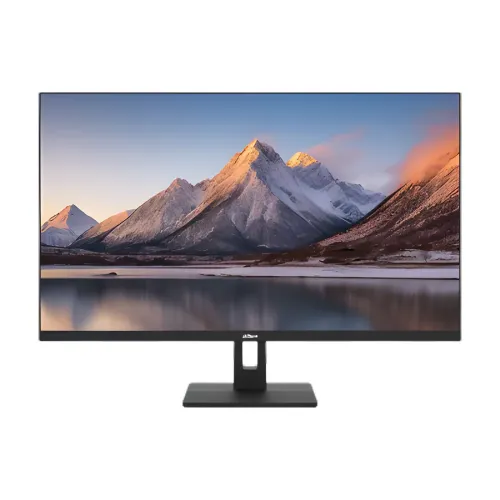
Dahua · DHI-LM32-C301B V2 31.5-inch QHD 100Hz IPS
31.5-inch QHD IPS monitor with 100Hz refresh on the current V2 specification, HDMI 2.1, DP 1.4 and low-blue-light features.
Price unavailable
Price range updating
No verified price is available yet. Store offers will appear when merchants publish them.
Compare store prices
No live offers for this variant
Offers will appear when merchants publish them.
Loading history…
Product story
Dahua DHI-LM32-C301B is a 31.5-inch IPS monitor with 2560 × 1440 QHD resolution. The current Dahua V2 product specification lists 100Hz maximum refresh, HDMI 2.1 × 2, DisplayPort 1.4 × 1, 300 cd/m² typical brightness and 75 × 75mm VESA mounting. An older 2024 datasheet for the same base model name lists 75Hz and earlier HDMI 1.4/DisplayPort 1.2 inputs. Because this difference is material, verify the delivered unit’s V2/version label and manual. This description follows the current V2 manufacturer listing, not the older revision.
The monitor’s 31.5-inch display uses a 16:9 aspect ratio and 2560 × 1440 pixels. QHD can provide a broad workspace for documents, spreadsheets, browser windows and media, with more detail than Full HD. Set the computer to native resolution and adjust scaling if text looks too small. On a 31.5-inch panel, pixel density is lower than on a 27-inch QHD screen, so choose a viewing distance that suits the user. QHD gaming also requires more graphics power than Full HD.
Dahua specifies IPS liquid-crystal technology, an ELED backlight and 178° horizontal/vertical viewing angles. The current V2 page lists a 1000:1 contrast ratio, 85% NTSC typical gamut and 300 cd/m² typical brightness. Viewing angle does not guarantee identical brightness or color at every position, and gamut coverage is not a factory calibration certificate. For general office and media use, the broad angles help when sharing the screen. For professional color work, calibrate the particular display and use color-managed applications.
The current manufacturer V2 listing specifies a maximum refresh rate of 100Hz and supports 2560 × 1440 at 100Hz over its listed HDMI 2.1 and DisplayPort 1.4 inputs. The older datasheet lists only 75Hz with HDMI 1.4 and DisplayPort 1.2. Verify that the delivered monitor is the V2 configuration before relying on 100Hz or the newer ports. Select the native resolution and a refresh mode offered by both source and display. A higher refresh can make compatible motion smoother but does not increase computer frame generation.
A 31.5-inch QHD display can suit office work, study, video and casual gaming. The 100Hz V2 specification offers smoother supported motion than a standard 60Hz mode. Actual game frame rate depends on GPU, CPU, software and graphics quality. The monitor does not improve those components’ rendering speed. Check the computer’s output capabilities and the exact V2 manual, especially if the display will be used with a console, dock or older laptop. A device may support QHD but not the maximum refresh through every connector.
Dahua lists 5ms overdrive response for the current V2 product specification. Overdrive changes pixel transitions, but results can vary by transition, selected mode and display conditions. Response time is not input latency and should not be treated as a promise that all motion is blur-free. If the image shows overshoot or trailing, try another response setting or a lower refresh mode. The older model datasheet also describes 5ms, but compare the delivered version’s own manual rather than relying on a generic marketing phrase.
The V2 specification lists 300 cd/m² typical brightness and a 1000:1 contrast ratio. It also lists 85% NTSC color gamut. The older datasheet reports slightly different contrast and describes brightness as a maximum value, which reinforces the need to use version-specific documentation. Set brightness for the room and avoid interpreting typical or maximum measurements as guaranteed output for every mode. Gamut percentage does not reveal color accuracy; calibrate the display if dependable color reproduction is important.
Dahua lists 8-bit color for the current V2 version. Do not claim 10-bit color for this model based on unrelated monitors or older catalog assumptions. Eight-bit display color is suitable for many documents, web pages, presentations and video. Gradients and color-critical workflows can be more demanding, so review the specific source signal, application and panel behavior. Use a neutral picture mode for predictable image output and avoid unnecessary saturation enhancement when working with brand or image assets.
The current V2 specification lists two HDMI 2.1 inputs and one DisplayPort 1.4 input, with QHD up to 100Hz, plus one audio output. The older datasheet names HDMI 1.4 and DP 1.2 with a 75Hz limit. Confirm the delivered revision and connector labels before installing a cable run or dock. The audio jack is an output for compatible external equipment; the V2 page does not list integrated speakers. Use headphones or external speakers if audio is needed, and check the source device’s audio routing.
Dahua lists low-blue-light and flicker-free features for the V2 model. These may change display behavior or color temperature, but they are not medical treatments and do not replace suitable room lighting, text size, viewing distance or regular breaks. Low-blue-light settings can make the image warmer. For color-sensitive work, use a neutral profile or calibrate the chosen mode. If the screen flickers, check the input timing, refresh setting and cable, then consult the exact version manual.
The manufacturer V2 specification lists a tilt range around -5° ±2° to +15° ±2°. It does not list a height-adjustable stand or swivel/pivot for this V2 display. Adjust the tilt gently and place the base on a stable desk. Set chair and desk height to bring the screen into a comfortable position. If additional ergonomic movement is needed, use a compatible monitor arm after verifying the VESA pattern and mounting instructions. Do not assume that another Dahua C-series stand has the same adjustment range.
Dahua lists a 75 × 75mm VESA mounting pattern for the current V2 version. Verify the pattern, screw depth and supported load in the delivered manual before attaching an aftermarket arm. Use suitable screws and install the screen securely; do not force fasteners or hang the display from an incompatible bracket. The old datasheet also lists 75 × 75mm, but weight and chassis dimensions differ slightly between documents. Measure the actual unit and mount it according to its version-specific instructions.
Dahua V2 gives dimensions without the base of 715.1 × 422.8 × 49.2mm, net weight 6.79kg and package size 796 × 515 × 116mm; gross weight is 7.72kg. The older 2024 datasheet reports nearby but different dimensions and weights. Confirm the version and local carton label for shipping, shelf and stand planning. Measure desk width and depth, allow for the base and cable connectors, and keep ventilation space around the display. Avoid ordering a tight-fit enclosure using the older dimensions.
The current V2 specification lists a 12V DC, 4A external adapter, 30W basic, 32W typical and 36W maximum consumption, with standby below 0.5W. Use the adapter supplied with the regional monitor and do not substitute one by connector shape alone. Dahua lists an operating temperature range of 0°C to +40°C and non-condensing humidity requirements. Keep vents clear, protect the power connection from liquids and unplug the adapter before moving or cleaning the screen.
A 31.5-inch screen occupies more horizontal space than a typical 24- or 27-inch monitor. Measure desk width, depth, viewing distance and rear clearance before placing it. The large QHD workspace can display more content, but small text may benefit from scaling. Center the screen with the user and angle it to limit reflections. Route the HDMI/DisplayPort and power cable so they cannot be trapped against a wall or pinched by furniture. Use a stable surface capable of supporting the monitor and stand.
The current V2 offers a large 31.5-inch QHD IPS panel, 100Hz refresh, wide viewing angles, low-blue-light and flicker-free features, and HDMI 2.1/DisplayPort 1.4 input options. The 75 × 75mm VESA pattern provides another mounting choice. Trade-offs include the lower pixel density of QHD at 31.5 inches versus smaller QHD panels, no integrated speakers listed, and version-dependent specifications: the older datasheet describes 75Hz and earlier ports. Confirm the exact revision before buying cables, brackets or expecting 100Hz.
Dahua manufacturer documents establish product features but do not confirm warranty coverage for a Bangladesh serial sold through BiponiBD. The catalog’s warranty field should be checked with the seller and authorized service provider. Ask who handles service, when coverage begins, whether panel defects and pixels are covered and what invoice or serial evidence is required. Current BiponiBD price, stock, delivery, payment and return terms can change. Check the live offer at checkout and keep the serial, invoice and packaging.
First confirm the product’s V2 label, then connect the supplied 12V adapter and a compatible HDMI 2.1 or DP 1.4 cable. Set 2560 × 1440 and choose 100Hz if offered by the display and source. If only 75Hz appears, verify whether the device is an older revision, inspect the cable and port, update the graphics driver and review the version-specific timing table. If there is no image, select the correct input and check cable seating. The audio output needs separate sound equipment.
The LM32-C301B V2 can suit a user who wants a large QHD IPS workspace for office tasks, study, browsing, video and casual gaming, with 100Hz motion and basic tilt adjustment. It is a better fit when the buyer confirms the newer V2 revision and can use its ports at the intended timing. Users requiring a built-in audio system, height adjustment, high-end HDR or a compact high-density screen should compare other models. Verify desk fit, mounting needs, local service and the product revision first.
Dahua DHI-LM32-C301B V2: 31.5-inch IPS, 16:9, 2560 × 1440 QHD, 100Hz, 8-bit color, 85% NTSC, 300 cd/m² typical, 1000:1 contrast and OD 5ms. Current manufacturer inputs: HDMI 2.1 × 2 and DP 1.4 × 1 at QHD 100Hz, plus audio out. Features include flicker-free and low-blue-light, tilt stand and 75 × 75mm VESA. Power is 12V/4A with 32W typical. An older datasheet lists 75Hz and prior-generation inputs; confirm the V2 marking.
Helpful answers
Product-specific answers maintained with the catalog information.
Dahua lists 2560 × 1440 QHD on a 31.5-inch 16:9 panel.
The current Dahua V2 page lists 100Hz. An older datasheet lists 75Hz, so check the delivered revision.
The current page lists two HDMI 2.1 and one DisplayPort 1.4, each supporting QHD at 100Hz.
The current V2 page lists audio out but does not list built-in speakers.
Dahua lists 75 × 75mm for V2. Confirm the unit label and manual before mounting.
The V2 specification lists tilt, but does not list height, swivel or pivot adjustment.
The current V2 page lists 300 cd/m² typical brightness.
An older 2024 Dahua datasheet lists 75Hz and older inputs; the current V2 page lists 100Hz and updated ports.
Confirm serial-specific warranty and local service terms with the seller.
Customer community
Become a merchant
Join BiponiBD, publish accurate offers and start free.