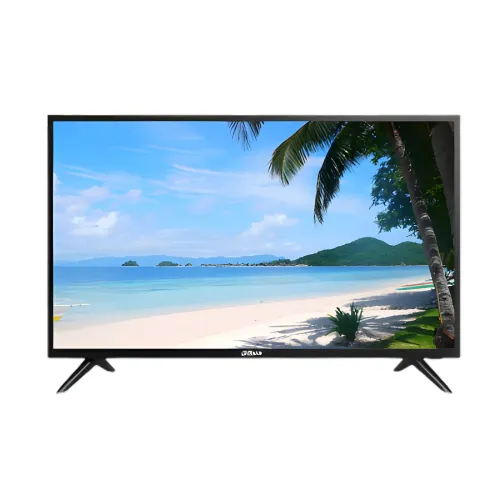
Dahua LM32-F200 overview
Dahua LM32-F200 is a 31.5-inch Full HD monitor in Dahua’s F200 Light Series. The latest available Dahua product page and 2025 datasheet identify a VA panel, 1920 × 1080 resolution, 60Hz refresh rate, 240 cd/m² brightness, 1400:1 contrast, 8ms response time, HDMI 1.4, VGA, USB 2.0 and integrated speakers. Dahua describes the series for continuous 24/7 operation and lists physical buttons plus infrared remote control. This model is an everyday or display-monitor format, not a high-refresh gaming screen. Dahua’s page marks LM32-F200 as end-of-life, so buyers should verify current stock, replacement options and service arrangements before purchase.
31.5-inch Full HD viewing area
The official specification lists a 31.5-inch diagonal screen, 16:9 aspect ratio and a viewing area of 698.40 × 392.85mm. Native resolution is 1920 × 1080 Full HD, with approximately 69.93 pixels per inch. The large display makes content physically easy to see at a distance, but the pixel density is lower than on a 27-inch Full HD screen or a 31.5-inch 4K display. Use the native resolution for a correctly mapped image. This screen size can work for information displays, general desktop use and video viewing where larger text or a distant seat is useful. Check the intended desk or wall viewing distance before selecting it.
VA panel and contrast
Dahua identifies VA LCD technology with a DLED backlight. The current product page lists a 1400:1 contrast ratio and 178-degree horizontal and vertical viewing angles. VA panels can provide stronger native contrast than many IPS panels, which may help dark scenes appear deeper, though room lighting and picture settings still matter. The manufacturer lists 16.7 million colors and 68% NTSC color gamut in its current datasheet. These values are general panel specifications rather than a factory-calibration report. If the monitor is used for color-sensitive work, verify the specific unit and calibrate it with a suitable workflow.
Refresh rate and supported signal
The current Dahua datasheet specifies a 60Hz refresh rate. Its HDMI 1.4 and VGA inputs are each listed for up to 1920 × 1080 at 60Hz. This is suitable for standard desktop interfaces, security viewing and video playback, but it does not offer a high refresh gaming mode. Select Full HD at 60Hz on the source device. If a signal is not detected, confirm the selected input, cable and source output resolution. Older devices may use lower supported resolutions. The monitor displays the signal supplied to it and does not upscale the source’s frame rate into a faster refresh.
Use for security and continuous display
Dahua lists the F200 Series as suitable for continuous 24/7 operation. That describes the intended product positioning, but real deployment should still follow the specified temperature, humidity, ventilation and power conditions. A security operator can connect a compatible recorder or computer using HDMI or VGA, depending on the source output. The monitor itself is not a recording device, network video recorder or camera controller; those functions belong to the connected equipment. For multi-camera layouts, the recorder or software determines the number and arrangement of video feeds. Confirm the input mode and installation environment before leaving the display in continuous service.
Response time and motion
Dahua specifies an 8ms response time for the current LM32-F200 datasheet. Response time describes pixel transition behavior and is different from input lag, refresh rate and video frame rate. At 60Hz, this model targets routine display use rather than fast competitive gaming. Camera movement, scrolling and rapid action may appear less sharp than on a high-refresh display. The earlier 2022 Dahua revision reports the same 8ms figure, while power and some physical values vary across revisions. Use the latest model-specific manual and carton to determine the specification of the exact shipped version.
Brightness and color settings
The latest datasheet lists brightness at 240 cd/m², contrast at 1400:1 and 68% NTSC gamut. An older revision lists 200 cd/m² brightness, illustrating that specifications can differ between document versions or hardware revisions. The latest manufacturer page links to the 2025 datasheet and is the basis for the current attribute set, but buyers should compare the label on their unit. Set brightness for the room and adjust contrast carefully to retain detail in highlights and shadows. The datasheet’s color-gamut specification does not certify calibration. For a security room or shared display, choose a legible mode and avoid excessive brightness in a dim space.
Ports and connected equipment
The current Dahua datasheet lists one HDMI 1.4 input, one VGA input and one USB 2.0 input. HDMI and VGA are each specified at 1920 × 1080 and 60Hz. The USB port’s role should be verified in the manual; its presence alone does not mean the monitor is a general-purpose USB hub or provides computer data functions. The sources reviewed do not list DisplayPort or USB-C. Choose a cable that matches the source device and monitor input. If using a recorder, PC or media player, confirm the output resolution and cable before installation. Use direct connections first if the source is not recognized.
Built-in speakers and remote control
Dahua lists two 6W speakers in the current datasheet and describes built-in speakers and infrared remote control for the F200 series. This can simplify basic sound and remote menu control in a display installation. The sound output is intended as integrated monitor audio; confirm volume, audio routing and speaker rating on the exact unit because earlier model literature may list a different wattage. The manufacturer’s latest source should be compared with the physical label and included documentation. If the monitor is placed far from viewers or used in a noisy space, separate speakers or a sound system may be more suitable.
Mounting and installation
The 2025 Dahua datasheet lists bracket mounting dimensions of 100 × 100mm. Previous documentation for the same model lists 75 × 75mm, so verify the actual revision and rear mounting pattern before ordering a bracket. The current official specification describes the screen in horizontal orientation; height adjustment, swivel or pivot stand features are not listed. Use a wall bracket rated for the display and follow the manual for screw length and installation. If mounting on a wall, confirm the wall structure and leave space for HDMI, VGA, USB and power connections. Do not rely on a conflicting old retailer attribute for mount compatibility.
Dimensions and weight
Dahua’s current datasheet lists dimensions without bracket of 731.4 × 432.6 × 67.5mm and a net weight of 3.8kg. The carton is listed at 797 × 483 × 108mm with gross weight 5.2kg. A previous datasheet revision gives nearby but not identical values. Use the model label and current manual to confirm exact dimensions for a tight shelf or wall installation. The package dimensions are not the same as installed clearance; allow room for cables and ventilation. When moving the display, support the body securely and avoid applying pressure to the panel surface.
Power and environmental conditions
The latest Dahua datasheet specifies built-in power with AC input 100–240V ±10%, 50/60Hz. It lists power use of 26W basic, 33W typical and 55W maximum, with standby below 0.5W. Use the built-in AC connection as documented; do not connect an external adapter based on a reseller assumption. The stated operating range is 0–40°C with 10–85% relative humidity. Keep the display ventilated, avoid condensation and use a grounded supply where required by local electrical practice. Turn the unit off safely before cleaning or moving it, and check Dahua installation guidance for proper cable routing.
On-device buttons and infrared control
Dahua describes physical buttons and infrared remote control for menu and display operation. These controls can make it easier to change input or settings when the screen is mounted or used in a shared viewing area. Remote operation depends on the supplied remote, working batteries and a clear path to the infrared receiver. The latest datasheet and packaging should confirm whether a remote is included in the local box. Keep the physical controls accessible during installation. If the remote stops responding, verify the batteries, receiver line of sight and manual instructions before concluding that the monitor has a hardware fault.
Advantages for surveillance and everyday viewing
The LM32-F200’s large 31.5-inch Full HD panel, standard HDMI/VGA compatibility, integrated speakers and remote control can fit monitoring rooms, reception areas, classrooms and basic desktop use. Dahua describes continuous 24/7 suitability and a wide 178-degree viewing angle. Built-in power and a broad AC input range can simplify deployment. The 60Hz refresh is appropriate for routine display signals but should not be confused with gaming-oriented high refresh. Confirm the exact model revision and VESA pattern before installation, especially because older product literature differs from the latest document on a few specification details.
Limitations and purchase checks
This monitor is Full HD at 60Hz, with 8ms response time and 240 cd/m² listed in the latest manufacturer source. It is not positioned for high-refresh gaming or high-resolution creative work. Dahua marks LM32-F200 as EOL on its product page, so future replacement availability and warranty support should be checked. Documents differ on brightness, mounting pattern and speaker rating; the current product page links to a 2025 datasheet, but the delivered unit may be an earlier revision. Confirm rear label, full model code, included remote, ports, VESA pattern and warranty terms before payment or installation.
Warranty and Bangladesh service
Dahua’s official technical page and datasheet do not establish a specific Bangladesh retail warranty for this unit. The existing catalog’s “03 years” warranty text needs seller confirmation against the serial number. Ask who will provide service, whether support is authorized, which panel or power faults are covered, the coverage start date and what invoice is required. Because the manufacturer marks the product EOL, verify parts and service availability with the seller before relying on long-term support. Current price, stock, delivery, return eligibility and replacement options must be checked on the live BiponiBD offer. Retain the serial label and invoice.
Setup and troubleshooting
Place the monitor securely, connect AC power and use HDMI or VGA from a compatible source. Select the correct input and configure 1920 × 1080 at 60Hz. If the display reports no signal, test the cable and source output, confirm the active input and restart the connected device. If the picture is cropped or stretched, restore native resolution and check source aspect-ratio controls. For the USB port, consult the exact manual for supported use. Keep the monitor within its specified environmental range and provide ventilation for continuous operation. Use the included remote or physical buttons to access the on-screen menu.
Who should consider this display
Consider LM32-F200 when a large 31.5-inch Full HD display, standard 60Hz signal, basic HDMI/VGA sources and built-in speakers meet the installation requirements. It can suit security monitoring, reception or general viewing when continuous-use positioning matters. It is a less suitable choice for competitive gaming, fine-detail creative work or a user who needs higher resolution and refresh. Because the product is marked EOL and some technical data varies by revision, check the physical model number, current datasheet, local warranty and replacement stock before choosing it for a long-lived installation.
Product summary
Dahua LM32-F200 is a 31.5-inch VA DLED monitor with 1920 × 1080 resolution, 60Hz refresh, 178° viewing angles and 8ms response time. The latest Dahua datasheet lists 240 cd/m² brightness, 1400:1 contrast, HDMI 1.4, VGA, USB 2.0, two 6W speakers, internal AC power and 24/7 operation suitability. Dahua marks the model EOL. Earlier specifications differ on brightness, speaker power and VESA pattern, so verify the delivered revision and local support. Check current BiponiBD price, availability and serial-specific warranty before purchase.