Pros
- 34-inch ultrawide format supports immersive compatible content.
- 3440 × 1440 resolution combines workspace and fine detail.
- 165Hz and adaptive sync can support smoother compatible gaming.
- VA panel specification lists 3000:1 contrast.

All categories
 New condition
Monitors
Dahua · DHI-LM34-E330C
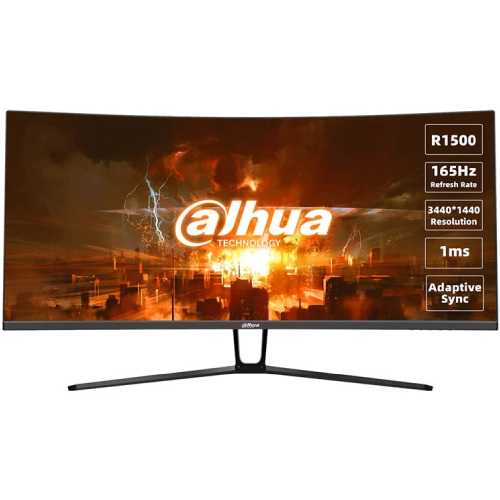
34-inch 3440 × 1440 curved VA ultrawide monitor with 165Hz, 1500R curvature and Adaptive-Sync; exact revision details should be confirmed.
Price unavailable
Price range updating
No verified price is available yet. Store offers will appear when merchants publish them.
Compare store prices
No live offers for this variant
Offers will appear when merchants publish them.
Loading history…
Product story
Dahua’s DHI-LM34-E330C is a 34-inch 21:9 curved monitor with a VA panel, 3440 × 1440 resolution and 165Hz maximum refresh. The official datasheet lists 1ms MPRT, Adaptive-Sync/FreeSync, 1500R curvature, two HDMI 2.0 inputs, two DisplayPort 1.4 inputs and an audio output. Manufacturer specifications can vary by revision; confirm the exact model and revision on the delivered box. Dahua’s official DHI-LM34-E330C documentation identifies a 34-inch 3440 × 1440 VA ultrawide monitor with 165Hz refresh and 1500R curvature. Where a retailer listing conflicts with the manufacturer sheet, confirm the exact revision and its port, stand, power or audio details before purchase.
A 34-inch ultrawide screen offers a wider horizontal view than a conventional 16:9 monitor. Dahua specifies a 21:9 aspect ratio and 3440 × 1440 native resolution, providing a broad canvas for compatible games, timelines and side-by-side windows. Set the source to native resolution for sharp output. Measure desk width and viewing distance before buying; the curved panel occupies more lateral space than a standard display. Dahua’s official DHI-LM34-E330C documentation identifies a 34-inch 3440 × 1440 VA ultrawide monitor with 165Hz refresh and 1500R curvature. Where a retailer listing conflicts with the manufacturer sheet, confirm the exact revision and its port, stand, power or audio details before purchase.
The native 3440 × 1440 UWQHD resolution places 4,953,600 pixels across a 21:9 display. It provides substantially more horizontal workspace than Full HD and a wider view for supported content. The graphics source must support the chosen timing, and the application must support ultrawide presentation. Older videos and some console games may show side bars or use scaling instead of filling the entire panel. Dahua’s official DHI-LM34-E330C documentation identifies a 34-inch 3440 × 1440 VA ultrawide monitor with 165Hz refresh and 1500R curvature. Where a retailer listing conflicts with the manufacturer sheet, confirm the exact revision and its port, stand, power or audio details before purchase.
Dahua specifies a VA panel and 3000:1 contrast ratio, with 178-degree horizontal and vertical viewing angles. The panel is designed to deliver strong contrast for dark scenes, while actual perception changes with viewing position, room light and settings. The datasheet lists 16.7 million colors (8-bit). These figures do not establish calibration accuracy or guarantee uniform appearance on every individual unit. Dahua’s official DHI-LM34-E330C documentation identifies a 34-inch 3440 × 1440 VA ultrawide monitor with 165Hz refresh and 1500R curvature. Where a retailer listing conflicts with the manufacturer sheet, confirm the exact revision and its port, stand, power or audio details before purchase.
The manufacturer’s datasheet identifies a 1500R curve. This curved format bends the wide panel toward the viewer, which may make the outer regions feel more within the viewing arc when seated centrally. Individual comfort depends on desk depth, viewing distance and preference. The curve does not change the native resolution or guarantee an expanded field of view in every game; software and content determine what is shown. Dahua’s official DHI-LM34-E330C documentation identifies a 34-inch 3440 × 1440 VA ultrawide monitor with 165Hz refresh and 1500R curvature. Where a retailer listing conflicts with the manufacturer sheet, confirm the exact revision and its port, stand, power or audio details before purchase.
The official datasheet lists a maximum 165Hz refresh rate. A high refresh can display more frequent updates when the source renders enough frames. Select 3440 × 1440 and 165Hz in the computer settings, then verify the active signal. Graphics output, port, cable, driver and display mode all matter. A monitor’s maximum refresh does not guarantee that a PC or game will reach the same frame rate. Dahua’s official DHI-LM34-E330C documentation identifies a 34-inch 3440 × 1440 VA ultrawide monitor with 165Hz refresh and 1500R curvature. Where a retailer listing conflicts with the manufacturer sheet, confirm the exact revision and its port, stand, power or audio details before purchase.
Dahua specifies 1ms MPRT response time. MPRT is a motion-picture-response measure and differs from gray-to-gray response and system input lag. The published value does not guarantee blur-free results under every setting or scene. Motion appearance depends on refresh, source frame rate and the monitor’s processing. Use supported OSD options and check for artifacts when tuning fast-motion content. Dahua’s official DHI-LM34-E330C documentation identifies a 34-inch 3440 × 1440 VA ultrawide monitor with 165Hz refresh and 1500R curvature. Where a retailer listing conflicts with the manufacturer sheet, confirm the exact revision and its port, stand, power or audio details before purchase.
Dahua lists Adaptive-Sync and FreeSync technology in its product documentation. Variable refresh can coordinate updates with compatible graphics output and reduce tearing in supported operating ranges. Enable the option on both monitor and source and use a compatible connection and driver. The documentation reviewed does not establish a G-SYNC certification or exact VRR range; verify those details for the intended graphics card. Dahua’s official DHI-LM34-E330C documentation identifies a 34-inch 3440 × 1440 VA ultrawide monitor with 165Hz refresh and 1500R curvature. Where a retailer listing conflicts with the manufacturer sheet, confirm the exact revision and its port, stand, power or audio details before purchase.
The datasheet lists 350 nits typical brightness, 120% sRGB, 85% NTSC, 85% DCI-P3 and 85% Adobe RGB. It does not list HDR support or an HDR certification in the reviewed manufacturer datasheets, so HDR should not be promised from older retailer text alone. Gamut percentages are not proof of calibration. Color-critical workflows require calibration and a verified mode for the target output. Dahua’s official DHI-LM34-E330C documentation identifies a 34-inch 3440 × 1440 VA ultrawide monitor with 165Hz refresh and 1500R curvature. Where a retailer listing conflicts with the manufacturer sheet, confirm the exact revision and its port, stand, power or audio details before purchase.
Dahua’s official datasheet lists two HDMI 2.0 inputs, two DisplayPort 1.4 inputs and one audio output. The exact supported refresh on each input is not specified in the cited sheet, so confirm the port/timing table in the manual or with Dahua before targeting 165Hz. The datasheet does not list USB-C or a USB hub. Verify the physical connector labels on the intended revision. Dahua’s official DHI-LM34-E330C documentation identifies a 34-inch 3440 × 1440 VA ultrawide monitor with 165Hz refresh and 1500R curvature. Where a retailer listing conflicts with the manufacturer sheet, confirm the exact revision and its port, stand, power or audio details before purchase.
The official signal interface lists one audio output. The reviewed manufacturer datasheet does not specify built-in speakers. Do not rely on retailer entries claiming 2W × 2 speakers unless the delivered revision or seller confirms it. Connect headphones or external speakers using the audio path supported by the source and monitor. Confirm audio routing and controls before purchase if integrated sound is important. Dahua’s official DHI-LM34-E330C documentation identifies a 34-inch 3440 × 1440 VA ultrawide monitor with 165Hz refresh and 1500R curvature. Where a retailer listing conflicts with the manufacturer sheet, confirm the exact revision and its port, stand, power or audio details before purchase.
The datasheet lists tilt adjustment from approximately -5° to +15° with tolerance; swivel, pivot and height adjustment are listed as not available. This conflicts with some retailer descriptions that claim height adjustment, so rely on the manufacturer data unless the local seller demonstrates a different revision. Plan desk height and monitor position before ordering; a separate stable riser may be needed for ergonomic placement. Dahua’s official DHI-LM34-E330C documentation identifies a 34-inch 3440 × 1440 VA ultrawide monitor with 165Hz refresh and 1500R curvature. Where a retailer listing conflicts with the manufacturer sheet, confirm the exact revision and its port, stand, power or audio details before purchase.
Dahua specifies a 75 × 75mm VESA mounting pattern, not 100 × 100mm. Confirm the mount’s load capacity, screw size and clearance before installation. The datasheet lists net weight around 7.24kg without stand context, so check the actual packaged unit and mount requirements. Support the display during mounting and avoid pressing the LCD surface. Dahua’s official DHI-LM34-E330C documentation identifies a 34-inch 3440 × 1440 VA ultrawide monitor with 165Hz refresh and 1500R curvature. Where a retailer listing conflicts with the manufacturer sheet, confirm the exact revision and its port, stand, power or audio details before purchase.
For PC use, connect to one of the listed DisplayPort 1.4 or HDMI 2.0 inputs using a cable rated for the required ultrawide timing. Set the native 3440 × 1440 resolution and confirm the chosen refresh in the OSD and operating system. The official sheet does not give per-port timing limits, so confirm which connection supports 165Hz for the specific GPU and revision. Dahua’s official DHI-LM34-E330C documentation identifies a 34-inch 3440 × 1440 VA ultrawide monitor with 165Hz refresh and 1500R curvature. Where a retailer listing conflicts with the manufacturer sheet, confirm the exact revision and its port, stand, power or audio details before purchase.
The 34-inch curved VA panel and listed 165Hz refresh are aimed at immersive gaming. A graphics system must render sufficient frames at 3440 × 1440 to use the high refresh. Adaptive-Sync can reduce tearing when both sides support it. Game support for 21:9 varies, and some titles may stretch, crop or letterbox. Check the actual game behavior and source capabilities before buying for competitive play. Dahua’s official DHI-LM34-E330C documentation identifies a 34-inch 3440 × 1440 VA ultrawide monitor with 165Hz refresh and 1500R curvature. Where a retailer listing conflicts with the manufacturer sheet, confirm the exact revision and its port, stand, power or audio details before purchase.
Console compatibility depends on the console’s output modes and the game’s supported aspect ratio. Many consoles primarily use 16:9 output, which can leave unused side areas or be scaled on this 21:9 panel. Verify console timing and compatibility in the official manual. The monitor’s 165Hz maximum does not mean a console will output that rate, and an HDR feature is not confirmed in the datasheets reviewed. Dahua’s official DHI-LM34-E330C documentation identifies a 34-inch 3440 × 1440 VA ultrawide monitor with 165Hz refresh and 1500R curvature. Where a retailer listing conflicts with the manufacturer sheet, confirm the exact revision and its port, stand, power or audio details before purchase.
The wide QHD canvas can show multiple documents, long editing timelines and broad spreadsheets. Application support and scaling determine how useful the extra width is. VA contrast may suit dark-themed content, but reported color gamut does not establish factory calibration. For photo or video finishing, verify color performance on the actual unit and use a calibrated, color-managed workflow. Dahua’s official DHI-LM34-E330C documentation identifies a 34-inch 3440 × 1440 VA ultrawide monitor with 165Hz refresh and 1500R curvature. Where a retailer listing conflicts with the manufacturer sheet, confirm the exact revision and its port, stand, power or audio details before purchase.
Dahua lists 54W typical and 80W maximum consumption in one official datasheet revision, with standby below 0.5W, AC 100–240V input and an external power adapter in catalog information. A separate Dahua datasheet lists 64W typical and 78W maximum, showing revision/test-condition differences. Confirm the power label on the delivered unit. The published weight is about 7kg in one revision and dimensions are about 808.65 × 129.59 × 363.33mm without stand. Dahua’s official DHI-LM34-E330C documentation identifies a 34-inch 3440 × 1440 VA ultrawide monitor with 165Hz refresh and 1500R curvature. Where a retailer listing conflicts with the manufacturer sheet, confirm the exact revision and its port, stand, power or audio details before purchase.
Use a stable desk or compatible arm, keep ventilation clear and avoid tension on signal and power leads. Clean the screen with a soft microfiber cloth; do not spray liquids directly onto the panel or use abrasive cleaners. Handle the curved panel by its frame and avoid pressure or twisting. Retain packaging and document the serial and condition when unpacking. Dahua’s official DHI-LM34-E330C documentation identifies a 34-inch 3440 × 1440 VA ultrawide monitor with 165Hz refresh and 1500R curvature. Where a retailer listing conflicts with the manufacturer sheet, confirm the exact revision and its port, stand, power or audio details before purchase.
The catalog’s three-year warranty wording is not proof of local Dahua coverage for a specific Bangladesh serial. Ask the seller to confirm provider, service location, duration, dead-pixel conditions, invoice requirements and replacement process. Check serial numbers on monitor, carton and invoice. Confirm current offer price, stock, delivery, included adapter/cables and return terms in writing before payment. Dahua’s official DHI-LM34-E330C documentation identifies a 34-inch 3440 × 1440 VA ultrawide monitor with 165Hz refresh and 1500R curvature. Where a retailer listing conflicts with the manufacturer sheet, confirm the exact revision and its port, stand, power or audio details before purchase.
Helpful answers
Product-specific answers maintained with the catalog information.
Dahua lists 3440 × 1440 UWQHD at a 21:9 aspect ratio.
The manufacturer datasheet specifies up to 165Hz.
The Dahua datasheet lists a 1500R curved screen.
Two HDMI 2.0, two DisplayPort 1.4 and one audio output are listed.
The manufacturer sheet lists height adjustment as unavailable; confirm the delivered revision.
USB-C is not listed in the reviewed Dahua datasheet.
Built-in speakers are not specified in the manufacturer sheet reviewed.
Dahua lists a 75 × 75mm VESA pattern.
Confirm serial-specific Dahua warranty and service terms with the seller.
Customer community
Become a merchant
Join BiponiBD, publish accurate offers and start free.