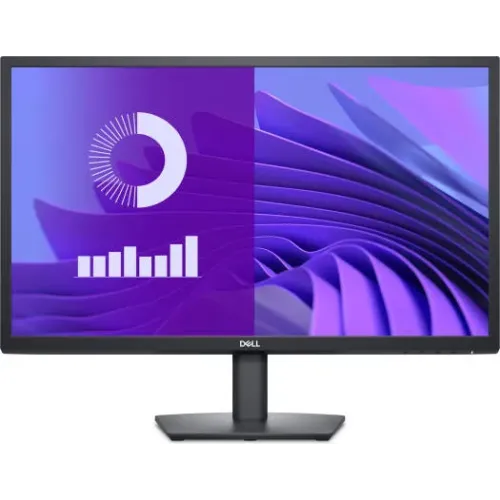
Dell E2425H 23.8-inch Full HD VA monitor
The Dell E2425H is a 23.8-inch viewable Full HD office monitor with a VA panel, up to 75Hz refresh through DisplayPort, 3000:1 typical contrast and 250 cd/m² typical brightness. Dell specifies one DisplayPort 1.2 input and one VGA connector. The E2425H does not have HDMI; Dell lists HDMI on the separate E2425HS variant. Confirm the exact model letters before ordering because the similar names refer to different ports.
This page uses Dell’s E2425H/E2425HS technical datasheet and Dell product information for the core specifications. Bangladesh seller listings report a three-year warranty and market prices, but these are seller terms rather than a guaranteed BiponiBD offer. Verify local serial eligibility, the exact model suffix, box accessories and written warranty conditions with the seller.
Display size, VA panel and Full HD resolution
The monitor has a 23.8-inch diagonal viewable area (604.70mm) and a 1920 × 1080 native resolution in a 16:9 format. Dell lists a 0.2745mm pixel pitch and 93 pixels per inch. The display uses Vertical Alignment (VA) technology with an LED edgelight system. Full HD is broadly supported by desktop computers and is suitable for common office, study and home use.
Dell specifies a 3000:1 typical contrast ratio and 250 cd/m² typical brightness. VA technology can produce deeper dark tones than many standard IPS monitors, particularly in a dim room. It may also show different dark-scene transitions or off-axis colour/contrast behaviour compared with IPS. Dell rates horizontal and vertical viewing angles at 178 degrees, but users who share the display or sit far to the side should consider their own viewing setup.
The E2425H supports 16.7 million colours and Dell specifies minimum colour coverage of 72% NTSC under CIE 1931 and 83% NTSC under CIE 1976. These measurements should not be casually restated as 99% sRGB; gamut spaces and measurement methods differ. This is a general office display rather than a documented wide-gamut or factory-calibrated professional monitor.
75Hz refresh and supported inputs
Dell specifies a maximum preset resolution of 1920 × 1080 up to 75Hz over DisplayPort 1.2. The E2425H’s VGA input supports Full HD up to 60Hz. The actual refresh options depend on the computer’s graphics output, selected input, adapter and cable. If 75Hz is important, connect through DisplayPort, choose 1920 × 1080 and verify the active signal rate in the operating-system display settings.
The difference between 60Hz and 75Hz can make normal desktop movement somewhat smoother, but this is not a high-refresh gaming model. It does not create extra frames, and the connected computer must render them. Check your source device’s output limits before assuming it can use 75Hz.
Important model distinction: E2425H vs E2425HS
The Dell E2425H and E2425HS are related but distinct models. Dell’s datasheet lists one DisplayPort 1.2 and one VGA connector on the E2425H. The E2425HS has an HDMI connector in addition to DisplayPort and VGA. Dell’s E2425H product page also lists DisplayPort and VGA, not HDMI. Some retailer pages or category summaries may combine details, so inspect the exact model suffix printed on the carton and product label.
If a laptop or console only has HDMI, the E2425H may need a compatible active or passive adapter depending on the source and target connection. An adapter does not add features that the display lacks, and compatibility can vary. If direct HDMI connection is required, confirm that the seller is offering the E2425HS or choose another model with the appropriate input.
Response time and everyday motion
Dell specifies 5ms grey-to-grey in Fast mode and 8ms grey-to-grey in Normal mode. These figures describe defined display response modes and are not a promise that every transition will be equally fast. Motion clarity also depends on refresh rate, source frame rate, content and the response mode selected. A 75Hz panel is aimed at everyday and office use, with casual gaming possible when the computer and connection support it.
For competitive games with rapid movement, compare monitors that explicitly support higher refresh rates and adaptive sync. Dell’s E2425H specification does not list adaptive sync. Consider how you use the monitor rather than choosing based only on a single response-time number.
Eye comfort and physical design
Dell lists TÜV Rheinland Eye Comfort certification at three stars and describes a flicker-free feature. The monitor also has an anti-glare surface. These functions are intended to support comfortable office viewing but cannot guarantee that long sessions will not cause eye fatigue. Set brightness for the room, choose a readable scaling level, maintain a comfortable viewing distance and take breaks.
The stand supports tilt adjustment. Dell does not list height adjustment, swivel, pivot or a VESA mounting interface for this E2425H configuration. Plan for the supplied stand on a stable desk. Do not assume that a standard VESA arm can be installed unless the documentation for the exact unit and the rear panel confirm a compatible pattern.
Dell lists a Kensington security lock slot and identifies arsenic-free glass and a mercury-free backlight. These are product and security details; a compatible lock is generally purchased separately. The monitor’s dimensions are approximately 538.64 × 412.00 × 171.00mm with stand and 538.64 × 323.00 × 50.00mm without stand, measured width × height × depth. Weight is about 3.93kg with the stand or 3.16kg without.
Power and included accessories
Dell specifies approximately 16W typical and 25W maximum power consumption with AC input from 100 to 240V at 50/60Hz. Actual use depends on brightness, active mode and operating conditions. The cited product information lists a DisplayPort cable and a power cable. Accessories can vary by market or seller package, so confirm what is included with the Bangladesh unit.
Who should consider the E2425H?
This monitor may suit office, study and general desktop use for someone who wants Full HD resolution, a VA panel, high static contrast, 75Hz DisplayPort support and a simple tilt stand. VGA can also be useful for older computers. Its physical lock slot and eye-comfort certification may fit shared or managed workspaces.
Choose another model if your setup requires HDMI without an adapter, built-in speakers, audio output, USB connectivity, height adjustment, VESA mounting, adaptive sync or a faster refresh rate. If you are comparing this model with E2425HS, verify the suffix because input selection is different.
Bangladesh price, availability and warranty
Bangladesh retailer observations reviewed for this pass showed prices around ৳19,200–৳19,900. Stock and price can change, and the range is not a live BiponiBD offer. One large retailer listing displayed an E2425H and noted that its specification may differ from the actual unit; always check the delivered model label, input ports and box contents.
Local sellers commonly advertise a three-year warranty, but Dell’s regional warranty and service arrangement can vary. Before paying, ask who provides the warranty, whether the serial number is eligible for service in Bangladesh, what the dead-pixel policy covers and whether the original carton is required. Keep the invoice and warranty documents.
Frequently asked questions
Model note: Dell E2425H has DisplayPort 1.2 and VGA; the separate E2425HS adds HDMI. The E2425H supports up to 75Hz over DisplayPort and up to 60Hz over VGA at native Full HD. Confirm exact suffix and warranty terms.