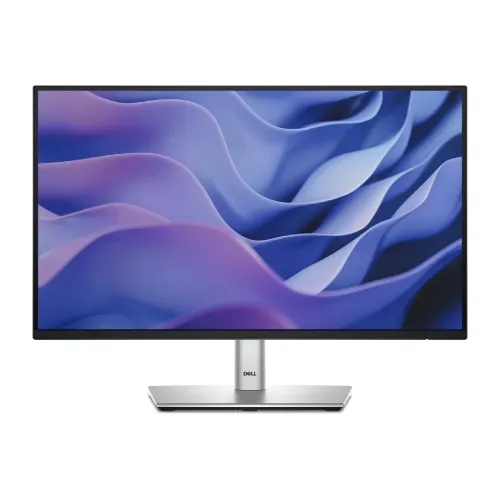
Dell P2225H 21.5-inch Full HD IPS Monitor
The Dell P2225H is a 21.5-inch-class Full HD business monitor designed for office desks, reception counters, study spaces and everyday home computing. Its IPS panel, 1920 × 1080 resolution and up to 100Hz refresh rate support clear text and smoother pointer movement than a standard 60Hz display when the computer sends a compatible signal. The included stand supports height, tilt, swivel and pivot adjustment, so the screen can be set for a more comfortable desk position or turned vertically for suitable documents and coding layouts.
This is the P2225H, not the similarly named P2226H or older P2222H. The 21.5-inch viewing size, 100Hz refresh and specific port layout belong to this model. Confirm the service tag/model on the actual product and invoice. Regional packages and bundled cables can differ, so verify the included items and written local warranty before ordering.
Display and everyday picture quality
The 16:9 IPS panel displays 1920 × 1080 pixels, a practical Full HD workspace for documents, web apps, video calls, dashboards and general desktop use. Dell lists a typical brightness of 250 cd/m² and a 1,500:1 typical contrast ratio. The panel has a matte anti-glare surface with 3H hardness and viewing angles up to 178 degrees horizontally and vertically. IPS viewing angles can help preserve colour and contrast when you are not sitting directly in front of the screen.
Dell lists 99% sRGB colour coverage and support for up to 16.7 million colours. That is useful for ordinary office graphics and web content, but it is not a substitute for a calibrated wide-gamut creator display when colour-critical work matters. The monitor is flat, and its 21.5-inch size keeps the footprint compact. At about 102 pixels per inch, Full HD text and interface elements appear relatively dense for a small office monitor, though operating-system scaling and eyesight preferences affect readability.
100Hz refresh rate and response
The maximum refresh rate is 100Hz. A higher refresh can make pointer motion, scrolling and supported games look smoother than 60Hz when the computer, cable, port and selected display mode all support the rate. It does not increase the frame rate produced by a laptop or PC, and the monitor will display a lower refresh when the source sends one. Dell's datasheet lists HDMI 1.4 support for Full HD at 100Hz as well as DisplayPort 1.2.
Dell specifies 5ms grey-to-grey in Fast mode and 8ms grey-to-grey in Normal mode. The result depends on the selected response setting and should not be confused with a motion-picture response (MPRT) figure. This is a professional productivity monitor rather than an esports screen; compare a faster gaming model if your priority is competitive response tuning or refresh above 100Hz.
Comfort and ergonomic positioning
Dell lists TÜV Rheinland Eye Comfort 4-Star certification, ComfortView Plus and flicker-free operation. ComfortView Plus is designed to reduce blue-light emission while retaining colour, but comfort still depends on room lighting, viewing distance, font size and breaks. Set brightness for the room and position the screen to avoid reflections and neck strain.
The supplied stand supports up to 150mm height adjustment, tilt from -5 to +21 degrees, swivel from -45 to +45 degrees and pivot from -90 to +90 degrees. This gives more positioning flexibility than a basic tilt-only stand. The display also supports a 100 × 100mm VESA mount. Check arm capacity, screw length, clearance and the actual product weight before mounting. Rotating to portrait mode can help with long documents, but software rotation and cable clearance are also required.
Ports and USB hub
Video inputs include one HDMI 1.4 port, one DisplayPort 1.2 input and one VGA input. The USB hub has one USB 3.2 Gen 1 Type-B upstream port, three USB-A downstream ports and one USB-C downstream port. Dell specifies up to 15W power delivery on that USB-C port for data only. It is not a laptop docking connection and does not replace a full-power USB-C monitor with video input and laptop charging.
The monitor has no built-in speakers listed. Dell's datasheet describes an optional separately sold soundbar. Plan to use headphones, external speakers or computer audio if sound is needed. HDCP 1.4 is listed for the digital video connections. Check your computer's available ports and cable requirements before purchase, especially if you need USB peripherals to connect through the monitor.
Power, dimensions and box contents
Dell lists a 100–240V AC, 50/60Hz power input. Typical on-mode consumption is 10.9W and maximum consumption is 60W. Dimensions with the stand are about 488.06mm wide, 181.75mm deep and 364.00–482.39mm high as the stand moves between compressed and extended positions. The panel-only weight for VESA mounting is 2.58kg; total monitor weight differs when the stand is installed.
Dell's US datasheet lists a monitor panel, stand riser and base, power cord, 1.8m DisplayPort-to-DisplayPort cable, 1.8m USB Type-A-to-B upstream cable and quick setup/safety documents. Regional packaging can vary. Confirm the Bangladesh seller's box contents, plug type and any included cable before ordering.
Who is it for?
The P2225H suits users who need a compact Full HD screen, an adjustable stand, a 100Hz refresh ceiling and a practical mix of legacy and modern video connections. The USB hub can help keep keyboard, mouse or other low-power accessories near the display, while VGA can support older computers. The stand's height and rotation range can be useful in shared offices and home workstations.
Consider a larger 23.8- or 27-inch display if you want more viewing area, or a QHD model if you regularly keep multiple detailed windows open. The Type-C port here is a downstream data port with up to 15W power; it does not carry the laptop video signal and does not charge most laptops. This product is currently listed without a confirmed BiponiBD offer. Check local stock, exact model, seller warranty and return terms before buying.
Key features
- 21.5-inch viewing size with 1920 × 1080 Full HD resolution
- IPS panel with 16:9 aspect ratio and 178° viewing angles
- Up to 100Hz refresh rate; source and cable must support the mode
- 99% sRGB colour coverage and 16.7 million colours listed by Dell
- 250 cd/m² typical brightness and 1,500:1 typical contrast
- HDMI 1.4, DisplayPort 1.2 and VGA video inputs
- USB hub: 3 USB-A, 1 USB-B upstream and 1 USB-C downstream up to 15W data-only PD
- Stand with 150mm height adjustment, tilt, swivel and pivot
- 100 × 100mm VESA mounting support
- TÜV Eye Comfort 4-Star, ComfortView Plus and flicker-free features
- No built-in speakers listed; optional soundbar sold separately
- 3-year limited hardware warranty listed by Dell globally; Bangladesh terms depend on the seller and unit
Advantages
- Ergonomic stand adjustments include height, tilt, swivel and pivot.
- 100Hz refresh can make compatible everyday desktop motion smoother than 60Hz.
- HDMI, DisplayPort and VGA cover a broad range of computers.
- USB hub adds convenient peripheral connections; USB-C downstream supports up to 15W data-only power delivery.
- Compact Full HD IPS panel with 99% sRGB and anti-glare coating suits ordinary business and home use.
Limitations to consider
- At 21.5 inches, the screen is smaller than many current 23.8- or 27-inch monitors.
- Full HD offers less workspace than a QHD display.
- The USB-C port is not a laptop video input or full laptop charging connection.
- There are no built-in speakers listed; a soundbar or external audio device is separate.
- Bangladesh price, current stock and local warranty coverage were not confirmed from an in-stock exact-model listing.
Frequently asked questions
What are the screen size and resolution?
Dell specifies a 21.5-inch viewing size, 1920 × 1080 Full HD resolution and 16:9 aspect ratio.
Does the P2225H support 100Hz?
Yes. Dell lists up to 100Hz. The computer, cable, port and selected mode must also support Full HD at 100Hz.
Can USB-C connect and charge my laptop?
The monitor's USB-C is a downstream data port with up to 15W power delivery. Dell does not list it as a USB-C video input or full laptop charging connection.
Which video and USB ports are included?
Video: one HDMI 1.4, one DisplayPort 1.2 and one VGA. USB: one Type-B upstream, three Type-A downstream and one Type-C downstream up to 15W for data only.
Does it have built-in speakers?
No built-in speakers are listed. Dell describes an optional soundbar sold separately; external speakers or headphones are another option.
Can I adjust the stand or mount it on an arm?
The stand supports height, tilt, swivel and pivot adjustments. Dell lists 100 × 100mm VESA mounting; verify the bracket and screw requirements for your setup.
What warranty applies in Bangladesh?
Dell lists a three-year limited hardware warranty for the model in its global datasheet. Local service coverage depends on the unit and seller. Get the local provider, duration and claim terms in writing before purchase.
Is the monitor currently available at BiponiBD?
No live BiponiBD offer was returned during this review. External catalogue prices are not a BiponiBD selling offer; confirm current local stock and price with the seller.
Price note: the exact-model Bangladesh listings checked show ৳17,700 as a reference price but are marked out of stock or coming soon. No current in-stock price range is claimed here.