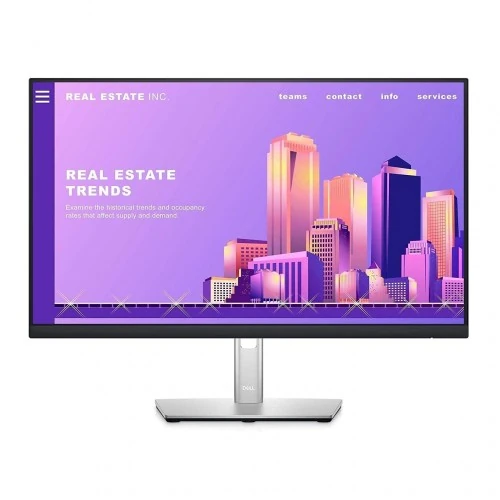
The Dell P2422H is a 23.8-inch viewable Full HD IPS business monitor with 60Hz refresh, ComfortView Plus and an integrated USB hub. Dell lists DisplayPort, HDMI, VGA, four USB downstream ports and an adjustable height/pivot/swivel/tilt stand. It does not list USB-C, laptop charging or integrated speakers. See specifications and Bangladesh buying notes below.
Product overview
The Dell P2422H is a 23.8-inch viewable Full HD IPS monitor designed for business and everyday productivity. Dell specifies native 1920 × 1080 at 60Hz, a USB 3.2 Gen 1 hub, and a stand with height, pivot, swivel and tilt adjustments. Its inputs include DisplayPort, HDMI and VGA, so it can connect to a mix of recent and older computers.
Dell’s product name calls it a 24-inch display, while the actual viewable diagonal is 23.8 inches. This listing uses both descriptions clearly to help with search without implying a true 24-inch active area. It is a productivity model, and its 60Hz timing and response modes should be considered before using it for fast competitive gaming.
Screen and resolution
The IPS panel displays 1920 × 1080 pixels in a 16:9 widescreen format, with 93 pixels per inch and a 0.2745mm pixel pitch. This is a common office resolution for documents, browser tabs, video calls and general desktop applications. The 23.8-inch size provides a familiar balance between readable interface scale and desk footprint.
Dell specifies typical brightness of 250 cd/m², static contrast of 1000:1 and typical viewing angles of 178 degrees horizontally and vertically. These are manufacturer ratings, not independent measurements of this particular unit. If you need more working area for large spreadsheets or simultaneous windows, compare a QHD model and check how your applications scale.
Color and response
Dell lists support for 16.7 million colors and 99% sRGB. Its user guide identifies 6-bit plus FRC color depth. This can suit standard office graphics and general web content, but the published gamut value does not prove factory calibration for every unit or suitability for print-critical production.
The P2422H offers 5ms gray-to-gray in Fast mode or 8ms in Normal mode according to Dell. These figures should be read alongside its 60Hz refresh rate: the monitor is designed for general productivity rather than high-refresh gaming. Motion performance and perceived input lag also depend on the computer, application and selected display mode.
ComfortView Plus and screen treatment
Dell describes ComfortView Plus as an always-on, built-in low-blue-light screen feature intended to reduce blue-light emissions while preserving color. Flicker Free technology is also listed. The screen uses an anti-glare front polarizer with 3H hard coating, which can help reduce reflections in many work environments.
These specifications do not guarantee that every person will experience the same comfort. Room lighting, brightness, viewing distance, posture, font size and breaks still affect long work sessions. Adjust the monitor to a comfortable height and angle, and follow any relevant workplace or clinical guidance for eye comfort.
Ports and USB hub
For video, Dell lists one DisplayPort 1.2 connection, one HDMI connection and one VGA input. The built-in USB hub has one USB 3.2 Gen 1 upstream port and four USB 3.2 Gen 1 downstream ports. Connect the upstream cable from the monitor to the computer to enable the hub’s data path.
The P2422H does not list a USB-C display input or laptop charging capability. The hub is not a replacement for a USB-C dock and should not be described as providing video pass-through or power delivery. Confirm which video input your computer supports and whether you need a separate adapter for VGA or another connection.
Ergonomic stand and mounting
Dell lists height adjustment, pivot, swivel and tilt, which allow the user to position the display for seated work or rotate it to portrait orientation. A 100 × 100mm VESA interface is available for compatible mounts. The manufacturer product listing describes a DisplayPort cable and a USB upstream cable among regional package contents.
Before attaching an arm, confirm VESA screw compatibility and mount capacity. Leave enough slack in video, USB and power cables if you use pivot or swivel. Desk shape and wall clearance may limit how far the screen can rotate. Package contents and included cables can vary by region, so verify the box with the local seller.
Power, dimensions and operating setup
Dell lists AC input from 100 to 240 volts at 50/60Hz. The UK specification gives 12W on-mode consumption, 48W maximum, and 0.3W standby/sleep figures. Actual consumption changes with brightness, connected USB devices and operating mode. Keep the power adapter/cable and ventilation arrangement consistent with Dell’s instructions.
A regional Dell specification describes the monitor with stand at approximately 53.78cm wide and 17.957cm deep; full height varies with adjustment. The complete dimensions and shipped configuration can vary by model region and stand packaging. Measure the intended desk area and check the exact Dell service tag and part number on the unit before comparing regional listings.
Who should choose it
The P2422H may suit office workers who need an adjustable stand, ordinary Full HD resolution, integrated USB-A connectivity and a matte IPS screen. Its combination of VGA, HDMI and DisplayPort can be helpful when a workplace uses computers from different generations. ComfortView Plus is a distinct manufacturer-listed feature for extended desk use.
It may not suit a buyer who needs USB-C one-cable docking, laptop charging, built-in speakers, HDR, very high refresh, or higher-than-Full-HD detail. Those capabilities are not listed in Dell’s specifications for this model. Compare ports and resolution carefully with neighboring P-series models, since similar model numbers may have different interfaces.
Bangladesh price, warranty and purchase checks
Bangladesh seller snapshots found Powerland at ৳28,000 and In Stock with a three-year box-mandatory warranty; Ultra Technology at ৳37,500; and BME at ৳26,000. These differ substantially and may represent different import channels, promotions, stock dates or warranty coverage. They are not a BiponiBD offer, and the prices may change without notice.
Before paying, confirm whether the unit is new, its exact P2422H regional part number, Dell service-tag warranty status, invoice terms, local service provider, return/dead-pixel policy and included DisplayPort/USB cables. Ask whether warranty is official Dell coverage or seller-provided coverage and whether the original box is required for a claim.
Key features
- 23.8-inch viewable IPS screen in a 24-inch Full HD office monitor format.
- 1920 × 1080 resolution at 60Hz, 16:9 aspect ratio and 93 PPI.
- Dell lists 250 cd/m² typical brightness, 1000:1 static contrast and 99% sRGB.
- ComfortView Plus is Dell’s always-on low-blue-light screen feature; Flicker Free is also listed.
- Ergonomic stand supports height adjustment, tilt, swivel and pivot.
- USB 3.2 Gen 1 hub with one upstream and four downstream connections.
- Video inputs include DisplayPort 1.2, HDMI and VGA.
- 100 × 100mm VESA mount support for compatible arms and brackets.
- Dell rates response at 5ms gray-to-gray Fast or 8ms Normal, rather than a gaming 1ms claim.
- No integrated speakers, USB-C connection or laptop charging are listed in Dell’s specification.
Pros
- IPS panel, 178-degree viewing angles and Full HD resolution suit everyday office and shared-screen work.
- Height, tilt, swivel and pivot adjustments allow a more flexible ergonomic setup than a fixed stand.
- USB hub and three types of video input can simplify a desk with legacy and current devices.
- 99% sRGB and 16.7 million listed colors suit general productivity and non-critical content work.
- ComfortView Plus and Flicker Free are useful display comfort features for a work monitor.
Cons and buying considerations
- 60Hz refresh and 5/8ms manufacturer response modes are intended for productivity, not high-refresh gaming.
- Full HD on a 23.8-inch screen is less detailed than QHD or 4K for dense spreadsheets or multiwindow work.
- USB-C video, laptop charging and integrated speakers are not provided/listed.
- The USB hub requires its upstream connection to the computer; it is not a standalone charging dock.
- Bangladesh seller prices and regional Dell warranty coverage differ; exact service-tag eligibility must be confirmed.
Full specifications
- Brand: Dell
- Model: P2422H
- ManufacturerPartNumber: 210-AZYX (UK)/210-BBCC (US order part; region varies)
- ViewableSize: 23.8 inches (Dell marketing name: 24-inch class)
- Panel: IPS, LED-backlit TFT active-matrix LCD
- Resolution: 1920 × 1080 Full HD
- RefreshRate: 60Hz native
- AspectRatio: 16:9
- PixelPitch: 0.2745mm; 93 pixels per inch
- Brightness: 250 cd/m² typical
- ContrastRatio: 1000:1 typical static
- Color: 16.7 million colors; 6-bit + FRC per Dell user guide
- ColorGamut: 99% sRGB (Dell specification)
- ResponseTime: 5ms gray-to-gray Fast; 8ms gray-to-gray Normal
- ViewingAngle: 178° horizontal / 178° vertical typical
- Surface: Anti-glare front polarizer with 3H hard coating
- EyeCare: Dell ComfortView Plus always-on low-blue-light screen; Flicker Free technology
- Ports: 1 × DisplayPort 1.2 (HDCP 1.4); 1 × HDMI (HDCP 1.4); 1 × VGA; 1 × USB 3.2 Gen 1 upstream; 4 × USB 3.2 Gen 1 downstream
- Hub: USB 3.2 Gen 1 hub; USB ports are data connectivity, not a USB-C display or laptop charging port
- Stand: Height adjustment up to 150mm; pivot, swivel and tilt
- VESA: 100 × 100mm
- Audio: No integrated speakers listed; no audio output listed in Dell interface specifications
- Power: AC 100–240V, 50/60Hz; 12W on-mode typical; max 48W; standby/sleep 0.3W; off 0.2W
- Included: Dell regional product page lists DisplayPort cable and USB upstream cable; verify local package contents
- Warranty: Dell warranty terms vary by region; Bangladesh retailers advertise three years on some offers. Verify official local warranty and service tag eligibility.
- LocalMarketObservation: Powerland ৳28,000/In Stock with 3-year box-mandatory warranty; Ultra Technology ৳37,500/In Stock (3-week crawl); BME ৳26,000 listed; prices and availability vary and are not BiponiBD offers.
- Sources: [object Object]
- CheckedAt: 2026-11-08T20:35:52.632Z
Frequently asked questions
What is the actual screen size?
Dell calls this a 24-inch monitor, while the viewable diagonal is 23.8 inches. It uses an IPS panel with 1920 × 1080 Full HD resolution.
What refresh rate does it support?
Dell lists native Full HD at 60Hz. This is an office/productivity display rather than a high-refresh gaming monitor.
What ports are included?
Dell lists DisplayPort 1.2, HDMI, VGA, one USB 3.2 Gen 1 upstream connection and four USB 3.2 Gen 1 downstream ports. The USB hub requires the upstream cable to be connected to the computer.
Does it have USB-C or charge a laptop?
No USB-C video or laptop power-delivery port is listed for the P2422H. Its USB-A hub provides downstream data connectivity, not a USB-C docking or charging feature.
Can the stand adjust for height and portrait use?
Yes. Dell lists height, pivot, swivel and tilt adjustments. The stand can rotate the display to portrait orientation; check desk clearance and cable slack before rotating.
Does it include a VESA mount?
Dell lists a 100 × 100mm VESA mounting interface. Verify the bracket’s screw compatibility and weight capacity before installation.
Is this good for gaming?
It can display ordinary PC output, but Dell specifies 60Hz and 5ms Fast/8ms Normal gray-to-gray response. Buyers prioritizing competitive gaming should compare a monitor with a higher refresh rate and response characteristics suited to that use.
What does ComfortView Plus do?
Dell describes ComfortView Plus as an always-on, built-in screen feature designed to reduce potentially harmful blue-light emissions while maintaining color. Flicker Free technology is also listed. It does not replace breaks or guarantee an individual comfort outcome.
What brightness, contrast and color gamut are specified?
Dell lists 250 cd/m² typical brightness, 1000:1 typical contrast and 99% sRGB. The user guide describes 16.7 million colors using 6-bit plus FRC. These manufacturer figures are not an individual calibration report.
Are speakers or a headphone jack built in?
Dell’s interface list does not include speakers or an audio output, and integrated speakers are not listed. Use the computer or an external audio device for sound.
What cables come in the box?
Dell’s UK listing includes a DisplayPort cable and a USB upstream cable. Local bundles can vary by region and seller; confirm the exact box contents and power cable before purchase.
What is the price and warranty in Bangladesh?
Local listings checked varied: Powerland showed ৳28,000 and In Stock with a three-year, box-mandatory warranty; Ultra Technology showed ৳37,500; BME listed ৳26,000. These seller observations may be stale and do not represent a BiponiBD offer. Confirm stock, exact model, service-tag eligibility, warranty provider and final checkout price.
Source note: Dell regional product specifications and user guide are the primary technical sources. Local retailers are used only for Bangladesh price/stock/warranty observations. No BiponiBD offer or hands-on test is claimed. Sources checked 2026-11-08T20:35:52.632Z.