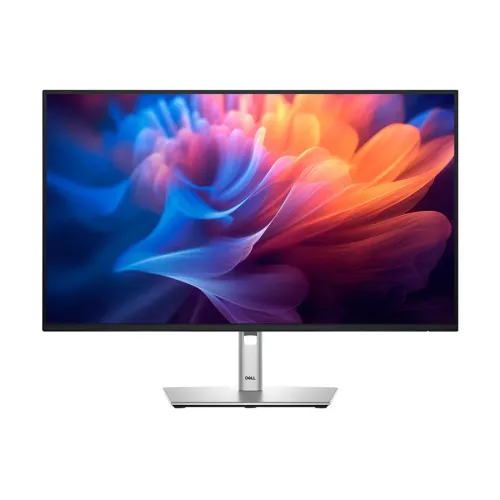
Dell P2725H overview
Dell Pro 27 Plus P2725H is a 27-inch Full HD IPS business monitor with 1920 × 1080 resolution and up to 100Hz refresh. Dell specifies 300 cd/m² typical brightness, 1500:1 typical contrast, 99% sRGB, 5ms gray-to-gray in Fast mode and 8ms in Normal mode. Inputs include HDMI 1.4, DisplayPort 1.2 and VGA. The USB hub has one Type-B upstream, three Type-A downstream and one Type-C downstream data port with up to 15W power delivery. The included stand adjusts height, tilt, swivel and pivot. The exact Dell datasheet corrects the catalog’s unspecified connectivity and confirms the 100Hz model and its key features.
Display size and Full HD resolution
The display measures 27 inches diagonally, with an active area of 597.89 × 336.31mm, 16:9 aspect ratio, 0.3114mm pixel pitch and 81.57 PPI. Its maximum preset resolution is 1920 × 1080. Full HD supports broad computer compatibility and everyday office workloads, while 27-inch QHD monitors provide more pixels at a similar size. If small text or detailed design work matters, compare pixel density before buying. Select 1920 × 1080 for the native image and use display scaling to suit your viewing distance.
IPS panel and color
Dell identifies an IPS panel with 178° horizontal and vertical viewing angles, 99% sRGB coverage and up to 16.7 million colors. Typical contrast is 1500:1. The screen uses an edge-lit LED backlight and anti-glare coating with 3H hardness. Wide viewing angles can help preserve a consistent image when sharing the screen, though color and brightness uniformity vary across individual panels. 99% sRGB coverage supports common web and office content, but does not guarantee professional calibration. Use a measured profile if color-critical work is required.
100Hz refresh and response modes
Dell lists refresh rates up to 100Hz and gray-to-gray response of 5ms in Fast mode or 8ms in Normal mode. Refresh rate and pixel response are separate measurements. A 100Hz mode can make scrolling and general motion appear smoother than 60Hz when the computer outputs a supported timing. The monitor remains a productivity model rather than a high-refresh gaming display. Fast mode may affect transitions or create artifacts; choose a setting that looks clear to you. Confirm the computer, selected port, cable and operating-system display setting support 1920 × 1080 at 100Hz.
HDMI, DisplayPort and VGA
P2725H has one HDMI 1.4 input, one DisplayPort 1.2 input and one VGA input. Dell lists HDCP 1.4 on HDMI and DisplayPort and states HDMI supports Full HD at 100Hz according to HDMI 1.4 TMDS. DisplayPort and VGA timing depend on source and cable capabilities. Choose the best supported connection for the host. An adapter, dock or older graphics output can limit the refresh rate. VGA is analog and may not produce the same sharpness as a digital input. Check the monitor OSD input selection if the computer image does not appear.
USB hub and USB-C downstream
The built-in hub includes one USB 3.2 Gen 1 Type-B upstream port, three USB 3.2 Gen 1 Type-A downstream ports and one USB 3.2 Gen 1 Type-C downstream port. The Type-C port supports up to 15W power delivery for data-only use. It is not an upstream USB-C video input and does not provide laptop docking or monitor-to-laptop charging. Connect the USB-B upstream cable to the host to enable the hub. Dell lists a 1.8m USB-A-to-B upstream cable in the box. Consider peripheral power requirements and use the computer directly for devices needing more power.
ComfortView Plus and eye comfort
Dell specifies ComfortView Plus, an always-on feature that reduces blue-light emission to less than 35% while retaining 99% sRGB coverage, along with flicker-free operation. The datasheet identifies TÜV Rheinland 4-Star Eye Comfort certification. These features are intended to support viewing comfort; they do not replace suitable room lighting, readable scaling, breaks or ergonomic positioning. Brightness and color preferences vary. If color work is important, review the image in the appropriate mode and calibrate the display for the target workflow.
Stand adjustment and ergonomics
The included stand provides up to 150mm height adjustment, tilt from -5° to +21°, swivel from -45° to +45° and pivot from -90° to +90°. Raise and tilt the display to fit your posture and desk; leave enough cable slack before swiveling or rotating to portrait. Change the computer’s display orientation when using pivot. Dell lists dimensions with the stand of 610.68mm wide, 192.28mm deep and 384.56–534.56mm high, depending on height setting. The adjustment range is suitable for flexible office desks and shared workstations.
VESA, security and cable management
The monitor supports 100 × 100mm VESA mounting and includes a Kensington security lock slot. The stand riser provides a cable-management route; a lock cable is sold separately. Dell lists panel-only weight of 4.03kg and packaged weight of 8.47kg. Check the mount’s load rating, VESA pattern and screws before installation. The detachable stand allows arm mounting, but confirm the correct hardware and follow Dell’s setup guide. When pivoting, ensure cables do not snag or pull the monitor toward the edge of the desk.
Dell Display and Peripheral Manager
Dell Display and Peripheral Manager supports Easy Arrange for tiling application windows and restoring saved layouts. The software can also manage display settings and support selected fleet-management functions. Download the version supported by your host operating system from Dell’s support page for P2725H. Software availability can differ by platform. The display’s on-screen joystick provides direct access to menu controls. These tools help organize a workstation but do not change the panel’s Full HD resolution or maximum refresh rate.
Audio and optional soundbar
Dell lists an optional soundbar attachment that is sold separately; built-in speakers are not specified. The soundbar is not included with the standard monitor package. Plan for external speakers or headphones if audio is needed, and confirm the soundbar’s compatibility and local availability before purchase. Video inputs may carry audio signals, but the monitor does not become a speaker system without the optional accessory. The official port diagram shows rear soundbar mounting slots.
Power and energy
Dell specifies AC input from 100 to 240V at 50/60Hz and 1.5A typical. The datasheet lists 15.8W on-mode, 74W maximum, 0.3W standby and 0.3W off-mode consumption, plus 12.9W Pon and 41.3kWh TEC. These values come from defined measurement methods; maximum power is not expected to be constant use. Connect the supplied power cord and keep ventilation clear. Dell Display and Peripheral Manager includes PowerNap settings that can reduce energy use in supported configurations.
Cables and package contents
Dell lists a power cord, 1.8m DisplayPort-to-DisplayPort cable, 1.8m USB 3.2 Gen 1 Type-A-to-B upstream cable and a quick setup guide. The US product page also lists a 1.8m HDMI cable; accessories can vary by market. Check the actual Bangladesh package and seller invoice before relying on an included HDMI cable. The Type-B upstream cable is needed to enable the USB hub. A USB-C video cable is not a substitute for that upstream connection because the Type-C port here is downstream/data-only.
Work and compatibility
The P2725H suits documents, spreadsheets, browser tabs, remote work and general productivity. Connect through HDMI, DisplayPort or VGA according to the host device. For 100Hz, verify the source, selected connection, adapter and operating-system mode support Full HD at that refresh. Connect USB-B to the computer for peripheral hub access, then attach USB devices to the downstream ports. USB-C on this monitor provides downstream data and up to 15W power; it is not a laptop video input. Check laptop docks and adapters if the display or peripherals are not detected.
Warranty and Bangladesh offer
Dell’s datasheet lists a three-year Limited Hardware Warranty with Advanced Exchange Service and Premium Panel Exchange in applicable service regions. Local service, serial eligibility and panel exchange terms vary by country and seller. The catalog lists three years, but that alone does not establish coverage for the unit offered in Bangladesh. Ask the seller for the local authorized provider, serial registration, dead-pixel policy, exchange terms, warranty start date and invoice requirements in writing. No current BiponiBD stock or offer was independently verified in this review; confirm price, delivery and return conditions before checkout.
Advantages and trade-offs
P2725H combines Full HD IPS, 100Hz refresh, 99% sRGB, ComfortView Plus, a USB hub, three video inputs and a fully adjustable stand. The USB-C downstream port adds up to 15W for connected accessories but does not provide laptop video or charging. The 27-inch Full HD pixel density is lower than QHD, and built-in speakers are not specified. The model is designed for business productivity and eye comfort rather than high-frame-rate gaming or USB-C docking. Compare resolution, hub needs and local warranty before purchase.
Buyer checklist
Confirm the exact model is Dell P2725H, not P2725HE or a P2725H without-stand configuration. Verify the package includes a stand, power cord, DisplayPort and USB upstream cables; HDMI cable inclusion can vary by market. Check that the USB-C port is downstream/data-only at up to 15W. Confirm Full HD at up to 100Hz on the chosen source and ask for local three-year service and panel-exchange terms in writing. On setup, select 1920 × 1080 at 100Hz, connect USB-B for the hub and adjust height, tilt, swivel or pivot.
Summary
Dell Pro 27 Plus P2725H is a 27-inch 1920 × 1080 IPS productivity monitor with up to 100Hz refresh, 5ms Fast/8ms Normal response, 300 cd/m² typical brightness, 1500:1 contrast, 99% sRGB, ComfortView Plus and TÜV 4-Star Eye Comfort. Inputs are HDMI 1.4, DisplayPort 1.2 and VGA. The hub adds USB-B upstream, three USB-A downstream and a Type-C downstream data port with up to 15W power. Its stand supports 150mm height, tilt, swivel and pivot; VESA is 100 × 100mm. Verify local warranty and current BiponiBD offer before purchase.