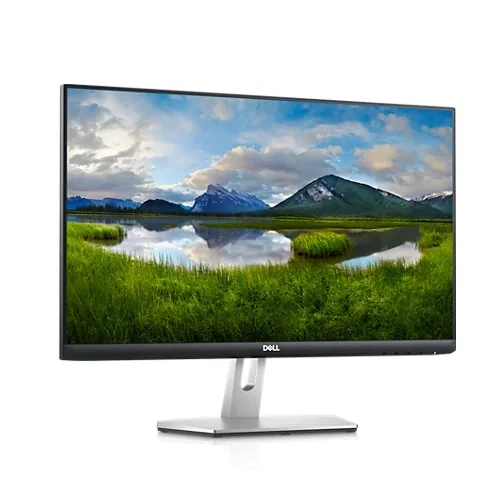
Dell S2421HN 23.8-inch Full HD IPS FreeSync Monitor
The Dell S2421HN is a 23.8-inch viewable IPS monitor with native 1920 × 1080 Full HD resolution, a 16:9 aspect ratio and refresh rates up to 75Hz. Dell lists AMD FreeSync, two HDMI 1.4 inputs and an audio line-out. Its compact size and straightforward connections suit everyday desktop work, study, browsing, video and casual gaming. It is the HN model with a tilt-only stand; do not confuse it with the S2421HS, which has a different adjustable stand configuration.
Dell’s official S2421HN product page and user guide are the primary sources for model features and physical specifications. Regional part numbers, included accessories and warranty service can differ. The Bangladesh price and warranty information below reflects local retailer listings only and is not a live BiponiBD offer. Confirm the actual unit’s model/serial label and service terms before purchase.
Full HD IPS picture
The display has a 23.8-inch diagonal viewable area, 1920 × 1080 resolution and standard 16:9 proportions. Full HD works with a wide range of computers and media devices and is a practical resolution for documents, web browsing and video. The screen is an IPS, LED-backlit LCD with 178-degree horizontal and vertical viewing angles. IPS viewing angles can help maintain a useful image for people sitting beside the main viewer, though brightness and colour can still change with angle and the characteristics of an individual panel.
Dell specifies 250 cd/m² typical brightness and 1000:1 typical contrast. These values are intended for ordinary indoor conditions; strong light or direct sunlight can make the display harder to see. The anti-glare coating with 3H hardness helps manage reflections and surface handling but is not scratch-proof. Keep the screen clean using the care instructions in Dell’s guide.
75Hz refresh and AMD FreeSync
The native Full HD mode supports up to 75Hz. A higher refresh rate than 60Hz can make pointer movement and scrolling look somewhat smoother when the computer supplies the corresponding frames. Dell also lists AMD FreeSync adaptive-sync technology, which can coordinate supported Radeon graphics output with the display and help reduce tearing in compatible content. The result depends on the GPU, driver, connection and selected mode. This listing does not claim NVIDIA G-SYNC certification.
The S2421HN is an everyday 75Hz display, not a high-refresh competitive gaming monitor. Dell quotes 4ms grey-to-grey response time in Extreme mode. That response-time figure applies to a particular setting and does not mean every transition completes in exactly four milliseconds or that all motion trails disappear. If the OSD offers response modes, use the setting that produces a clean picture without visible overshoot.
Colour and eye comfort
Dell lists support for 16.7 million colours, 99% sRGB and 72% NTSC measured under CIE 1931. These gamut figures describe colour range and are not a guarantee of factory calibration, colour uniformity or print accuracy. For colour-critical design, photography or video, use calibration and a colour-managed workflow. Dell also advertises ComfortView Plus as a low-blue-light feature. It can change the display’s spectral output while maintaining colour, but it does not guarantee that every user will experience less eye fatigue. Take regular breaks and set brightness to match the room.
HDMI inputs and audio output
The rear panel has two HDMI 1.4 ports with HDCP 1.4. Having two inputs can make it convenient to connect a computer and another HDMI source without swapping the cable. The monitor also has one 3.5mm audio line-out. It has no built-in speakers, USB hub, webcam or microphone listed, and it has no DisplayPort input. Connect speakers or headphones to the audio output or directly to the computer. The source device must route sound through HDMI if you intend to use the monitor’s output.
Dell’s reference package includes an HDMI cable, listed in the user guide as 1.8 metres. Regional packaging or seller bundles may vary. Confirm whether the exact unit includes its HDMI and power cables and retain the serial label, invoice and packaging for service.
Stand, mounting and desk fit
The S2421HN stand tilts from approximately -5° to +21°. It does not provide height adjustment, swivel or pivot. This fixed-height design is one of the important differences between the HN and HS versions, so choose the precise model suffix that matches your ergonomic needs. If you need the screen higher, use a stable riser or a properly rated monitor arm.
The monitor supports a 100 × 100mm VESA mount. Check the arm’s load rating, screw requirements and clearance before installation. A Kensington-compatible security slot is available; the cable lock is sold separately. Approximate Dell dimensions are 537.8 × 152.8 × 412.8mm with the stand and 537.8 × 53.8 × 322.6mm without it. Dell lists 4.1kg with the stand and cables, 3.3kg without the stand and 5.9kg packaged.
Power use and compatibility
Dell lists AC 100–240V at 50/60Hz. Power figures include 12.2W in on mode, 21W maximum, and 0.3W in standby or sleep under the referenced measurement conditions. Actual consumption changes with brightness, attached sources and settings. The S2421HN works with standard HDMI-equipped computers and consoles at compatible modes; confirm resolution and refresh support on the source if 75Hz or FreeSync is important.
Who should choose the Dell S2421HN?
This model may fit someone who wants a reliable brand-name IPS screen for office tasks, classes, browsing and general entertainment, with two HDMI inputs and modest 75Hz motion. Consider a 120Hz or faster monitor if gaming response is the main priority, a taller stand if ergonomics matter, or a monitor with built-in speakers if desk simplicity is important. The S2421HN’s 23.8-inch Full HD format is familiar and easy to drive but offers less workspace than a QHD screen.
Bangladesh price and warranty
Local listings checked for this review ranged approximately from ৳17,450 to ৳21,800, with observed stock status varying. BME listed ৳19,500 cash price, Tech Link showed a lower promotional figure and a price-comparison listing showed offers around ৳20,999–৳21,800. These snapshots are time-sensitive; confirm final price, availability, delivery, payment fees and return terms with the seller. They are not a BiponiBD offer.
Warranty coverage differs by market. Dell’s US configuration page lists one year of Advanced Exchange service and limited hardware warranty, while Bangladesh retailers commonly advertise three years. Ask who provides the local coverage, whether the Dell serial is eligible for service in Bangladesh, and what the dead-pixel policy, invoice requirement and service location are. Get the warranty terms in writing for the specific unit; do not infer local coverage from another country’s listing.
Frequently asked questions
Model note: S2421HN is the tilt-only HN variant. Dell lists 75Hz Full HD, two HDMI 1.4 inputs and audio-out. Confirm regional part number, serial warranty and package contents with the Bangladesh seller.