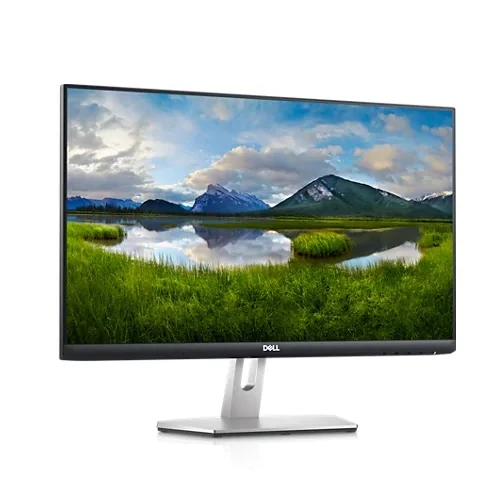
The Dell S2721HN is a 27-inch Full HD IPS monitor for everyday work, study, media and casual gaming. Dell specifies 1920 × 1080 at up to 75Hz, AMD FreeSync, 99% sRGB on its current product page, two HDMI inputs and a tilt stand. The three-sided narrow-bezel design and Dell Display Manager support make it a straightforward desk display. Its strengths are basic digital connectivity, broad IPS viewing angles and modest motion improvement over 60Hz. It does not provide QHD resolution, an adjustable-height stand, built-in speakers, USB-C docking or a high-refresh gaming ceiling. Buyers should compare those needs against their devices and workspace before choosing a 27-inch Full HD model.
Resolution, pixel density and image layout
The panel’s 1920 × 1080 pixels are spread across a 27-inch diagonal with 16:9 aspect ratio, 0.3114mm pitch and 81.59 pixels per inch. Native Full HD is compatible with common office computers and video sources. At its native setting, the monitor displays a standard desktop without scaling the image to a non-native panel resolution.
At 27 inches, Full HD is less dense than a 1440p screen of the same size. Small text and fine interface details can appear less sharp from a close viewing distance. Use operating-system scaling, font size and viewing distance to make content comfortable. If you frequently work with dense spreadsheets, high-resolution photos or several large windows, a QHD monitor may offer more workspace and sharper detail.
IPS viewing, brightness and contrast
Dell lists IPS technology, 178° typical horizontal and vertical viewing angles, 300 cd/m² typical brightness and 1000:1 typical contrast. An anti-glare surface with 3H hard coating helps reduce reflections and resist ordinary surface wear. Dell’s current product page states 99% sRGB; the user manual lists NTSC 72%, which is a separate gamut convention and not directly interchangeable with sRGB coverage.
The gamut figure is not a color calibration report. It does not establish Delta E, panel uniformity or the accuracy of an individual unit. If you use the monitor for color-critical design or print, check the target color space and use a calibrated workflow. Set brightness for the room rather than maximizing it automatically, and keep strong reflections away from the screen to maintain comfortable viewing.
75Hz refresh and FreeSync
Dell specifies native Full HD at up to 75Hz. The user manual identifies AMD FreeSync certified operation from 48Hz to 75Hz. A higher refresh rate can make cursor movement and compatible game motion look smoother than at 60Hz, while variable refresh can coordinate display updates with supported frame rates within its operating range.
The monitor cannot make a computer render faster, and the benefit depends on the source, software and settings. Use an HDMI cable and graphics output that support 1920 × 1080 at 75Hz, then select the refresh rate in operating-system display settings. If FreeSync is desired, enable it in the graphics driver and confirm that the source supports AMD FreeSync. The maximum remains 75Hz, so this is not a high-refresh esports display.
Response modes and motion expectations
Dell lists 4ms gray-to-gray in Extreme mode on its product page. The user guide lists 8ms Normal, 5ms Fast and 4ms Extreme. These are pixel-transition specifications under mode-specific conditions. They do not represent the full time from a mouse action to a displayed response, and every transition does not necessarily take the same time.
More aggressive overdrive can reduce some transition trails while causing overshoot or inverse ghosting. Try the available response setting with familiar content and choose a mode that looks comfortable. Motion clarity also depends on frame pacing, refresh rate, game rendering and the viewer’s environment. Do not interpret the smallest millisecond number as proof of zero motion artifacts or identical performance for every user.
Connectivity and audio routing
Two HDMI 1.4 inputs with HDCP 1.4 support let a user leave two digital sources connected. Dell also lists a 3.5mm audio line-out. The monitor has no integrated speakers listed. According to the user guide, the line-out routes two-channel audio arriving over HDMI to external speakers and does not support headphones.
There is no DisplayPort, VGA, USB-C docking or USB hub in the official port list. If a computer lacks HDMI, confirm an adapter supports the required Full HD timing. Choose the active HDMI input from the display controls. For sound, connect powered speakers to the line-out and verify that the source sends audio over HDMI. Use separate headphones through the computer or an appropriate audio device, not this monitor’s line-out jack.
Stand, VESA mounting and desk arrangement
The supplied stand tilts from -5° to +21°. Dell lists a 100 × 100mm VESA mounting interface, allowing an appropriate monitor arm or wall mount to replace the supplied stand. With stand, the screen is about 609.9mm wide, 186.8mm deep and 453.3mm high. Without stand, it measures about 609.9 × 54.0 × 363.6mm.
The stand does not include height adjustment, swivel or pivot. Measure desk width and depth, and check the viewer distance before placement. For a VESA mount, follow Dell’s installation instructions, use suitable fasteners and confirm the mount’s load rating. Route cables with slack so tilt or arm movement does not pull on the connector. Keep the packaging until the monitor has been inspected and the display is confirmed to work.
ComfortView Plus, coating and daily comfort
Dell identifies ComfortView Plus and a flicker-free screen among the display features. Dell describes ComfortView Plus as a low-blue-light approach intended to preserve color presentation. The anti-glare coating can help in a lit room, though strong windows and lamps can still reflect from the display depending on their position.
Comfort features work best alongside practical setup: place the display at a comfortable distance, angle it to reduce reflections and set brightness to the room. Take breaks and adjust text size for long sessions. ComfortView modes may affect how a picture appears, so review color settings if color accuracy matters. These features do not constitute medical advice or guarantee that every user will experience the same comfort.
Power, included items and safety
Dell lists an AC 100–240V, 50/60Hz input, 15.5W on-mode power, 19W typical power and 29W maximum under the noted conditions. Standby, sleep and off figures are listed at 0.3W. Dell’s product page includes an HDMI cable, while the manual lists the stand, power cable, HDMI cable, VESA cover and documentation; package contents may vary by country.
Use the power cable supplied with the actual unit and a suitable outlet. Leave ventilation clear and unplug the monitor safely before moving it. Do not remove the cover or press hard on the LCD. For cleaning, use a soft cloth and follow the manual. If a regional package is missing a listed item, check with the seller and retain the invoice and box for warranty support.
Bangladesh price and warranty checks
TechLand showed a ৳26,000 listing marked discontinued. Zentech showed ৳25,900 and requested customers confirm stock and delivery before ordering. TechLink showed ৳25,900. These are seller page observations, not a current market guarantee, confirmed BiponiBD price or availability. Stock and price can change by seller, import route, promotion and location.
Dell’s US page lists one-year Advanced Exchange service; Bangladesh retailers advertise three years for some units. A local seller’s offer may represent a different import or service arrangement. Confirm the exact regional part and serial eligibility, service provider, covered duration, invoice requirement, service center and claim conditions in writing before purchase. Save the invoice, serial number and packaging for any service request.
Who this monitor suits
The S2721HN may suit a home office or general-purpose PC where 27-inch Full HD, IPS viewing angles, two HDMI connections and 75Hz motion are appropriate. The VESA option helps users who already have a compatible arm, and the line-out can feed an external speaker set. The panel works with ordinary HDMI sources, subject to their supported output modes.
Consider a higher-resolution 27-inch monitor if you need more workspace or fine text detail, a height-adjustable display if ergonomics require vertical movement, and a separate speaker setup if built-in audio is important. Competitive gamers may prefer a screen with a much higher refresh ceiling. Confirm whether local warranty support is valid for your unit rather than relying only on a listing headline.
Key features
- 27-inch Full HD IPS display with 1920 × 1080 native resolution, 16:9 aspect ratio and 81.59ppi.
- 75Hz maximum refresh and AMD FreeSync certified operating range 48–75Hz.
- 300 cd/m² typical brightness, 1000:1 contrast and Dell-stated 99% sRGB gamut.
- 178° horizontal/vertical viewing angles and anti-glare front coating with 3H hardness.
- Two HDMI 1.4 ports and a 3.5mm audio line-out for connecting external speakers.
- Tilt adjustment from -5° to +21°; 100 × 100mm VESA mounting support.
- ComfortView Plus, flicker-free screen, Dell Display Manager and Easy Arrange.
- Three-sided narrow bezel and cable-management design for clean desktop placement.
- HDMI audio can be routed to an external speaker system; no integrated speakers are listed.
- Dell manual states a 48–75Hz FreeSync range and 0.3W standby, with configuration-specific power figures.
Frequently asked questions
What resolution and refresh rate does the Dell S2721HN support?
Dell specifies 1920 × 1080 Full HD at up to 75Hz. The manual lists an AMD FreeSync certified range of 48–75Hz. Confirm the PC, cable and selected mode expose the supported rate.
Is the panel IPS?
Yes. Dell identifies an IPS LCD with 178° typical horizontal and vertical viewing angles.
Does it support AMD FreeSync?
Yes. Dell lists AMD FreeSync and the manual states a certified range of 48–75Hz. Compatible graphics hardware, drivers and settings are required.
What ports are available?
Two HDMI 1.4 ports with HDCP 1.4 and one 3.5mm audio line-out are listed. There is no DisplayPort, USB-C or VGA listed.
Does it have built-in speakers?
Dell does not list integrated speakers. The 3.5mm audio line-out passes two-channel audio from HDMI to external speakers. Dell’s manual says this line-out does not support headphones.
What does the 4ms response rating mean?
Dell lists 4ms gray-to-gray in Extreme mode. Its manual also lists 5ms Fast and 8ms Normal. These are pixel-transition figures, not total system input latency; overdrive can change motion artifacts.
Can I adjust the screen height or rotate it?
The included stand supports tilt from -5° to +21° only. Dell lists no height adjustment, swivel or pivot. A compatible 100 × 100mm VESA mount can provide other positioning options.
Can the monitor be mounted on an arm?
Yes. Dell specifies a 100 × 100mm VESA interface. Check the arm’s load rating, screw compatibility and clearance before installation.
What is the price in Bangladesh?
Seller observations showed TechLand at ৳26,000 but discontinued, Zentech at ৳25,900 with stock confirmation requested, and TechLink at ৳25,900. These are snapshots, not a confirmed BiponiBD offer or guaranteed current price.
What warranty applies in Bangladesh?
Dell US lists one-year Advanced Exchange service, while Bangladesh retailers advertise three years. Imported configuration and local serial coverage can differ; confirm the warranty provider, term and claim process in writing.
What is included in the package?
Dell lists stand components, power cable, HDMI cable, VESA cover, quick-start guide and safety information. Some components may be optional or vary by country, so confirm the actual local box.
What is Dell ComfortView Plus?
Dell describes ComfortView Plus as an eye-comfort feature that reduces blue-light exposure while preserving color presentation. It does not replace breaks, correct positioning or suitable room lighting.
Source note: Dell official product specifications and user guide support technical details. Bangladesh prices, stock and warranty references are seller observations checked 2026-11-08T21:06:42.890Z; they do not establish a BiponiBD offer or local serial coverage. No hands-on or instrument testing is claimed.