Pros
- QHD at 165Hz over DisplayPort supports responsive PC gaming.
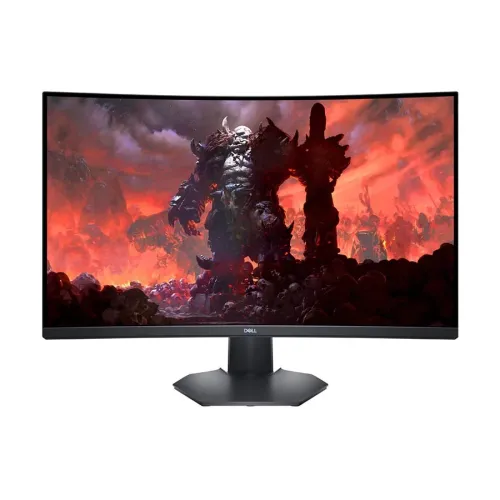
- 31.5-inch curved screen provides an immersive, broad view.
- VA contrast is rated at 3000:1.
- FreeSync Premium and height adjustment support flexible gaming setups.

All categories
 New condition
Monitors
Dell · S3222DGM
31.5-inch QHD 1800R curved VA gaming monitor with 165Hz DisplayPort, FreeSync Premium and height adjustment.
Price unavailable
Price range updating
No verified price is available yet. Store offers will appear when merchants publish them.
Compare store prices
No live offers for this variant
Offers will appear when merchants publish them.
Loading history…
Product story
The Dell S3222DGM is a 31.5-inch curved gaming monitor with a VA panel, QHD 2560 × 1440 resolution and a maximum 165Hz refresh rate over DisplayPort. Dell lists HDMI operation up to 144Hz, AMD FreeSync Premium, 350 cd/m² typical brightness and a 3000:1 native contrast ratio. This model combines a large 16:9 desktop with 1800R curvature for PC gaming and general screen use. Real operation depends on GPU output, cable, input mode, selected settings and the game. Confirm local stock, package contents and serial-specific warranty with the seller; published specifications do not establish a current Bangladesh offer.
Dell’s display diagonal is 31.5 inches, although sellers often round it to 32 inches. Check that the rear label reads S3222DGM; it differs from S2722DGM, S3422DWG and other similarly named Dell gaming monitors. The smaller S2722DGM has a different curvature. Confirm model code before relying on a listing, since panel size and curve affect desk layout and viewing distance. Real operation depends on GPU output, cable, input mode, selected settings and the game. Confirm local stock, package contents and serial-specific warranty with the seller; published specifications do not establish a current Bangladesh offer.
The native resolution is 2560 × 1440 QHD at 16:9, with about 93 pixels per inch. QHD provides more detail than Full HD while remaining less demanding than 4K for high-frame-rate gaming. At 31.5 inches, users who sit close may notice individual pixels more than on a smaller QHD panel. Adjust scaling and viewing distance to balance text comfort and usable desktop area. Real operation depends on GPU output, cable, input mode, selected settings and the game. Confirm local stock, package contents and serial-specific warranty with the seller; published specifications do not establish a current Bangladesh offer.
The VA panel has an 1800R curve and 3000:1 typical contrast. The curved shape is intended to keep the wide screen visually consistent from a central seating position and can feel immersive in games. VA contrast can produce deeper blacks than many standard IPS screens, though dark transitions and viewing-angle behavior vary by scene and panel. Sit centrally for the most even view. Real operation depends on GPU output, cable, input mode, selected settings and the game. Confirm local stock, package contents and serial-specific warranty with the seller; published specifications do not establish a current Bangladesh offer.
DisplayPort 1.2 supports QHD up to 165Hz. The two HDMI 2.0 ports support up to QHD at 144Hz according to Dell’s manual. Choose the connection based on the target refresh; an adapter or dock may reduce available modes. After connecting, open the operating system advanced display settings and verify the active resolution and refresh rather than assuming a cable negotiates the maximum automatically. Real operation depends on GPU output, cable, input mode, selected settings and the game. Confirm local stock, package contents and serial-specific warranty with the seller; published specifications do not establish a current Bangladesh offer.
Dell lists 1ms MPRT and 2ms gray-to-gray in Extreme mode. MPRT blur reduction and gray-to-gray pixel transition measure different behaviors. Dell’s response presets can introduce overshoot or visible artifacts at some refresh rates, so compare Fast and Extreme in the actual game. A low response-time figure alone does not state total system latency or guarantee blur-free movement. Real operation depends on GPU output, cable, input mode, selected settings and the game. Confirm local stock, package contents and serial-specific warranty with the seller; published specifications do not establish a current Bangladesh offer.
The S3222DGM supports AMD FreeSync Premium. Variable refresh can synchronize display refresh with compatible GPU frame output within its operating range, helping reduce tearing and judder. Enable it in the monitor menu and GPU driver, then confirm the game and connection support the desired mode. FreeSync does not increase the frame rate produced by the graphics card. Real operation depends on GPU output, cable, input mode, selected settings and the game. Confirm local stock, package contents and serial-specific warranty with the seller; published specifications do not establish a current Bangladesh offer.
Dell specifies 350 cd/m² typical brightness, 3000:1 contrast and 16.7 million colors. The monitor is not advertised with HDR certification on the official spec listing, so do not assume HDR performance from unrelated product descriptions. Brightness and color are suitable for typical indoor gaming, but color-critical work benefits from calibration and a suitable color profile. Real operation depends on GPU output, cable, input mode, selected settings and the game. Confirm local stock, package contents and serial-specific warranty with the seller; published specifications do not establish a current Bangladesh offer.
The anti-glare coating has 3H hardness. Dell ComfortView reduces blue-light emissions and the monitor uses a flicker-free screen, which may help viewing comfort for some users. Set brightness to match the room and take regular breaks. Eye comfort modes can shift color; turn them off or select a calibrated preset when neutral color matters. Real operation depends on GPU output, cable, input mode, selected settings and the game. Confirm local stock, package contents and serial-specific warranty with the seller; published specifications do not establish a current Bangladesh offer.
Connections include two HDMI 2.0 ports, one DisplayPort 1.2 and a mini-jack audio line-out. The display does not have built-in speakers, so use headphones, powered speakers or the computer’s audio output. Dell lists a security-lock slot. Check the physical port labels and use the supplied or appropriately rated video cables for the chosen resolution and refresh. Real operation depends on GPU output, cable, input mode, selected settings and the game. Confirm local stock, package contents and serial-specific warranty with the seller; published specifications do not establish a current Bangladesh offer.
The stand supports tilt from -5° to +21° and height adjustment up to 100mm; it does not provide swivel or pivot. Dell lists 100 × 100mm VESA mounting. Ensure the desk or monitor arm can support the display weight and confirm cable clearance. The curved 31.5-inch panel benefits from a centered position, with the top edge near comfortable eye height. Real operation depends on GPU output, cable, input mode, selected settings and the game. Confirm local stock, package contents and serial-specific warranty with the seller; published specifications do not establish a current Bangladesh offer.
For QHD at 165Hz, connect the graphics card directly through DisplayPort 1.2 and select 2560 × 1440 at 165Hz. HDMI supports up to 144Hz. Enable FreeSync in the monitor OSD and graphics driver when desired. If the refresh option is missing, check cable, GPU output, dock, driver, active signal and monitor menu settings before changing resolution. Real operation depends on GPU output, cable, input mode, selected settings and the game. Confirm local stock, package contents and serial-specific warranty with the seller; published specifications do not establish a current Bangladesh offer.
Game consoles generally output at rates lower than 165Hz. Dell lists HDMI modes including 1440p at up to 144Hz, but actual console modes depend on console generation and game. Check the console’s detected resolution and refresh. Do not infer HDMI 2.1 support: the monitor’s ports are HDMI 2.0. Real operation depends on GPU output, cable, input mode, selected settings and the game. Confirm local stock, package contents and serial-specific warranty with the seller; published specifications do not establish a current Bangladesh offer.
The large QHD screen and high refresh are suited to PC games, action titles and general work. FreeSync Premium can help when frame rate varies, and the VA panel’s contrast can suit darker games. For spreadsheets or text, the 31.5-inch size offers room for several windows, though the 93 PPI pixel density may be less crisp than smaller high-density displays. Real operation depends on GPU output, cable, input mode, selected settings and the game. Confirm local stock, package contents and serial-specific warranty with the seller; published specifications do not establish a current Bangladesh offer.
An 1800R curve is most useful when sitting centered and at a suitable distance. Reflections and off-axis viewing can vary across a curved panel, so position lamps and windows carefully. Measure desk depth and width before purchase. The stand’s limited movement means a monitor arm or riser may be needed for a specific posture or side-by-side screen arrangement. Real operation depends on GPU output, cable, input mode, selected settings and the game. Confirm local stock, package contents and serial-specific warranty with the seller; published specifications do not establish a current Bangladesh offer.
Advantages include QHD resolution, 165Hz via DisplayPort, FreeSync Premium, 1800R curvature, 3000:1 contrast, anti-glare coating and height adjustment. Trade-offs include only 144Hz over HDMI, no built-in speakers, no swivel or pivot and no official HDR certification listed. The large screen’s pixel density is moderate, and high frame rates require a capable PC. Real operation depends on GPU output, cable, input mode, selected settings and the game. Confirm local stock, package contents and serial-specific warranty with the seller; published specifications do not establish a current Bangladesh offer.
This is a curved monitor, not a television or a 4K display. It has no built-in speakers and no HDMI 2.1 input. USB ports and USB-C charging are not listed. Dell specifies FreeSync Premium; do not automatically claim Nvidia certification. It can work with many GPU combinations, but adaptive-sync behavior depends on hardware, driver, input and settings. Real operation depends on GPU output, cable, input mode, selected settings and the game. Confirm local stock, package contents and serial-specific warranty with the seller; published specifications do not establish a current Bangladesh offer.
Before buying in Bangladesh, verify S3222DGM on the monitor label, delivered price, current stock, included cable, dead-pixel policy and local Dell service terms. Ask for the warranty provider, duration and serial eligibility in writing. Dell’s US product status or international specifications do not prove a local warranty. Check that your GPU can drive QHD at the intended frame rate. Real operation depends on GPU output, cable, input mode, selected settings and the game. Confirm local stock, package contents and serial-specific warranty with the seller; published specifications do not establish a current Bangladesh offer.
What is the native resolution? QHD 2560 × 1440. What size? 31.5 inches, commonly rounded to 32. What refresh rate? 165Hz over DisplayPort and 144Hz over HDMI. What is the curve? 1800R. Does it have speakers? No built-in speakers are listed. What VRR does it support? AMD FreeSync Premium. What VESA mount? 100 × 100mm. Does HDMI support 165Hz? Dell specifies up to 144Hz over HDMI 2.0. Real operation depends on GPU output, cable, input mode, selected settings and the game. Confirm local stock, package contents and serial-specific warranty with the seller; published specifications do not establish a current Bangladesh offer.
Choose the Dell S3222DGM if you want a large curved QHD screen with high refresh for PC gaming and can connect over DisplayPort for 165Hz. Consider a smaller or higher-density screen for close-range text work, and choose another model if you need built-in audio, HDMI 2.1 or pivot adjustment. Confirm local availability and warranty against the serial number. Real operation depends on GPU output, cable, input mode, selected settings and the game. Confirm local stock, package contents and serial-specific warranty with the seller; published specifications do not establish a current Bangladesh offer.
Helpful answers
Product-specific answers maintained with the catalog information.
The S3222DGM has a native QHD resolution of 2560 × 1440.
Dell specifies 165Hz over DisplayPort and up to 144Hz over HDMI 2.0.
The viewable diagonal is 31.5 inches, often rounded to 32 inches.
The monitor uses an 1800R curved VA panel.
Yes, Dell lists AMD FreeSync Premium support.
No built-in speakers are listed; it has an audio line-out.
Dell lists 1ms MPRT and 2ms gray-to-gray in Extreme mode.
Yes, the monitor supports a 100 × 100mm VESA mount.
No. Dell specifies up to 144Hz over HDMI 2.0; use DisplayPort for 165Hz.
Confirm the local Dell provider, duration and serial-specific coverage with the seller.
Customer community
Become a merchant
Join BiponiBD, publish accurate offers and start free.