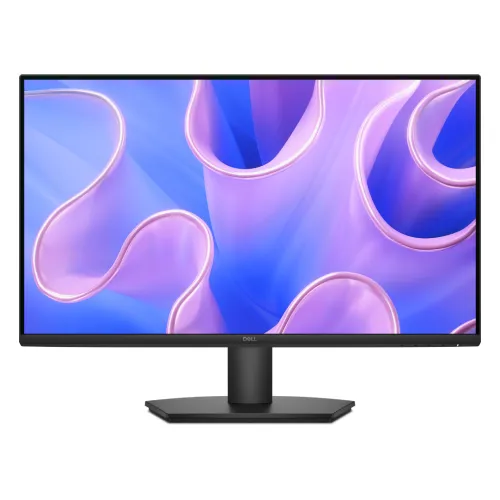
The Dell SE2725HM is a 27-inch Full HD IPS monitor for everyday office, study and home-computing tasks. Its 1920 × 1080 resolution, 16:9 format and 100Hz maximum refresh rate provide a familiar desktop canvas with smoother motion than a 60Hz display when the connected system supports the mode. Dell specifies a typical brightness of 250 cd/m², a 1000:1 typical contrast ratio and 178° viewing angles. This is an entry-level Full HD model: its larger screen gives a generous physical viewing area, while image detail is less dense than on a 27-inch QHD screen.
Screen area, resolution and pixel density
The panel measures 27 inches diagonally and displays 1920 × 1080 pixels. Dell lists 81 pixels per inch and a 0.3114mm pixel pitch. The larger screen can make controls and text physically larger at a similar scaling setting, which some desktop users prefer. At the same time, small text and fine interface details are less tightly packed than on a 24-inch Full HD monitor. If you need more workspace for many windows or detailed spreadsheets, compare the PPI and resolution of a QHD option before choosing by screen size alone.
IPS panel, viewing angles and colors
Dell identifies the panel as IPS with 178° horizontal and 178° vertical viewing angles. The listed color support is 16.7 million colors, and the manufacturer datasheet gives a minimum color gamut of 72% NTSC under CIE 1931. That gamut value should not be rewritten as 72% sRGB or as proof of factory calibration. For design, print or color-critical work, check the application’s required color space and consider a display with documented calibration characteristics.
100Hz refresh rate and connection requirements
The standard refresh rate is 100Hz, and Dell lists HDMI 1.4 support up to Full HD 1920 × 1080 at 100Hz. The source computer, GPU, operating system, cable and selected output timing must all support the mode. Dell lists VGA’s vertical frequency range as 56Hz to 76Hz, so analog VGA should not be presented as a route to 100Hz. If the 100Hz option is not visible, check the HDMI connection and graphics settings, then consult the source device and monitor documentation.
Response time and motion expectations
Dell specifies 5ms gray-to-gray in Fast mode and 8ms in Normal mode. These values describe pixel transition behavior under manufacturer-defined conditions; they do not describe the entire system’s input latency. The model can serve general desktop motion and casual video use, but Dell does not position the SE2725HM as a high-refresh competitive gaming monitor. Actual motion appearance also depends on the content, source frame rate, response mode and visual preferences.
Brightness, contrast and surface
The monitor is specified at 250 cd/m² typical brightness and a 1000:1 typical contrast ratio. It uses an anti-glare coating with 3H hardness and LED edgelight backlighting. These are standard SDR specifications; HDR certification is not listed. In a bright room, reflections and perceived contrast depend on desk placement and ambient light. Position the screen away from direct glare and set brightness for comfortable indoor viewing rather than assuming the maximum setting is best.
Eye-comfort features
Dell lists TÜV Rheinland 3-star eye comfort, flicker-free operation and low-blue-light features. These product features are intended to support a more comfortable viewing setup, but they are not medical claims or a guarantee against eye fatigue. Adjust the display to a comfortable height and distance, use suitable room lighting and take regular breaks during long sessions. Individual comfort depends on the user, task, ambient lighting and display settings.
HDMI and VGA connectivity
The available video inputs are one HDMI 1.4 port with HDCP 1.4 and one VGA input. HDMI is the digital connection and is the Dell-specified path for Full HD at up to 100Hz. VGA is an analog connection for compatible legacy computers and has a lower listed refresh range. This model does not list DisplayPort, USB-C or a USB hub. Check the ports on the computer before ordering, and use a suitable active adapter only when its supported resolution and refresh rate match the intended setup.
Stand adjustment and VESA mounting
The included stand supports tilt from -5° to +21° and does not provide height adjustment, swivel or pivot. Dell lists a 100 × 100mm VESA interface for compatible mounts. A VESA arm can add positioning flexibility, but it is a separate accessory and must support the display’s weight, mounting pattern and installation requirements. Keep the monitor stable, support the panel while attaching the mount and route the cables so they do not pull when the screen moves.
Audio and connected devices
Dell does not list integrated speakers, an audio output, USB ports or a docking hub on the SE2725HM. HDMI may carry audio as part of the signal, but this monitor has no listed speaker system to play it. Use the computer’s built-in audio, a separate speaker set or headphones connected to the computer. If you need sound and video routing through one monitor, compare another model with documented audio features before purchase.
Dimensions, weight and desk placement
Dell lists the monitor at 611.10mm wide. With its stand, the dimensions are approximately 611.10 × 199.87 × 453.71mm (W × D × H); without the stand, the depth is about 49.22mm and height about 361.86mm. The panel-only weight is approximately 3.56kg, and weight with stand is 4.40kg. Measure the desk depth, stand footprint and viewing distance before setup, and leave room for cable bends and ventilation.
Power and energy figures
Dell specifies a 100–240V AC input. Its datasheet lists 16.3W typical on-mode power, 28W maximum, and 0.3W standby and off-mode consumption. These are manufacturer test figures; actual use varies with brightness settings, signal and operating conditions. Connect the supplied power cable to a suitable outlet, keep cables undamaged and switch off the monitor before moving or cleaning it. The exact cable bundle can vary by sales region.
Package contents and initial setup
Dell lists the monitor with stand, power cable, 1.8m HDMI cable, QR card and safety information. Regional import packages can differ, so ask the seller to confirm the exact sealed-box contents and inspect them at delivery. Assemble the stand on a stable, protected surface, connect HDMI or VGA, attach power and choose the matching input in the monitor menu. For 100Hz, use HDMI and then select a supported refresh rate in the computer’s display settings.
Who this monitor may suit
The SE2725HM may suit users who want a large 27-inch Full HD IPS display for browsing, documents, online classes, office applications and general home use. HDMI 100Hz, tilt adjustment and VESA mounting cover common desk setups. It may be less suitable when text sharpness at 27 inches is the top priority, when a height-adjustable stand is required, or when you need DisplayPort, USB-C docking, integrated audio or a USB hub. Compare those requirements against the exact model rather than the Dell brand name alone.
Limitations to consider
The main trade-off is Full HD resolution over a 27-inch screen, which provides 81 PPI. A 24-inch Full HD panel has denser pixels, while a 27-inch QHD panel provides more detail and desktop space. The included stand tilts only; an arm is needed for height, swivel or pivot adjustment. Dell lists only HDMI and VGA video inputs, no speakers, no audio output and no USB hub. The product is not specified as HDR-certified. These model-specific limits are important when comparing SE2725HM with P-series or higher-resolution monitors.
Bangladesh price, stock and warranty
During this research, Skyland showed ৳24,300 and Four Star IT showed ৳24,350 for listings of the Dell SE2725HM. The retailer pages may change, and these snapshots do not verify current stock, delivery cost or a BiponiBD offer. Local retailers advertise three-year warranty coverage; Dell’s datasheet describes a three-year worldwide service plan in listed regions, but actual Bangladesh support depends on the local serial, importer and service channel. Get the warranty provider, claim process, exchange terms and dead-pixel conditions in writing before purchase.
Care, support and model identification
Keep the invoice, packaging and rear serial/model label for support. Turn off and unplug the monitor before cleaning; use a soft clean cloth and do not spray cleaner directly on the panel. Do not press the display surface or block ventilation. Dell’s support resources for the SE2725HM provide model-specific manuals and troubleshooting. Check that the rear label reads SE2725HM because similar Dell names can indicate different refresh rates, panel types, connectors or warranty configurations.
Key features
- 27-inch IPS panel with Full HD 1920 × 1080 resolution and 16:9 aspect ratio.
- 100Hz maximum over HDMI for compatible devices and output timings; VGA is specified for a lower refresh range.
- 250 cd/m² typical brightness and 1000:1 typical contrast ratio per Dell.
- 178° horizontal and vertical viewing angles with 16.7 million supported colors.
- 72% NTSC minimum gamut coverage (CIE 1931); this is not an sRGB coverage or calibration claim.
- 5ms gray-to-gray Fast and 8ms Normal response specifications.
- One HDMI 1.4 HDCP 1.4 input and one VGA input; HDMI supports FHD at up to 100Hz.
- Tilt adjustment from -5° to +21°; fixed-height stand without swivel or pivot.
- 100 × 100mm VESA mounting interface for compatible monitor arms or brackets.
- TÜV Rheinland 3-star eye-comfort, flicker-free and low-blue-light features are listed for this model.
- Anti-glare screen coating with 3H hardness and LED edgelight backlighting.
- Dell lists a 1.8m HDMI cable and power cable in the package; confirm local-box contents.
Pros and considerations
Pros
- A 27-inch IPS panel offers a larger viewing area for everyday documents, browsing and general office work.
- The HDMI input supports Full HD at 100Hz, enabling smoother motion when a compatible computer and timing are used.
- HDMI and VGA provide one current digital connection and one legacy analog connection.
- VESA 100 × 100mm mounting allows use with a compatible aftermarket arm or wall bracket.
- The simple tilt stand, anti-glare finish and TÜV 3-star eye-comfort designation support practical everyday desktop placement.
Cons and limitations
- Full HD spread across 27 inches gives about 81 PPI; text and fine detail look less dense than on smaller Full HD or higher-resolution monitors.
- The included stand provides tilt only; it does not offer height adjustment, swivel or pivot.
- There is no DisplayPort, USB hub, USB-C, audio output or integrated speaker listed by Dell.
- The 72% NTSC gamut figure is not an sRGB calibration guarantee or professional color-workflow certification.
- Brightness is 250 cd/m² typical and HDR certification is not listed; very bright rooms or HDR-focused use may need another display.
Frequently asked questions
What are the screen size and resolution?
Dell specifies a 27-inch diagonal IPS panel with 1920 × 1080 Full HD resolution and a 16:9 aspect ratio.
Does the SE2725HM support 100Hz?
Yes. Dell lists Full HD up to 100Hz over HDMI. The connected computer, graphics output, cable and chosen timing must support that mode. Dell lists a lower 56–76Hz vertical range for VGA.
Does it have an IPS panel?
Yes. Dell specifies In-Plane Switching (IPS) technology with typical 178° horizontal and 178° vertical viewing angles.
What ports are available?
Dell lists one HDMI 1.4 port with HDCP 1.4 and one VGA input, plus the power connector and security-lock slot. DisplayPort and USB ports are not listed.
Can I connect a laptop through USB-C?
The monitor has no USB-C input listed. Use HDMI for digital video if the laptop provides HDMI or a compatible adapter; check the laptop’s supported output and the adapter’s refresh-rate capability.
Does it have speakers or a headphone jack?
Dell does not list built-in speakers or an audio output for this model. Plan to use the computer’s audio jack, external speakers or headphones.
What does 72% NTSC mean?
Dell specifies 72% NTSC minimum in the CIE 1931 color space. This is not a stated 72% sRGB result and does not establish calibration accuracy.
What is the stand adjustment?
The included stand supports tilt from -5° to +21°. Dell does not list height adjustment, swivel or pivot for the stand. A compatible VESA arm may provide other positioning.
Can it be wall-mounted or used with an arm?
Dell lists a 100 × 100mm VESA mounting pattern. Verify that the mount supports the display’s weight, correct fasteners and installation clearances.
What response time does Dell list?
Dell lists 5ms gray-to-gray in Fast mode and 8ms in Normal mode. Response time is a pixel-transition figure, not total input latency.
What is included in the box?
Dell lists the monitor with stand, power cable, 1.8m HDMI cable, QR card and safety information. Imported regional bundles can vary, so verify the carton contents with the seller.
What are current Bangladesh price and warranty details?
Research observed Skyland at ৳24,300 and Four Star IT at ৳24,350. Listings can change and do not establish BiponiBD stock or pricing. Retailers advertise three-year warranty; confirm local serial eligibility, service provider and written terms before purchase.
Source note: Technical facts use Dell’s exact SE2725HM product specification and datasheet. Bangladesh price and warranty are retailer observations checked 2026-11-08T21:26:14.043Z; they do not confirm BiponiBD stock or a particular serial’s coverage. No hands-on test is claimed.