Pros
- Connects USB-A peripherals to a compatible USB-C host.
- USB 3.0/5Gbps data capability is listed.
- Compact aluminum-alloy adapter is portable.

All categories
 New condition
Computer Accessories
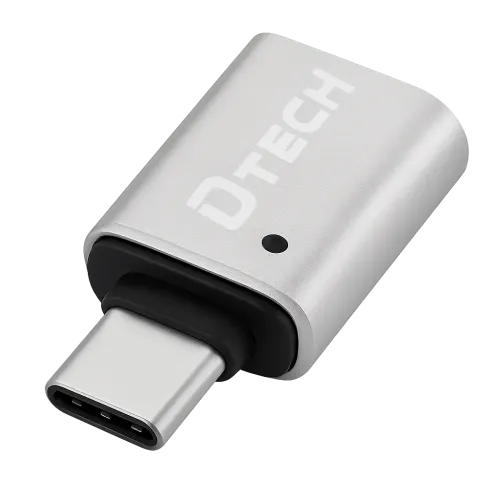
Dtech · DT-2959S Type-C Male to USB 3.0 Female Adapter
DTECH DT-2959S USB-C male to USB-A female OTG adapter with USB 3.0/5Gbps listed. Host OTG support and peripheral power needs apply; verify local warranty.
Approximate Market Price
BDT 350
Informational market estimate only; this is not a current Store offer.
Compare store prices
No live offers for this variant
BDT 350
Approximate Market Price
Informational market estimate only; this is not a current Store offer.
Loading history…
Product story
The DTECH DT-2959S is a compact OTG adapter with a USB Type-C male plug and USB Type-A female socket, as identified by DTECH and Bangladesh retailer listings. It connects a compatible USB-A peripheral such as a flash drive, keyboard or mouse to a USB-C host device. Retailers list USB 3.0 data transfer up to 5Gbps and an aluminum-alloy body. Actual operation depends on the host, peripheral, cable and device software.
Insert the USB-C male plug into a USB-C host that supports the required USB data or OTG function. The USB-A female socket accepts a standard USB-A male peripheral plug. This direction is the reverse of a USB-A male to USB-C female charging adapter. Check the connector shape and model DT-2959S before ordering; USB-C-to-USB-A adapters are not interchangeable in every direction or use case.
DTECH and Bangladesh listings describe a USB 3.0 Type-A female output and advertise up to 5Gbps. This is the theoretical maximum for USB 3.0/USB 3.2 Gen 1 signaling, not guaranteed file-copy throughput. The USB-C host must support SuperSpeed data, and the peripheral must also be USB 3.0 capable. A USB 2.0 device or host will run at a lower negotiated rate. Verify the link speed in the operating system when performance matters.
For phone or tablet use, the USB-C device must support USB host/OTG operation and enumerate the attached accessory. Some devices require an OTG setting, unlock state or permission prompt. A USB-C socket alone does not guarantee host mode. Computers with USB-C ports can also use the adapter when their operating system and port support the connected peripheral. Consult the device manual for external storage and peripheral restrictions.
A compatible USB flash drive, keyboard, mouse, controller or other USB-A accessory can connect through the female socket. DTECH describes the adapter as plug-and-play; some peripherals still need a driver, app, permissions or adequate power. Printers and specialized USB devices may not be supported by every phone operating system. The adapter does not add multiple ports, Ethernet, HDMI video, audio conversion or a card-reader slot.
The inspected DT-2959S pages do not specify a verified current rating, charger output or USB Power Delivery profile. The host typically supplies power to an OTG peripheral, and available current depends on the USB-C device and adapter. Do not assume the adapter can charge a phone or power a high-draw external drive. Use a separately powered hub only when the host supports it and the peripheral needs additional current.
Bangladesh sellers list an aluminum-alloy housing. The product pages inspected do not establish a water-resistance rating, independent durability testing or insertion-cycle count. The adapter is small, so a connected cable or heavy peripheral can place leverage on the USB-C host port. Support the attached device, avoid side pressure and remove the adapter by holding its housing. Keep the connectors dry and clean.
The compact adapter can travel with a laptop or phone and avoids carrying a long adapter cable for simple USB-A peripherals. Confirm that the USB-C port is accessible when a case is installed; a thick case may prevent full insertion. Do not force the plug or leave a heavy USB device hanging from a tablet or phone. Store it where debris cannot enter the female USB-A socket.
Connect the USB-C male end to a compatible host, insert the USB-A peripheral into the female socket, then unlock the device and approve any access prompt. If the peripheral is not recognized, verify OTG/host support, test the peripheral on a computer, try another host port and check the USB-C socket for debris. If data is slower than expected, confirm that both the host and peripheral support USB 3.0; a USB 2.0 link will be slower.
The physical adapter only changes the connector access. It cannot make an unsupported phone support OTG, convert digital video, add USB Power Delivery or speed up a slower port. The attached device’s operating system must support the peripheral class and file system. For storage, safely eject before removal to avoid file-system corruption. Back up important data; the adapter does not recover damaged or deleted files.
Warranty coverage and provider depend on the local seller. Confirm duration, invoice requirement, exclusions, return period and whether the selected unit is original DTECH stock. Check that the package label says DT-2959S and that it has a USB-C male plug, USB-A female socket and aluminum body. Current price and stock vary by seller and were not independently confirmed for the selected BiponiBD offer.
The DT-2959S offers a small USB-C-to-USB-A OTG connection, USB 3.0 support and up to 5Gbps listed, with an aluminum-alloy housing. It is useful for compatible USB-C phones, tablets and computers that need a USB-A peripheral. A USB host-capable device is required, and real data speed depends on every component. The sources do not establish a charging current, PD support or high-power peripheral capability.
What is the model? DTECH DT-2959S. What connectors does it have? USB-C male to USB-A female. What data speed is listed? Up to 5Gbps for USB 3.0; real speed depends on the host and peripheral. Does it support OTG? Retailers list OTG use, but the host device must support USB host mode. Can I connect a flash drive? Yes, if the host and operating system support the drive and file system. Will every USB-C phone work? No, OTG support varies. Does it charge a phone? No charging profile was verified; this is an OTG adapter. Does it support PD? No PD specification was established. What material is listed? Aluminum alloy. What warranty applies in Bangladesh? Confirm the selected seller’s terms.
Helpful answers
Product-specific answers maintained with the catalog information.
The model is DT-2959S.
USB-C male plugs into the host; USB-A female accepts a USB-A peripheral.
Up to 5Gbps is listed for USB 3.0, subject to the whole connection supporting it.
Retailers list OTG use; the USB-C host must support USB host mode.
Yes, if the host supports OTG and the drive/file system are compatible.
No, OTG/host support differs between devices.
A charging current or profile was not established; it is described as an OTG adapter.
No PD rating was found in the inspected DT-2959S sources.
Bangladesh retailers list an aluminum-alloy housing.
Confirm the warranty provider and duration with the selected local seller.
Customer community
Become a merchant
Join BiponiBD, publish accurate offers and start free.