Pros
- Adds four USB-A connections through one host port
- USB 2.0 suits common keyboards, mice, and flash drives
- Magnetic placement may help organize a compatible metal workspace

All categories
 New condition
Computer Accessories
Dtech · DT-3013
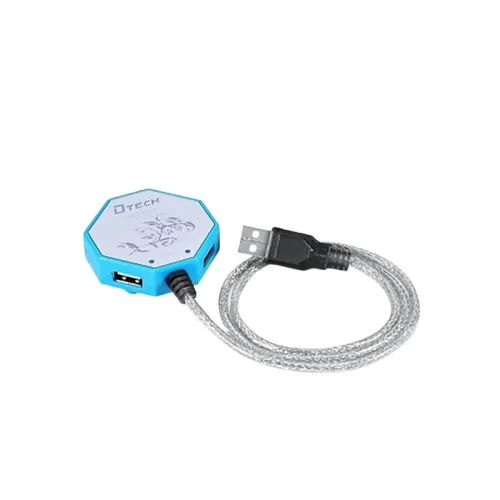
Dtech DT-3013 is a 4-port USB 2.0 hub with USB-A input/output and up to 480Mbps transfer rate listed.
Approximate Market Price
BDT 600
Informational market estimate only; this is not a current Store offer.
Compare store prices
No live offers for this variant
BDT 600
Approximate Market Price
Informational market estimate only; this is not a current Store offer.
Loading history…
Product story
The Dtech DT-3013 is a compact USB 2.0 hub that expands one USB-A host port into four USB-A female ports. Star Tech lists transfer speeds up to 480Mbps and a 1-metre cable; Techland and Ryans also identify the model as a four-port USB 2.0 hub. Some retailer descriptions mention a built-in magnet for attachment to a metal computer case or surface. It is a data hub, not a USB 3.x hub or multiport video adapter.
Connect the hub’s USB Type-A male upstream plug to a compatible computer USB-A port. The hub provides four USB Type-A female downstream ports for compatible peripherals. The four devices share the single upstream connection. Check each peripheral’s connector and power needs before attaching it; the hub does not add HDMI, Ethernet, memory-card, USB-C, or display outputs.
Retailers specify USB 2.0 with data transfer up to 480Mbps. This is the interface’s stated maximum signalling rate, not a guaranteed file-copy speed. Actual performance depends on the host USB port, connected device, cables, workload, and simultaneous activity on other hub ports. Connecting a USB 3.x peripheral through this hub does not make the hub’s USB 2.0 connection operate at USB 3.x speeds.
Star Tech lists a 1-metre cable. Ryans does not state a cable length, so confirm the actual supplied length if cable reach matters. Techland and Ryans describe a built-in magnet that can attach the hub to a compatible metal surface; magnetic attachment is useful only where the mounting surface is suitable and the hub can be kept stable. Keep the cable away from tension and pinch points.
Retailers describe plug-and-play operation and support for Windows, macOS, and Linux. Connect the hub directly to a computer and allow the system to detect the attached devices. If a peripheral is not recognized, test it directly on the computer, try another hub port, and check the operating system and device requirements. No separate software or driver is listed for ordinary USB 2.0 hub operation.
The retailer descriptions mention common low-power peripherals such as keyboards, mice, flash drives, and printers. Compatibility still depends on the host system, driver support, device connector, and power draw. Several bus-powered external drives or other high-demand devices may exceed what a host-powered hub can reliably supply. The reviewed exact-model pages do not specify an included external power adapter, so verify before planning a high-power setup.
A built-in magnet is described by Techland and Ryans; Star Tech’s hub description also mentions magnetic attachment. The reviewed listings do not provide a tested holding force, mounting orientation, or universal surface compatibility. Keep the hub away from magnetic-sensitive items where appropriate and avoid relying on the magnet to support heavy cables. Exact housing material and dimensions are not consistently documented in the model sources.
The DT-3013 is a USB 2.0 hub with four downstream ports and one upstream connection. It does not multiply bandwidth; attached devices share the host link. No USB 3.x speed, charging protocol, per-port power rating, external supply, data encryption, or surge protection is established by the reviewed exact-model listings. Confirm the required device power, cable length, and seller package before buying.
Star Tech, Techland, and Ryans list a one-year warranty for the DT-3013. Warranty coverage for the specific BiponiBD seller still needs confirmation. Ryans lists the Dtech DT-3013 USB hub in the package, while the other pages do not consistently enumerate accessories. Do not assume that a power adapter or extra cable is included unless the seller confirms it.
Disconnect the hub before cleaning and use a dry cloth. Keep the USB connectors clean and do not force plugs into the ports. For intermittent connection, reduce the number of peripherals, inspect the upstream plug and cable, and test each device directly on the computer. Avoid placing the hub where the magnet or connected cables could cause it to fall, obstruct vents, or pull on the host port.
It provides four USB Type-A female downstream ports from one USB Type-A male host connection.
The DT-3013 is listed as a USB 2.0 hub.
Retailers specify up to 480Mbps; actual throughput varies and the four ports share the host connection.
Star Tech lists a 1m cable; confirm supplied length with the seller because other listings do not specify it.
Techland and Ryans describe a built-in magnet for attachment to a suitable metal surface.
Star Tech lists Windows, macOS, and Linux.
The reviewed model pages do not establish a per-port power rating or included external adapter. Check the drive’s power requirements.
No. It is listed as USB 2.0, with up to 480Mbps.
Listings mention compatible keyboards, mice, flash drives, printers, and other USB devices; host and power compatibility still apply.
Star Tech, Techland, and Ryans list one year. Confirm warranty coverage for the specific BiponiBD seller.
Source basis: DT-3013 exact-model listings from Star Tech, Techland, Ryans and Hitech. Cable length attribution and unspecified power characteristics are clearly stated.
Helpful answers
Product-specific answers maintained with the catalog information.
It provides four USB Type-A female downstream ports from one USB Type-A male host connection.
The DT-3013 is listed as a USB 2.0 hub.
Retailers specify up to 480Mbps; actual throughput varies and the four ports share the host connection.
Star Tech lists a 1m cable; confirm supplied length with the seller because other listings do not specify it.
Techland and Ryans describe a built-in magnet for attachment to a suitable metal surface.
Star Tech lists Windows, macOS, and Linux.
The reviewed model pages do not establish a per-port power rating or included external adapter. Check the drive’s power requirements.
No. It is listed as USB 2.0, with up to 480Mbps.
Listings mention compatible keyboards, mice, flash drives, printers, and other USB devices; host and power compatibility still apply.
Star Tech, Techland, and Ryans list one year. Confirm warranty coverage for the specific BiponiBD seller.
Customer community
Become a merchant
Join BiponiBD, publish accurate offers and start free.