Pros
- Expands one host USB-A port to four
- Integrated 1.2m lead
- Magnetic placement feature

All categories
 New condition
Computer Accessories
Dtech · DT-3015
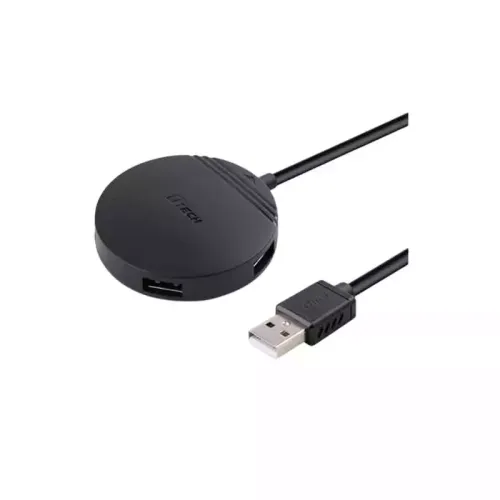
Dtech DT-3015 is a USB 2.0 hub with four USB-A ports and a 1.2m lead. Its 480 Mbps link is shared; power limits are not specified.
Approximate Market Price
BDT 500
Informational market estimate only; this is not a current Store offer.
Compare store prices
No live offers for this variant
BDT 500
Approximate Market Price
Informational market estimate only; this is not a current Store offer.
Loading history…
Product story
Dtech DT-3015 is a compact four-port USB 2.0 hub. Local retailer listings identify a USB-A male upstream plug, four USB-A female downstream ports and an integrated 1.2-metre cable. Star Tech and TechLand also describe a built-in magnet for attachment to a suitable metal surface. The hub expands the number of available USB-A connections, while its devices share the single upstream link. Retailers list up to 480 Mbps; actual throughput depends on the host, hub, connected devices and workload.
Connect the USB-A male lead to a compatible computer or host, then attach USB-A peripherals to the four female ports. The DT-3015 is a hub rather than an extension cable or connector converter. Its four outputs do not create four independent host connections, and a USB-C-only computer needs a compatible adapter or port. Check the host’s data support and the connector layout of every device before setup.
Star Tech and TechLand identify the DT-3015 as USB 2.0 with a headline transfer rate up to 480 Mbps. That figure is not a guaranteed copy speed and is not 480 Mbps independently available to every downstream port. Devices share the upstream bus; protocol overhead, device speed, simultaneous activity and file type affect observed throughput. Choose a hub with a faster, documented USB generation if high-speed storage performance is important.
The checked listings do not specify a per-port current rating, total power budget or dedicated power input for this exact hub. A host-powered hub relies on the available upstream power unless a separate supply is documented. Low-power devices may be suitable, but multiple external drives, phones or other high-draw devices can exceed what the host connection provides. Do not assume fast charging or stable operation under every load; use an appropriately powered hub when device documentation requires it.
The four ports allow several compatible devices to remain connected, such as a keyboard, mouse, flash drive and printer. Each still shares the hub’s upstream connection. Two storage devices transferring data at the same time compete for bandwidth, and a printer or camera may have its own software or setup requirements. Connect demanding devices directly when a hub causes instability or when the device maker recommends a direct port.
Star Tech and Smart View list an integrated 1.2-metre cable. This gives more placement flexibility than a very short dongle, but the measured usable distance depends on where the host port sits. Avoid stretching or tightly bending the cable, and keep the hub where plugs can be reached without pulling the lead. If a peripheral disconnects, try a shorter route or direct host connection to isolate the cause.
Star Tech and TechLand describe a built-in magnet that can attach the hub to a suitable metal computer case or other surface. Use a flat, stable placement and ensure the hub cannot fall or pull on its cable. The seller pages do not specify magnetic force, mounting orientation or compatibility with every case material. Keep the hub away from devices or storage media if their manufacturer advises against close magnetic placement.
Star Tech lists Windows, macOS and Linux support. The hub provides standard USB connectivity; actual functionality also depends on the host operating system and each attached peripheral. A printer, scanner, webcam or storage device may need its own driver or configuration. “Plug and play” describes the hub connection, not a guarantee that every connected device works without setup. Check the device maker’s requirements for specialized hardware.
The product is primarily listed as a USB 2.0 hub for data connectivity. Some third-party descriptions mention charging, but the checked specifications do not give output current, charging protocol or total power budget. A port’s physical ability to supply some power does not mean it supports fast charging or can power several devices at once. Use a dedicated charger or powered hub with a documented rating when charging performance matters.
Star Tech and TechLand list a one-year warranty for their own offers. This does not confirm coverage from another seller or from the BiponiBD merchant. Confirm the warranty provider, duration, claim process, exclusions and return policy on the live offer. Check model DT-3015, four USB-A outputs, USB-A host plug, 1.2m lead and included items. BiponiBD price and stock were not verified during this update.
The DT-3015 may suit a desk that needs a few extra USB-A connections for ordinary peripherals and where USB 2.0 performance is sufficient. It is not a high-speed USB 3.x hub or a confirmed multi-device fast charger. Buyers with high-bandwidth drives, high-power devices or a USB-C-only host should verify their requirements and consider a product with the needed generation, power input and connectors documented.
It is a wired USB 2.0 hub that connects to a host through USB-A male and provides four USB-A female ports, according to local listings.
The hub has four downstream USB-A ports. The ports share the single upstream USB connection and its available bandwidth and power.
Star Tech and TechLand list USB 2.0 and up to 480 Mbps. This is the standard’s headline link rate, not a guaranteed file-copy speed for each port or simultaneous devices.
Star Tech and Smart View list a 1.2-metre cable. Measure your setup and leave slack before placing the hub.
Star Tech and TechLand describe a built-in magnet that can attach the hub to a suitable metal surface. Confirm the hub’s placement is stable and does not interfere with nearby equipment.
The reviewed pages do not clearly specify per-port current, total power budget or an external power input. Do not assume fast charging or reliable operation of several high-draw devices. Use a powered hub where the device load requires one.
No such per-port guarantee is stated. The listed 480 Mbps describes the USB 2.0 connection rate; active devices share the upstream bus, and real throughput is lower and workload dependent.
Star Tech lists Windows, macOS and Linux. The hub uses standard USB connectivity, but the host and connected devices must still support their respective functions.
TechLand describes plug-and-play use. Standard USB hub support is commonly handled by the operating system, but device-specific drivers may still be needed for connected printers, cameras or other peripherals.
The host connector is USB-A male. A suitable USB-C adapter may be needed, but confirm host data support and physical compatibility; an adapter does not add features absent from the computer.
Star Tech and TechLand list a one-year warranty for their respective offers. Verify provider, coverage and claim terms on the selected BiponiBD offer.
No current BiponiBD price, stock or seller terms were checked during this update. Check the active product offer before ordering; third-party prices are not BiponiBD pricing.
Helpful answers
Product-specific answers maintained with the catalog information.
It is a wired USB 2.0 hub that connects to a host through USB-A male and provides four USB-A female ports, according to local listings.
The hub has four downstream USB-A ports. The ports share the single upstream USB connection and its available bandwidth and power.
Star Tech and TechLand list USB 2.0 and up to 480 Mbps. This is the standard’s headline link rate, not a guaranteed file-copy speed for each port or simultaneous devices.
Star Tech and Smart View list a 1.2-metre cable. Measure your setup and leave slack before placing the hub.
Star Tech and TechLand describe a built-in magnet that can attach the hub to a suitable metal surface. Confirm the hub’s placement is stable and does not interfere with nearby equipment.
The reviewed pages do not clearly specify per-port current, total power budget or an external power input. Do not assume fast charging or reliable operation of several high-draw devices. Use a powered hub where the device load requires one.
No such per-port guarantee is stated. The listed 480 Mbps describes the USB 2.0 connection rate; active devices share the upstream bus, and real throughput is lower and workload dependent.
Star Tech lists Windows, macOS and Linux. The hub uses standard USB connectivity, but the host and connected devices must still support their respective functions.
TechLand describes plug-and-play use. Standard USB hub support is commonly handled by the operating system, but device-specific drivers may still be needed for connected printers, cameras or other peripherals.
The host connector is USB-A male. A suitable USB-C adapter may be needed, but confirm host data support and physical compatibility; an adapter does not add features absent from the computer.
Star Tech and TechLand list a one-year warranty for their respective offers. Verify provider, coverage and claim terms on the selected BiponiBD offer.
No current BiponiBD price, stock or seller terms were checked during this update. Check the active product offer before ordering; third-party prices are not BiponiBD pricing.
Customer community
Become a merchant
Join BiponiBD, publish accurate offers and start free.