Pros
- Adds separate headphone and microphone jacks to a compatible USB host
- Compact adapter does not need a separate power supply in listings
- Can be selected as a USB audio input/output device in supported systems

All categories
 New condition
Computer Accessories
Dtech · DT-6006
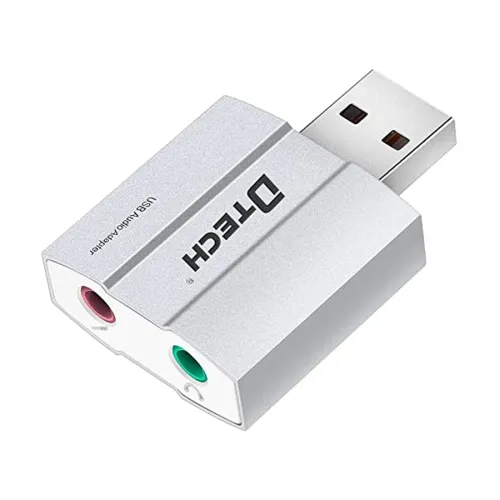
DTECH DT-6006 adds a 3.5mm stereo headphone output and mono microphone input through USB-A. Listed at 5V/100mA and 48kHz max; verify OS support.
Approximate Market Price
BDT 450
Informational market estimate only; this is not a current Store offer.
Compare store prices
No live offers for this variant
BDT 450
Approximate Market Price
Informational market estimate only; this is not a current Store offer.
Loading history…
Product story
The DTECH DT-6006 is a compact USB-A external audio adapter for computers and other compatible USB hosts. Local listings describe two 3.5mm jacks: a stereo headphone output and a mono microphone input. It can add separate analogue headphone and mic connections where a computer has no suitable audio jacks or where an external sound interface is useful. The listing also mentions virtual 5.1 audio; this describes a processing effect and should not be confused with six discrete analogue outputs or a verified surround-sound speaker interface.
Plug the adapter’s USB Type-A connector into a compatible computer or other USB host. It is a USB-A device; it does not plug directly into USB-C without a separate compatible adapter. Retail listings describe plug-and-play use, but the operating system and application determine device detection and audio routing. Confirm that the exact host supports USB audio devices and select the DT-6006 as the input or output device where needed.
The adapter has a 3.5mm stereo headphone output for compatible headphones or powered speakers. Connect the listening device to the output jack, then select the external USB audio device as the system output. The specification does not state a headphone amplifier power or supported impedance range, so volume and drive capability depend on the adapter and headphone. Start at a low volume and raise it gradually.
A separate 3.5mm mono microphone input is listed for voice recording, calls or chat with a compatible microphone. Connect a mic to the input and choose DT-6006 as the recording device in the operating system or app. Microphone bias voltage, supported mic wiring and headset-combo compatibility are not documented. A single-plug TRRS headset may need a separate headset splitter; the DT-6006’s two jacks are not one combined headset socket.
Ryans lists stereo output and a maximum sample rate of 48kHz. Some retailers advertise virtual 5.1 sound, which may be an operating-system or driver effect. The adapter provides one stereo headphone output and one mono mic input; it is not documented as providing six discrete analogue speaker channels. Bit depth, supported formats, frequency response and measured noise/distortion were not consistently established.
Ryans lists 5V operating voltage and 100mA working current, and local sellers describe USB-powered operation without a separate power adapter. Actual USB power is supplied by the host. The 100mA figure is a listed operating value, not an available charging output or a guarantee for external devices. Do not connect a charger to the audio jacks or treat the adapter as a powered speaker supply.
The catalog lists Windows, Linux and macOS compatibility, and local listings describe plug-and-play operation. Actual detection depends on the OS version, device policy, available USB port and application audio settings. If the adapter is not selected automatically, open sound settings and choose the USB audio device for playback or recording. A separate vendor driver is not confirmed as necessary for every system; do not install unrelated drivers from unofficial download sites.
For voice calls, connect headphones to the stereo output and a compatible microphone to the mono input. In the meeting or recording app, select DT-6006 separately for speaker and microphone if needed. Test microphone input level and monitoring before an important call. The adapter does not guarantee noise cancellation, echo cancellation, headset-button support or compatibility with every 3.5mm microphone plug. Those features depend on the host and application.
If there is no playback, check that the headphones are in the headphone output and that DT-6006 is chosen as the system/app output. For a silent mic, confirm the mic plug is in the input jack and choose the USB device as the recording source. Test the headphones and microphone separately, try another USB port, and check app permissions and input levels. If both functions work separately but not through one headset plug, a compatible TRRS splitter may be required.
Star Tech lists dimensions of about 28 × 28 × 12mm and weight of approximately 14g. The small adapter can be carried in a laptop bag, but avoid leaving it unsupported where movement may strain the USB-A port. Keep the 3.5mm jacks clear of dust and liquids. The product is an audio input/output adapter, not a USB hub, Bluetooth receiver, DAC with documented high-resolution formats or standalone recorder.
Retailers identify model DT-6006 but warranty terms vary or are not consistently stated. Confirm the supplied unit, included items, service provider, warranty duration and return policy with the selected seller. Headphones and microphone are not confirmed as included. A USB-C adapter, headset splitter and external power supply are also not confirmed. External retailer price and stock do not verify a live BiponiBD offer.
It adds a USB-A audio connection with a stereo 3.5mm headphone output and a separate mono 3.5mm microphone input.
It uses USB Type-A. USB-C-only hosts may need a separate compatible adapter.
The headphone jack carries stereo audio output; the other 3.5mm jack is for mono microphone input.
The DT-6006 has separate headphone and mic jacks. A compatible TRRS headset splitter may be needed, and wiring compatibility should be checked.
Some listings mention virtual 5.1 processing, but the adapter has one stereo headphone output and is not documented as six discrete analogue outputs.
Ryans lists a maximum sample rate of 48kHz. Bit depth and broader format support are not consistently specified.
It is USB-powered in local listings; no separate power supply is confirmed as required.
Retailers describe plug-and-play behavior, though OS versions and app settings can affect recognition and routing.
Yes, with a compatible mic and app configured to use the adapter’s input; test the mic level first.
Warranty terms are not consistent across listings; confirm coverage with the selected seller.
Helpful answers
Product-specific answers maintained with the catalog information.
It adds a USB-A audio connection with a stereo 3.5mm headphone output and a separate mono 3.5mm microphone input.
It uses USB Type-A. USB-C-only hosts may need a separate compatible adapter.
The headphone jack carries stereo audio output; the other 3.5mm jack is for mono microphone input.
The DT-6006 has separate headphone and mic jacks. A compatible TRRS headset splitter may be needed, and wiring compatibility should be checked.
Some listings mention virtual 5.1 processing, but the adapter has one stereo headphone output and is not documented as six discrete analogue outputs.
Ryans lists a maximum sample rate of 48kHz. Bit depth and broader format support are not consistently specified.
It is USB-powered in local listings; no separate power supply is confirmed as required.
Retailers describe plug-and-play behavior, though OS versions and app settings can affect recognition and routing.
Yes, with a compatible mic and app configured to use the adapter’s input; test the mic level first.
Warranty terms are not consistent across listings; confirm coverage with the selected seller.
Customer community
Become a merchant
Join BiponiBD, publish accurate offers and start free.