Pros
- Connects compatible DisplayPort computers to HDMI screens
- Audio and video support documented by manufacturer
- HDCP compliance stated by manufacturer

All categories
 New condition
Computer Accessories
Dtech · DT-6505
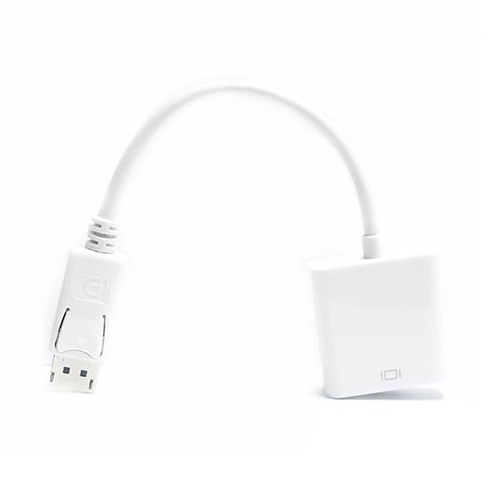
DTECH DT-6505 is a one-way DisplayPort 1.2 male to HDMI 1.3 female converter for up-to-1080p video and LPCM audio.
Approximate Market Price
BDT 500
Informational market estimate only; this is not a current Store offer.
Compare store prices
No live offers for this variant
BDT 500
Approximate Market Price
Informational market estimate only; this is not a current Store offer.
Loading history…
Product story
DTECH DT-6505 is a compact DisplayPort-to-HDMI converter for connecting a compatible PC or graphics-card DisplayPort output to an HDMI monitor, HDTV or projector. The DTECH manufacturer page specifies DisplayPort v1.2, HDMI v1.3, HDCP compliance, up to 1080p video and uncompressed LPCM 5.1/7.1 audio. The adapter has a DisplayPort male plug and an HDMI female port. Use the correct signal direction and a separate HDMI cable unless the seller confirms one is included.
The documented path is DisplayPort source to HDMI display: plug the adapter’s male DisplayPort connector into a PC or graphics card, then connect an HDMI cable from the female HDMI port to the screen. The adapter does not convert HDMI output into DisplayPort input. Confirm the source port is DisplayPort and the screen accepts HDMI before purchase. Connector shape alone does not establish that two devices support the required direction.
DTECH lists DisplayPort v1.2 input and HDMI v1.3 output, with resolutions up to 1080p. The local seller specifications repeat the 1080p limit and 225MHz/2.25Gbps-per-channel HDMI bandwidth. No model-specific 4K or high-refresh-rate support was confirmed in the reviewed manufacturer and retailer information. Check the resolution and refresh rate required by the display before choosing this converter.
The manufacturer states that the converter supports audio with video and uncompressed LPCM 5.1 and 7.1 audio. The computer must send audio over DisplayPort, and the HDMI display or connected audio equipment must accept the selected format. Operating-system output selection, graphics drivers and display capabilities can affect whether sound is available. This does not establish support for every compressed surround format.
DTECH lists HDCP compliance. Protected playback still depends on the whole chain: source device, adapter, HDMI cable, display and the content service must all meet the required HDCP level. A compliant adapter alone cannot resolve an unsupported display, outdated driver or service-specific playback restriction.
Before ordering, confirm that the source has a DisplayPort output, the display has an HDMI input, the signal direction is correct, and 1080p is sufficient. Check whether the computer can output audio over DisplayPort if sound is required. If the setup depends on a special refresh rate, protected content or an unusual graphics configuration, request model-specific confirmation from the seller.
The HDMI output is a female socket, so an HDMI cable is needed to reach the monitor, television or projector. The sources reviewed do not confirm that such a cable is included. Connect the adapter and cable firmly, select the corresponding HDMI input on the display, and choose an available output mode in the computer settings. Package inclusions should be confirmed before checkout.
The listed maximum is up to 1080p, so the DT-6505 is not the verified choice for a 4K requirement. The conversion is one-way from DisplayPort source to HDMI display, and the female output needs an HDMI cable. Compatibility depends on the source’s DisplayPort output and the receiving display. The reviewed details do not provide a length, active/passive design, refresh-rate table or universal compatibility guarantee.
DTECH lists a black finish and identifies the item as the DT-6505 DP-to-HDMI cable/adapter. Handle the connectors by their housings rather than pulling on a cable. Avoid forcing the plug into a different connector type or bending the connected cable sharply. The manufacturer product page does not provide a complete dimensional or weight specification for this item.
Warranty terms depend on the merchant. TechLand’s listing snippet reports no warranty, while this does not automatically determine another seller’s offer. Confirm written coverage, return terms, package contents, current price and availability with the seller. BiponiBD’s live offer and merchant stock were not verified during this content update. Choose the DT-6505 when the source is DisplayPort, the destination is HDMI and up-to-1080p output meets the requirement.
The converter supports a useful one-way DisplayPort-to-HDMI connection, HDCP compliance and LPCM audio according to DTECH. The main trade-offs are the stated up-to-1080p ceiling, the need for an HDMI cable and dependence on source/display compatibility. It should not be described as bidirectional or as a verified 4K converter.
If there is no picture, confirm the computer is using the DisplayPort output, the monitor is set to the correct HDMI input and the HDMI cable is seated. Test a supported resolution up to 1080p and check the graphics settings. For missing audio, select the HDMI/DisplayPort audio output and verify the display or receiver accepts it. Try another cable or compatible display to isolate the connection, then contact the seller if the adapter appears faulty.
It connects a DisplayPort output on a PC or graphics card to an HDMI display input. It is not an HDMI-source-to-DisplayPort-display converter.
The adapter has a DisplayPort male input plug and an HDMI female output port. An HDMI cable is needed between the adapter and the display.
DTECH and local listings specify resolutions up to 1080p. The checked specification does not claim 4K support. Actual output also depends on the source, display and HDMI cable.
The manufacturer lists DisplayPort v1.2 and HDMI v1.3. Version labels alone do not ensure every source and display combination will work.
DTECH lists audio with video and uncompressed LPCM 5.1/7.1 audio support. Audio availability depends on the computer’s DisplayPort output and display or audio configuration.
DTECH states that the adapter is HDCP compliant. Protected playback can still depend on HDCP support throughout the source, adapter, cable, display and content chain.
The manufacturer and Bangladesh listings checked state up to 1080p; they do not document 4K or a high refresh-rate mode for this model. Do not buy it for 4K unless the seller provides verified model-specific confirmation.
No. The documented direction is DisplayPort source to HDMI display. It does not reverse signal direction.
The product is an adapter with an HDMI female port; the reviewed sources do not confirm an HDMI cable in the package. Plan to use a separate suitable HDMI cable unless the seller confirms otherwise.
The sources describe a DisplayPort 1.2 source, but do not provide an exhaustive device compatibility list. Check the computer or graphics-card port, output settings and display requirements with the seller.
TechLand’s listing snippet says no warranty, but seller terms can differ. Confirm the exact warranty and return policy on the selected offer before ordering.
The listed product is a black DP-male to HDMI-female converter. Verify the package contents and cable requirements with the seller; an HDMI cable is not confirmed.
Helpful answers
Product-specific answers maintained with the catalog information.
It connects a DisplayPort output on a PC or graphics card to an HDMI display input. It is not an HDMI-source-to-DisplayPort-display converter.
The adapter has a DisplayPort male input plug and an HDMI female output port. An HDMI cable is needed between the adapter and the display.
DTECH and local listings specify resolutions up to 1080p. The checked specification does not claim 4K support. Actual output also depends on the source, display and HDMI cable.
The manufacturer lists DisplayPort v1.2 and HDMI v1.3. Version labels alone do not ensure every source and display combination will work.
DTECH lists audio with video and uncompressed LPCM 5.1/7.1 audio support. Audio availability depends on the computer’s DisplayPort output and display or audio configuration.
DTECH states that the adapter is HDCP compliant. Protected playback can still depend on HDCP support throughout the source, adapter, cable, display and content chain.
The manufacturer and Bangladesh listings checked state up to 1080p; they do not document 4K or a high refresh-rate mode for this model. Do not buy it for 4K unless the seller provides verified model-specific confirmation.
No. The documented direction is DisplayPort source to HDMI display. It does not reverse signal direction.
The product is an adapter with an HDMI female port; the reviewed sources do not confirm an HDMI cable in the package. Plan to use a separate suitable HDMI cable unless the seller confirms otherwise.
The sources describe a DisplayPort 1.2 source, but do not provide an exhaustive device compatibility list. Check the computer or graphics-card port, output settings and display requirements with the seller.
TechLand’s listing snippet says no warranty, but seller terms can differ. Confirm the exact warranty and return policy on the selected offer before ordering.
The listed product is a black DP-male to HDMI-female converter. Verify the package contents and cable requirements with the seller; an HDMI cable is not confirmed.
Customer community
Become a merchant
Join BiponiBD, publish accurate offers and start free.