Pros
- Supports DisplayPort source to VGA legacy display
- 1080p mode listed by multiple local sellers
- No external power requirement listed

All categories
 New condition
Computer Accessories
Dtech · DT-6506
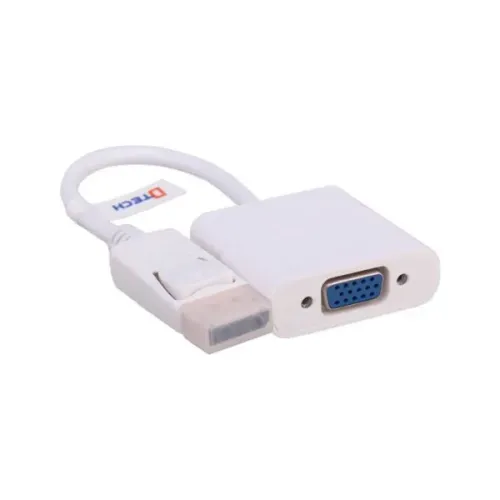
Dtech DT-6506 converts DisplayPort output to VGA input up to 1920×1080. It is video-only and powered from the DisplayPort source.
Approximate Market Price
BDT 480
Informational market estimate only; this is not a current Store offer.
Compare store prices
No live offers for this variant
BDT 480
Approximate Market Price
Informational market estimate only; this is not a current Store offer.
Loading history…
Product story
Dtech DT-6506 is a DisplayPort-to-VGA video adapter with a DisplayPort male plug and VGA female socket. Local listings specify Full HD output up to 1920×1080 and video bandwidth up to 10.8Gbps. The adapter is intended to connect a DisplayPort graphics output to a VGA monitor or projector; the signal direction is one way. VGA does not carry audio, and this product’s sources do not establish audio support.
Connect the adapter’s DisplayPort male plug to the computer or graphics card output. Use a separate VGA cable from the adapter’s female VGA socket to the monitor or projector. The adapter does not convert VGA to DisplayPort. Check the source port and display input before ordering, because a connector that looks similar may require a different converter.
Local product listings specify support up to 1920×1080 (Full HD) and bandwidth up to 10.8Gbps. The exact refresh rate and supported timings are not consistently stated. Actual output depends on the graphics source, adapter and VGA display. Configure the computer to a resolution and refresh rate that the monitor or projector accepts.
VGA transports analog video and does not carry audio. The DT-6506 listings describe video conversion, so use the computer’s separate audio output and suitable speakers if sound is required. Do not expect audio to arrive through the VGA cable. The sources checked do not list a 3.5mm audio socket on this model.
Retail descriptions indicate that the adapter draws power from the DisplayPort source and works without an external power supply or driver. The source device must provide a compatible DisplayPort output. No separate power adapter or software is confirmed as part of the package. If the display is not detected, check the graphics output settings and reconnect the adapter.
For a VGA monitor or projector, connect the adapter and a VGA cable, power on the display and select its VGA input. Then configure the source computer to a supported display mode. Secure the VGA plug and use its screw posts where available to reduce accidental disconnection. The adapter is suited to presentations and legacy displays when their resolution requirements fit.
Ryans lists no measurable cable length while other descriptions call it a converter or adapter. Treat it as a compact connector adapter rather than a guaranteed long cable. A separate VGA cable is needed for distance to the display. Avoid leaving the adapter unsupported if its weight puts strain on the computer’s DisplayPort socket.
Confirm that the source has a DisplayPort output and the target display has VGA input. A USB-C port only works with this adapter if the computer supports DisplayPort Alt Mode and an appropriate USB-C-to-DisplayPort link is provided. HDMI, DVI and VGA source devices need a converter with a matching input direction.
The local product listings checked specify up to 1080p. They do not establish 4K support, HDR, audio, HDCP behavior or high refresh operation. If the setup requires 4K, choose a converter whose exact model specifications explicitly support the desired resolution and refresh rate.
Check the adapter orientation, VGA cable, monitor power and selected input. Reseat the DisplayPort plug, inspect VGA pins and choose a lower supported resolution or refresh rate. Test the monitor and cable with another source if possible. For a USB-C source, confirm DisplayPort Alt Mode and the required upstream adapter.
Connect plugs straight and avoid twisting the adapter while it is attached. Support the VGA cable so it does not pull on the DisplayPort socket. Keep connector contacts free from dust and moisture, and avoid bending the adapter at the joint. Disconnect by holding the connector body rather than pulling the cable.
Live stock, exact package, color, warranty and return terms depend on the seller. Confirm that the received unit is model DT-6506, has DisplayPort male and VGA female connectors, and is covered by the seller’s stated warranty. The available product sources do not consistently provide local warranty details.
It converts DisplayPort output from a computer to VGA input on a monitor or projector. It does not convert VGA output to DisplayPort input.
The DT-6506 is listed with a DisplayPort male input and VGA female output. Connect a separate VGA cable from the adapter to the display.
Several local retailers list Full HD up to 1920×1080. Refresh rate and specific timing support are not consistently stated; check the monitor and graphics source.
No audio is carried over VGA. This adapter is for video conversion; use a separate audio connection from the computer if sound is needed.
Retail descriptions state that it draws power from the DisplayPort source and requires no external driver. External power is not listed as required.
The source must provide a compatible DisplayPort video output. Confirm the graphics port and display mode; a USB-C port that supports DisplayPort Alt Mode may need a separate USB-C-to-DisplayPort adapter.
Yes, when the projector has a VGA input and supports a display mode the computer can output. Secure the VGA connection and select the correct projector input.
The product is a compact adapter with a DisplayPort plug and VGA socket. Some listings show zero cable length, while others describe a short converter; use a separate VGA cable for distance.
The sources checked specify up to 1080p. 4K output is not supported or verified for this listing.
Warranty terms vary by seller and are not consistently verified. Confirm the duration, provider and return terms for the exact unit before purchase.
Helpful answers
Product-specific answers maintained with the catalog information.
It converts DisplayPort output from a computer to VGA input on a monitor or projector. It does not convert VGA output to DisplayPort input.
The DT-6506 is listed with a DisplayPort male input and VGA female output. Connect a separate VGA cable from the adapter to the display.
Several local retailers list Full HD up to 1920×1080. Refresh rate and specific timing support are not consistently stated; check the monitor and graphics source.
No audio is carried over VGA. This adapter is for video conversion; use a separate audio connection from the computer if sound is needed.
Retail descriptions state that it draws power from the DisplayPort source and requires no external driver. External power is not listed as required.
The source must provide a compatible DisplayPort video output. Confirm the graphics port and display mode; a USB-C port that supports DisplayPort Alt Mode may need a separate USB-C-to-DisplayPort adapter.
Yes, when the projector has a VGA input and supports a display mode the computer can output. Secure the VGA connection and select the correct projector input.
The product is a compact adapter with a DisplayPort plug and VGA socket. Some listings show zero cable length, while others describe a short converter; use a separate VGA cable for distance.
The sources checked specify up to 1080p. 4K output is not supported or verified for this listing.
Warranty terms vary by seller and are not consistently verified. Confirm the duration, provider and return terms for the exact unit before purchase.
Customer community
Become a merchant
Join BiponiBD, publish accurate offers and start free.