Pros
- Compact adapter for compatible Mini DisplayPort computers
- HDMI female output connects to a separately supplied HDMI cable
- Can carry audio when the source and display support it

All categories
 New condition
Computer Accessories
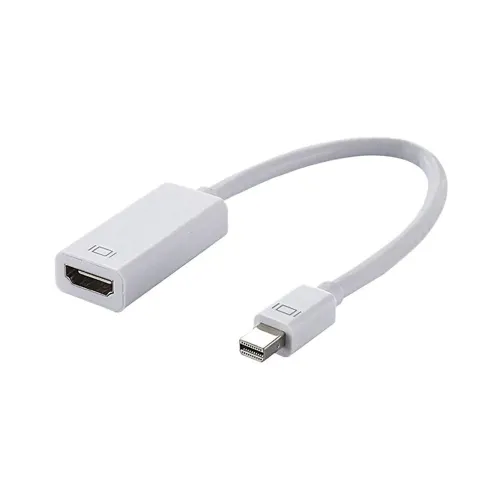
Dtech · DT-6508 Mini DisplayPort to HDMI Adapter
DTECH DT-6508 connects a Mini DisplayPort male source to an HDMI female display cable. Local sellers disagree on 4K versus 1080p support; verify the exact revision.
Approximate Market Price
BDT 450
Informational market estimate only; this is not a current Store offer.
Compare store prices
No live offers for this variant
BDT 450
Approximate Market Price
Informational market estimate only; this is not a current Store offer.
Loading history…
Product story
The DTECH DT-6508 is a compact Mini DisplayPort to HDMI adapter for connecting a compatible Mini DisplayPort output to an HDMI cable and display. Bangladesh retailer listings describe a Mini DisplayPort male input, an HDMI female output and an approximately 4cm adapter section. Sellers differ on the maximum supported resolution: some list up to 4K Ultra HD, while others state 1920 × 1080. Because the exact revision and full timing specifications are not consistently documented, confirm the required resolution and refresh rate for the unit being sold.
The adapter’s source side is a Mini DisplayPort male plug, and its display side is an HDMI female socket. The Mini DisplayPort plug connects to a compatible computer or graphics output; an HDMI cable (sold separately unless stated otherwise) runs from the adapter to a TV, monitor or projector. This direction is important: it does not convert an HDMI source into a Mini DisplayPort display signal. Check the symbols and ports before connecting, and do not force a plug.
Star Tech, TechLand and Infinity search listings describe support up to 4K Ultra HD, while Hossain Electronics and CSI describe up to 1920 × 1080. These claims conflict and the listings do not establish the exact 4K refresh rate, colour depth or adapter hardware revision. Treat 4K as unverified for the specific unit until the seller confirms it in writing. A source, adapter, HDMI cable and display must all support the requested mode.
Mini DisplayPort is a digital video output found on selected computers and graphics devices. A USB-C connector may look similar in some situations but is not the same port; this DT-6508 listing is for Mini DisplayPort. Thunderbolt ports that carry a compatible Mini DisplayPort signal may work, subject to the host model and output support. Verify the computer manual and port markings instead of relying on appearance alone.
Connect a standard HDMI cable to the female HDMI socket, then connect it to a compatible display. The HDMI cable is not confirmed as part of the package. The display’s input, HDMI version, resolution and refresh capability can limit the result. If the screen stays blank, select the correct display input, reseat both ends, inspect the adapter and test a known-working HDMI cable. Check the computer’s display settings for external-screen detection.
Some Bangladesh seller listings state that the adapter supports audio output. Whether audio is available depends on the source computer, graphics driver, operating system and display or audio equipment. After connecting, choose the HDMI display as the audio output if the computer supports it. The listing does not specify supported surround formats, channel count or copy-protection version, so verify these requirements separately for home-theatre use.
Retailer specifications commonly give an adapter length of about 4cm, making it suitable for nearby ports and short HDMI cable runs from the computer. The listed measurement may describe the adapter section and not the attached HDMI cable. Avoid letting a heavy cable hang from the computer port, especially when the device is moved. Support the cable and adapter where needed and avoid sharp bends or lateral strain.
Confirm the adapter orientation, the selected HDMI input and external display settings. Disconnect and reconnect both ends while holding their housings. Try another HDMI cable and display port, then test the display with another source. If the computer offers several modes, begin with a conservative resolution and refresh rate, then increase them only after stable output is confirmed. A signal limitation can come from any component in the chain.
This is a one-way video adapter; it does not add an HDMI output to a device without a compatible Mini DisplayPort source. Exact 4K refresh, HDR, HDCP version, VRR, FreeSync, G-Sync and multi-display behavior are not established by the reviewed listings. It does not include a guaranteed HDMI cable or power supply. For a specific professional monitor, protected video service or high-refresh gaming mode, obtain model-specific confirmation before purchase.
Retailers identify the adapter model as DT-6508 and the product images/listings may show a white housing; confirm the colour and included items for the actual package. Warranty and availability vary by shop, and no uniform warranty term was verified across the reviewed pages. Confirm that the source connector is Mini DisplayPort male and the display connector is HDMI female, ask about the resolution revision and keep the invoice for support. Other shops’ listings do not verify BiponiBD inventory.
The DT-6508 offers a small Mini DisplayPort male to HDMI female connection and is listed for audio output by some local retailers. Its short body can keep the adapter close to the host port while a separately selected HDMI lead provides display reach. The main buying consideration is conflicting resolution information: some shops advertise 4K while others specify 1080p. Exact refresh rate, advanced video features, package details and warranty should be checked with the selected seller.
DTECH DT-6508 is listed as a Mini DisplayPort male to HDMI female adapter with an approximately 4cm body. It connects a compatible Mini DisplayPort source to an HDMI cable and display. Some local listings claim up to 4K, while others state 1080p, so the exact resolution capability must be confirmed for the specific revision. Audio is listed by some sellers; refresh rate, HDR, HDCP and warranty are not consistently specified.
Helpful answers
Product-specific answers maintained with the catalog information.
DTECH identifies this Mini DisplayPort to HDMI adapter as model DT-6508.
The source-side input is listed as a male Mini DisplayPort plug.
The display-side output is a female HDMI socket for an HDMI cable.
It connects a Mini DisplayPort source to an HDMI display through an HDMI cable.
Some retailers list up to 4K while others list 1080p; confirm the exact revision and supported mode.
Retailers commonly list an adapter section of approximately 4cm, excluding any separate HDMI cable.
Some local sellers list audio output; host, driver and display support are required for playback.
An HDMI cable is not confirmed as included; check the actual package with the selected seller.
This model is listed for Mini DisplayPort, not a standard USB-C video port. Verify the exact source interface.
HDR, HDCP version and high-refresh support are not established by the reviewed listings.
Warranty terms vary by seller; confirm current coverage and service conditions before ordering.
Customer community
Become a merchant
Join BiponiBD, publish accurate offers and start free.