Pros
- Connects a compatible Mini DisplayPort source to a VGA display
- Published maximum mode up to 1920 × 1200 at 60Hz
- Compact adapter can bridge newer source and legacy display ports

All categories
 New condition
Computer Accessories
Dtech · DT-6509
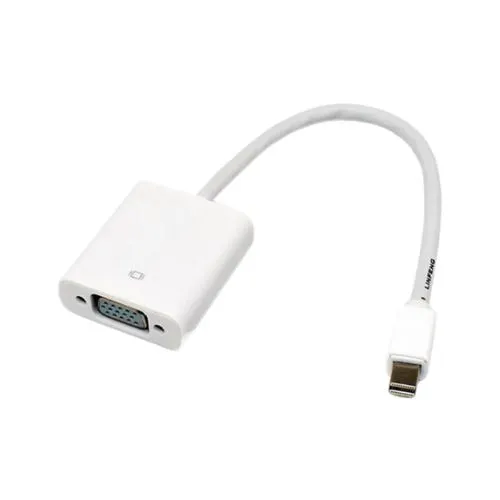
Dtech DT-6509 converts Mini DisplayPort video output to VGA display input, up to 1920 × 1200 at 60Hz as listed. VGA cable is separate; confirm warranty.
Approximate Market Price
BDT 550
Informational market estimate only; this is not a current Store offer.
Compare store prices
No live offers for this variant
BDT 550
Approximate Market Price
Informational market estimate only; this is not a current Store offer.
Loading history…
Product story
The Dtech DT-6509 is a Mini DisplayPort-to-VGA video adapter for connecting a compatible Mini DisplayPort video output to a VGA display input. Exact-model Bangladesh retailer listings specify a maximum output mode of up to 1920 × 1200 at 60Hz and describe DisplayPort link training support. Its VGA socket is female, so a separate VGA cable is needed to connect most monitors or projectors. The adapter provides video conversion only; it does not add HDMI, USB or audio outputs.
Use the DT-6509 with a source device that has a Mini DisplayPort video output and a display that accepts VGA input. The adapter converts in this direction only. It cannot take a VGA output from an older computer and turn it into a Mini DisplayPort input for a newer display. Before buying, identify the source port and display input rather than relying only on a connector’s shape. DisplayPort, Mini DisplayPort, Thunderbolt and USB-C can look similar in some device families but do not guarantee the same signal support.
The reviewed exact-model seller listings specify video resolution up to 1920 × 1200 at 60Hz. This is a maximum published mode, not a guarantee for every computer, graphics adapter, VGA cable or display. The source must output a compatible DisplayPort signal, and the monitor or projector must support the selected timing. If an image appears blank or unstable, test a lower resolution and refresh rate, reseat both connections and confirm the display input selection. 4K output is not listed for this model.
The adapter is listed with a Mini DisplayPort male connector and a VGA female socket. Connect the Mini DisplayPort plug to the source, then use a compatible VGA cable between the adapter and the display. The VGA cable is a separate item unless the seller confirms otherwise. Avoid forcing the connector; align it with the port and secure any VGA thumbscrews without overtightening. The reviewed listings do not establish package contents, cable length or a bundled VGA lead.
Confirm that the computer or other source has a Mini DisplayPort output capable of video and that the destination has a VGA input. This model does not convert HDMI, USB-C or standard DisplayPort unless the source device itself exposes a compatible Mini DisplayPort signal or an appropriate additional adapter is used. Some Thunderbolt ports may carry Mini DisplayPort-compatible video, but support depends on the specific host and port generation. Check the manufacturer specifications for the exact laptop or graphics device.
VGA transmits analog video and does not carry audio. The DT-6509 is specified as a Mini DisplayPort-to-VGA video adapter, with no audio output or extraction feature documented. If the presentation or media setup needs sound, connect audio separately from the source device to the speakers or display audio system. Do not expect this adapter to provide an audio signal through the VGA connection.
Exact-model listings state support for full DisplayPort link training and cite receiver rates of 1.62 and 2.7 Gbps over four lanes. These are interface-level specifications and do not override the maximum resolution and refresh rate of the source, adapter, VGA cable and display as a complete system. VGA is an analog display interface, so cable quality, length and electrical noise can affect the image. No 4K mode, color-depth specification or extended-cable guarantee is verified for this model.
The product listings reviewed do not consistently state whether the DT-6509 needs external power or whether any driver is required for every operating system. Check the package or seller instructions for your device before use. Avoid assuming that all Mini DisplayPort adapters behave identically. If the screen does not appear, verify the source output is enabled, the display is set to VGA, the VGA cable is secure and the selected resolution is supported.
Warranty information varies across local listings: some exact-model pages say no warranty, while another lists one year. The terms need confirmation from the seller selected for purchase. Before checkout, verify the DT-6509 model, Mini DisplayPort male to VGA female direction, maximum 1920 × 1200 at 60Hz listing, separate VGA cable requirement and written warranty. BiponiBD price, stock and warranty terms were not checked during this content update.
The DT-6509 may suit someone who needs to connect an older VGA monitor or projector to a computer that provides Mini DisplayPort video output. It is not suitable for a VGA-source-to-digital-display conversion, HDMI/USB-C-only source without a compatible intermediary, 4K output requirement or audio connection. Confirm both ports and the display’s accepted resolution before choosing it.
It connects a Mini DisplayPort source output to a VGA display input. It is a one-way conversion; it does not convert a VGA source into a Mini DisplayPort display signal.
The model is listed with a Mini DisplayPort male input and a VGA female output. You need a separate VGA cable from the adapter to the monitor or projector; package contents should be confirmed with the seller.
Exact-model retailer pages list up to 1920 × 1200 at 60Hz. The actual mode depends on the computer’s Mini DisplayPort output, graphics hardware, VGA cable, display and supported timings.
The source must provide Mini DisplayPort video output and support the required DisplayPort link. Check the device manual and port markings; similar-looking Mini DisplayPort, Thunderbolt and USB-C connectors are not interchangeable in every configuration.
Yes, if the target has a VGA input and supports a compatible resolution and refresh rate. This adapter does not provide HDMI, DVI, USB or audio output.
VGA carries analog video, not audio. Use a separate audio connection if sound is needed. The DT-6509 is a video adapter, not an audio extractor.
The reviewed exact-model listings do not clearly specify driver requirements or external power. Check the manufacturer instructions and seller package details for the target source device before use.
No. The exact-model retailer specification lists up to 1920 × 1200 at 60Hz; 4K support is not documented.
Retailer listings disagree: some list no warranty while another lists one year. Confirm the selected seller’s written warranty and return terms before purchase.
This review did not verify a live BiponiBD offer, stock or checkout price. Confirm the current item and seller terms before ordering.
Helpful answers
Product-specific answers maintained with the catalog information.
It connects a Mini DisplayPort source output to a VGA display input. It is a one-way conversion; it does not convert a VGA source into a Mini DisplayPort display signal.
The model is listed with a Mini DisplayPort male input and a VGA female output. You need a separate VGA cable from the adapter to the monitor or projector; package contents should be confirmed with the seller.
Exact-model retailer pages list up to 1920 × 1200 at 60Hz. The actual mode depends on the computer’s Mini DisplayPort output, graphics hardware, VGA cable, display and supported timings.
The source must provide Mini DisplayPort video output and support the required DisplayPort link. Check the device manual and port markings; similar-looking Mini DisplayPort, Thunderbolt and USB-C connectors are not interchangeable in every configuration.
Yes, if the target has a VGA input and supports a compatible resolution and refresh rate. This adapter does not provide HDMI, DVI, USB or audio output.
VGA carries analog video, not audio. Use a separate audio connection if sound is needed. The DT-6509 is a video adapter, not an audio extractor.
The reviewed exact-model listings do not clearly specify driver requirements or external power. Check the manufacturer instructions and seller package details for the target source device before use.
No. The exact-model retailer specification lists up to 1920 × 1200 at 60Hz; 4K support is not documented.
Retailer listings disagree: some list no warranty while another lists one year. Confirm the selected seller’s written warranty and return terms before purchase.
This review did not verify a live BiponiBD offer, stock or checkout price. Confirm the current item and seller terms before ordering.
Customer community
Become a merchant
Join BiponiBD, publish accurate offers and start free.