Pros
- Connects HDMI-output sources to VGA-input monitors or projectors
- Compact 0.5m lead can suit nearby display setups
- Up to 1080p output is listed by several Bangladesh sellers

All categories
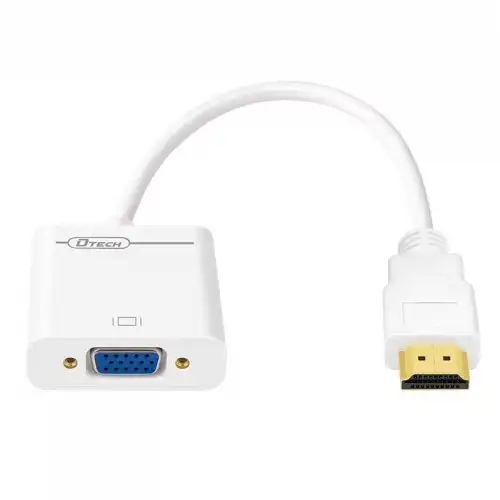 New condition
Computer Accessories
Dtech · DT-6515 HDMI to VGA Converter
DTECH DT-6515 converts HDMI output to VGA input; 0.5m lead and up to 1080p are listed. Audio and power details vary by seller; verify exact unit.
Approximate Market Price
BDT 380
Informational market estimate only; this is not a current Store offer.
Compare store prices
No live offers for this variant
BDT 380
Approximate Market Price
Informational market estimate only; this is not a current Store offer.
Loading history…
Product story
The DTECH DT-6515 is an HDMI-to-VGA converter cable designed to connect a device with HDMI output to a display with VGA input. Star Tech lists an HDMI Type-A interface, a 0.5-meter cable, pure copper material and a maximum VGA output resolution of 1080p. The product is directional: HDMI source to VGA display. It cannot convert VGA output to HDMI input. Check the exact ports and product label before ordering, especially because some listings describe additional audio output.
The expected arrangement is HDMI Type-A male input from a laptop, desktop, media player or set-top box, and VGA female output for a monitor or projector. A VGA cable then connects the converter to the display. The direction matters because HDMI carries a digital source signal and VGA uses analog video; conversion requires circuitry. The DT-6515 is not a passive plug-shape adapter and will not work in reverse. Confirm source and display port roles before buying.
Star Tech, Techlink and other local product pages list up to Full HD 1920×1080 output. The display, source device, graphics output, refresh rate and converter all need to support the selected mode. The inspected exact-model pages do not provide a complete table of refresh rates, color formats or supported timings. Start with a common mode such as 1920×1080 only if both endpoints support it; otherwise choose a lower shared resolution in the operating system.
HDMI is digital and VGA is analog. The DT-6515 converts the signal for a compatible VGA display, so it can help connect newer HDMI-output equipment to a legacy projector or monitor. It cannot improve the source resolution, create HDCP permission or guarantee image quality across every device. Analog display quality may vary with resolution, cable routing, equipment and interference. For best results, use a short VGA cable and select a mode supported by the display.
Some listings, including CSI, advertise a 3.5mm audio jack and audio support, while Star Tech’s product description focuses on video and does not confirm an audio jack. VGA itself does not carry audio, so any sound must be output separately by the converter or source. The product images and package for the exact BiponiBD offer need confirmation before promising audio. If audio is required, verify that the physical unit includes a 3.5mm port and test it with the intended speaker or amplifier.
Star Tech describes the converter as requiring no external power and plug-and-play. However, the inspected pages do not provide a detailed power requirement, HDMI source compatibility matrix or electrical specification. If a display remains blank, check whether the exact converter needs additional power and follow its included instructions; do not connect an arbitrary power supply. Driver installation is not listed as required, but operating-system display settings and correct input selection may still be necessary.
Star Tech lists a 0.5-meter cable, HDMI Type-A interface, gold-plated technology and pure copper material. This length can fit a nearby monitor or projector but may require a separate VGA cable to reach the display. Keep the converter supported so its HDMI plug does not bear the weight of the attached VGA cable. Avoid sharp bends near the connector and do not force the VGA socket or HDMI plug into a misaligned port.
Use the DT-6515 with an HDMI output source and a VGA input display. Connect the HDMI male plug to the source, attach a VGA cable from the converter’s female socket to the monitor or projector, then select the VGA input on the display. Configure a supported output mode in the source device. Some HDMI sources may limit conversion because of HDCP or output settings; test with a known-compatible source if the display remains blank.
Confirm the converter direction, source output, display input selection and VGA cable connections. Try a lower resolution and refresh rate supported by both endpoints. Inspect VGA pins for damage and reseat both plugs. Test the monitor and source directly with known-good equipment to identify where the issue occurs. If the source is protected or uses a mode the converter cannot handle, the converter cannot bypass those restrictions. Do not repeatedly hot-plug equipment if its manufacturer advises powering down first.
The DT-6515 is not listed as a scaler, USB-C/DisplayPort converter, VGA-to-HDMI converter, video capture device or network adapter. It does not add a VGA output to a source that cannot output video through HDMI. It cannot guarantee support for every resolution, refresh rate or protected video stream. Audio handling is unclear across exact-model listings. Confirm the intended mode and any required sound output before using it for a presentation, classroom or permanent installation.
Star Tech and Techland list a one-year warranty, while other local listings differ or show no warranty. Confirm the warranty provider, term, claim location, invoice requirements and return window with the selected seller. Prices and stock on other sites do not prove the current BiponiBD offer. At delivery, verify model DT-6515, HDMI male input, VGA female output, cable length, any 3.5mm audio port and the warranty documents before relying on those features.
The DT-6515 offers a compact HDMI-source-to-VGA-display conversion path, a 0.5m lead and 1080p support listed by several Bangladesh sellers. Some listings describe operation without an external power supply. It is direction-specific, requires a separate VGA cable, and audio support differs between product pages. Confirm the actual audio port, power requirements and supported display timing on the selected unit. The converter cannot compensate for unsupported output modes or damaged ports.
DTECH DT-6515 converts HDMI output to VGA input and is not reversible. Star Tech lists a 0.5m cable and up to 1080p. A VGA cable connects from the converter’s female port to the display. Audio is uncertain: some sellers list a 3.5mm jack and others do not. Star Tech says no external power is required, but check the exact unit instructions. Warranty varies by seller, commonly one year on some listings.
Helpful answers
Product-specific answers maintained with the catalog information.
The converter model is DTECH DT-6515.
It converts HDMI output from the source to VGA input on a display; it is not reversible.
Listings describe HDMI Type-A male input and VGA female output.
Several sellers list up to Full HD 1920×1080; actual mode depends on source and display support.
Listings conflict: CSI mentions a 3.5mm audio jack, while Star Tech does not confirm it. Verify the exact unit.
Star Tech says no external power is required; check the included instructions for the exact product.
Star Tech describes plug-and-play operation; display settings may still need adjustment.
No. This model converts HDMI source output to VGA display input only.
The listing describes a VGA female socket; a separate VGA cable may be needed. Confirm package contents.
Star Tech and Techland list one year; other sellers differ, so confirm the chosen offer.
Customer community
Become a merchant
Join BiponiBD, publish accurate offers and start free.