Pros
- Allows two VGA sources to share one display.
- Manual button selection is simple and requires no driver.
- Manufacturer lists DDC2 and hot-plug support.

All categories
 New condition
Computer Accessories
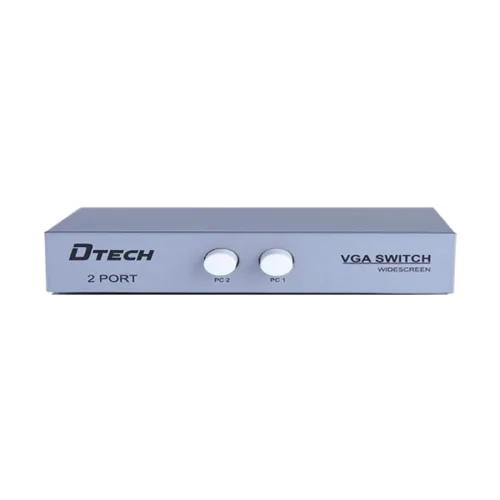
Dtech · DT-7032 2-Input 1-Output VGA Switch
DTECH DT-7032 manual VGA switch connects two VGA sources to one display, with button selection and up to 2560×1600 listed. VGA cables and local warranty need confirmation.
Approximate Market Price
BDT 330
Informational market estimate only; this is not a current Store offer.
Compare store prices
No live offers for this variant
BDT 330
Approximate Market Price
Informational market estimate only; this is not a current Store offer.
Loading history…
Product story
The DTECH DT-7032 is a manual 2-input-to-1-output VGA switch that lets two VGA source devices share one VGA display. DTECH’s switcher brochure identifies the DT-7032 as a VGA Switcher 2x1 and lists plug-and-play setup, hot-plug support, button switching, DDC2 and maximum resolution up to 2560×1600. It is a selector for choosing one source at a time; it does not show two computers simultaneously or convert VGA to HDMI.
The DT-7032 uses VGA female connections. Connect the two VGA source outputs to the input ports, then connect the VGA display to the output port, following the labels on the unit. The switch selects one computer/source to feed the shared screen. The manufacturer brochure describes a 2x1 switch, while retailer pages may describe the total ports or direction differently; follow the device labels and included diagram. VGA cables are not confirmed as included.
DTECH documentation identifies switching by buttons. Select the active source at the unit and check its indicator if present. A retailer lists front-panel buttons and remote-control switching, but a remote was not confirmed in the manufacturer brochure inspected; check the actual package before assuming one is included. This is not an automatic KVM and does not switch keyboard, mouse, USB peripherals or audio. It only switches the VGA display signal.
DTECH states a maximum resolution up to 2560×1600. An exact-model manual and retailer listings specify 2560×1600 at 60Hz; that refresh rate depends on the sources, display and VGA cables, and should be treated as a configuration-specific claim. Analog VGA quality can vary with cable length, cable shielding, electrical noise and source output. Set a resolution supported by every connected device and reduce it if the image is unstable or blurred.
The manufacturer brochure lists DDC2 support. Display Data Channel communication allows a source to read display capability information in compatible setups. Correct behavior can depend on the display, source graphics adapter and cabling. When changing sources, a computer may take time to detect the monitor or may retain a previous resolution. Re-check display settings after switching if the image is blank, scaled incorrectly or unavailable.
The manufacturer says the switch supports hot plug, meaning a source can be connected or disconnected without turning off the switch. Still, follow the manuals for the connected computer and display, and avoid forcing connectors. Tighten VGA thumbscrews gently to reduce accidental disconnection. Connect one source to each labeled input and one monitor to the output; do not connect output ports together or treat the switch as a splitter.
The VGA interface is analog video. Compatible sources include computers or other equipment with VGA output, and the display must have a matching VGA input. A modern HDMI-only laptop needs an appropriate active conversion solution; the DT-7032 itself does not convert HDMI, DisplayPort, USB-C or digital video. The manufacturer brochure mentions broad operating-system compatibility, but the switch is a hardware selector and does not install an OS driver.
The product is marketed as a compact plug-and-play VGA switch. The inspected manufacturer brochure and manual describe button operation and do not list a separate power supply for this model. Verify the exact revision and package with the seller. A passive/manual switch cannot amplify a weak signal, extend cable reach beyond source/display limits, combine two images or provide KVM functions. Keep the unit dry and avoid placing strain on its connectors.
Check that the monitor is connected to the output and the intended computer is connected to the selected input. Press the corresponding source button, confirm the monitor input is set to VGA, and verify the computer is outputting a supported resolution. If the picture is noisy or blurred, test shorter or better VGA cables and inspect connector pins. If a computer does not detect the display after switching, reselect the input or reopen display settings so DDC information can be read.
The switch box does not replace the VGA cables between sources and display. Cable quality and total run length affect analog signal clarity. One retailer lists VGA cable distance up to 30m, but this is environment-dependent and not a guaranteed result for every cable or resolution. Route cables away from power interference and avoid sharp bends. For long runs or high resolution, use good-quality, properly shielded cables and test the setup before permanent installation.
A Bangladesh retailer lists a one-year warranty, but the selected seller’s current coverage should be confirmed. Ask who provides service, which failures are covered, whether an invoice is required, and what return period applies. Confirm the package contains the DT-7032 switch and check whether the listing includes a remote, power supply or VGA cables; those accessories were not established by the manufacturer brochure reviewed. Current stock and offer pricing can change.
The DT-7032 provides a straightforward way to share one VGA monitor between two sources, with manual selection and manufacturer-listed DDC2, hot-plug support and up to 2560×1600 resolution. It needs no software driver according to its plug-and-play design. It does not display both sources at once, convert digital interfaces, switch USB peripherals or guarantee a particular result with long VGA cables. Confirm the exact port labels, cable needs and package contents.
What is the model? DTECH DT-7032. What does 2x1 mean? Two VGA sources share one VGA display, one source selected at a time. What connectors does it use? VGA female ports; verify labels on the unit. How do I switch sources? The manufacturer brochure lists button switching. Does it support 2560×1600? DTECH lists up to 2560×1600; exact refresh depends on the complete setup. Does it support hot plugging? DTECH lists hot-plug support. Is it a KVM? No, it switches VGA video only. Does it convert HDMI to VGA? No, a separate suitable converter is needed. Are VGA cables included? Not confirmed; check seller package contents. Is a remote included? Retailer information differs; confirm before purchase. What warranty applies in Bangladesh? Confirm the selected local seller’s warranty terms.
Helpful answers
Product-specific answers maintained with the catalog information.
The model is DT-7032.
It is a 2-input-to-1-output VGA selector for two sources and one display.
DTECH’s brochure lists button switching at the unit.
DTECH lists a maximum resolution up to 2560×1600; the full setup determines the achievable mode.
The manufacturer brochure lists hot-plug support.
No, it is a VGA video switch, not a KVM.
No, a separate suitable video converter is required for digital sources.
The manufacturer brochure does not confirm bundled cables; check the seller package.
Retailer descriptions vary; confirm the exact package contents with the seller.
Confirm warranty duration and service terms with the selected Bangladesh seller.
Customer community
Become a merchant
Join BiponiBD, publish accurate offers and start free.