Pros
- Share one VGA monitor across as many as four legacy sources
- Manual source selection avoids repeatedly moving VGA plugs
- Published maximum mode and bandwidth help plan compatible setups

All categories
 New condition
Computer Accessories
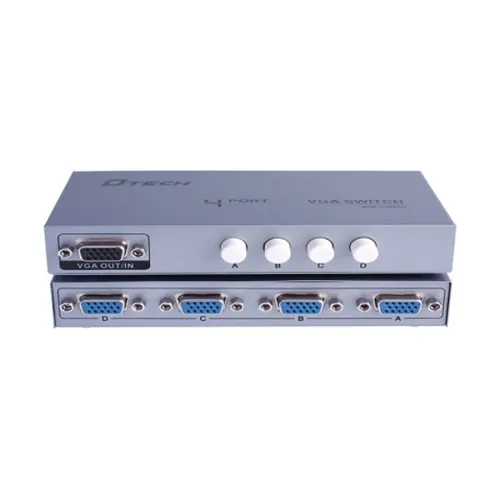
Dtech · DT-7034 4-in-1 VGA Switch
Dtech DT-7034 switches one of four VGA sources to one display, with up to 2560×1600 at 60Hz listed; remote and cable contents need confirmation.
Approximate Market Price
BDT 650
Informational market estimate only; this is not a current Store offer.
Compare store prices
No live offers for this variant
BDT 650
Approximate Market Price
Informational market estimate only; this is not a current Store offer.
Loading history…
Product story
Dtech DT-7034 is a manual VGA source switch designed to let users select among four VGA input sources and send the selected signal to one VGA display. Dtech’s product documentation identifies it as a 4-to-1 VGA switch; local retailer listings describe a maximum resolution up to 2560 × 1600 at 60Hz and 500MHz bandwidth. Confirm the port arrangement and included controls in the supplied unit before purchase. This is a VGA switch, not a VGA-to-HDMI converter, splitter that displays four sources simultaneously, or USB KVM.
The manufacturer describes four inputs and one output: connect up to four VGA sources to the switch and connect its output to a VGA monitor or projector. Select one source at a time for display. It does not combine four images or show multiple sources concurrently. The device does not convert VGA to HDMI, DisplayPort or USB-C; a separate compatible converter may be required if the display lacks VGA input. Use suitable VGA cables, which may not be included.
The manufacturer and local retailer pages list support up to 2560 × 1600 at 60Hz and 500MHz bandwidth. This is a published maximum and the actual picture depends on the source output, display, VGA cable quality and length, selected mode and installation. It does not guarantee that every connected computer can run that mode through every cable. VGA is an analog video connection; do not infer digital HDMI features, HDR, HDCP or audio-video conversion from the resolution claim.
Dtech documentation states switching by buttons, and some retailer copy also mentions remote control. The specific local DT-7034 pages are inconsistent on whether a remote is included in the package, so verify supplied controls with the seller. Use the front-panel source buttons if present and check any source indicator to identify the active input. Do not assume automatic source switching or software control unless the seller confirms that function for this revision.
Manufacturer documentation describes easy installation and hot-plug support, meaning sources may be connected or disconnected without powering the switch off. Follow the manuals for the connected computers and display, and avoid forcing VGA connector screws or pins. Secure the connectors hand-tight. If the display does not show the selected source, check that source is powered, the correct input is selected and the source is configured for a compatible VGA mode.
Retailer listings cite desktops, notebooks, DVD players, set-top boxes, televisions, displays and projectors with VGA output/input as applicable. Dtech documentation lists legacy and current platform families including Windows, Apple/Mac, Linux, Unix and others, but a manual analog switch does not install operating-system drivers. Compatibility depends on actual VGA ports and supported signal modes. Confirm the exact connector gender and ports on all source devices and the monitor before ordering.
Dtech catalog material mentions an audio port supporting phone or microphone, while some retailer specifications describe only VGA female connectors. The available listing evidence does not establish the included audio cable, exact audio connector routing or whether every DT-7034 retail package includes audio switching. Verify the physical unit and audio wiring if sound routing is required. The VGA switch does not itself provide USB keyboard/mouse sharing or peripheral switching.
The switch is listed with female VGA ports; source and display cables generally need matching male VGA plugs. Cable contents and lengths must be confirmed with the seller. Ryans lists distance guidance up to 30m for VGA and 100m for audio, but signal quality can decline with cable type, shielding, source and environment; these maxima are not a guarantee for every setup. Keep cables away from strong interference sources and avoid sharp bends.
Only the selected input is sent to the output; the device is not a VGA splitter for simultaneous identical outputs and is not a signal converter. If the image is fuzzy or absent, test a shorter known-good cable, check all VGA pins and screws, confirm the monitor supports the source resolution/refresh rate, and select the correct input. Some computers may need their VGA output mode configured manually. The listing does not specify EDID emulation behavior across every source/display combination.
Ryans lists a one-year warranty and China origin/assembly; warranty and package details vary by seller. Confirm selected BiponiBD offer, warranty provider, return policy, gray color, 4-input/1-output layout, resolution needs, button/remote contents, audio support and whether VGA cables are included. Verify your source devices provide VGA and the display accepts VGA. If your equipment uses HDMI or USB-C only, budget for a separate compatible converter and confirm directionality.
It selects one of four VGA sources and sends that selected signal to one VGA display.
No. It is a 4-input/1-output selector; only one selected source is shown at a time.
Manufacturer and retailer documents list up to 2560 × 1600 at 60Hz and 500MHz bandwidth.
No VGA-to-HDMI conversion is specified; use a separate compatible converter if needed.
Cable inclusion is not consistently established. Confirm package contents with the seller.
Some descriptions mention remote control, but inclusion is unclear; verify the actual package.
A manufacturer catalog mentions an audio port, but local package details are unclear. Confirm if audio switching is essential.
Manufacturer material says hot-plug support; follow source and display instructions.
Not directly. The switch uses VGA; a separate compatible adapter/converter may be needed.
Ryans lists one year; confirm the selected BiponiBD seller’s written terms.
Source note: Dtech manufacturer DT-7034 switcher material, Ryans and Star Tech product specifications. The product is a VGA 4-to-1 source switch, not a digital-video converter; remote, audio and cable package details require seller confirmation.
Helpful answers
Product-specific answers maintained with the catalog information.
It selects one of four VGA sources and sends that selected signal to one VGA display.
No. It is a 4-input/1-output selector; only one selected source is shown at a time.
Manufacturer and retailer documents list up to 2560 × 1600 at 60Hz and 500MHz bandwidth.
No VGA-to-HDMI conversion is specified; use a separate compatible converter if needed.
Cable inclusion is not consistently established. Confirm package contents with the seller.
Some descriptions mention remote control, but inclusion is unclear; verify the actual package.
A manufacturer catalog mentions an audio port, but local package details are unclear. Confirm if audio switching is essential.
Manufacturer material says hot-plug support; follow source and display instructions.
Not directly. The switch uses VGA; a separate compatible adapter/converter may be needed.
Ryans lists one year; confirm the selected BiponiBD seller’s written terms.
Customer community
Become a merchant
Join BiponiBD, publish accurate offers and start free.