Pros
- Long 5m run for room-scale source/display placement
- Manufacturer documents 4K@60Hz and HDMI 2.0 support
- Copper-core and shielding construction details are published

All categories
 New condition
Computer Accessories
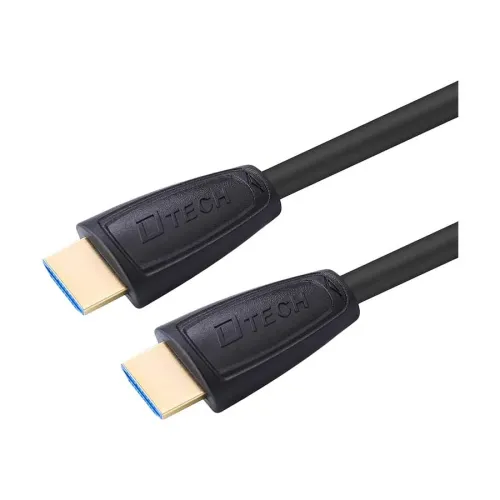
Dtech · DT-H006 5m HDMI 2.0 Cable
Dtech DT-H006 is a 5m HDMI 2.0 male-to-male cable rated for up to 4K@60Hz and 18Gbps; confirm device support and warranty.
Approximate Market Price
BDT 650
Informational market estimate only; this is not a current Store offer.
Compare store prices
No live offers for this variant
BDT 650
Approximate Market Price
Informational market estimate only; this is not a current Store offer.
Loading history…
Product story
Dtech DT-H006 is a 5-meter HDMI male-to-male cable for connecting compatible HDMI source and display devices. Dtech’s model datasheet identifies the 5m DT-H006, 19+1 copper-core construction, HDMI 2.0, 4K at 30Hz and 60Hz modes, and a 24K gold-plated connector interface. The manufacturer’s HDMI 2.0 product page lists up to 18Gbps total bandwidth. Actual video mode depends on the source, display, settings and signal integrity over the cable run.
Both ends are standard HDMI male plugs. Connect an HDMI output on a compatible computer, player or console to an HDMI input on a television, monitor, projector or receiver. This is a cable, not an adapter, splitter, active repeater or converter between HDMI and USB-C/DisplayPort/VGA. Check the port shape and source-to-display direction before purchase. The product package is listed as one HDMI cable and a qualification/certificate card in the manufacturer datasheet; confirm local package contents.
Dtech’s DT-H006 model datasheet states HDMI 2.0 and supports modes including 4K at 30Hz and 4K at 60Hz. Its separate HDMI 2.0 product page lists 18Gbps total bandwidth and refresh modes up to 4K/60Hz. This is a manufacturer specification, not an independent certification of every retail unit. The source, display, HDMI port configuration, color depth, chroma mode and settings must all support the chosen signal. Do not assume 4K at 120Hz, HDMI 2.1, 48Gbps, HDR performance or VRR unless separately confirmed.
At 5 meters, the cable can connect devices farther apart than a short desk cable, such as a media source and television across a room. Longer passive copper runs can be more sensitive to cable routing, connector condition, interference and the selected resolution/refresh mode. Avoid tight coils, sharp bends, doorways and pulling tension. If a required high-bandwidth mode is unstable over the run, test a shorter cable or use a suitable active/fiber solution specified for that mode.
Dtech lists 19+1 pure-copper cable cores, a PVC jacket, double shielding/aluminum foil and a 24K gold-plated interface. The datasheet also mentions oxygen-free copper and an outer soft coat. These are manufacturer descriptions, not independently tested performance or corrosion guarantees. Gold plating does not improve image quality by itself; reliable contact, cable construction and compatible devices determine signal integrity. Keep plugs clean and avoid bending the cable sharply at the connector strain relief.
The cable carries digital HDMI audio/video signals when the connected devices support them. Dtech lists computers, HD/Blu-ray players, televisions, game consoles and other HDMI devices as applications. Supported audio formats, eARC/ARC behavior, HDCP revision, CEC features and specific console modes are not fully documented for this retail SKU. Use the display input and source output settings required by the devices; confirm any required audio or copy-protection feature with the seller and device manuals.
Turn off or follow the equipment makers’ instructions before connecting. Insert both HDMI plugs firmly without forcing them, select the correct display input and set a video mode supported by both devices. If the screen is blank or flickers, check connector seating, input selection, source output settings and whether the display accepts the selected resolution/refresh rate. Try a lower mode and inspect the plugs for damage. A 4K label does not ensure every port or graphics device supports 4K/60Hz.
This cable requires HDMI output and input ports. A USB-C-only or DisplayPort-only computer needs a separate adapter or converter that supports the intended signal; this cable does not perform that conversion. The manufacturer describes it as HDMI 2.0, not HDMI 2.1. The reviewed sources do not state 4K/120Hz support, 8K support, a certified cable category, a guaranteed maximum distance at all modes, or a measured bend-life rating. Verify requirements for the exact television, monitor, receiver and graphics device.
Route the cable so it is not pinched by furniture or pulled by its cord. Grip the plug housing when disconnecting and avoid repeatedly flexing the connector end. Keep the cable away from liquids, high heat and sharp edges. Do not use a damaged plug or cable jacket. For long runs near power wiring or other interference sources, choose a route that reduces interference and test the actual resolution/refresh mode after installation.
The manufacturer and local retailer listings show one year warranty, though coverage and provider depend on the selected seller. Verify the delivered model code DT-H006, 5m length, HDMI male-to-male plugs, black color, cable condition, current price, stock and written warranty. Confirm that the required source and display can drive the target mode through a 5m copper cable. If the setup requires 4K/60Hz, HDR, ARC, CEC or a specific color depth, ask the seller to confirm the exact requirement rather than relying only on a generic 4K label.
The manufacturer lists the DT-H006 cable at 5 meters.
It has HDMI male connectors at both ends.
Dtech’s DT-H006 datasheet lists 4K@60Hz, and its HDMI 2.0 page lists up to 18Gbps. Device and signal conditions also matter.
No. The manufacturer identifies it as HDMI 2.0; HDMI 2.1 features are not established.
That mode is not listed for DT-H006 in the reviewed manufacturer material.
The manufacturer datasheet lists a 19+1 copper core and describes pure copper.
Compatible HDMI sources and displays such as computers, TVs, projectors, players and consoles are listed.
No. A USB-C-to-HDMI adapter compatible with the device is required; this cable has HDMI plugs at both ends.
Some local listings show one year; confirm written coverage with the selected BiponiBD seller.
Confirm that both devices support the target resolution/refresh rate and test signal stability along the intended route.
Source note: DTECH DT-H006 official 5m cable datasheet/product page and local Star Tech/Ryans listings. Manufacturer material lists HDMI 2.0 and 4K@60Hz; actual performance over 5m depends on both devices, settings and cable condition.
Helpful answers
Product-specific answers maintained with the catalog information.
The manufacturer lists the DT-H006 cable at 5 meters.
It has HDMI male connectors at both ends.
Dtech’s DT-H006 datasheet lists 4K@60Hz, and its HDMI 2.0 page lists up to 18Gbps. Device and signal conditions also matter.
No. The manufacturer identifies it as HDMI 2.0; HDMI 2.1 features are not established.
That mode is not listed for DT-H006 in the reviewed manufacturer material.
The manufacturer datasheet lists a 19+1 copper core and describes pure copper.
Compatible HDMI sources and displays such as computers, TVs, projectors, players and consoles are listed.
No. A USB-C-to-HDMI adapter compatible with the device is required; this cable has HDMI plugs at both ends.
Some local listings show one year; confirm written coverage with the selected BiponiBD seller.
Confirm that both devices support the target resolution/refresh rate and test signal stability along the intended route.
Customer community
Become a merchant
Join BiponiBD, publish accurate offers and start free.