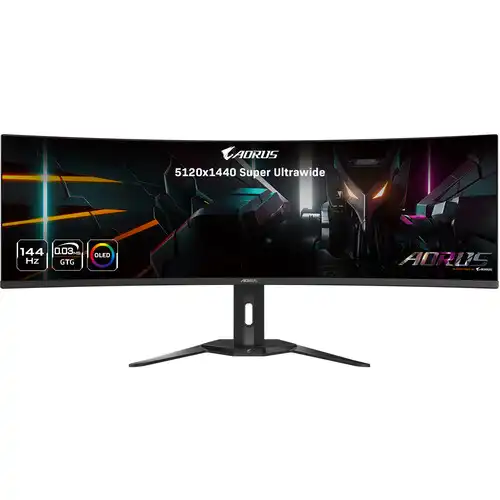
AORUS CO49DQ overview
The GIGABYTE AORUS CO49DQ is a 49-inch super-ultrawide OLED gaming monitor with a 5120 × 1440 Dual QHD resolution, 32:9 aspect ratio, 144Hz maximum refresh rate and 0.03ms GTG response time. GIGABYTE lists 99% DCI-P3 color saturation, 10-bit color, VESA DisplayHDR True Black 400, a 1800R curve, HDMI 2.1, DisplayPort 1.4, USB-C with up to 18W power delivery, KVM and built-in 5W × 2 speakers.
Identify the exact CO49DQ model
Check the AORUS CO49DQ model name and regional label on the unit, carton and invoice before purchase. It is an OLED 49-inch 32:9 display. Model names in the AORUS range can look similar while using different panel sizes, resolutions, curves and ports. The listing retains its original URL, active status and variant/SKU identity. Confirm the supplied unit matches this model.
49-inch QD-OLED and 1800R curve
GIGABYTE describes a 49-inch OLED monitor with 1,196.7 × 339.2mm viewing area and a soft 1800R curvature. The broad curved panel wraps more of the horizontal field of view and suits flight simulation, racing, wide timelines and side-by-side desktop windows. The curve and 32:9 format need adequate desk depth and width; check the product dimensions before arranging a stand or arm.
5120 × 1440 Dual QHD resolution
The native 5120 × 1440 resolution combines two 2560 × 1440 areas side by side, with an ultrawide 32:9 shape. It provides a large continuous desktop, while games and video must support ultrawide framing to fill the screen. Some content may use black bars or crop differently. Confirm GPU output and operating-system mode support before expecting the full native resolution.
144Hz maximum refresh rate
The specification lists a maximum 144Hz refresh rate. A higher refresh can make supported games and motion feel smoother when the computer outputs enough frames. The monitor does not raise a game’s frame rate by itself. Use a suitable graphics source and cable, choose the supported refresh mode in system settings and verify the signal information shown by the monitor.
0.03ms GTG response time
GIGABYTE specifies 0.03ms GTG response time for the OLED panel. This manufacturer rating describes pixel transition behavior under its test definition; it is not the complete input-to-photon latency of a game system. Motion clarity also depends on frame rate, refresh rate, processing settings and content. Evaluate the display in the actual mode and games you use.
OLED contrast, color and HDR
GIGABYTE lists 1,500,000:1 typical contrast, 99% DCI-P3 saturation, 10-bit color (1.07 billion colors), 250 cd/m² typical brightness and VESA DisplayHDR True Black 400 support. HDR performance depends on compatible content and source settings. OLED pixels can switch off for deep blacks, but brightness varies by content and picture mode; the 250-nit figure is typical SDR brightness.
Non-glare display and viewing angles
The official specification identifies a non-glare surface and 178-degree horizontal and vertical viewing angles. Room lighting, reflections, viewing distance and seating position still affect perceived contrast and color. Place the monitor to limit direct light sources and adjust the stand so the curved panel is centered at a comfortable distance. These specifications do not guarantee color uniformity across every delivered panel.
HDMI 2.1 and DisplayPort 1.4
Connectivity includes two HDMI 2.1 inputs and one DisplayPort 1.4 input. Connect gaming PCs, compatible consoles or other video devices through the port supported by the source and chosen resolution/refresh combination. Cable quality, graphics hardware and device timing can limit available modes. GIGABYTE lists HDMI VRR and ALLM as model features; enable compatible settings on both connected devices.
USB-C with DisplayPort Alt Mode
The USB Type-C connection supports Alternate Mode and is specified for up to 18W Power Delivery. It can carry compatible video and provide limited power to a connected device, but 18W is not a high-power laptop charging replacement. Check your laptop’s charging requirement and use its proper power adapter if needed. The monitor also has USB upstream/downstream ports for its hub and KVM functions.
KVM and USB hub
The CO49DQ includes a KVM feature and USB 3.0 connectivity: one USB upstream port and two downstream ports are specified. A KVM setup can share attached keyboard and mouse peripherals between connected systems when the correct upstream data path is connected and selected. It does not merge computers or applications. Consult the on-screen menu and manual if USB devices do not follow the active input.
OLED Care and gaming features
GIGABYTE promotes OLED Care protection and gaming tools including Black Equalizer, Dashboard, Crosshair, Timer, Counter, PiP/PbP, Auto-Update, 6-axis color control and HDMI-CEC. OSD Sidekick requires a USB connection between the monitor and PC. OLED protection features can help manage panel use, but they do not remove all risks from static images; follow the manual and vary long-running content.
Built-in speakers and audio output
The official specification lists two built-in 5W speakers and an earphone jack. These provide convenient basic audio, while an external headset or speaker system may suit more demanding listening. Audio behavior depends on source output and selected input. If sound is missing, check the active display input, operating-system audio output and monitor volume settings.
Adjustable stand and VESA mounting
The supplied stand supports -5° to +20° tilt, ±30° swivel and 130mm height adjustment. The VESA mounting pattern is 100 × 100mm; pivot is listed as unavailable. The estimated weight is 11.28kg with stand and 8.33kg without. Check desk or arm load rating, mounting screws, clearance and the wide footprint before installation.
Dimensions and connections for a wide desk
With the stand, GIGABYTE lists dimensions of 1194.78 × 558.80 × 261.52mm; without the stand, 1194.78 × 372.23 × 160.51mm. The box is larger still, so plan transport and placement accordingly. Allow room for the curved screen, stand, cables and airflow. The included accessory list may vary by region; verify exact local box contents with the seller.
Power and operating environment
The monitor uses a built-in power board and accepts AC 100–240V at 50/60Hz. GIGABYTE specifies 72W maximum input power, less than 0.5W in power-saving mode and less than 0.3W powered off under its stated conditions. Use a grounded outlet and the supplied power cable. Follow the product manual for ventilation, care, cleaning and safe operation.
PC and console compatibility
For PC gaming, confirm the GPU can drive 5120 × 1440 at the desired refresh through the selected HDMI or DisplayPort connection. Console support depends on console generation, game output and aspect-ratio behavior; a 32:9 screen may show side bars for standard 16:9 console output. Verify HDR, VRR and ALLM in the source menus and test the actual content before relying on a particular mode.
Bangladesh availability, price and warranty
This content review verifies manufacturer specifications, not a live BiponiBD offer, current stock, delivery condition or serial-specific local warranty. Ask the seller to confirm the exact CO49DQ model, new/sealed condition, current price, available service route, warranty duration and included cables for the unit being supplied. Keep the invoice and carton serial label for support.
Frequently asked questions
What size is the CO49DQ? 49 inches. What resolution? 5120 × 1440 Dual QHD. What aspect ratio? 32:9. What refresh rate? Up to 144Hz. What response rating? 0.03ms GTG. What is the curve? 1800R. What HDR certification? VESA DisplayHDR True Black 400. Does it have USB-C? Yes, with DisplayPort Alt Mode and up to 18W PD. Is KVM included? Yes. What warranty applies in Bangladesh? Confirm the supplied serial and local terms with the seller.