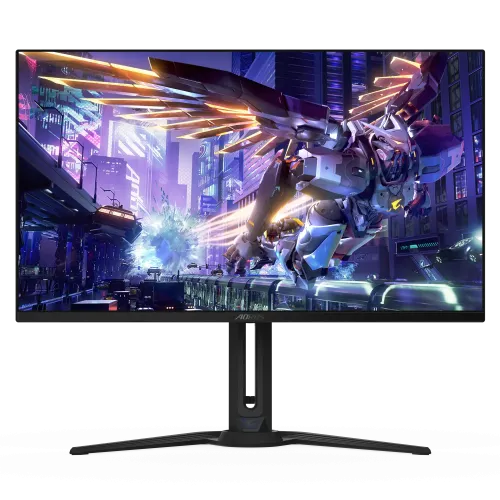
AORUS FO32U2P overview
The GIGABYTE AORUS FO32U2P is a 31.5-inch 4K QD-OLED gaming monitor with 3840 × 2160 resolution, 16:9 aspect ratio, 240Hz refresh and 0.03ms response specification. The standout connection is DisplayPort 2.1 UHBR20 with 80Gbps interface bandwidth. Gigabyte also lists two HDMI 2.1 inputs, Mini DisplayPort 2.1 UHBR20, USB-C video, a DP 1.4 output for daisy chaining, KVM and AI-based OLED Care.
Exact model identity
Check FO32U2P on the display label, box and invoice. The model differs from FO32U2, FO32U, FO32U2P-EK regional packages and newer products in the AORUS OLED lineup. Ports and accessories may vary by country. Do not transfer FO32U2’s DisplayPort 1.4 input or other sibling-model specifications to FO32U2P. This product’s existing BiponiBD slug and SKU remain unchanged.
31.5-inch 4K QD-OLED panel
Gigabyte describes a 32-inch class QD-OLED panel; the detailed specification lists 31.5 inches. Native resolution is 3840 × 2160 with a 16:9 aspect ratio. OLED pixels produce their own light, which supports very deep black image areas. The display is flat and intended for desktop viewing. Manage room reflections and avoid pressing on the thin panel surface.
240Hz refresh and 0.03ms response
The manufacturer lists 240Hz and 0.03ms response time. High refresh can show smoother motion when the PC renders enough frames. Response time is a panel-transition figure, not full system input lag. Game engine, frame pacing, GPU, cable and chosen input all contribute to responsiveness. Set a supported refresh in the graphics settings after connecting the monitor.
DisplayPort 2.1 UHBR20
Gigabyte highlights a full-size DisplayPort 2.1 UHBR20 input with up to 80Gbps bandwidth. The product page positions it for uncompressed 4K at 240Hz and 8K at 60Hz under suitable source conditions. Actual operation requires a compatible graphics output and certified cable, such as a VESA DP80 cable. Check the input mode, color depth and source capabilities before expecting a specific signal.
Mini DisplayPort 2.1 and daisy chain
The official product page also lists a Mini DisplayPort 2.1 UHBR20 input and a full-size DisplayPort 1.4 output. Gigabyte describes daisy-chain functionality for connecting multiple monitors. The DP output is not a second high-bandwidth input; the monitor manual specifies signal routing and supported modes. Confirm the exact cable type and daisy-chain limits for the computers and monitors in your setup.
HDMI 2.1 inputs and console support
The monitor has two HDMI 2.1 inputs. Gigabyte lists HDMI 2.1 connectivity for current consoles and high-refresh PC signals. Console refresh and resolution are determined by the console and game; the monitor’s 240Hz maximum is not a promise that a console can output 240 frames per second. Check the console video menu and exact input timing support.
HDR True Black 400
Gigabyte lists VESA DisplayHDR True Black 400 for the QD-OLED panel. Its specification lists typical 250 cd/m² brightness at 100% APL and up to 1,000 nits at 3% APL in HDR. The peak figure applies to a small highlight region, not full-screen sustained brightness. HDR also requires a compatible source, content and selected display mode.
Color coverage and 10-bit depth
The manufacturer lists 99% DCI-P3, 10-bit color and a typical 1.5-million-to-one contrast ratio. These are product-level specifications rather than measurement data for the individual unit sold. Color-managed software and display settings affect results. For professional work, use calibration tools and verify the supplied color report against the exact monitor and target workflow.
VESA ClearMR and motion clarity
The product specification identifies ClearMR 13000, a VESA motion-blur performance certification. ClearMR complements refresh and response specifications but does not represent the total latency of a game system. Motion clarity also depends on frame rate, refresh mode and content. Use the monitor’s motion features thoughtfully and compare them with your preferred brightness and image quality.
KVM and USB-C connectivity
Gigabyte lists KVM functionality and a USB-C port with DisplayPort Alt Mode. KVM lets compatible computers share a keyboard and mouse through the monitor when video and USB upstream connections are configured correctly. USB-C power delivery is model- and regional-spec dependent; the catalog previously claimed 65W. Check the exact regional specification and delivered unit manual before relying on USB-C to charge a laptop.
USB hub, audio and microphone
The official manual lists a USB Type-B upstream port, two USB 3.2 downstream ports, microphone input and headphone output. The downstream hub requires the upstream connection to a computer. Audio routing and KVM behavior depend on selected source. The reviewed official materials describe immersive sound through headphones; built-in speakers should not be assumed without regional specifications.
AI-based GIGABYTE OLED Care
Gigabyte describes AI-based OLED Care functions intended to minimize burn-in risk with minimal interruption. The monitor can run protective routines in the background and offers configurable settings. Follow on-screen prompts and allow maintenance to finish. OLED pixels may still wear unevenly after prolonged static use; care technology reduces risk but cannot guarantee that image retention will never occur.
Tactical Switch and gaming tools
AORUS lists Tactical Switch, Resolution Switch, Night Vision, Game Assist, Black Equalizer 2.0, crosshair and timer features. These options provide display overlays and image controls for games. Their behavior depends on mode and firmware, and enhancements can change the image. Use optional tools only where permitted by the game and according to the model’s control guide.
Ergonomic stand and portrait rotation
Gigabyte lists 130mm height adjustment, tilt from -5° to +20°, swivel from -20° to +20° and clockwise pivot up to 90°. Portrait orientation can suit documents but the monitor’s primary use is landscape gaming. The 31.5-inch curved-free panel is sizable; check desk space, screen height, stand clearance and cable routing before rotating or moving it.
VESA mounting and physical fit
The detailed specification lists a 100 × 100mm VESA mount. Confirm arm capacity and screw depth in the manual before installation. The panel is large and should be supported during assembly. Make room for rear connectors, the power adapter and thick display cables. Regional dimensions and included mounting hardware can vary, so verify the delivered package documentation.
Power and included accessories
The manual lists 78W operating consumption and 100–240V AC input. The official accessory specification may include power cable, HDMI 2.1 cable, DP 2.1 cable, Type-C cable, USB cable, quick-start guide, warranty card and a color calibration test report, but Gigabyte notes regional differences. Confirm local contents and cable certification with the seller before installation.
PC setup for 4K 240Hz
For 4K 240Hz over DisplayPort UHBR20, the source GPU and cable must support the required DisplayPort 2.1 bandwidth. HDMI and USB-C may have different modes and limits. Use the OSD information page to confirm the active signal, select 3840 × 2160 and desired refresh in the operating system, and test stability. The monitor does not guarantee that a game will render at 240fps.
Bangladesh price and warranty
This review does not confirm current BiponiBD stock, price, delivered condition or local warranty eligibility. Gigabyte advertises a three-year warranty including panel burn-in on its product page, while explicitly stating that warranty terms vary by region. Ask the seller to confirm the serial-specific Bangladesh service route, warranty length and OLED burn-in coverage in writing. Keep the invoice and serial details.
Frequently asked questions
What is the native resolution? 3840 × 2160 4K UHD. What refresh rate? 240Hz. What panel? QD-OLED. What is special about DisplayPort? Full-size DP 2.1 UHBR20 at up to 80Gbps. Does it support HDMI 2.1? Yes, two inputs. What HDR certification? DisplayHDR True Black 400. Does it have KVM? Yes. What is USB-C charging? Verify the exact regional specification; the reviewed source confirms video Alt Mode, while PD rating varies by spec/region. What warranty in Bangladesh? Confirm serial-specific terms locally.