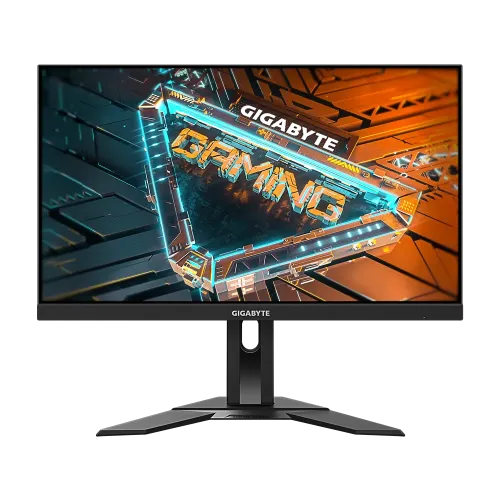
GIGABYTE G24F 2 23.8-inch FHD 165Hz (OC 180Hz) SS IPS Gaming Monitor pairs a 23.8-inch Full HD SS IPS panel with a 165Hz standard refresh rate and optional 180Hz overclocked mode. This guide covers its confirmed features, connection and USB options, stand adjustment, strengths, limitations and Bangladesh market observations.
A balanced 23.8-inch Full HD gaming screen
The GIGABYTE G24F 2 is a 23.8-inch Super Speed IPS gaming monitor with a Full HD 1920 × 1080 panel. It offers a familiar 16:9 image format for PC games, streaming video and everyday desktop work. GIGABYTE specifies a 527.04 × 296.46mm active viewing area, 0.2745mm pixel pitch and a non-glare surface. This size and resolution can be practical for desk setups and high frame rates, while offering less pixel density and workspace than a 1440p monitor. Users who spend long hours with small text or detailed design assets may want a higher-resolution alternative; gamers prioritizing smooth Full HD motion may find the balance more appealing.
165Hz standard and optional 180Hz overclock
A key detail for this exact model is that 165Hz is the standard maximum refresh, while 180Hz is an overclocked mode. GIGABYTE’s specification page explicitly labels it 165Hz/OC 180Hz. The content here preserves that difference so buyers do not mistake the OC figure for the unmodified native rating. Higher refresh can make motion, scrolling and supported games appear smoother when the graphics system can provide enough frames. To use the OC mode, enable it through the monitor settings if required and verify the connected computer, cable, selected input and display configuration. If the image flickers, drops signal or skips frames, return to 165Hz and check the cable and graphics output.
Panel, color and image presentation
The SS IPS panel is specified at 300 cd/m² typical brightness and 1100:1 typical contrast, with 178-degree viewing angles. GIGABYTE lists 95% DCI-P3 and 125% sRGB color saturation. The larger gamut can create vivid-looking games and video, but standard sRGB content may appear more saturated than intended without appropriate color management. This is a gaming-oriented specification rather than a factory calibration report. If color accuracy matters for photo, video or print work, check available picture modes and seek measured calibration results. The non-glare surface can reduce some reflected light in ordinary rooms, but placement and ambient light still affect comfort and readability.
Understanding 1ms MPRT
The manufacturer lists a 1ms MPRT response time. Moving Picture Response Time is not the same measurement as gray-to-gray pixel transition time and should not be read as a universal one-millisecond response for every pixel change. Motion appearance depends on refresh rate, overdrive, content and individual sensitivity. The monitor includes Smart OD and Aim Stabilizer tools that can alter motion presentation. Use moderate settings first and compare results in the games you play. If a mode reduces brightness, creates halos or looks less comfortable, turn it down. A strong headline number does not eliminate every form of motion blur or guarantee low total system latency.
Adaptive-Sync and HDR Ready
GIGABYTE lists Adaptive-Sync support and HDR Ready compatibility. Adaptive-Sync can coordinate refresh with compatible graphics output within supported operating modes, helping reduce tearing or uneven pacing. The GPU, driver, cable, selected input and OC setting all influence whether it works as expected. HDR Ready means the display can handle HDR signal content; it does not establish premium peak brightness, local dimming or high HDR contrast. The listed typical brightness is 300 cd/m². Treat HDR support as a compatibility feature and consider the G24F 2 mainly for its high-refresh Full HD image and gaming tools.
Gaming tools and OSD Sidekick
The monitor provides Aim Stabilizer, Black Equalizer, Dashboard, crosshair, timer, counter and Smart OD. These on-screen utilities can help users adjust visibility or display useful game information without installing an overlay for every task. OSD Sidekick allows monitor settings to be controlled from a PC through GIGABYTE software. Its USB upstream cable must connect the monitor to the computer for Sidekick, and the downstream ports then act as a USB hub for supported peripherals. Features are optional and can change the visual image; choose settings for clear and fair use within each game's rules and your own preference.
Ports and USB hub
There are two HDMI 2.0 inputs, one DisplayPort 1.2 input that supports HDR, one USB 3.2 Gen 1 upstream port, two USB 3.2 Gen 1 downstream ports and an earphone jack. The monitor does not have built-in speakers. The two video inputs can keep a PC and another device connected, while the USB hub can place peripherals close to the desk. Connect the upstream USB cable to the computer to enable data functions. Maximum refresh and HDR behavior depend on the actual source and selected port. Check the connected GPU output and cable before assuming every input supports every timing mode.
Stand flexibility and VESA mounting
GIGABYTE specifies 130mm of height adjustment and tilt from -5 degrees to +20 degrees. Swivel and pivot are listed as unavailable. The stand can therefore raise the display and change its vertical angle, but it does not rotate the panel or turn left and right. A 100 × 100mm VESA mount offers another option for a more flexible arm. Confirm the arm load rating and screw length before attaching it. The manufacturer estimates 541 × 519.3 × 136.75mm and 4.8kg with the stand, and 541 × 326.4 × 53.4mm and 3.2kg without it. Allow space for the stand footprint and cables.
Power, accessories and setup
The published power consumption is 17.5W under CEC test conditions, with 0.5W in power-saving mode and 0.3W when powered off. The input supports 100–240V AC. GIGABYTE lists a power cable, HDMI cable, USB cable, quick-start guide and warranty card, although bundles can vary by region. Keep the packaging and invoice until the return period and warranty process are understood. For initial setup, connect the video cable, choose the correct input, install current graphics drivers and set the preferred resolution and refresh rate. Test the standard 165Hz mode before enabling 180Hz OC so any instability can be isolated.
Bangladesh price and warranty checks
PCPartsBD showed an aggregated snapshot range of ৳23,800–৳24,600 and several retailer entries marked in stock when checked. The listed sellers included Computer Village at ৳23,800, Creatus at ৳24,400 and other entries between ৳24,500 and ৳24,600; some stores listed call-for-price or check-stock. This comparison data is a time-bound market observation, not a BiponiBD offer or guaranteed live inventory. Confirm current price, exact G24F 2 SKU, stock and delivery terms with the retailer. Some Bangladesh pages advertise three years of warranty; request the provider, serial eligibility, invoice terms and local service procedure before paying.
Who should consider the G24F 2?
The G24F 2 may suit a gamer looking for a 23.8-inch Full HD SS IPS monitor with 165Hz native refresh, optional 180Hz OC, Adaptive-Sync and a height-adjustable stand. The USB hub and OSD utilities can also help with a compact desktop setup. It may be less suitable if you require QHD detail, speakers, swivel or pivot adjustment, USB-C connectivity or professional color accuracy without calibration. Consider the frame rates your PC can sustain, whether the OC mode is useful, the number of devices you connect and the local warranty terms. Those factors matter more than the 180Hz label alone.
Specifications at a glance
- Brand: GIGABYTE
- Model: G24F 2
- Panel Size: 23.8-inch SS IPS
- Display Viewing Area: 527.04 × 296.46mm
- Resolution: 1920 × 1080 Full HD
- Aspect Ratio: 16:9
- Pixel Pitch: 0.2745 × 0.2745mm
- Display Surface: Non-glare
- Brightness: 300 cd/m² typical
- Contrast Ratio: 1100:1 typical
- Viewing Angle: 178° horizontal / 178° vertical
- Color Saturation: 95% DCI-P3; 125% sRGB
- Display Colors: 16.7 million
- Refresh Rate: 165Hz native; 180Hz overclocked
- Response Time: 1ms MPRT
- HDR: HDR Ready
- Adaptive-Sync: Yes
- Flicker-free: Yes
- Low Blue Light: Yes
- HDMI: 2 × HDMI 2.0
- DisplayPort: 1 × DisplayPort 1.2 with HDR capability; HBR3 not supported
- USB: 1 × USB 3.2 Gen 1 upstream; 2 × USB 3.2 Gen 1 downstream
- Audio: 1 × earphone jack; no built-in speakers
- Gaming Utilities: OSD Sidekick, Aim Stabilizer, Black Equalizer, Dashboard, crosshair, timer, counter, Smart OD
- Power Type: Built-in power board
- Power Consumption: 17.5W under CEC test conditions
- Power Saving: 0.5W
- Power Off: 0.3W
- Voltage: 100–240V AC
- Tilt: -5° to +20°
- Swivel: Not supported
- Pivot: Not supported
- Height Adjustment: 130mm
- VESA Mount: 100 × 100mm
- Kensington Lock: Yes
- Dimensions with Stand: 541 × 519.3 × 136.75mm
- Dimensions without Stand: 541 × 326.4 × 53.4mm
- Weight with Stand: 4.8kg estimated
- Weight without Stand: 3.2kg estimated
- Gross Weight: 7.83kg estimated
- Accessories: Power cable, HDMI cable, USB cable, quick-start guide, warranty card (regional bundle may vary)
- Warranty: Local listings advertise 3 years; verify provider and unit eligibility
Frequently asked questions
What refresh rate does the GIGABYTE G24F 2 support?
GIGABYTE lists 165Hz as the standard maximum and 180Hz as an overclocked mode. Start at 165Hz and enable OC only if the mode remains stable with your GPU, cable, selected input and display settings.
Is 180Hz the native refresh rate?
No. The manufacturer specification identifies 165Hz/OC 180Hz. The product name and short description retain that distinction so the overclocked rate is not mistaken for the standard mode.
What does the 1ms response claim mean?
The official specification lists 1ms MPRT. MPRT describes motion-picture persistence and is not a 1ms GTG transition guarantee. Actual transitions and motion clarity depend on overdrive and refresh settings.
Which ports and USB functions does it have?
It includes two HDMI 2.0 inputs, one DisplayPort 1.2 input capable of HDR, one USB upstream port, two USB 3.2 Gen 1 downstream ports and an earphone jack. USB peripherals require the upstream connection to the computer.
Does it support Adaptive-Sync?
Yes. GIGABYTE lists Adaptive-Sync. The graphics card, driver, selected port and refresh mode must be compatible for variable refresh to work.
What are the stand adjustments?
The stand supports 130mm height adjustment and tilt from -5° to +20°. GIGABYTE lists no swivel or pivot adjustment for this model. A VESA arm may provide additional movement.
Can the screen be mounted on a wall or arm?
Yes. The manufacturer specifies a 100×100mm VESA pattern. Confirm the mount’s load rating and correct screw length before installation.
Does it have built-in speakers?
No. GIGABYTE lists the speaker as N/A. Use headphones or external speakers through the computer or other connected audio equipment; the monitor has an earphone jack.
What does HDR Ready mean?
HDR Ready indicates HDR signal support, not guaranteed high peak brightness, local dimming or premium HDR contrast. The published typical brightness is 300 cd/m², so evaluate the monitor primarily as a high-refresh Full HD display.
What is the price in Bangladesh?
PCPartsBD showed a snapshot range of ৳23,800–৳24,600 with several seller entries marked in stock; the listing data is not a BiponiBD offer and can change. Confirm current price and stock directly with the retailer before buying.
What warranty is available locally?
Some local listings advertise three years. Confirm the exact seller, serial eligibility, warranty provider, invoice requirements and service terms for the specific unit because retailer coverage can differ.
What should I consider before enabling 180Hz OC?
Verify that the graphics output and cable support the selected mode, enable OC in the monitor’s OSD if required, then test for flicker, frame skipping or signal loss. If unstable, return to the native 165Hz setting.
Source note: Technical specifications are from GIGABYTE. Bangladesh price snapshots are aggregated retailer listings and can change; confirm live stock, package and warranty before purchase.