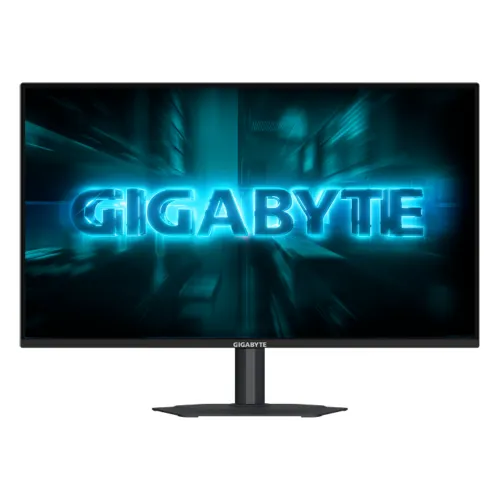
GIGABYTE G25F2A 24.5-inch FHD 240Hz SS IPS Gaming Monitor combines Full HD resolution with a 240Hz SS IPS panel, Adaptive-Sync, HDR10 input support and a fully adjustable stand. This guide explains its verified specifications, image and motion features, setup requirements, limitations and Bangladesh purchase checks.
A 24.5-inch Full HD esports display
The GIGABYTE G25F2A is a 24.5-inch monitor for players who want fast Full HD motion and flexible desk positioning. Its Super Speed IPS panel shows 1920 × 1080 pixels in a 16:9 aspect ratio. GIGABYTE lists a viewing area of 543.744 × 302.616mm and a non-glare surface. At this size, Full HD is familiar for games and everyday desktop work, and it can be easier for a graphics card to drive at very high frame rates than a QHD panel. The trade-off is lower pixel density and less workspace than 1440p. Buyers who prioritize dense text, large spreadsheets or detailed image editing should compare a higher-resolution display before choosing.
240Hz refresh and 1ms GTG
The headline specification is a maximum 240Hz refresh rate, paired with a manufacturer-listed 1ms GTG response time. A high refresh rate can present motion more frequently than a typical 60Hz screen and can make fast camera movement and cursor motion appear smoother. The benefit is most noticeable when a capable PC consistently produces high frame rates. It does not create additional frames or guarantee lower game latency by itself. To select the highest mode, connect through a supported HDMI or DisplayPort path, update the graphics driver and select the refresh rate in system display settings. If 240Hz is unavailable, check the source capability, cable, chosen resolution and monitor input.
SS IPS image and wide color
GIGABYTE specifies a Super Speed IPS panel, 300 cd/m² typical brightness, 1000:1 typical contrast and 178-degree viewing angles. It also lists 16.7 million colors and 120% sRGB color saturation. This wide saturation can make games and videos look vivid, but it may also make standard sRGB content look more intense than intended when no color-management or sRGB-limiting mode is used. For color-critical work, check the available picture modes and seek calibrated measurements rather than assuming that a large gamut percentage means accurate color. The matte non-glare surface helps limit some reflections, but it cannot remove glare from a bright window or direct light.
Adaptive-Sync and G-SYNC compatibility
The G25F2A supports Adaptive-Sync, and the official GIGABYTE product page labels it G-SYNC Compatible. These technologies can coordinate monitor refresh with compatible graphics output over supported modes and may reduce tearing or uneven pacing. Results depend on the GPU, driver, game, input and selected refresh range. They do not raise graphics performance. Enable the feature in the monitor menu and graphics control panel where appropriate, then verify that the selected resolution and refresh rate remain stable. Console VRR support and maximum console refresh may differ from PC behavior, so check the console model and game mode separately.
Gaming controls for darker scenes and motion
GIGABYTE includes Smart OD, Black Equalizer, Game Assist and Aim Stabilizer. Smart OD adjusts overdrive according to refresh behavior to help manage ghosting. Black Equalizer changes dark-scene visibility, while Game Assist includes tools such as an on-screen timer and crosshair. Aim Stabilizer is intended to reduce motion blur. These features alter the displayed image and should be tuned to preference: stronger enhancement can affect brightness, contrast or visual artifacts. Compare changes in the actual game rather than maximizing every setting. The monitor also supports control through GIGABYTE OSD Sidekick within GCC when the monitor is connected to the PC with an HDMI or DisplayPort cable.
HDR10 and practical expectations
The monitor accepts HDR10 content and is marketed as an HDR-capable gaming display. HDR10 signal support means it can receive compatible content; it does not alone guarantee high HDR peak brightness, local dimming or the contrast of a premium HDR display. GIGABYTE lists 300 cd/m² typical brightness and 1000:1 typical contrast. Treat HDR as a compatibility feature and judge the picture using actual content and settings. The 240Hz and motion-focused features are the primary reasons to consider this model, while users seeking an HDR-first movie or editing display should compare measured HDR performance and local dimming on alternative products.
Connections, sound and source switching
The connection list includes two HDMI 2.0 inputs, one DisplayPort 1.4 and one earphone jack. This layout can support a desktop PC and an additional device without constantly swapping cables. The G25F2A also has two built-in 2W speakers. Their convenience is useful for basic system sound, notifications or casual viewing, while a headset or external speakers can provide stronger audio. Confirm that the source device and cable support the resolution and refresh rate you want. An HDMI 2.0 label does not mean every connected source can output 240Hz; the source timing, GPU and cable all affect the available mode.
Adjustable stand and mounting
The manufacturer specifies an ergonomic stand with 130mm height adjustment, tilt from -5 to +21 degrees, swivel of ±15 degrees and pivot from 0 to 90 degrees counter-clockwise. These adjustments help align the display to different desks and seating positions and allow a portrait orientation for some workflows. A 100 × 100mm VESA pattern supports compatible arms or wall mounts. Verify the mounting plate, load limit and clearance before installation. GIGABYTE estimates dimensions with the stand at 556.9 × 498.3 × 187.5mm and weight at 4.34kg; without the stand it is 556.9 × 321.5 × 51.3mm and 2.73kg. Check desk depth and cable routing before setup.
Power use and included accessories
GIGABYTE lists 16W power consumption under CEC test conditions, less than 0.5W in power-saving mode and less than 0.3W when off. The power input is AC 100–240V at 50/60Hz. The listed regional bundle includes a power cable, HDMI cable, quick-start guide and warranty card, but included accessories can vary between markets and sellers. Confirm the sealed package contents and keep the box, serial information and invoice until return and warranty conditions are clear. The integrated power board reduces the need for a separate external monitor brick, while the cable arrangement should still be checked against your desk layout.
Bangladesh price and warranty
A Bangladesh price aggregator showed a snapshot range of ৳20,000–৳23,400 and several retailer listings marked in stock when checked, including TechLand around ৳20,500. These are seller observations collected by a third-party comparison page, not a BiponiBD offer or a guarantee of live inventory. Contact the store for a fresh price, stock confirmation, delivery terms and exact SKU. Local seller pages advertise a three-year warranty. GIGABYTE Bangladesh notes that warranties provided by agents or dealers may remain the responsibility of those providers and may not pass directly to the manufacturer. Ask who will service the exact serial number, whether the channel is authorized, and which invoice, packaging and claim rules apply.
Who should consider the G25F2A?
This model is aimed at a player who values 240Hz Full HD performance, a fast IPS-type panel and an adjustable stand. The multiple inputs, built-in speakers and monitor-side gaming tools also make it practical for a desktop setup that switches among devices. It may be less suitable for users seeking QHD detail, verified professional color accuracy, USB-C docking or high-end HDR. Think about whether your computer can deliver the frame rates that justify 240Hz, whether Full HD suits your viewing distance and work, and whether the local seller can document warranty coverage. Matching the monitor to the PC and room is more useful than choosing by a single headline number.
Specifications at a glance
- Brand: GIGABYTE
- Model: G25F2A
- Panel Size: 24.5-inch SS IPS
- Display Viewing Area: 543.744 × 302.616mm
- Resolution: 1920 × 1080 (Full HD)
- Aspect Ratio: 16:9
- Pixel Pitch: 0.2832mm horizontal × 0.2802mm vertical (calculated from viewing area and resolution)
- Display Surface: Non-glare
- Brightness: 300 cd/m² typical
- Contrast Ratio: 1000:1 typical
- Viewing Angle: 178° horizontal / 178° vertical
- Color Saturation: 120% sRGB (manufacturer stated)
- Display Colors: 16.7 million
- Refresh Rate: Up to 240Hz
- Response Time: 1ms GTG
- HDR Support: HDR10 input support
- Adaptive-Sync: Yes
- G-SYNC Compatibility: GIGABYTE product page labels G-SYNC Compatible
- HDMI: 2 × HDMI 2.0
- DisplayPort: 1 × DisplayPort 1.4
- Audio: 2 × 2W speakers; 1 × earphone jack
- Ergonomic Stand: 130mm height; -5° to +21° tilt; ±15° swivel; 0° to 90° counter-clockwise pivot
- VESA Mount: 100 × 100mm
- Kensington Lock: Yes
- Power Type: Built-in power board
- Power Consumption: 16W under CEC test conditions
- Power Saving: Less than 0.5W
- Power Off: Less than 0.3W
- Voltage: AC 100–240V, 50/60Hz
- Dimensions with Stand: 556.9 × 498.3 × 187.5mm
- Dimensions without Stand: 556.9 × 321.5 × 51.3mm
- Weight with Stand: 4.34kg
- Weight without Stand: 2.73kg
- Gross Weight: 6.0kg
- Accessories: Power cable, HDMI cable, quick-start guide and warranty card (regional bundle may vary)
- Warranty: Local sellers advertise 3 years; verify serial/channel coverage with seller
Frequently asked questions
What is the maximum refresh rate of the G25F2A?
GIGABYTE specifies a maximum 240Hz refresh rate at Full HD. Use a compatible graphics device, port, cable and display setting, then select 240Hz in the operating system.
What does SS IPS mean?
GIGABYTE describes the panel as Super Speed IPS. It is intended to combine IPS viewing characteristics with fast gaming response. The manufacturer lists 178-degree horizontal and vertical viewing angles.
Does it support 1ms response time?
Yes. The official specification lists 1ms GTG. Actual transitions vary by pixel change and overdrive setting, so the value should not be interpreted as a universal measurement for every transition.
Which ports are available?
GIGABYTE lists two HDMI 2.0 ports, one DisplayPort 1.4 and one earphone jack. The monitor can keep multiple sources connected, while the exact available resolution and refresh depend on the source device and selected input.
Can the stand be adjusted?
Yes. GIGABYTE specifies 130mm height adjustment, tilt from -5 to +21 degrees, swivel of ±15 degrees and pivot up to 90 degrees counter-clockwise.
Can it be wall mounted?
Yes. The specification lists a 100×100mm VESA mounting pattern. Confirm the mount load rating, screw length and installation instructions before fitting it.
Does it have built-in speakers?
Yes. The specification lists two 2W speakers. They are convenient for basic desktop audio; dedicated speakers or headphones generally provide a fuller listening experience.
Does HDR10 mean premium HDR image quality?
The monitor accepts HDR10 signals, but HDR10 support alone does not indicate high peak brightness, local dimming or premium HDR contrast. GIGABYTE lists 300 cd/m² typical brightness; consider it a gaming monitor with HDR input support.
What is the current Bangladesh price?
PCPartsBD reported a range of ৳20,000–৳23,400, with retailer snapshots from ৳20,500 to ৳23,400 and several listings marked in stock when captured. Prices and inventory can change. BiponiBD has no verified live offer in this review.
What warranty is available in Bangladesh?
Local retailer pages advertise three years, but Gigabyte Bangladesh states that dealer/agent warranties may remain the dealer’s responsibility and may not pass to Gigabyte. Confirm the authorized channel, serial eligibility, warranty provider and invoice terms with the seller.
Is 120% sRGB suitable for color-accurate work?
The manufacturer lists 120% sRGB color saturation. A wide or oversaturated gamut can look vivid, but professional color work may require an accurate sRGB mode, calibration and color-managed software. Ask for measured calibration data if color precision is critical.
What should I check before ordering?
Confirm the exact G25F2A model and regional SKU, current stock and price, included cables, dead-pixel/return policy, warranty provider, serial eligibility and whether the included stand is the fully adjustable version.
Source note: Core monitor specifications are from GIGABYTE. Bangladesh prices are aggregator snapshots; verify seller stock, exact model, accessories and warranty before purchase.