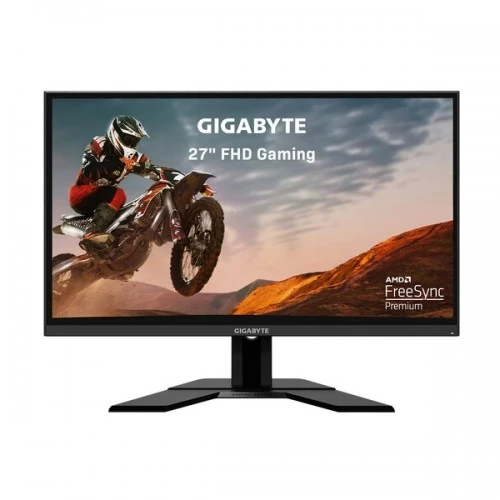
The GIGABYTE G27F 2 is a 27-inch Full HD gaming monitor built around a Super Speed IPS panel, a 165Hz refresh rate and a manufacturer-listed 170Hz overclock mode. GIGABYTE specifies 1ms MPRT, Adaptive-Sync, AMD FreeSync Premium, a 130mm height-adjustable stand, HDMI and DisplayPort inputs, plus a USB hub. The exact model matters: specifications for the original G27F, a G27F 2, regional UK-version bundles and similarly named GIGABYTE displays can differ. This page is written for the G27F 2 model; check the carton and rear label of the offered unit.
Panel size, resolution and pixel density
The 27-inch display has 1920 × 1080 pixels in a 16:9 format. Its viewable area is 597.736 × 335.664mm, and GIGABYTE lists a 0.3108mm pixel pitch. Full HD can be a sensible gaming resolution when a graphics card needs to render many frames per second, but the pixel density is lower than a 27-inch QHD panel. Fine text, small interface details and dense workspaces may look less sharp than on higher-resolution options. Choose based on the games and applications you actually use.
Refresh rate and overclocking
GIGABYTE specifies a maximum standard refresh rate of 165Hz and an overclock setting up to 170Hz. Higher refresh can make movement appear smoother when a compatible computer produces enough frames. The overclock mode is an optional configured maximum, not a guarantee that every graphics card, cable, game or operating mode will run stably at 170Hz. Select a supported mode in the graphics settings and consult the manual if the display blanks or artifacts appear.
Response time and motion clarity
The official specification lists 1ms MPRT. MPRT describes a motion-picture response measurement and is different from gray-to-gray transition time and end-to-end input lag. The result depends on response mode, refresh rate, frame cadence and content. A very short stated response time should not be read as a guarantee that all transitions are blur-free or free of overdrive artifacts. Adjust Smart OD and related settings conservatively, then judge motion using the games or applications you use.
IPS image, brightness and color
GIGABYTE lists Super Speed IPS, typical brightness of 400 cd/m², typical contrast of 1000:1, 178° viewing angles and 16.7 million colors. The official page states 95% DCI-P3 and 130% sRGB gamut figures. Those are coverage/volume specifications, not color accuracy, calibration, uniformity or professional certification. A broad gamut can make compatible content more saturated, but applications and color management affect the result. Calibrate separately for color-critical production.
Adaptive-Sync and FreeSync Premium
The G27F 2 specification lists Adaptive-Sync and AMD FreeSync Premium. Variable refresh can help coordinate display refresh with frame output on a compatible graphics device and supported connection. Enable the feature in the monitor menu and graphics driver, and check the driver’s range and compatibility notes. It does not increase the game’s frame rate by itself. Actual results depend on the GPU, driver, cable, application and refresh setting.
HDR Ready and its limits
GIGABYTE labels this model HDR Ready. That wording should not be confused with a DisplayHDR certification or a claim that it has the peak brightness, local dimming or contrast performance of a dedicated HDR display. HDR playback depends on the operating system, source, connection, settings and content. If verified HDR performance is a key requirement, look for the exact model’s certification and measured capability rather than relying on the HDR Ready label alone.
Video connections and compatible sources
The official connector list includes two HDMI 2.0 ports and one DisplayPort 1.2 input. These digital connections let a user attach several sources such as a desktop, console or laptop with compatible video output. The supported resolution and refresh combinations depend on source capability, cable quality and selected monitor settings. Connect the source to an available input, choose that input in the OSD and then set a supported display mode. Do not assume a regional bundle includes every cable needed for every device.
USB hub and OSD Sidekick setup
The monitor has two USB 3.2 Gen 1 downstream Type-A ports and one upstream Type-B connection. Connect the upstream cable between the monitor and the computer before expecting the downstream ports to act as a hub. GIGABYTE notes that OSD Sidekick also requires a USB cable connection between the PC and monitor, plus compatible software. These are USB-A/USB-B connections, not USB-C docking; the monitor does not provide one-cable USB-C laptop video and charging.
Gaming controls and OSD tools
GIGABYTE lists OSD Sidekick, Aim Stabilizer, Black Equalizer, Dashboard, Crosshair, Timer, Counter, Auto-Update and Smart OD features. They provide menu-level adjustments or visual overlays; their usefulness depends on the game, user preference and configured mode. Use overlays only where allowed by the game or competition rules. Some settings may change motion appearance, brightness or response behavior, so compare them in actual use and consult the model manual for supported combinations.
Stand ergonomics and VESA mounting
The included stand supports height adjustment up to 130mm and tilt from -5° to +20°. GIGABYTE lists swivel and pivot as not available on the stand. A 100 × 100mm VESA mounting pattern allows installation on a compatible arm or bracket. The arm is a separate accessory. Check load capacity, mounting hardware, desk clearance and panel orientation; support the monitor while fitting it and make sure cables have enough slack for movement.
Audio and connected equipment
A headphone jack is listed for connecting compatible headphones or an audio device. The manufacturer’s listed specifications do not identify built-in speakers, so plan separate audio through the computer, headphones or external speakers. An HDMI or DisplayPort source may carry audio, but that does not mean the monitor includes speakers. Confirm the desired audio route and connector compatibility before buying.
Power, dimensions and setup
GIGABYTE specifies an external power adapter with 19V DC output at 3.42A and a 21W consumption figure under stated test conditions; idle and off-mode values are listed separately in the specification. Dimensions are about 615.11 × 535.66 × 193.63mm with stand and 615.11 × 367.35 × 42.21mm without stand. Estimated net weight is 5.2kg with stand and 3.5kg without. Leave room for height adjustment, cables and ventilation, and use the adapter supplied for the regional unit.
Box contents and UK-version checks
GIGABYTE lists a power cable, HDMI cable, USB cable, quick setup guide and warranty card. The catalog title identifies a UK Version, but the exact included mains lead, adapter, plug and warranty route depend on the importer’s package. Ask the retailer to confirm the exact model code and sealed-box contents before ordering. If using the USB hub or Sidekick, ensure the supplied USB upstream cable is included. Retain the packaging and serial label for any service claim.
Who may prefer this monitor
The G27F 2 may suit PC gamers who want a 27-inch IPS display, high refresh, variable refresh, a height-adjustable stand, USB hub and several digital inputs. Full HD can be easier to drive at high frame rates than QHD, though its detail density is lower at this size. It may not suit someone who prioritizes crisp small text, QHD workspace, USB-C laptop docking, stand pivot, certified HDR or a verified local pixel warranty. Weigh those requirements before selecting by refresh rate alone.
Bangladesh price and local warranty
During this research, Monarch and Nexus listings displayed ৳27,300 for the G27F 2 UK-version listing. Price, stock, delivery and import channel can change; these retailer snapshots do not establish BiponiBD pricing or availability. Local listings advertise three-year warranty, and one retailer states a dead-pixel exclusion/threshold condition. Confirm the warranty provider, claim location, serial eligibility, panel-defect policy, exchange rules and included UK/regional power accessories in writing. No specific unit’s local warranty or serial status was verified.
Care and model support
Place the monitor on a stable surface and keep ventilation openings clear. Turn off and disconnect power before cleaning; use a soft cloth and do not spray liquid onto the panel. Retain the serial and purchase invoice. For firmware, OSD or display issues, use GIGABYTE support resources for G27F 2 rather than instructions for the earlier G27F or another similarly named model. Report a visible pixel or image defect promptly and follow the local seller’s documented inspection window.
Key features
- 27-inch Super Speed IPS panel with Full HD 1920 × 1080 resolution and 16:9 aspect ratio.
- 165Hz native refresh rate with 170Hz overclock mode listed by GIGABYTE; source and connection must support the selected timing.
- 1ms MPRT response specification; MPRT is not gray-to-gray response or system input latency.
- 400 cd/m² typical brightness, 1000:1 typical contrast and 178° viewing angles per GIGABYTE official specification.
- 95% DCI-P3, 130% sRGB and 16.7 million colors are manufacturer gamut/color-support figures, not calibration claims.
- AMD FreeSync Premium and Adaptive-Sync support for compatible graphics hardware.
- Two HDMI 2.0 inputs and one DisplayPort 1.2 input for multiple digital sources.
- USB 3.2 Gen 1 hub with two downstream Type-A ports and one upstream Type-B connection.
- Height adjustment up to 130mm and tilt from -5° to +20°; no swivel or pivot specified.
- 100 × 100mm VESA mounting, headphone jack and Kensington security lock.
- GIGABYTE gaming tools include Aim Stabilizer, Black Equalizer, Dashboard, Crosshair and OSD Sidekick.
- HDR Ready label is not equivalent to DisplayHDR certification; verify content, connection and settings.
Pros and considerations
Pros
- A high 165Hz refresh ceiling with a 170Hz overclock option can provide smoother motion when the graphics system sustains high frame rates.
- IPS technology, wide viewing angles, official 400-nit typical brightness and broad stated gamut figures create a feature-rich gaming panel.
- Two HDMI inputs plus DisplayPort and a USB hub support several wired devices without changing the monitor.
- The stand provides 130mm height travel as well as tilt, which helps adapt desk position more than a tilt-only stand.
- FreeSync Premium and gaming OSD tools add variable-refresh and on-screen adjustment features for compatible PC setups.
Cons and limitations
- Full HD across 27 inches gives roughly 81 PPI, so fine text and detail appear less dense than on a 27-inch QHD display.
- The 170Hz mode is an overclock; actual available refresh modes depend on source, cable, settings and stability.
- The monitor has no stand swivel or pivot per GIGABYTE; portrait rotation or side-to-side angle may require a separate arm.
- A USB Type-B upstream cable is needed for the USB hub and OSD Sidekick; the display has no USB-C connection.
- Bangladesh warranty and dead-pixel eligibility are retailer/importer terms and must be checked for the unit’s actual serial number.
Frequently asked questions
What are the screen size and resolution?
GIGABYTE specifies a 27-inch Super Speed IPS panel with 1920 × 1080 Full HD resolution and a 16:9 aspect ratio.
Does the G27F 2 support 170Hz?
GIGABYTE lists 165Hz and an overclock mode up to 170Hz. The computer graphics output, cable, input and monitor setting must support the chosen timing; 170Hz is not the default native mode.
What does 1ms MPRT mean?
It is GIGABYTE’s motion-picture response-time specification. MPRT differs from gray-to-gray transition time and total system input latency, and it does not guarantee identical motion clarity in every mode.
What ports does this monitor have?
GIGABYTE lists two HDMI 2.0 inputs, one DisplayPort 1.2 input, two USB 3.2 Gen 1 Type-A downstream ports, one USB Type-B upstream port and a headphone jack.
How do I use the USB hub and OSD Sidekick?
Connect the monitor’s USB upstream Type-B port to the computer using the USB cable. The two downstream USB-A ports and OSD Sidekick depend on that USB connection. Sidekick support also depends on GIGABYTE software and a compatible computer.
What brightness and color gamut does GIGABYTE specify?
GIGABYTE lists 400 cd/m² typical brightness, 95% DCI-P3, 130% sRGB and 16.7 million colors. These are manufacturer figures, not a calibration report or a guarantee of color accuracy on an individual panel.
Does HDR Ready mean certified HDR?
No. GIGABYTE labels the monitor HDR Ready, but this does not by itself establish DisplayHDR certification. Check the source, settings and content requirements if certified HDR performance is important.
Does it support FreeSync?
GIGABYTE lists Adaptive-Sync and AMD FreeSync Premium support. A compatible graphics card, driver, connection and configuration are required to use variable refresh.
How adjustable is the stand?
The stand supports up to 130mm height adjustment and -5° to +20° tilt. GIGABYTE lists no swivel or pivot. A compatible VESA arm can add motion if needed.
Can I mount it on a monitor arm?
Yes, GIGABYTE lists a 100 × 100mm VESA mount. Verify arm weight capacity, screw length, panel clearance and installation instructions before fitting.
What is included in the UK-version package?
GIGABYTE’s listed accessories are a power cable, HDMI cable, USB cable, quick setup guide and warranty card. The regional cable/adapter supplied with an imported UK-version unit may vary; confirm the exact sealed-box contents with the seller.
What Bangladesh price and warranty should I expect?
Monarch and Nexus listings showed ৳27,300 during research. Listings may change, and this is not a verified BiponiBD offer. Local sellers advertise three years but may state pixel-defect conditions; confirm the warranty provider, serial eligibility and exact dead-pixel policy in writing.
Source note: Specifications come from GIGABYTE’s exact G27F 2 product page and user guide. Retailer pricing and warranty details are observations checked 2026-11-08T21:30:52.992Z; they do not confirm BiponiBD stock or a particular serial’s coverage. Regional UK-package details should be checked with the seller. No independent hands-on test is claimed.