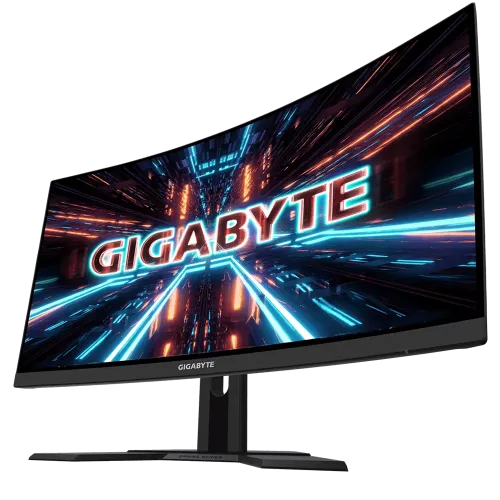
The GIGABYTE G27FC A is a 27-inch curved gaming monitor with a 1500R VA panel, Full HD resolution and a 165Hz maximum refresh rate with an overclock mode up to 170Hz. GIGABYTE specifies a 3000:1 typical contrast ratio, 250 cd/m² typical brightness, 1ms MPRT, built-in 2×2W speakers, a height-adjustable stand and HDMI/DisplayPort inputs. The official specifications list no HDR support and do not identify FreeSync or G-Sync branding for this exact model. Some retailer pages claim VRR support, so verify the exact regional unit rather than confusing it with a similarly named G27FC or other gaming model.
Curved screen and viewing position
The display uses a 1500R curve across a 27-inch panel. Curvature can make the left and right sides feel more oriented toward a centered user, though the effect depends on sitting distance and personal preference. It is not a substitute for additional resolution or extra desktop pixels. A curved screen can also affect how straight lines appear from an angle, so consider how you edit spreadsheets, diagrams or images. Check the available desk width and the distance from your chair before choosing a curved monitor.
Full HD resolution and pixel density
The native resolution is 1920 × 1080 in a 16:9 format. GIGABYTE lists a 597.88 × 336.31mm viewing area and a 0.3114mm pixel pitch. Full HD can make it easier for a gaming PC to reach high frame rates, but at 27 inches text and fine details are less dense than on a 27-inch QHD display. Consider the viewing distance, operating-system scaling and applications you use. Users doing detailed design or dense multi-window work may prefer a higher-resolution screen.
165Hz and overclock mode
GIGABYTE lists a maximum refresh rate of 165Hz and an overclock mode up to 170Hz. To use a high-refresh setting, the computer’s graphics output, cable, selected input and monitor configuration must all support it. Overclock is an optional setting, not a guarantee that every unit, GPU or game will run stably at the maximum. If the mode is unavailable, check the cable and graphics settings, then follow the G27FC A manual. The game’s frame rate still depends on the computer’s rendering performance.
Response time and motion clarity
The official listing states 1ms MPRT. MPRT is a motion-picture response figure and differs from gray-to-gray transition time or total input latency. It does not guarantee that all transitions look identical or eliminate every blur or overshoot effect. Actual motion depends on frame rate, refresh mode, overdrive settings, content and the user’s visual preference. Compare settings with the games and applications you use instead of evaluating the display by the minimum response number alone.
VA panel, contrast and brightness
GIGABYTE specifies a VA panel with a typical contrast ratio of 3000:1 and typical brightness of 250 cd/m². The official page gives a dynamic contrast figure of 12,000,000:1, which should be kept distinct from the static 3000:1 value. A higher static contrast can help dark scenes appear deeper in suitable lighting, while brightness is intended for typical indoor setups. Room light, screen settings and panel variation affect the perceived result. Direct sunlight and strong reflections can still reduce visibility.
Color support and gamut
The monitor is listed as 8-bit and GIGABYTE gives 91% DCI-P3 and 127% sRGB gamut figures. These are manufacturer gamut specifications and do not confirm color accuracy, calibration, uniformity or suitability for a particular professional workflow. Content and color management affect the appearance of wide-gamut content. For photo, print or video work, compare the project color space and use a measured calibration process rather than treating a gamut percentage as a full quality score.
Video connections and input switching
The published connectors include two HDMI 1.4 inputs and one DisplayPort 1.2 input. These allow more than one source to remain connected, with the monitor menu used to select the active input. Supported resolution and refresh rate can depend on the source, cable and port. Confirm the timing required for 165Hz or the 170Hz overclock mode from the manual and your GPU documentation. The listed model also includes a headphone jack, two USB 3.0 ports, AC power and Kensington lock.
USB ports and peripherals
GIGABYTE lists two USB 3.0 ports. The official overview does not clearly state the upstream connection role or hub setup for all regional versions. Before planning to connect a keyboard, mouse or storage device through the display, check the supplied manual and confirm whether an upstream USB cable is included. If the ports are only downstream without the upstream connection, they will not relay data to the computer. Do not assume USB-C or laptop docking; neither is listed.
Speakers and headphone output
The monitor includes two speakers rated at 2W each and a headphone jack according to GIGABYTE. The speakers can handle basic desktop audio, but separate speakers or headphones may provide fuller sound. If using HDMI or DisplayPort audio, select the monitor as the playback endpoint on the computer. For headphones, confirm the source audio route and volume controls. Retailer box contents can vary, so verify any cable needed to connect your preferred devices.
Stand movement and VESA mounting
GIGABYTE lists height adjustment up to 130mm and tilt from -5° to +20°. Swivel and pivot are listed as unavailable on the included stand. The monitor supports a 100 × 100mm VESA mount, allowing use with a separate compatible arm or bracket. Check the mount’s capacity for the curved monitor, correct screws and clearance. Support the panel during installation and leave sufficient cable slack for the arm’s movement.
Power, dimensions and weight
The official specification lists an internal power supply, AC 100–240V input, maximum input of 60W, 0.5W power-saving mode and 0.3W off mode. Dimensions are about 610.3 × 531 × 203mm with stand (W × H × D) and 610.3 × 367.4 × 84.5mm without stand. Estimated net weight is 6.4kg and gross weight is 8.9kg. Measure the desk depth and allow space for the stand base, cables and the full height/tilt range.
HDR and variable refresh claims
GIGABYTE lists HDR support as not applicable for the G27FC A. The official exact-model specification also does not list FreeSync or G-Sync branding, while some Bangladesh retailer listings claim FreeSync/G-Sync compatibility. Treat the retailer statement as a claim requiring confirmation rather than a confirmed manufacturer feature. If HDR certification or variable-refresh support is essential, obtain documentation for the exact regional SKU and test the configuration with the graphics card and chosen port.
Who may prefer this model
This monitor may suit users who want a large curved VA screen, high refresh, strong static contrast, basic built-in audio and height adjustment. The 1500R curve can suit a centered single-screen desk, and the stand offers more adjustment than a fixed tilt-only model. It may be less suitable if you need QHD detail, HDR, a flat panel, pivot rotation, confirmed variable-refresh branding or a highly documented USB hub. Compare these priorities before choosing by curved appearance or refresh rate alone.
Bangladesh price, stock and warranty
During research, TechLand displayed ৳27,500 with an out-of-stock status, ZettaByte displayed ৳26,300 as available, and Skyland showed out of stock with price to be announced. These seller pages disagree and may change; they do not confirm BiponiBD inventory. Retailers advertise three-year warranty, but the local importer and dead-pixel policy are unit-specific. Ask for written confirmation of price, exact SKU, stock, service provider, serial eligibility, claim location and required packaging before ordering.
Care and model identification
Check the rear label for G27FC A and the regional SKU before purchase. The G27FC A differs from the similarly named G27FC, and regional details or included cables can vary. Keep the invoice, serial number, box and warranty card. Turn off and unplug the monitor before cleaning, use a soft cloth and do not spray liquid directly on the screen. For display timing, OSD options or firmware guidance, use the G27FC A support page rather than a different G27FC revision.
Key features
- 27-inch VA panel with 1500R curve, Full HD 1920 × 1080 resolution and 16:9 aspect ratio.
- 165Hz refresh rate with an overclock mode up to 170Hz listed by GIGABYTE.
- 1ms MPRT response specification; MPRT is different from GtG and total input latency.
- 250 cd/m² typical brightness and 3000:1 typical contrast ratio per GIGABYTE.
- 8-bit color with GIGABYTE-listed 91% DCI-P3 and 127% sRGB gamut figures.
- Two HDMI 1.4 inputs and one DisplayPort 1.2 input.
- Integrated stereo speakers rated 2 × 2W and a headphone jack.
- Height adjustment up to 130mm and tilt from -5° to +20°; no swivel or pivot listed.
- 100 × 100mm VESA mount, Kensington lock and non-glare display surface.
- Two USB 3.0 ports are listed by GIGABYTE; check the manual for upstream/hub setup on the regional version.
- Built-in power supply with 100–240V AC input and maximum power figure of 60W.
- The official GIGABYTE page does not list HDR support or FreeSync/G-Sync branding for this exact model.
Pros and considerations
Pros
- A 1500R curve and 27-inch VA panel can create a more enveloping desktop view than a flat screen for a centered single-user setup.
- 165Hz with optional 170Hz overclock supports high-refresh motion on compatible hardware.
- The VA panel’s listed 3000:1 typical contrast can produce deeper dark tones than typical IPS panels.
- Built-in 2×2W speakers, headphone output and height-adjustable stand provide useful everyday features.
- Dual HDMI, DisplayPort and USB ports allow several devices and accessories to connect, subject to the exact USB layout.
Cons and limitations
- Full HD at 27 inches has lower pixel density and text detail than a 27-inch QHD monitor.
- The 170Hz mode is an overclock, and actual compatibility depends on the source, cable and selected timing.
- The 1500R curve may not suit every desk, multi-monitor layout or users who prefer flat displays.
- Stand adjusts height and tilt but does not list swivel or pivot; HDR is not listed by GIGABYTE.
- Local retailer claims about FreeSync/G-Sync and three-year warranty need confirmation; stock pages conflict.
Frequently asked questions
What is the screen size and curve?
GIGABYTE specifies a 27-inch VA display with a 1500R curve and Full HD resolution. The curved panel is intended for a centered viewing position; preference varies by desk and use.
What are the resolution and refresh rates?
The native resolution is 1920 × 1080. GIGABYTE lists 165Hz and an overclock mode up to 170Hz. The computer, cable, input and selected mode must support the chosen timing.
What does 1ms MPRT mean?
MPRT is MSI/GIGABYTE-style motion-picture response notation for a display mode; it is not the same as gray-to-gray pixel transition time or full-system input latency. The product listing states 1ms MPRT.
What is the contrast ratio?
GIGABYTE lists 3000:1 typical static contrast and 12,000,000:1 dynamic contrast. The dynamic figure is not a substitute for the static contrast rating.
What ports are available?
GIGABYTE lists two HDMI 1.4 inputs, one DisplayPort 1.2, two USB 3.0 ports and a headphone jack. Confirm the exact USB role and connection procedure for the regional unit.
Does it have speakers?
Yes. GIGABYTE lists two built-in speakers rated at 2W each, plus a headphone jack. External speakers may still provide stronger sound for a larger room.
Does the G27FC A support HDR?
GIGABYTE’s official G27FC A specification page lists HDR support as N/A. Do not treat this model as HDR-certified based on retailer text or features of another GIGABYTE monitor.
Does it support FreeSync or G-Sync?
Some Bangladesh sellers claim FreeSync/G-Sync support, but GIGABYTE’s cited exact-model specification page does not list VRR branding. Confirm support for the exact unit, graphics card and connection with the seller before relying on it.
How adjustable is the stand?
The stand supports up to 130mm of height adjustment and -5° to +20° tilt. GIGABYTE lists swivel and pivot as unavailable. A compatible VESA arm may offer additional positioning.
What color gamut and brightness are specified?
GIGABYTE lists 250 cd/m² typical brightness and gamut figures of 91% DCI-P3 and 127% sRGB. These gamut values do not certify color accuracy or calibration.
Can I mount it on an arm?
GIGABYTE specifies 100 × 100mm VESA mounting. Check the arm’s load capacity, fasteners and clearance for the curved panel.
What Bangladesh price and warranty should I expect?
TechLand listed ৳27,500 out of stock, ZettaByte listed ৳26,300 available, and Skyland showed out of stock/to be announced. Retailers advertise three years, but stock, price and serial coverage need direct confirmation. These listings are not a BiponiBD offer.
Source note: Technical specifications use GIGABYTE’s exact G27FC A official product page. Local price, stock, warranty and VRR claims are retailer observations checked 2026-11-08T21:47:18.284Z; they do not verify a BiponiBD offer or a particular serial’s coverage. No independent hands-on test is claimed.