Pros
- 34-inch 21:9 WQHD screen offers broad workspace and immersion.
- 144Hz refresh supports smoother compatible PC gaming.
- VA panel and 3000:1 contrast provide strong native contrast.
- FreeSync Premium Pro and built-in speakers are listed by GIGABYTE.

All categories
 New condition
Monitors
Gigabyte · G34WQC
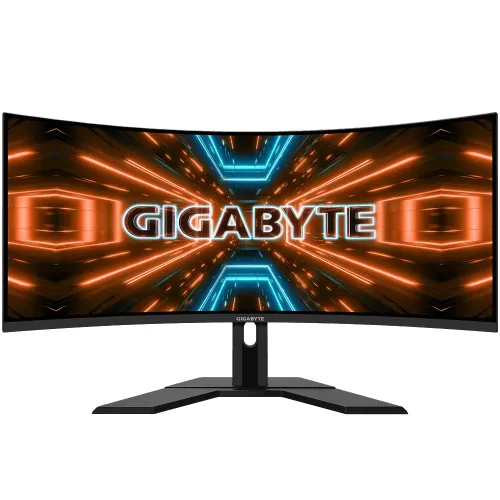
34-inch 3440 × 1440 curved VA ultrawide with 144Hz refresh, FreeSync Premium Pro and DisplayHDR 400.
Price unavailable
Price range updating
No verified price is available yet. Store offers will appear when merchants publish them.
Compare store prices
No live offers for this variant
Offers will appear when merchants publish them.
Loading history…
Product story
GIGABYTE G34WQC is a 34-inch curved ultrawide gaming monitor. GIGABYTE’s official specification lists 3440 × 1440 resolution and 144Hz refresh, alongside a VA panel, 1500R curve, FreeSync Premium Pro and DisplayHDR 400. The older catalog’s 180Hz claim is corrected here. Use the exact G34WQC specification page and user guide for input and setup details. Signal capability depends on source, selected port, cable and software. Current price, stock, local warranty and return terms are seller information and should be confirmed before purchase.
The exact model code is G34WQC. It is distinct from the later G34WQCP, G34WQC2 and G34WQC A. Their refresh rates and hardware can differ. Confirm the model on the rear label and use the G34WQC-specific manual. Do not transfer the newer product’s 180Hz value. Use the exact G34WQC specification page and user guide for input and setup details. Signal capability depends on source, selected port, cable and software. Current price, stock, local warranty and return terms are seller information and should be confirmed before purchase.
The 34-inch panel uses a wide 21:9 format. This creates a broader view for compatible games and desktop windows but needs a wide desk and suitable viewing distance. Check whether your main applications and games support ultrawide layouts. Standard 16:9 video may display side bars. Use the exact G34WQC specification page and user guide for input and setup details. Signal capability depends on source, selected port, cable and software. Current price, stock, local warranty and return terms are seller information and should be confirmed before purchase.
Native resolution is 3440 × 1440 WQHD. The wide pixel canvas supports detailed games and side-by-side work. It places more load on the GPU than standard QHD. Use native resolution for clear text and set game quality to a frame rate the PC can sustain. Use the exact G34WQC specification page and user guide for input and setup details. Signal capability depends on source, selected port, cable and software. Current price, stock, local warranty and return terms are seller information and should be confirmed before purchase.
GIGABYTE specifies 144Hz for G34WQC. This differs from the G34WQCP model’s 180Hz. The source, port and cable must support the desired 3440 × 1440 timing. Confirm refresh in the operating system and OSD after connecting. A headline refresh cannot increase game frame output. Use the exact G34WQC specification page and user guide for input and setup details. Signal capability depends on source, selected port, cable and software. Current price, stock, local warranty and return terms are seller information and should be confirmed before purchase.
The G34WQC uses a VA panel. GIGABYTE lists 3000:1 typical contrast and 178-degree viewing angles. VA technology can provide deep native contrast; transition behavior and uniformity depend on the panel, overdrive and room. The official manual’s response metric is 1ms MPRT, which differs from GTG latency. Use the exact G34WQC specification page and user guide for input and setup details. Signal capability depends on source, selected port, cable and software. Current price, stock, local warranty and return terms are seller information and should be confirmed before purchase.
The display is specified with a 1500R curve. The curvature can bring the screen edges toward the viewer on an ultrawide layout. Sit centered and consider how the curve affects straight-line drawing and shared viewing. Ensure desk depth and monitor placement feel comfortable before purchase. Use the exact G34WQC specification page and user guide for input and setup details. Signal capability depends on source, selected port, cable and software. Current price, stock, local warranty and return terms are seller information and should be confirmed before purchase.
GIGABYTE lists VESA DisplayHDR 400 and 350 nits typical brightness. HDR400 is an entry HDR certification level and does not imply local dimming or OLED-like contrast. HDR performance depends on content, picture mode and viewing conditions. Confirm color and brightness claims against the exact G34WQC manual. Use the exact G34WQC specification page and user guide for input and setup details. Signal capability depends on source, selected port, cable and software. Current price, stock, local warranty and return terms are seller information and should be confirmed before purchase.
GIGABYTE product information lists AMD FreeSync Premium Pro and Adaptive-Sync. VRR depends on source GPU, driver, cable, input and supported range. Check the official specification for operating limits. Do not assume NVIDIA certification without a matching official G-SYNC listing. Use the exact G34WQC specification page and user guide for input and setup details. Signal capability depends on source, selected port, cable and software. Current price, stock, local warranty and return terms are seller information and should be confirmed before purchase.
The product has two HDMI 2.0 and two DisplayPort 1.4 inputs plus headphone output according to the manual. It also has built-in 2W × 2 speakers. Confirm port timing and included cable with the exact regional unit. Audio output and integrated speakers are different features. Use the exact G34WQC specification page and user guide for input and setup details. Signal capability depends on source, selected port, cable and software. Current price, stock, local warranty and return terms are seller information and should be confirmed before purchase.
The catalog lists height adjustment and tilt. Verify precise stand range on the manual, as product revisions and bundle pages may vary. Position the monitor so the screen center aligns with the viewer and keep the wide base stable. Adjustments help posture but do not alter refresh capability. Use the exact G34WQC specification page and user guide for input and setup details. Signal capability depends on source, selected port, cable and software. Current price, stock, local warranty and return terms are seller information and should be confirmed before purchase.
GIGABYTE specifies a 100 × 100mm VESA mount. Confirm screw depth and mount capacity from the manual before installation. Support the panel during fitting and leave room behind it for ventilation and cable connections. Use the exact G34WQC specification page and user guide for input and setup details. Signal capability depends on source, selected port, cable and software. Current price, stock, local warranty and return terms are seller information and should be confirmed before purchase.
For PC gaming, connect using DisplayPort 1.4 and a suitable cable where needed for 3440 × 1440 at 144Hz. Select native resolution and refresh in system settings, then verify the OSD signal. Ultrawide WQHD requires a capable GPU to maintain high frame rates. Use the exact G34WQC specification page and user guide for input and setup details. Signal capability depends on source, selected port, cable and software. Current price, stock, local warranty and return terms are seller information and should be confirmed before purchase.
Console output varies by model and title. Consoles may use a 16:9 signal and leave unused side areas on the 21:9 screen; most will not use 144Hz ultrawide. Verify HDMI resolution, refresh, HDR and VRR support for the exact console and game. Use the exact G34WQC specification page and user guide for input and setup details. Signal capability depends on source, selected port, cable and software. Current price, stock, local warranty and return terms are seller information and should be confirmed before purchase.
The wide canvas is useful for compatible games, editing timelines and side-by-side desktop tasks. Many films and web videos are 16:9. The VA contrast can suit darker media, while color gamut is not a substitute for calibration in professional proofing workflows. Use the exact G34WQC specification page and user guide for input and setup details. Signal capability depends on source, selected port, cable and software. Current price, stock, local warranty and return terms are seller information and should be confirmed before purchase.
Strengths include 34-inch WQHD ultrawide detail, 144Hz refresh, high VA contrast, FreeSync Premium Pro and integrated speakers. Trade-offs include substantial GPU demand, content that may not fill 21:9, and a lower refresh than the newer G34WQCP. Choose based on exact model. Use the exact G34WQC specification page and user guide for input and setup details. Signal capability depends on source, selected port, cable and software. Current price, stock, local warranty and return terms are seller information and should be confirmed before purchase.
The catalog previously described G34WQC as 180Hz; that value is corrected to 144Hz using the official model specification. G34WQCP is a separate 180Hz model. Also avoid conflating G34WQC with G34WQC2 or G34WQC A. Confirm revision and manual before publication or ordering. Use the exact G34WQC specification page and user guide for input and setup details. Signal capability depends on source, selected port, cable and software. Current price, stock, local warranty and return terms are seller information and should be confirmed before purchase.
Inspect panel, curve, ports, stand, speakers and included cables on delivery. Retain invoice, serial labels and packaging through the return period. Clean with microfiber and avoid spraying liquid on the screen. Keep ventilation clear and use a stable surface for the wide display. Use the exact G34WQC specification page and user guide for input and setup details. Signal capability depends on source, selected port, cable and software. Current price, stock, local warranty and return terms are seller information and should be confirmed before purchase.
For Bangladesh, confirm live price, stock, delivery, included cables, return/dead-pixel policy and serial-specific warranty provider and service location. The catalog’s previous three-year entry does not prove local coverage. Ask the seller to confirm exact model G34WQC and serial on the invoice. Use the exact G34WQC specification page and user guide for input and setup details. Signal capability depends on source, selected port, cable and software. Current price, stock, local warranty and return terms are seller information and should be confirmed before purchase.
GIGABYTE’s official G34WQC specification is 34-inch 3440 × 1440 at 144Hz, with 1500R VA panel, FreeSync Premium Pro and DisplayHDR 400. Do not use the G34WQCP model’s 180Hz value. Verify exact port timing, accessories and Bangladesh warranty before ordering. Use the exact G34WQC specification page and user guide for input and setup details. Signal capability depends on source, selected port, cable and software. Current price, stock, local warranty and return terms are seller information and should be confirmed before purchase.
Helpful answers
Product-specific answers maintained with the catalog information.
GIGABYTE specifies 144Hz for the G34WQC model.
The native resolution is 3440 × 1440 WQHD in a 21:9 format.
G34WQC is listed at 144Hz; the separate G34WQCP model is listed at 180Hz.
GIGABYTE specifies a VA panel with 1500R curvature.
GIGABYTE lists VESA DisplayHDR 400 for the G34WQC.
The manual lists built-in 2W × 2 speakers and headphone output.
GIGABYTE lists AMD FreeSync Premium Pro and Adaptive-Sync.
Console aspect support varies; many output 16:9 and may show side bars.
Confirm the serial-specific local provider, duration and service terms with the seller.
Customer community
Become a merchant
Join BiponiBD, publish accurate offers and start free.