Pros
- Wide 21:9 canvas for compatible games and multitasking.
- WQHD resolution and up to 180Hz refresh.
- VA panel with high listed native contrast.
- FreeSync Premium and DisplayHDR 400 listed by GIGABYTE.

All categories
 New condition
Monitors
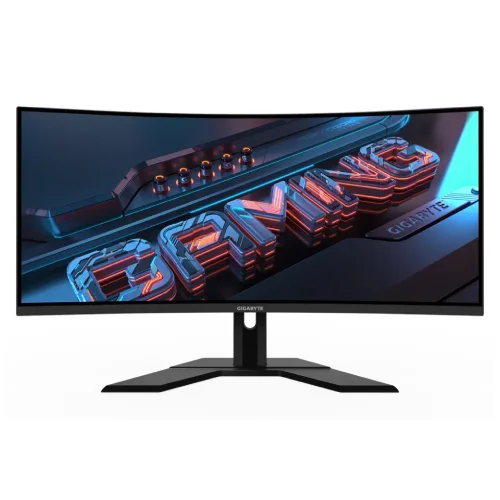
Gigabyte · G34WQCP
34-inch 3440 × 1440 curved VA ultrawide with up to 180Hz refresh, FreeSync Premium and DisplayHDR 400; verify revision.
Price unavailable
Price range updating
No verified price is available yet. Store offers will appear when merchants publish them.
Compare store prices
No live offers for this variant
Offers will appear when merchants publish them.
Loading history…
Product story
GIGABYTE G34WQCP is a 34-inch curved WQHD gaming monitor with a VA panel and up to 180Hz refresh. Manufacturer specifications list 3440 × 1440, AMD FreeSync Premium and VESA DisplayHDR 400. Exact stand and panel details can vary by revision, so check the unit label. Check the exact G34WQCP revision page and matching manual for regional details. Signal availability depends on the input, source, cable and selected mode. Current price, stock, warranty and return terms are commercial details that must be confirmed with the Bangladesh seller.
GIGABYTE publishes separate Rev. 1.0 and Rev. 2.0 product pages. Both list G34WQCP and 180Hz WQHD, while the stand and some implementation details can differ. Verify revision marking on the carton or rear label and consult its matching manual rather than combining revision-specific specifications. Check the exact G34WQCP revision page and matching manual for regional details. Signal availability depends on the input, source, cable and selected mode. Current price, stock, warranty and return terms are commercial details that must be confirmed with the Bangladesh seller.
The monitor has a 34-inch ultrawide panel. Its 21:9 shape provides a wider view for compatible games, films and desktop windows than a standard 16:9 screen. Check desk width and viewing distance. Some video and console content uses 16:9 and will not fill the full panel without cropping. Check the exact G34WQCP revision page and matching manual for regional details. Signal availability depends on the input, source, cable and selected mode. Current price, stock, warranty and return terms are commercial details that must be confirmed with the Bangladesh seller.
Native resolution is 3440 × 1440 WQHD. The wide pixel canvas suits detailed PC games and side-by-side windows, but it puts more load on a graphics card than standard 2560 × 1440. Use native resolution for clarity and tune game settings to the frame rate your system can sustain. Check the exact G34WQCP revision page and matching manual for regional details. Signal availability depends on the input, source, cable and selected mode. Current price, stock, warranty and return terms are commercial details that must be confirmed with the Bangladesh seller.
GIGABYTE lists 180Hz maximum refresh for G34WQCP. Use the input, cable and source timing documented in the manual, then confirm the active signal in the OSD and operating system. Port support and picture-by-picture modes may constrain refresh; do not assume every input configuration reaches 180Hz. Check the exact G34WQCP revision page and matching manual for regional details. Signal availability depends on the input, source, cable and selected mode. Current price, stock, warranty and return terms are commercial details that must be confirmed with the Bangladesh seller.
The panel is VA and manufacturer materials list 4000:1 typical contrast. VA can provide deep native contrast, while dark transitions and overdrive behavior depend on the panel and selected setting. Response claims vary between MPRT and other measures; compare the exact specification and test motion settings for artifacts. Check the exact G34WQCP revision page and matching manual for regional details. Signal availability depends on the input, source, cable and selected mode. Current price, stock, warranty and return terms are commercial details that must be confirmed with the Bangladesh seller.
The product is listed with a 1500R curve. The curvature can bring the edges of a wide display toward a centered viewer. Position the monitor directly ahead and consider the curve for line-based design or collaborative side viewing. Maintain a comfortable distance and reduce reflections with room placement. Check the exact G34WQCP revision page and matching manual for regional details. Signal availability depends on the input, source, cable and selected mode. Current price, stock, warranty and return terms are commercial details that must be confirmed with the Bangladesh seller.
GIGABYTE lists VESA DisplayHDR 400. HDR certification at this level does not imply local dimming or OLED-like contrast. Brightness figures may vary by product revision; consult the matching specification page. HDR also depends on source content, signal configuration and display mode. Check the exact G34WQCP revision page and matching manual for regional details. Signal availability depends on the input, source, cable and selected mode. Current price, stock, warranty and return terms are commercial details that must be confirmed with the Bangladesh seller.
The monitor supports AMD FreeSync Premium and Adaptive-Sync according to product information. VRR requires compatible GPU, cable, port and driver settings. Confirm range for the precise revision and selected mode. NVIDIA compatibility should not be described as certified unless official support lists the exact model. Check the exact G34WQCP revision page and matching manual for regional details. Signal availability depends on the input, source, cable and selected mode. Current price, stock, warranty and return terms are commercial details that must be confirmed with the Bangladesh seller.
The catalog lists two HDMI 2.0 and two DisplayPort 1.4 inputs with a headphone output. Confirm these against the manual for the purchased revision. An audio output is not the same as built-in speakers. Use a cable rated for the desired WQHD refresh and check the input timing table. Check the exact G34WQCP revision page and matching manual for regional details. Signal availability depends on the input, source, cable and selected mode. Current price, stock, warranty and return terms are commercial details that must be confirmed with the Bangladesh seller.
G34WQCP stand adjustment differs by revision. The catalog says 100mm height adjustment and tilt, but Rev. 2.0 may have a different stand design. Check matching Gigabyte product page/manual for height, tilt and swivel before purchase. Place the wide base securely and leave cable clearance. Check the exact G34WQCP revision page and matching manual for regional details. Signal availability depends on the input, source, cable and selected mode. Current price, stock, warranty and return terms are commercial details that must be confirmed with the Bangladesh seller.
The local catalog lists a 100 × 100mm VESA pattern. Verify the mounting holes, monitor weight and screw depth in the exact revision manual before fitting an arm. Support the screen while installing and ensure that the arm can handle repeated touch-free adjustment and the panel’s curve. Check the exact G34WQCP revision page and matching manual for regional details. Signal availability depends on the input, source, cable and selected mode. Current price, stock, warranty and return terms are commercial details that must be confirmed with the Bangladesh seller.
For PC use, connect to a supported DisplayPort input and select 3440 × 1440 at the refresh rate supported by the GPU and cable. Confirm 180Hz in OS settings and OSD. The ultrawide resolution demands GPU power; adjust game quality if the frame rate is below the refresh target. Check the exact G34WQCP revision page and matching manual for regional details. Signal availability depends on the input, source, cable and selected mode. Current price, stock, warranty and return terms are commercial details that must be confirmed with the Bangladesh seller.
Console support varies. Many consoles output 16:9 and may show side bars on a 21:9 panel. They also may not use 180Hz. Check the console’s supported resolution, refresh, HDR and VRR modes against the selected HDMI input and game. The maximum PC DisplayPort timing is not a console guarantee. Check the exact G34WQCP revision page and matching manual for regional details. Signal availability depends on the input, source, cable and selected mode. Current price, stock, warranty and return terms are commercial details that must be confirmed with the Bangladesh seller.
The broad 21:9 canvas supports multitasking and compatible games. Many shows and clips are 16:9, so black bars may appear. The VA contrast can suit darker content, while color gamut and calibration should be checked against the exact revision for creative work. Check the exact G34WQCP revision page and matching manual for regional details. Signal availability depends on the input, source, cable and selected mode. Current price, stock, warranty and return terms are commercial details that must be confirmed with the Bangladesh seller.
Potential strengths include WQHD ultrawide detail, a high 180Hz refresh, VA contrast and FreeSync Premium. The large pixel workload requires a capable PC. The wide format may not fit every game or desk, and DisplayHDR 400 has practical limits. Match the monitor’s strengths to actual use. Check the exact G34WQCP revision page and matching manual for regional details. Signal availability depends on the input, source, cable and selected mode. Current price, stock, warranty and return terms are commercial details that must be confirmed with the Bangladesh seller.
Do not confuse G34WQCP with G34WQC, G34WQC2 or other similar names. Revisions can change the stand and component details. Use the exact model page and manual, and do not transfer specifications from a different suffix. Confirm connector versions, response measurement and physical dimensions before publishing or ordering. Check the exact G34WQCP revision page and matching manual for regional details. Signal availability depends on the input, source, cable and selected mode. Current price, stock, warranty and return terms are commercial details that must be confirmed with the Bangladesh seller.
Inspect the curved panel, stand, inputs, included power and signal cables, and screen condition on delivery. Keep the packaging and serial label for the return period. Clean with a soft microfiber cloth, avoid spraying liquid directly on the display and keep ventilation unobstructed. Check the exact G34WQCP revision page and matching manual for regional details. Signal availability depends on the input, source, cable and selected mode. Current price, stock, warranty and return terms are commercial details that must be confirmed with the Bangladesh seller.
For Bangladesh, confirm price, live stock, delivery, dead-pixel/return terms and serial-specific warranty provider and service location. Catalog text saying three years is not proof of coverage for the unit. Ask the seller to confirm the revision and warranty in writing and ensure serial is on the invoice. Check the exact G34WQCP revision page and matching manual for regional details. Signal availability depends on the input, source, cable and selected mode. Current price, stock, warranty and return terms are commercial details that must be confirmed with the Bangladesh seller.
GIGABYTE lists G34WQCP as 34-inch 3440 × 1440 WQHD at 180Hz with VA technology, FreeSync Premium and DisplayHDR 400. Check whether the unit is Rev. 1.0 or Rev. 2.0; stand and detailed hardware data may differ. Confirm local warranty and offer with the seller. Check the exact G34WQCP revision page and matching manual for regional details. Signal availability depends on the input, source, cable and selected mode. Current price, stock, warranty and return terms are commercial details that must be confirmed with the Bangladesh seller.
Helpful answers
Product-specific answers maintained with the catalog information.
GIGABYTE lists 3440 × 1440 WQHD resolution in the 21:9 format.
The G34WQCP product pages list up to 180Hz; verify input timing in its manual.
The monitor uses a VA panel; confirm exact revision on the unit.
Product listings specify a 1500R curved screen.
GIGABYTE lists VESA DisplayHDR 400; performance depends on content and settings.
The catalog lists a headphone output; built-in speakers were not confirmed.
GIGABYTE lists AMD FreeSync Premium and Adaptive-Sync.
Yes. Check Rev. 1.0 or Rev. 2.0 and use the matching manual.
Confirm serial-specific warranty provider, term and service with the seller.
Customer community
Become a merchant
Join BiponiBD, publish accurate offers and start free.