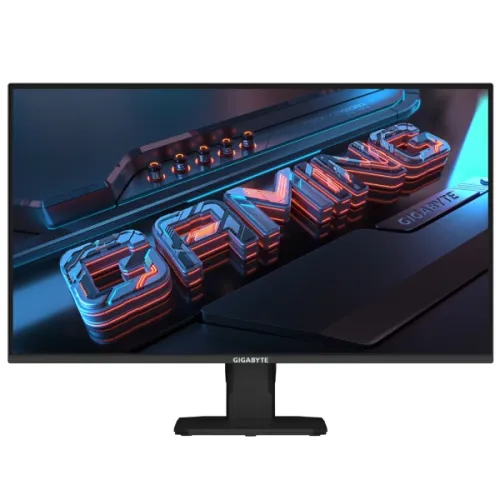
GIGABYTE GS25F2 is a 24.5-inch Full HD Super Speed IPS gaming monitor with 200Hz refresh, Adaptive-Sync, two HDMI 2.0 inputs, DisplayPort 1.4 and built-in 2W × 2 speakers. This GS25F2 version has a tilt-only stand; it does not list the height, swivel or pivot adjustments found on the related G25F2. The official manual documents supported 200Hz timings and 100 × 100mm VESA mounting.
24.5-inch Full HD Super Speed IPS
The GS25F2 is a 24.5-inch Super Speed IPS monitor with 1920 × 1080 Full HD resolution and a 16:9 layout. This format works with common computers, games and video. GIGABYTE’s official manual lists 178-degree horizontal and vertical viewing angles, 300 nits typical SDR brightness and an 8-bit colour depth. The non-glare surface can help reduce reflections, although strong light can still affect visibility.
Full HD is easier to render at high frame rates than QHD, which can suit a competitive gaming PC. At this panel size it provides less fine detail than QHD, so users who work with dense text or detailed images should compare higher-resolution models. The GS25F2 prioritizes refresh rate and gaming features over extra desktop pixels.
200Hz refresh and verified input timings
GIGABYTE markets the GS25F2 as a 200Hz Full HD monitor. The official manual lists 1920 × 1080 at 200Hz on HDMI 1, HDMI 2 and DisplayPort. This can support smooth motion when a computer renders enough frames and the correct mode is selected. Refresh rate does not guarantee a game’s frame rate; source hardware, settings and frame pacing determine that.
Connect directly to the monitor and select Full HD at 200Hz in the operating-system display settings. If the refresh option is missing, check the selected input, graphics driver, cable, adapter or dock. DisplayPort 1.4 and HDMI 2.0 are listed, but the whole signal path must support the chosen mode. Console output modes differ from PC timing.
Response time without oversimplifying
GIGABYTE advertises a 1ms response-time feature. This headline should not be read as a guarantee that every pixel transition always completes in one millisecond. Response behavior depends on the measurement method and selected overdrive. Perceived motion also depends on refresh, frame rate, frame pacing, backlight behavior and game content.
Try the monitor’s Smart OD settings with the games you play. Aggressive overdrive may create bright overshoot or inverse ghosting, so the strongest setting is not always the clearest. Competitive users who are sensitive to trails should compare independent testing across refresh rates rather than relying on the marketing number alone.
300-nit SDR brightness and colour
The official GIGABYTE manual lists 300 nits typical SDR brightness, 1000:1 typical contrast, 8-bit colour and 178-degree viewing angles. GIGABYTE describes the panel as wide-gamut, but do not infer calibrated accuracy from a gamut percentage alone. These specifications target general gaming and media viewing; they do not by themselves establish premium HDR or factory calibration.
Adjust brightness for the room and reduce reflections from windows or overhead lights. For photo or design work, confirm colour-space coverage and measured accuracy for the relevant unit, and consider calibration. Some seller pages use different sRGB percentages or swap gamut standards; this content avoids presenting an unqualified percentage as verified calibration.
HDMI 2.0 and DisplayPort 1.4
The official user guide lists two HDMI 2.0 inputs, one DisplayPort 1.4 input and a headphone jack. It also lists 1920 × 1080 at 200Hz over all three video ports. This allows a PC, console or second computer to stay connected while the user changes the active input. Cable, graphics output and configuration still determine the mode.
Use a direct connection when setting up high refresh. If a dock limits refresh, test without it and check the dock’s published bandwidth. The manual’s supported timing table provides a useful mode reference. Keep cables routed safely so they do not snag when the monitor is tilted or moved on the desk.
Built-in speakers and headphone output
The official guide confirms two integrated 2W speakers, correcting local product data that says speaker support is unavailable. These speakers provide basic sound for alerts, voice or casual viewing. They are small drivers and should not be expected to reproduce strong bass or fill a large room. The monitor also provides a headphone jack.
For HDMI or DisplayPort audio, select the monitor as the computer’s playback device and check volume controls. If higher sound quality is needed, connect a headset or powered external speakers. The built-in speakers add convenience but do not replace dedicated audio equipment for detailed games or music.
Tilt-only stand and ergonomic setup
GIGABYTE identifies the GS25F2 stand as tilt-adjustable from -5 to +20 degrees. Unlike the more adjustable G25F2 variant, this GS25F2 configuration does not list height adjustment, swivel or pivot. The official manual distinguishes their dimensions and stand geometry, so buyers should check the exact model suffix and rear label rather than assuming the two stands match.
Place the screen at a comfortable eye level using a suitable desk or monitor riser. Tilt the panel within its range and keep power/video cables loose enough that they are not strained. If you need height or portrait orientation, a compatible VESA arm can add movement after checking the mount’s load and screw fit.
VESA mounting and security
The GIGABYTE manual specifies a 100 × 100mm VESA mount and four M4 × 10mm minimum screws. Check the manual and the bracket for the correct fastener length; screws that are too long can damage the monitor. Select a mount rated for the display’s weight and install it on a suitable wall or desk surface.
The official manual also identifies a Kensington lock slot. A compatible cable lock can discourage casual removal in shared spaces but is not a substitute for secure installation. Keep the monitor supported while removing the stand and attaching an arm. Follow the guide’s mounting instructions and keep cables clear of pivoting joints if using a third-party mount.
Adaptive-Sync and GIGABYTE gaming tools
GIGABYTE lists Adaptive-Sync, Smart OD, OSD Sidekick, Game Assist timer and crosshair, Aim Stabilizer and Black Equalizer. These options offer display controls for supported sources and games. Adaptive-Sync depends on the graphics card, driver and active range; the software and overlays depend on compatible system configuration. The features do not change the panel’s physical resolution or refresh limit.
Try settings one at a time and compare results in your own games. A timer or crosshair overlay is optional and may not be suitable for every title. Black Equalizer changes shadow visibility, while motion settings can affect artifacts. Install OSD Sidekick only from GIGABYTE’s official support resources and check current operating-system compatibility.
Low-blue-light, Eyesafe and Flicker-Free
The GS25F2 product page lists Eyesafe 2.0, Low Blue Light certified by TÜV Rheinland and Flicker-Free features. These can provide viewing modes and comfort-related options, but they do not guarantee that a user will avoid eye fatigue. Lighting, brightness, font size, posture and breaks still matter. Colour modes may shift the image, so use a neutral mode when colour judgement is important.
Position the screen to reduce glare and choose a brightness comfortable for the room. Consult the user guide for the available settings. Eye-comfort features are not medical treatment; users with persistent symptoms should seek professional advice.
Power, dimensions and daily setup
The official manual lists AC 100–240V at 50/60Hz, 18W on-mode consumption, 0.5W standby and 0.3W off-mode under the cited test conditions. For the GS25F2 it lists approximately 556.9 × 402.0 × 179.4mm with stand and 556.9 × 321.5 × 51.3mm without. Approximate weight is 3.11kg with stand and 2.73kg without, each with stated tolerance.
Those figures are for the GS25F2 version; the G25F2 variant has a different stand and dimensions despite the similar model name. Measure desk space and cable clearance before installation. Keep vents clear, use the supplied power cable and avoid positioning the stand where it can be knocked or where connectors are under tension.
Who should choose the GS25F2?
The GS25F2 can suit gamers who want Full HD at up to 200Hz, IPS viewing angles, Adaptive-Sync, basic built-in audio and a simple tilt stand. It can also serve as a general-purpose screen when motion smoothness matters more than high pixel density. The HDMI and DisplayPort inputs support multiple connected devices, and the official timing list documents the high-refresh mode.
Choose QHD for finer detail at a similar size, or the G25F2 model if you want a more adjustable stand. Consider higher-wattage speakers for stronger audio and a monitor with USB-C if laptop charging and docking matter. Confirm the exact suffix before ordering because closely named models can have different stand features.
Bangladesh price, stock and warranty
Creatus showed ৳22,000 in stock, Tech Valley showed ৳23,400 and Monarch IT showed ৳24,300 in stock when reviewed. Seller pages can change and may describe delivery, warranty or offers differently. These are market observations, not a BiponiBD offer or a guarantee of current stock. Confirm the exact model, final payable price and delivery schedule.
GIGABYTE’s global page does not confirm warranty eligibility for a Bangladesh serial. Local warranty claims are distributor-specific. Ask which authorized service center covers the serial, how long the term lasts, which failures are excluded and what documents a claim requires. Keep the invoice, warranty card and serial number.
Care and delivery inspection
Set the display on a flat, stable surface and clean it with a soft microfiber cloth. Avoid spraying liquid directly onto the screen or pressing on the LCD surface. Keep ventilation clear and route power and video cables safely. Follow GIGABYTE’s guide when assembling the stand or using the VESA holes.
Inspect the image, ports, speaker output, tilt mechanism, lock slot and power lead after delivery. Test Full HD at 200Hz from each intended input and verify audio through the built-in speakers or headphone jack. Record the serial and keep packaging and proof of purchase through the seller’s return period.
Sources and Bangladesh price observations
Core specifications were checked against GIGABYTE’s GS25F2 product page and the official GS25F2/G25F2 user guide. Local sellers checked 2026-11-08 showed prices from ৳22,000 to ৳24,300. Price, stock, delivery and warranty can change; these are seller snapshots, not a BiponiBD offer.