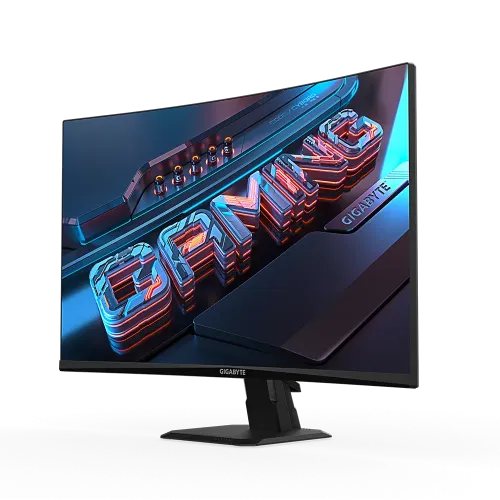
The GIGABYTE GS27FC is a 27-inch Full HD curved gaming monitor built around a VA panel and 180Hz maximum refresh rate. GIGABYTE lists 1500R curvature, 3000:1 typical contrast, 1ms MPRT, Adaptive-Sync support, two HDMI 2.0 inputs and one DisplayPort 1.4 input. It also includes gaming OSD options and a tilt stand. This model is GS27FC, not GS27FC2. The GS27FC2 is a separate product with different refresh and specification details; its values should not be reused here. The GS27FC’s Full HD resolution favors compatibility and frame-rate headroom, while its 27-inch size offers a large viewing area. Buyers should compare pixel density, curvature and stand ergonomics with their own setup.
Curved VA panel and viewing position
GIGABYTE specifies a 1500R curve on a 27-inch VA display. Curvature can make the left and right portions of the screen feel angled toward a single user, particularly when seated at a suitable distance. The display viewing area is 597.888 × 336.312mm, and the manufacturer lists 178-degree viewing angles horizontally and vertically.
The viewing experience depends on seating distance and screen position. Curvature is a personal preference; it does not make the screen physically larger or increase its resolution. VA panels can deliver strong dark-scene contrast, but image appearance may vary by position and scene. If you often share the screen with people seated off-center, compare the curved panel’s viewing feel with a flat monitor before purchase.
Full HD resolution and pixel density
The panel’s 1920 × 1080 resolution is 16:9, with 0.3114mm pixel pitch. At 27 inches, Full HD provides a larger image area but less pixel density than QHD at the same diagonal. It is compatible with a broad range of PCs and lets a graphics card render more frames than a higher-resolution display may allow under the same settings.
For text-heavy or detailed desktop work, small fonts and fine lines may look less crisp than on a 1440p display. Use native resolution and tune scaling or text size to the viewing distance. Gamers choosing Full HD should balance the large 27-inch image against their preference for sharper detail. Buyers who split time between competitive games and productivity may want to compare the panel density with a 24-inch FHD or 27-inch QHD monitor.
180Hz refresh and system setup
GIGABYTE specifies a maximum refresh of 180Hz. This describes the display update ceiling, not the frame rate a PC will achieve. The actual output depends on graphics hardware, game engine, graphics settings, connection, cable, driver and selected display mode. Use the manual and monitor OSD to set up the supported timing.
Connect a suitable source using DisplayPort 1.4 or HDMI 2.0, select the correct input, set 1920 × 1080 and choose the highest supported refresh rate in the operating system. If 180Hz does not appear, check the cable, GPU port, driver, color output settings and active input. Do not rely on a retailer title alone; confirm the monitor reports the selected refresh. Frame pacing and the game’s rendered FPS also affect the perceived smoothness.
MPRT, overdrive and motion clarity
GIGABYTE lists 1ms MPRT. MPRT measures motion-picture response in a different way from gray-to-gray pixel transition timing. It is not the complete delay from a user action through the PC to the displayed image, and it does not promise that every transition is artifact-free. Motion clarity also depends on refresh rate, frame consistency, game content and settings.
Use the OSD’s motion and overdrive controls conservatively. Stronger settings can reduce some blur while creating inverse ghosting or other artifacts. Evaluate actual games or familiar motion content at the refresh rate you plan to use. Do not assume that a 1ms label makes every VA transition identical or that the lowest listed response mode is best for all users and scenes.
Adaptive-Sync and gaming tools
GIGABYTE lists Adaptive-Sync support and gaming features including Aim Stabilizer, Black Equalizer, Crosshair, Timer and OSD Sidekick. Adaptive sync can coordinate screen refresh with compatible frame output within a supported range. The monitor’s compatibility and the exact available feature behavior depend on graphics hardware, driver, cable, selected input and software settings.
Enable variable refresh in the compatible graphics driver and monitor OSD, then check the behavior in a supported game. The feature does not guarantee tear-free output in every condition, particularly outside its operating range or with unsupported hardware. GIGABYTE’s OSD options can help adjust visibility or provide overlays, but they do not replace correct game settings or confer any competitive advantage guarantee. Confirm software support for the computer’s operating system.
Contrast, brightness and color
GIGABYTE specifies 250 cd/m² typical brightness, 3000:1 typical contrast, 16.7 million colors and 108% sRGB color saturation. The 108% value is a gamut-area figure and should not be described as measured accuracy or calibrated color coverage. The screen has a non-glare surface, which can reduce mirror-like reflections in a normally lit room.
HDR Ready is not the same as VESA DisplayHDR certification. The official sheet does not identify a DisplayHDR tier, and 250 cd/m² typical brightness is not a certified HDR peak. If HDR image quality is a priority, compare certification, peak brightness and local-dimming capabilities. For photography or color-critical design, request an actual calibration result or use a suitable measurement tool rather than relying on gamut-area marketing alone.
Ports, sound and setup
Two HDMI 2.0 inputs, one DisplayPort 1.4 and one earphone jack are listed. The monitor has no integrated speakers according to GIGABYTE. The audio jack is intended for earphones or an external audio device as described in the product specification; confirm its behavior with the chosen source. The rear also includes AC input and a Kensington lock connection.
Plan the cable route before placing the display close to a wall. Use DisplayPort when the source and cable support the desired high-refresh mode. HDMI can be convenient for additional devices, but the source timing must match the monitor’s capabilities. Connect external speakers if room audio is needed, and check whether HDMI audio is passed through to the audio jack. Avoid assuming that the monitor has a USB hub, USB-C connection or built-in sound.
Stand, VESA and desk layout
The included stand supports tilt from -5° to +20°, with no height adjustment, swivel or pivot. GIGABYTE lists 100 × 100mm VESA mounting. Dimensions are 610.5 × 441 × 208mm with stand and 610.5 × 362.5 × 78.3mm without; weight is 4.53kg with stand and 3.62kg without.
Measure the desk depth and width, then allow for the curved screen and stand footprint. A compatible VESA arm can provide height, swivel or pivot if required. Check arm load capacity and correct fasteners, and leave cable slack for movement. Install the stand on a stable desk and use the manufacturer’s instructions. Keep the box until you have checked the display for damage and tested all inputs.
Power, care and package details
GIGABYTE lists a built-in power board, AC 100–240V at 50/60Hz, 18W consumption, 0.5W power-saving mode and 0.3W power-off mode. Flicker-free and low-blue-light functions are listed. These are manufacturer specifications; actual use varies with brightness, selected mode and activity. The local package should be confirmed with the seller because box contents can vary by region.
Use a suitable grounded outlet and the included power cord. Keep ventilation unobstructed and unplug safely before moving the monitor. Clean with a soft microfiber cloth and follow the manual; do not spray liquid directly onto the panel. Ask the seller which video cable is included and retain the invoice, serial number and packaging for support. Warranty terms and dead-pixel policy should be documented for the exact unit.
Bangladesh price, warranty and buyer fit
PC House and Creatus listed ৳26,500 and In Stock for GS27FC when checked, with three-year warranty claims. Seller pages can change and do not verify BiponiBD stock, a final selling price or local warranty entitlement. Ask for the exact model label, availability, invoice, service provider and serial eligibility before ordering.
This monitor may suit a single-user gaming setup that values a curved VA screen, high refresh ceiling, gaming OSD controls and Full HD performance. It may be less suitable for buyers who need QHD text detail, an adjustable-height stand, built-in speakers, certified HDR or very bright HDR playback. Compare a flat or higher-resolution display if your work involves color-critical editing or if several viewers watch from different angles.
Key features
- 27-inch 1500R curved VA panel with Full HD 1920 × 1080 resolution.
- Up to 180Hz refresh rate as published by GIGABYTE; source and connection must support the mode.
- 1ms MPRT motion specification, which is not a GtG or total input-latency figure.
- 3000:1 typical contrast and 250 cd/m² typical brightness.
- 108% sRGB manufacturer gamut-area figure; it does not establish calibrated color accuracy.
- Two HDMI 2.0 inputs, one DisplayPort 1.4 input and an earphone jack.
- Adaptive-Sync/FreeSync support and gaming OSD options including Aim Stabilizer and Black Equalizer.
- HDR Ready signal handling; no VESA DisplayHDR certification is claimed.
- Tilt-only stand, 100 × 100mm VESA mounting and Kensington lock.
- No integrated speakers; use an external audio device through the earphone output or source.
Frequently asked questions
What panel and resolution does the GS27FC use?
GIGABYTE specifies a 27-inch 1500R curved VA panel with native Full HD resolution of 1920 × 1080 and a 16:9 aspect ratio.
What is the maximum refresh rate?
GIGABYTE lists 180Hz maximum. The computer graphics output, cable, selected input and display settings must support the required 1920 × 1080 timing.
What does 1ms MPRT mean?
MPRT describes motion-picture response under a manufacturer-defined condition. It is not the same as GtG response or total input latency, and it does not guarantee that all motion artifacts disappear.
Does it support AMD FreeSync?
GIGABYTE lists Adaptive-Sync/FreeSync support. Actual variable-refresh behavior depends on the graphics card, drivers, selected connection, supported range and settings.
Is HDR certified?
The specification says HDR Ready. GIGABYTE does not list VESA DisplayHDR certification for this model. The 250 cd/m² typical brightness should not be presented as a certified HDR peak figure.
What ports are included?
Two HDMI 2.0, one DisplayPort 1.4, one earphone jack and AC input are listed. A Kensington lock slot is also provided.
Does the monitor have speakers?
No integrated speakers are listed in GIGABYTE’s official specifications. Use external speakers or another audio device.
Can I adjust monitor height or rotate it?
The included stand supports -5° to +20° tilt. Height adjustment, swivel and pivot are listed as unavailable. A separate compatible 100 × 100mm VESA mount can provide other positioning.
Is 108% sRGB the same as 108% accurate color coverage?
No. It is a manufacturer gamut-area figure, not a calibration result or proof of 108% coverage accuracy. Color-critical use requires a measured and calibrated workflow.
What is the Bangladesh price and availability?
PC House showed ৳26,500/In Stock; Creatus showed ৳26,500/In Stock. Seller prices and stock change and do not establish a BiponiBD offer.
What warranty is available locally?
Some Bangladesh retailers advertise three years. Confirm the exact serial’s eligible warranty provider, service center, covered period, invoice requirements and dead-pixel policy before ordering.
What comes in the box?
The local package can vary. Ask the seller to confirm whether the specific sealed box includes an HDMI or DisplayPort cable, power lead, stand parts and documentation.
Source note: Technical specifications come from GIGABYTE’s GS27FC model page and user guide. Bangladesh prices and warranty statements are seller observations checked 2026-11-08T21:09:34.409Z; they do not establish a BiponiBD offer or local serial coverage. No hands-on or instrument test is claimed.