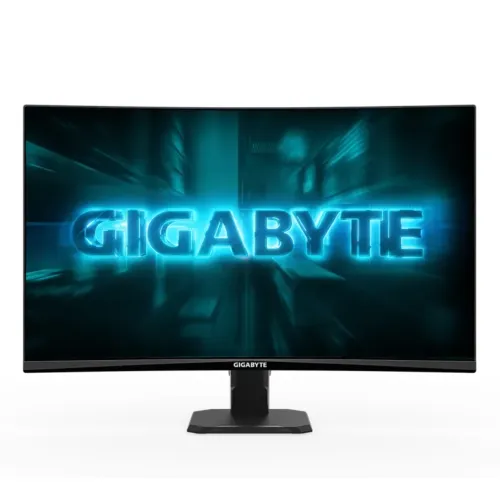
The GIGABYTE GS27FC2 is a 27-inch 1500R curved Full HD VA monitor with up to 240Hz, HDR10 and two HDMI 2.0 inputs. Its manual lists 240Hz over HDMI and 180Hz over DisplayPort for this exact model. The manual and regional page also differ on contrast ratio. Check the source caveats, full specifications and Bangladesh buying notes below.
Monitor overview
The GIGABYTE GS27FC2 is a curved 27-inch Full HD VA gaming monitor. Gigabyte specifies a 1500R curve, 1920 × 1080 resolution, up to 240Hz, a 350-nit typical SDR rating and 16.7 million 8-bit colors in its manual table. It has two HDMI 2.0 inputs, DisplayPort 1.4 and a headphone output.
Two model-specific details need attention. Gigabyte’s manual timing list shows HDMI modes up to 240Hz and DisplayPort up to 180Hz for GS27FC2. The manual’s contrast ratio also differs from Gigabyte’s regional product page. This page makes both distinctions visible so buyers can match the product to the exact suffix and input.
Curved Full HD panel
The monitor uses a 27-inch VA display with 1500R curvature, 16:9 aspect ratio and Full HD 1920 × 1080 resolution. The active viewing area is 597.888 × 336.312mm and pixel pitch is 0.3114mm. A curved VA panel can provide a wraparound feel, while Full HD makes it easier to reach high frame rates than more demanding resolutions.
The trade-off is pixel density: Full HD across 27 inches is less detailed than QHD at the same size, especially for fine text at a close desk distance. Consider how far you sit and whether high refresh or sharper workspace matters more. The 178-degree viewing angles in the manual are specification values and do not remove the viewing behavior differences common to VA panel types.
Refresh rate and connection-specific limit
Gigabyte lists a 240Hz maximum, but the manual timing table for the exact GS27FC2 model lists 1920 × 1080 at 240Hz for HDMI 1 and HDMI 2, and 180Hz for DisplayPort. That means the chosen input and source affect the maximum listed mode. A PC should use an HDMI connection if 240Hz is the goal, subject to the graphics output, cable and settings.
The monitor cannot create frames that the graphics card does not render. Enable the supported display mode in the OS or graphics software and check the OSD input source. Use only supported timings from the manual and do not apply GS27FCA timings as if it were the same unit. The suffix on the label matters because Gigabyte documents separate versions together.
Contrast and brightness source discrepancy
The Gigabyte manual table separates GS27FC2 from GS27FCA. It lists 350-nit typical SDR brightness and 4000:1 typical contrast for GS27FC2, versus 250 nits and 3000:1 for GS27FCA. Gigabyte’s regional product page, however, lists 350 cd/m² and 3000:1 for GS27FC2, and local sellers commonly repeat 3000:1.
The 350-nit value is consistent across the available official sources for GS27FC2, while the contrast figures conflict. This listing shows the discrepancy instead of choosing a convenient number. Before ordering, ask the seller for the current datasheet or carton label for the exact region and production revision.
Color, HDR and motion
Gigabyte lists 125% sRGB color saturation, 16.7 million 8-bit colors, 1ms GTG response and HDR10 support on its official regional product page. A saturation-area figure is not calibrated coverage or an accuracy guarantee. HDR10 input support is also distinct from VESA DisplayHDR certification and a verified high peak brightness level.
Motion response depends on overdrive and display settings; 1ms GTG is not system input lag. The local retailer descriptions also mention flicker-free and Adaptive-Sync/FreeSync, but the accessible manufacturer pages do not specify the VRR operating range. Check exact-mode support with the GPU and source you plan to use.
Ports, audio and devices
The monitor has two HDMI 2.0 inputs, one DisplayPort 1.4 and one headphone output. The built-in power board accepts 100–240V AC, 50/60Hz. Gigabyte does not list internal speakers. Connect a headset to the monitor’s headphone jack or route audio through the PC, console or external speaker system.
HDMI and DisplayPort cables can expose different maximum refresh modes on this exact model according to Gigabyte’s manual. Match the port and cable to the desired setting and verify it in the OS. Gigabyte lists an HDMI cable and power cable in the accessory set; a DisplayPort cable is not listed, so confirm the local box before purchase.
Stand and setup
The stand tilts from -5 to +20 degrees. It does not list height adjustment, swivel or pivot. A 100 × 100mm VESA interface and Kensington lock are specified by Gigabyte. The monitor measures 610.5 × 434.4 × 205.4mm with stand and 610.5 × 362.5 × 78.3mm without it.
Gigabyte’s manual estimates 4.09 ± 0.5kg with stand and 3.62 ± 0.5kg without it; the regional product page lists about 4.53kg with stand. Verify the exact weight and arm capacity when mounting. Leave clearance for the curved panel and cables, and check that a VESA arm supports 100 × 100mm.
Who may prefer this model
This monitor may suit players who want a curved VA panel and high refresh at Full HD, especially when the system can deliver high frame rates. Two HDMI inputs, DisplayPort, headphone-out and VESA support offer flexibility for a compact gaming setup. The high static contrast typical of VA panels can also be attractive for games and films in a dimmer room.
It may not suit buyers who prioritize QHD sharpness at 27 inches, wide ergonomic stand movement, built-in speakers or guaranteed 240Hz over DisplayPort. Buyers who need HDR certification or independently calibrated color should request additional evidence. Compare the display modes and the exact model suffix rather than relying on a 240Hz headline alone.
Bangladesh price and warranty checks
At the time checked, TechLand showed ৳25,799/In Stock, Ultra Technology ৳25,800 with availability confirmation requested, and Daffodil ৳27,500/Out of Stock. These seller listings may change and can differ due to discount, payment method, import channel or inventory. They are market snapshots, not a BiponiBD offer.
Bangladesh retailers advertise a three-year warranty. Gigabyte coverage depends on country and local serial eligibility, so ask who provides support, where to submit a claim, whether the warranty is official local coverage, and what invoice or packaging is required. Confirm exact GS27FC2 suffix, included cables, port support and contrast specification in writing before paying.
Key features
- 27-inch Full HD 1920 × 1080 VA panel with 1500R curvature.
- Maximum 240Hz refresh; manual timing table distinguishes HDMI 240Hz from DisplayPort 180Hz on the exact GS27FC2 model.
- Gigabyte product page lists 1ms GTG and HDR10 support.
- 350-nit SDR typical brightness in manual for GS27FC2; its paired GS27FCA column has different specs.
- 2 × HDMI 2.0, 1 × DisplayPort 1.4 and 1 × headphone output.
- Manual and regional product page differ on static contrast: 4000:1 versus 3000:1.
- 125% sRGB color saturation is a manufacturer figure, not proof of calibrated color accuracy.
- Tilt adjustment from -5° to +20°, 100 × 100mm VESA, Kensington lock.
- No integrated speakers, height adjustment, swivel or pivot listed.
- Built-in power board; HDMI cable and power cable listed among regional accessories.
Pros
- 1500R curvature and VA panel can provide a more enveloping desktop view and deep contrast.
- 240Hz timing is available over supported HDMI input per the manufacturer manual, for systems capable of supplying high frame rates.
- HDR10 input support, variable refresh claims and 1ms GTG are listed by Gigabyte or local retailers.
- Two HDMI ports plus DisplayPort and VESA mounting give useful setup flexibility.
- Manual publishes exact port timing modes, dimensions and power details for GS27FC2.
Cons and buying considerations
- Full HD resolution across 27 inches is less sharp than QHD at a similar viewing distance.
- DisplayPort timing table lists 180Hz while HDMI lists 240Hz; input choice affects the maximum refresh mode.
- Contrast figures conflict between manufacturer manual (4000:1) and regional product page/retailers (3000:1).
- 350-nit SDR brightness and HDR10 input support do not imply VESA DisplayHDR certification or a high-brightness HDR experience.
- Retailer/local serial warranty, current stock and exact region version require verification; BiponiBD offer is not confirmed.
Full specifications
- Brand: GIGABYTE
- Model: GS27FC2
- PanelSize: 27-inch
- Panel: VA, edge-lit, curved 1500R
- Resolution: 1920 × 1080 Full HD
- AspectRatio: 16:9
- PixelPitch: 0.3114 × 0.3114mm
- ActiveArea: 597.888 × 336.312mm
- RefreshRate: Up to 240Hz; official timing table lists 1920×1080 at 240Hz on HDMI inputs and up to 180Hz on DisplayPort for GS27FC2. Check manual and exact input.
- Brightness: 350 nits SDR typical (GS27FC2; separate GS27FCA in same manual is 250 nits)
- ContrastRatio: Source discrepancy: Gigabyte manual table gives GS27FC2 4000:1 typical; Gigabyte regional page and Bangladesh sellers list 3000:1. Confirm current unit documentation.
- Color: 16.7 million, 8-bit
- ColorSaturation: Gigabyte describes 125% sRGB color saturation; this area/saturation figure is not a calibrated coverage or color-accuracy guarantee.
- ResponseTime: 1ms GTG (Gigabyte product page); measurement conditions/mode should be checked in the user manual
- HDR: HDR10 support listed by Gigabyte product page; not a VESA DisplayHDR certification claim
- Sync: Adaptive-Sync/AMD FreeSync features claimed by local retailers; verify exact supported variable-refresh range and GPU compatibility
- Surface: Non-glare
- ViewingAngle: 178° horizontal / 178° vertical
- Ports: 2 × HDMI 2.0; 1 × DisplayPort 1.4; 1 × headphone output
- Audio: No built-in speakers listed in Gigabyte specifications
- Stand: Tilt -5° to +20°; no height, swivel or pivot adjustment listed
- VESA: 100 × 100mm
- Power: Built-in power board; AC 100–240V, 50/60Hz; manual lists 18W on-mode, 0.5W standby, 0.3W off (CEC test). Local sellers show 20W.
- Dimensions: With stand 610.5 × 434.4 × 205.4mm (W×H×D); without stand 610.5 × 362.5 × 78.3mm
- Weight: 4.09 ± 0.5kg with stand; 3.62 ± 0.5kg without stand (manual); Gigabyte regional page estimates 4.53kg with stand
- Included: Gigabyte lists power cable, HDMI cable, quick-start guide and warranty card; package varies by region.
- Warranty: Gigabyte country warranty and local serial coverage must be checked. Bangladesh retailers advertise three years; confirm authorized provider and written terms.
- LocalMarketObservation: TechLand ৳25,799/In Stock; Ultra Technology ৳25,800 with availability confirmation requested; Daffodil ৳27,500/Out of Stock. Seller listings may change; not BiponiBD offers.
- Sources: [object Object]
- CheckedAt: 2026-11-08T20:47:47.937Z
Frequently asked questions
What are the size and resolution?
Gigabyte specifies a 27-inch curved VA panel with 1920 × 1080 Full HD resolution, 16:9 aspect ratio and 1500R curvature.
Can the GS27FC2 run at 240Hz?
Gigabyte lists a maximum 240Hz refresh rate. The official manual timing table for GS27FC2 lists 1920 × 1080 at 240Hz on HDMI inputs and 180Hz on DisplayPort. Use the matching input, graphics output and cable, then confirm the mode in display settings. Do not apply this timing table to the similar GS27FCA model.
Why are contrast figures different?
The Gigabyte manual table lists 4000:1 typical static contrast for GS27FC2, while Gigabyte’s regional product page and several Bangladesh retail listings show 3000:1. Both values are preserved as a source discrepancy; check the current box/datasheet for the exact regional unit.
How bright is this version?
The manual table differentiates two models: GS27FC2 is listed at 350 nits typical SDR, while GS27FCA is 250 nits. Confirm the exact model suffix and do not use GS27FCA figures for the GS27FC2.
Does HDR10 mean it is HDR400 certified?
Gigabyte’s regional product page lists HDR10. The specifications reviewed do not list VESA DisplayHDR certification, so HDR10 signal support should not be treated as proof of DisplayHDR 400 certification or a guaranteed high-brightness HDR experience.
What is the response time?
Gigabyte’s product page lists 1ms GTG. This is a pixel response specification under a particular mode and is not the same as system input lag. Check the manual’s response/overdrive guidance for the selected mode.
Does it support FreeSync or Adaptive-Sync?
Local listings describe AMD FreeSync or Adaptive-Sync, but the accessible official specification excerpt does not provide the compatible VRR range. Check current model support and your GPU, driver and connection before relying on a particular sync mode.
What ports are included?
Gigabyte lists two HDMI 2.0 inputs, one DisplayPort 1.4 and one headphone output. The manufacturer timing list indicates that the maximum refresh can differ by input for GS27FC2.
Does the monitor have speakers?
No built-in speakers are listed in Gigabyte’s specifications. The headphone output can connect suitable audio equipment; otherwise connect speakers or a headset to the computer or console.
Can I adjust its height or pivot?
The stand tilts from -5° to +20°. Gigabyte lists no height adjustment, swivel or pivot. The monitor does support 100 × 100mm VESA mounting for compatible arms.
What is included in the box?
Gigabyte lists a power cable, HDMI cable, quick-start guide and warranty card. Exact bundle can vary by market, so confirm the sealed local package and whether a DisplayPort cable is included.
What is the current price and warranty in Bangladesh?
At the time checked, TechLand showed ৳25,799/In Stock, Ultra Technology ৳25,800 with a request to confirm availability, and Daffodil ৳27,500/Out of Stock. Bangladesh sellers advertise three years, but local serial eligibility and provider should be confirmed. These are changing retailer observations and not a BiponiBD offer.
Source note: Gigabyte regional product specification and manual are the primary technical sources; local sellers provide market observations. Model-specific timing and contrast differences are disclosed. No BiponiBD offer or hands-on test is claimed. Sources checked 2026-11-08T20:47:47.937Z.