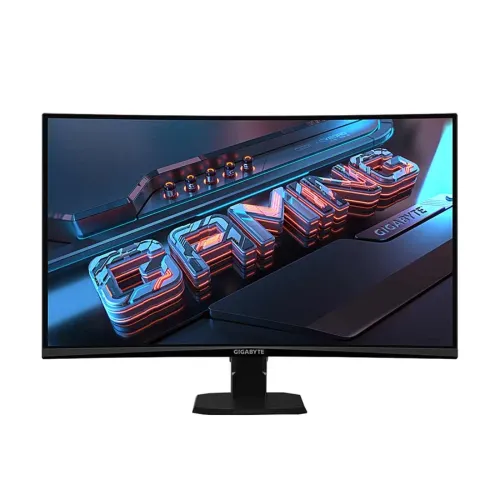
Verified model overview
The GIGABYTE GS27QCA is a 27-inch QHD gaming monitor with a VA panel and 1500R curve. GIGABYTE lists 2560 × 1440 resolution, 180Hz maximum refresh, 1ms MPRT, 250 cd/m² typical brightness and 5000:1 typical contrast. Other listed features include HDR Ready, Adaptive-Sync, 122% sRGB color saturation, flicker-free operation, Aim Stabilizer and OSD Sidekick. Its connections are two HDMI 2.0, one DisplayPort 1.4 and an earphone jack. The fixed stand tilts but has no height, swivel or pivot adjustment.
27-inch QHD resolution
The 27-inch screen uses 2560 × 1440 QHD resolution in a 16:9 aspect ratio. GIGABYTE lists a 596.736 × 335.664mm viewing area, 0.2331mm pixel pitch and approximately 109 pixels per inch. QHD provides more desktop detail than Full HD at the same screen size, useful for games, browsing and multiple windows. Use the native resolution for sharp text and apply operating system scaling if the interface looks too small. Rendering modern games at QHD and a high frame rate requires sufficient GPU performance.
1500R curved VA panel
The GS27QCA uses a 1500R curved VA display. GIGABYTE describes the curve as an immersive viewing design; the best fit depends on desk depth, viewing distance and personal preference. The VA panel’s 5000:1 typical contrast can produce deep-looking dark scenes, while response behavior can vary by transition and setting. Sit centered and adjust the position to reduce reflections. The panel is non-glare and lists 178-degree horizontal and vertical viewing angles, though off-axis image perception can still vary.
180Hz refresh rate
GIGABYTE lists 180Hz maximum refresh at QHD. A high refresh rate can make motion look smoother when the computer supplies enough frames. Select 2560 × 1440 and 180Hz in system display settings, then check the game’s actual frame rate. The cable, port, graphics output and driver must support the selected mode. If 180Hz does not appear, connect directly to the GPU and check the input and display settings. A monitor’s refresh ceiling does not make the game render at that frame rate automatically.
1ms MPRT and response settings
The specification lists a 1ms Moving Picture Response Time (MPRT). MPRT relates to perceived motion blur and is not the same as input lag or a measurement of every pixel transition. GIGABYTE’s Aim Stabilizer feature is designed to reduce motion blur for clearer tracking, while the effect can depend on the selected refresh rate and scene. Review the monitor manual and on-screen display instructions before enabling motion features. Choose settings based on visible clarity and artifacts rather than treating the shortest number as a guarantee.
Adaptive-Sync support
GIGABYTE lists Adaptive-Sync technology to coordinate compatible variable refresh behavior and help reduce tearing. Support depends on the graphics card, driver, connection and display configuration. Enable the matching option in the monitor and graphics software, then check whether it operates across the game’s frame-rate range. Adaptive-Sync does not increase rendering speed. If you notice flicker or instability, try another refresh setting, update the graphics driver, check the cable or disable the feature to compare.
HDR Ready and brightness
The monitor is marked HDR Ready, with a listed typical brightness of 250 cd/m² and minimum of 200 cd/m² in the manual. HDR Ready is not a VESA DisplayHDR certification. HDR appearance depends on the source, settings, brightness and content; this specification does not promise local dimming or a particular certified peak brightness. Compare HDR and SDR with familiar material and choose the mode that looks balanced. Avoid describing HDR Ready as a certified HDR tier in product comparisons.
Color saturation and color depth
GIGABYTE lists 122% sRGB color saturation and 16.7 million colors at 8-bit depth. Saturation ratio is distinct from color-space coverage and is not a factory calibration score. Oversaturated modes may make games vivid but can distort natural product colors and skin tones. Select a suitable picture preset for everyday use. For photography or design requiring accuracy, calibrate the individual monitor and use color-managed software; the published saturation figure alone does not establish color accuracy.
HDMI, DisplayPort and earphone jack
The connection panel has two HDMI 2.0 ports, one DisplayPort 1.4 and one earphone jack. GIGABYTE lists HBR3 support and recommends HDMI or DisplayPort connection between the PC and display to use OSD Sidekick. Actual resolution and refresh combinations depend on the source device, cable and mode. If a refresh option is missing, test a direct connection and check the graphics driver. The earphone jack connects headphones or compatible audio equipment; the monitor has no integrated speakers listed.
No integrated speakers
GIGABYTE specifies the speaker field as N/A, so plan for headphones or external speakers. The earphone output can be used for compatible audio equipment when the selected source sends audio over HDMI or DisplayPort. Select the monitor as the playback device in the operating system and check volume if there is no sound. A headphone jack is an output connection and does not mean the monitor contains a speaker system or microphone input.
Tilt-only stand
The included stand supports tilt from -5 to +20 degrees. The official specification lists no height adjustment, swivel or pivot. Set desk height and chair position so the fixed screen height remains comfortable, and use tilt to reduce glare. If you require ergonomic height movement or portrait orientation, consider a compatible 100 × 100mm VESA arm. Confirm the arm’s load rating and mounting hardware before installation, and support the panel securely while fitting it.
VESA mount, lock and footprint
The GS27QCA supports a 100 × 100mm VESA wall mount and lists a Kensington lock. With its stand, physical dimensions are 610.5 × 441 × 208mm and estimated net weight is 4.53kg. Without the stand, dimensions are 610.5 × 362.5 × 78.3mm and weight about 3.62kg. Measure desk width, depth and viewing distance for the curved 27-inch screen. If using a VESA arm, verify screw compatibility and load capacity, then secure power and video cables so they cannot tug on the display.
Power and consumption
GIGABYTE lists an internal power board, AC 100–240V at 50/60Hz, 26W consumption under its stated test condition, below 0.5W in power-saving mode and below 0.3W when off. The manual gives CEC-based figures that may differ according to measurement conditions. Use the supplied power cable and a properly grounded outlet. Keep ventilation clear and disconnect power before moving or cleaning the monitor. Do not substitute an external adapter; this model’s specification identifies a built-in power board.
Gaming tools and OSD Sidekick
GIGABYTE lists OSD Sidekick, Aim Stabilizer, Black Equalizer, crosshair and timer features. Sidekick allows display options to be adjusted using a keyboard and mouse when the PC is connected to the monitor over HDMI or DisplayPort, and it is integrated with GIGABYTE Control Center. Game Assist tools can add an onscreen timer or customizable crosshair; use them according to game rules and platform policies. Black Equalizer changes dark-scene visibility, while aggressive settings can affect natural image appearance.
Eye comfort and maintenance
The specification lists flicker-free technology and low-blue-light support. These are display features, not medical treatment claims. Comfort also depends on brightness, room lighting, text size, viewing distance and regular breaks. Non-glare surface treatment helps manage reflections but does not remove all glare. Clean the screen gently with a suitable soft cloth and avoid liquid entering the panel or controls. Choose a neutral color mode when accurate colors matter and adjust brightness to match the environment.
Advantages and trade-offs
The GS27QCA combines QHD detail, 180Hz refresh, a curved VA panel, 5000:1 typical contrast, Adaptive-Sync and GIGABYTE gaming tools. Its trade-offs include 250 cd/m² typical brightness, HDR Ready rather than a listed VESA DisplayHDR tier, and a stand without height, swivel or pivot adjustment. Integrated speakers are not specified. These details help set practical expectations for a gaming and everyday display and should be compared against the buyer’s desk setup, preferred brightness, HDR needs and external audio equipment.
Bangladesh warranty and seller terms
GIGABYTE’s specifications do not confirm warranty coverage for a specific serial number or an authorized service arrangement in Bangladesh. The listing currently says three years; ask the seller to verify the serial, warranty start date, service provider and panel defect terms before purchase. Price, stock, delivery, return and payment conditions can change, so check the current offer at checkout. Keep the invoice and product packaging for possible service requests.
Setup and troubleshooting
Connect the monitor to the computer with HDMI or DisplayPort, choose the correct input, set 2560 × 1440 and enable a supported refresh rate up to 180Hz. Use a direct GPU connection when diagnosing a missing mode. Check cable capability, drivers and monitor settings if high refresh is unavailable. Enable Adaptive-Sync where supported if tearing appears. For OSD Sidekick, GIGABYTE requires a PC-to-monitor HDMI or DisplayPort connection. Use headphones or external speakers because the speaker field is listed as N/A.
Who should consider this monitor
The GIGABYTE GS27QCA can suit a gamer seeking a 27-inch curved QHD screen, 180Hz refresh and high typical VA contrast, with OSD and game-assist tools. Check whether the 1500R curve suits your normal viewing distance and whether your graphics hardware can deliver QHD frames. Plan for external audio and decide whether a tilt-only stand meets your ergonomic needs. Buyers wanting a certified HDR tier, height-adjustable stand, USB-C docking or integrated speakers should verify those requirements before choosing.
Specification summary
GIGABYTE GS27QCA: 27-inch VA, 1500R curve, QHD 2560 × 1440, 16:9, 180Hz, 1ms MPRT, 250 cd/m² typical brightness, 5000:1 typical contrast, 122% sRGB saturation and 16.7M colors at 8-bit. HDR Ready, Adaptive-Sync, flicker-free, Aim Stabilizer, Black Equalizer and OSD Sidekick. Ports: 2 × HDMI 2.0, 1 × DP 1.4 and earphone jack. Tilt -5° to +20°; VESA 100 × 100mm; no height/swivel/pivot or speakers listed.