Pros
- Large 31.5-inch QHD screen with high refresh for compatible PC gaming.
- IPS viewing angles and listed 100% sRGB color saturation.
- Adaptive-Sync plus useful on-screen gaming options.
- Two HDMI inputs and DisplayPort 1.4 support multiple sources.

All categories
 New condition
Monitors
Gigabyte · GS32Q
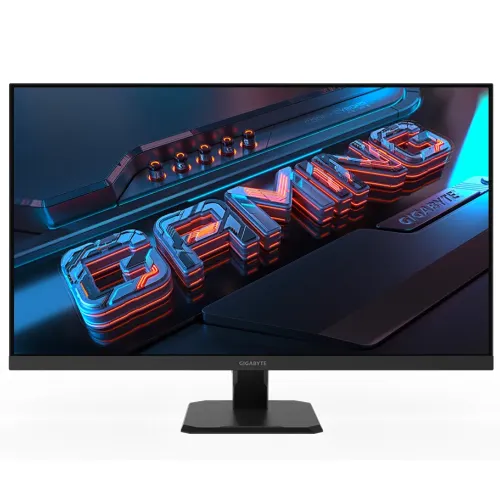
31.5-inch QHD Super Speed IPS gaming monitor with 165Hz refresh, 170Hz overclocked mode, Adaptive-Sync and DisplayPort 1.4.
Price unavailable
Price range updating
No verified price is available yet. Store offers will appear when merchants publish them.
Compare store prices
No live offers for this variant
Offers will appear when merchants publish them.
Loading history…
Product story
The GIGABYTE GS32Q is a flat 31.5-inch QHD gaming display using a Super Speed IPS panel. The manufacturer lists 2560 × 1440 resolution, 165Hz maximum refresh with an overclocked 170Hz mode, 1ms MPRT and Adaptive-Sync. It has two HDMI 2.0 inputs, one DisplayPort 1.4 and an earphone jack. Confirm exact model, supported timings, supplied cables and local seller terms before purchase.
The native QHD 2560 × 1440 resolution is shown across a 16:9 panel with a 698.112 × 392.688mm viewing area. At 31.5 inches, this gives a large gaming image with more detail than Full HD while retaining a practical desktop format. Choose the native resolution in the graphics settings for crisp output. Scaling can help keep interface text readable, and game performance depends on the connected PC or console.
GIGABYTE identifies a 31.5-inch Super Speed IPS display with 178-degree horizontal and vertical viewing angles. The specification lists 100% sRGB color saturation, 1.07 billion display colors and a non-glare surface. These manufacturer values describe the model, not a guarantee that every individual panel is calibrated to a professional standard. Room lighting, picture mode and viewing position affect perceived color and contrast.
The standard maximum refresh is listed as 165Hz, with 170Hz available through an overclocked mode. Select the overclock only if the source and connection expose that mode reliably; the graphics card, cable, driver and monitor setting all matter. After setup, verify the active refresh rate in the operating system or game. Higher refresh can display more frames when the source renders them, but does not itself increase game performance.
The 1ms response figure is specified as MPRT. Motion Picture Response Time is a particular measurement and is not interchangeable with input lag or a promise that every transition is blur-free. Motion clarity depends on frame rate, refresh, panel behavior and selected settings. Aim Stabilizer and other monitor functions can alter the experience and may have operating conditions. Tune settings for the game and check the manual for feature interactions.
Adaptive-Sync support can synchronize refresh behavior with compatible graphics output within supported operating modes, helping reduce tearing. Enable compatible settings on both monitor and GPU, use a suitable cable and keep graphics drivers current. Compatibility and range depend on the source and connection. Adaptive-Sync does not make the display exceed its listed 165Hz native maximum or guarantee variable-refresh operation with every console or graphics device.
The official specification lists typical brightness of 300cd/m², typical contrast of 1200:1 and 100% sRGB color saturation. Display colors are listed as 1.07 billion, with 8-bit plus FRC noted in the product manual. These data points help compare display capability but do not substitute for instrument calibration or guarantee uniformity. The non-glare coating can reduce reflections; it cannot remove direct sunlight or unsuitable room lighting.
The GS32Q lists Aim Stabilizer, Black Equalizer, crosshair, timer and PiP/PbP features. OSD Sidekick is available through GIGABYTE Control Center when the computer is connected over HDMI or DisplayPort. Feature names describe tools and options, not a promise of improved results in every game. Use the on-screen display and the official manual to learn controls, supported modes and any restrictions before relying on a feature during play.
Connections include two HDMI 2.0 ports, one DisplayPort 1.4 and one earphone jack. Select HDMI or DisplayPort according to the source and desired resolution/refresh timing; verify the signal in the monitor information menu. The manufacturer does not list USB-C video, USB hub functionality or laptop charging. Keep cable runs secure and avoid forcing connectors. An included DisplayPort cable is listed among standard accessories, but confirm the local box contents with the retailer.
The official specification lists no built-in speakers and provides a 3.5mm earphone jack. Route audio through the connected source and use headphones or external speakers as needed; the monitor jack availability does not imply integrated audio output hardware. For HDMI/DisplayPort sound, choose the intended playback device in the computer or console settings. Confirm volume and output selection independently if sound is absent.
The included stand supports tilt from -5° to +20°. Height adjustment, swivel and pivot are not listed, so plan desk height and viewing position accordingly. A stable riser or compatible arm can help place the large panel at eye level. Adjust tilt while supporting the frame and allow cable slack. Check dimensions and desk depth before installation because the 31.5-inch screen and stand require more space than a compact office display.
A 100 × 100mm VESA mounting pattern and Kensington lock support are listed. Confirm the mount’s capacity, screw fit and clearance before removing the stand or attaching an arm. The specification does not list stand height adjustment. Keep the panel supported during mounting, protect the screen from pressure and route cables so movement does not pull on the connectors. Follow GIGABYTE’s model manual for installation and safety guidance.
A gaming PC should connect through DisplayPort 1.4 or HDMI 2.0 using a cable and graphics output that support the desired QHD refresh. Then select 2560 × 1440 and the available refresh mode in system settings. The 170Hz overclocked mode may need to be enabled in the monitor OSD. If a mode is missing, check cable capability, driver, port selection and the monitor’s timing limits before assuming the panel is faulty.
The combination of large QHD resolution, 165Hz refresh and Adaptive-Sync is intended for responsive PC gaming. The optional 170Hz overclock requires compatible setup, and game frame rate still depends on PC hardware and software. Aim Stabilizer, Black Equalizer, crosshair and timer are listed gaming tools; choose settings that suit the game and comply with its rules. This is a flat-panel monitor, not a curved model.
HDMI 2.0 inputs can connect compatible consoles and media devices. Check each device’s supported QHD resolution and refresh modes; console output, game support and VRR behavior vary by model. Do not assume the console will use the monitor’s 165Hz or 170Hz PC modes. The earphone jack can serve an audio setup as supported by the source. Test the actual signal and audio path after connecting each device.
The 31.5-inch QHD desktop can display documents, browsers and creative tools alongside game or media content. A 165Hz/170Hz capability is most relevant to compatible motion and does not automatically improve static work. The tilt-only stand may require adjustment to desk or chair height. Use the native resolution and comfortable scaling, and calibrate the actual display for color-critical work because the published sRGB figure alone is not calibration evidence.
The product lists flicker-free operation and a non-glare screen. Set brightness for ambient conditions and position the display to avoid reflections. The specification does not establish a certified low-blue-light mode, so do not infer that feature from the product’s general gaming category. Take regular breaks and set a comfortable viewing distance, especially with a large 31.5-inch panel. User comfort depends on the whole workstation and viewing habits.
GIGABYTE lists 36W power consumption under CEC test conditions, 0.5W power-saving mode and 0.3W off mode, with AC 100–240V at 50/60Hz. Approximate dimensions with stand are 714 × 500.8 × 238mm and estimated net weight is about 7.1kg. Listed accessories include power cable, DisplayPort cable, quick start guide and warranty card; regional package contents can vary, so verify with the seller.
Place the monitor on a stable desk, connect power and signal cables without tension, and keep ventilation clear. Clean the display gently with a soft microfiber cloth; avoid abrasive materials, harsh solvents and spraying liquid directly on the panel. When changing tilt or moving the monitor, support the frame rather than pressing the LCD. Retain packaging and record the serial number and delivery condition for support or return requests.
The catalog’s existing three-year warranty wording is not independent confirmation of coverage for a particular Bangladesh unit. Ask the seller to identify the local warranty provider, duration, service location, dead-pixel terms, invoice requirements and serial eligibility. Match the unit and carton serials with the invoice. Confirm current price, stock, delivery, return terms and included accessories from the live seller offer before payment; manufacturer specifications do not verify retailer conditions.
Helpful answers
Product-specific answers maintained with the catalog information.
The GS32Q is a 31.5-inch QHD monitor with 2560 × 1440 resolution.
GIGABYTE lists 165Hz maximum and a 170Hz overclocked mode.
The manufacturer specifies a Super Speed IPS panel.
Yes, Adaptive-Sync is listed for compatible sources and modes.
Two HDMI 2.0, one DisplayPort 1.4 and an earphone jack are listed.
No; the manufacturer lists speakers as N/A and includes an earphone jack.
Only tilt is listed; height, swivel and pivot adjustment are not listed.
A 100 × 100mm VESA mounting pattern is listed.
Confirm local serial-specific warranty provider and service terms with the seller.
Customer community
Become a merchant
Join BiponiBD, publish accurate offers and start free.