Pros
- Two refresh/resolution modes for detailed or competitive gaming.
- KVM and USB hub support multi-device desks.
- USB-C display and dynamic PD up to 45W.
- Adjustable height, tilt, swivel and pivot stand.

All categories
 New condition
Monitors
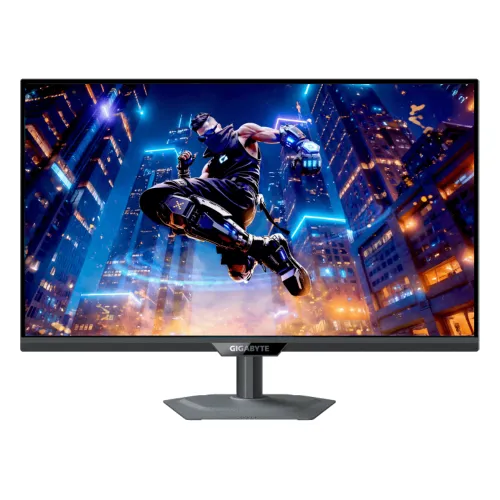
Gigabyte · M27UP
27-inch 4K gaming monitor with 4K/160Hz or FHD/320Hz dual mode, KVM, USB-C and DisplayHDR 400.
Price unavailable
Price range updating
No verified price is available yet. Store offers will appear when merchants publish them.
Compare store prices
No live offers for this variant
Offers will appear when merchants publish them.
Loading history…
Product story
GIGABYTE M27UP is a 27-inch SuperSpeed IPS gaming monitor with two modes: 3840 × 2160 UHD at 160Hz or 1920 × 1080 Full HD at 320Hz. Official specifications list 1ms GTG, 350 cd/m² typical brightness, VESA DisplayHDR 400, 95% DCI-P3/125% sRGB, KVM, HDMI 2.1, DisplayPort 1.4 DSC and USB-C Smart PD. Refer to GIGABYTE's M27UP specification and user guide for signal timings and setup. Performance depends on source, port, cable, selected resolution and content. Current Bangladesh price, stock, warranty and return terms are seller-specific and should be confirmed before purchase.
Confirm model M27UP on the rear label. This monitor's two headline modes are 4K 160Hz and FHD 320Hz; do not confuse the model with G27UP or other similarly named GIGABYTE displays. Some specifications can vary by market, so check the local product sheet and bundled cables before ordering. Refer to GIGABYTE's M27UP specification and user guide for signal timings and setup. Performance depends on source, port, cable, selected resolution and content. Current Bangladesh price, stock, warranty and return terms are seller-specific and should be confirmed before purchase.
Dual Mode lets users choose high-detail 4K UHD at up to 160Hz or faster Full HD at up to 320Hz. The 320Hz mode is only at 1920 × 1080, not 4K. Select the resolution/refresh combination in the display OSD and operating system, then verify the active input signal before launching a game. Refer to GIGABYTE's M27UP specification and user guide for signal timings and setup. Performance depends on source, port, cable, selected resolution and content. Current Bangladesh price, stock, warranty and return terms are seller-specific and should be confirmed before purchase.
The 27-inch 16:9 screen has native 3840 × 2160 resolution and 0.1554mm pixel pitch. UHD offers detailed games and desktop content. Driving high-refresh 4K requires a capable GPU and suitable interface; FHD 320Hz reduces pixel load for competitive play. Set native resolution for sharp desktop text and adjust scaling for comfort. Refer to GIGABYTE's M27UP specification and user guide for signal timings and setup. Performance depends on source, port, cable, selected resolution and content. Current Bangladesh price, stock, warranty and return terms are seller-specific and should be confirmed before purchase.
GIGABYTE specifies a 27-inch SS IPS panel, 178-degree horizontal/vertical viewing angles, 1000:1 contrast and a non-glare surface. IPS viewing angles help maintain image appearance when viewed off-center. Brightness, uniformity and color vary by unit and room, so treat published specifications as model-level targets rather than an individual calibration certificate. Refer to GIGABYTE's M27UP specification and user guide for signal timings and setup. Performance depends on source, port, cable, selected resolution and content. Current Bangladesh price, stock, warranty and return terms are seller-specific and should be confirmed before purchase.
The specification lists 1ms GTG response. Motion clarity also depends on refresh, frame rate, overdrive and adaptive sync. Compare OSD response modes in actual games and watch for overshoot. The monitor's response metric is not end-to-end input latency and cannot guarantee the same result for all pixel transitions or source systems. Refer to GIGABYTE's M27UP specification and user guide for signal timings and setup. Performance depends on source, port, cable, selected resolution and content. Current Bangladesh price, stock, warranty and return terms are seller-specific and should be confirmed before purchase.
VESA DisplayHDR 400 is listed. Typical brightness is 350 cd/m²; the spec does not present this as an HDR peak value. HDR results depend on content, source and monitor settings. DisplayHDR 400 is an entry HDR certification and should not be interpreted as OLED-level contrast or proof of local dimming. Refer to GIGABYTE's M27UP specification and user guide for signal timings and setup. Performance depends on source, port, cable, selected resolution and content. Current Bangladesh price, stock, warranty and return terms are seller-specific and should be confirmed before purchase.
GIGABYTE lists 95% DCI-P3 and 125% sRGB, with 1.07 billion display colors. Gamut percentages describe color coverage and depend on the cited standard. They do not establish unit-specific accuracy. For creative work, use suitable calibration, select the delivery color space and review how application color management handles the monitor's wide gamut. Refer to GIGABYTE's M27UP specification and user guide for signal timings and setup. Performance depends on source, port, cable, selected resolution and content. Current Bangladesh price, stock, warranty and return terms are seller-specific and should be confirmed before purchase.
The M27UP supports AMD FreeSync Premium and G-SYNC Compatible, with KVM switching for control of multiple connected devices using one keyboard and mouse. KVM operation requires the relevant video and USB upstream connections. Set the monitor input and KVM source intentionally, and check firmware/OSD instructions for switching between computers. Refer to GIGABYTE's M27UP specification and user guide for signal timings and setup. Performance depends on source, port, cable, selected resolution and content. Current Bangladesh price, stock, warranty and return terms are seller-specific and should be confirmed before purchase.
USB-C supports Alternate Mode and Smart PD: 18W standard with dynamic output up to 45W, according to GIGABYTE's product page. This may power some light-use laptops but is not guaranteed to replace a laptop charger. Confirm exact PD behavior, host USB-C video capability and the power your computer requires before planning a one-cable desk. Refer to GIGABYTE's M27UP specification and user guide for signal timings and setup. Performance depends on source, port, cable, selected resolution and content. Current Bangladesh price, stock, warranty and return terms are seller-specific and should be confirmed before purchase.
The monitor includes two HDMI 2.1 inputs and one DisplayPort 1.4 with DSC. GIGABYTE specifies console support at 4K UHD/120Hz (4:2:0) over HDMI 2.1 for PS5 and Xbox Series X. Use a suitable cable and verify source mode. The PC manual's timing list should guide exact resolution/refresh compatibility for each port. Refer to GIGABYTE's M27UP specification and user guide for signal timings and setup. Performance depends on source, port, cable, selected resolution and content. Current Bangladesh price, stock, warranty and return terms are seller-specific and should be confirmed before purchase.
Connectivity also includes three USB 3.2 Gen 1 downstream ports, one USB 3.2 Gen 1 upstream port, USB-C and an earphone jack. Two built-in 5W speakers are listed. Connect USB upstream to the host to use the hub and KVM peripherals. Choose the correct audio output and adjust speakers or headphones for the room. Refer to GIGABYTE's M27UP specification and user guide for signal timings and setup. Performance depends on source, port, cable, selected resolution and content. Current Bangladesh price, stock, warranty and return terms are seller-specific and should be confirmed before purchase.
The stand supports 130mm height adjustment, -5° to +21° tilt, ±15° swivel and clockwise pivot to 90°. VESA mounting is 100 × 100mm. Position the display at a comfortable eye level and keep its base stable. Before mounting, verify bracket capacity and screw fit, and leave cable slack for swivel or pivot movement. Refer to GIGABYTE's M27UP specification and user guide for signal timings and setup. Performance depends on source, port, cable, selected resolution and content. Current Bangladesh price, stock, warranty and return terms are seller-specific and should be confirmed before purchase.
For PC play, connect through DP 1.4 DSC or HDMI 2.1, select 3840 × 2160 at 160Hz or switch to 1920 × 1080 at 320Hz, and confirm signal information. GPU, driver, cable and game must support the mode. Set frame-rate options to match graphics performance and enable adaptive sync if supported. Refer to GIGABYTE's M27UP specification and user guide for signal timings and setup. Performance depends on source, port, cable, selected resolution and content. Current Bangladesh price, stock, warranty and return terms are seller-specific and should be confirmed before purchase.
HDMI 2.1 supports PS5 and Xbox Series X at 4K UHD 120Hz (4:2:0) according to GIGABYTE. Console output depends on console settings and game. Consoles generally do not use 320Hz. Confirm 4K/120Hz, HDR and VRR behavior for the exact device, and connect to the appropriate HDMI port with a certified cable. Refer to GIGABYTE's M27UP specification and user guide for signal timings and setup. Performance depends on source, port, cable, selected resolution and content. Current Bangladesh price, stock, warranty and return terms are seller-specific and should be confirmed before purchase.
KVM helps share keyboard, mouse and USB peripherals across multiple source devices, while USB-C can provide video and limited power to a compatible laptop. Check host USB connections and input assignments. The 27-inch 4K panel suits work and media as well as gaming; text scaling and cable management matter when switching between a desktop and laptop. Refer to GIGABYTE's M27UP specification and user guide for signal timings and setup. Performance depends on source, port, cable, selected resolution and content. Current Bangladesh price, stock, warranty and return terms are seller-specific and should be confirmed before purchase.
Advantages include flexible 4K/160Hz and FHD/320Hz modes, SS IPS, KVM, USB hub, USB-C PD and a fully adjustable stand. Trade-offs include the graphics demand of 4K high refresh, entry HDR400 brightness class and limited USB-C power for larger laptops. Select based on the devices and mode you will actually use rather than the highest headline alone. Refer to GIGABYTE's M27UP specification and user guide for signal timings and setup. Performance depends on source, port, cable, selected resolution and content. Current Bangladesh price, stock, warranty and return terms are seller-specific and should be confirmed before purchase.
The built-in power board uses AC 100–240V, 50/60Hz. GIGABYTE lists 27W under its CEC test condition, under 0.5W in power-saving mode and under 0.3W off. Dimensions are 612 × 515 × 192mm with stand and 612 × 371 × 59mm without. Net weights are 6.65kg and 5.15kg respectively. Refer to GIGABYTE's M27UP specification and user guide for signal timings and setup. Performance depends on source, port, cable, selected resolution and content. Current Bangladesh price, stock, warranty and return terms are seller-specific and should be confirmed before purchase.
Before purchase in Bangladesh, confirm live price and stock, exact M27UP revision, included HDMI/DP/USB cables, USB-C PD behavior, return/dead-pixel policy, delivery and serial-specific GIGABYTE warranty provider and term. The international specification does not prove local seller coverage. Verify bundle and service terms on the invoice before ordering. Refer to GIGABYTE's M27UP specification and user guide for signal timings and setup. Performance depends on source, port, cable, selected resolution and content. Current Bangladesh price, stock, warranty and return terms are seller-specific and should be confirmed before purchase.
GIGABYTE M27UP supports 4K at 160Hz or FHD at 320Hz, not 4K at 320Hz. It has a 27-inch SS IPS panel, DisplayHDR 400, KVM, USB-C Smart PD up to dynamic 45W, HDMI 2.1, DP 1.4 DSC and 5W × 2 speakers. Confirm exact cables, local revision and Bangladesh warranty. Refer to GIGABYTE's M27UP specification and user guide for signal timings and setup. Performance depends on source, port, cable, selected resolution and content. Current Bangladesh price, stock, warranty and return terms are seller-specific and should be confirmed before purchase.
Helpful answers
Product-specific answers maintained with the catalog information.
4K UHD at up to 160Hz or FHD at up to 320Hz.
No. GIGABYTE specifies 320Hz only in FHD; 4K mode reaches up to 160Hz.
Yes. KVM allows supported USB peripherals to switch between connected source devices.
Smart PD is 18W standard with dynamic output up to 45W according to GIGABYTE.
VESA DisplayHDR 400.
GIGABYTE lists two 5W speakers.
PS5/Xbox Series X at 4K UHD 120Hz (4:2:0) over HDMI 2.1.
The VESA mounting pattern is 100 × 100mm.
Confirm serial-specific local GIGABYTE provider, warranty term and service with the seller.
Customer community
Become a merchant
Join BiponiBD, publish accurate offers and start free.