Pros
- Dual mode balances UHD detail and very high FHD refresh.
- KVM and USB hub support a multi-computer desktop.
- HDMI 2.1, DP DSC and USB-C video offer flexible connections.
- Adjustable stand, VESA mount and built-in speakers are included.

All categories
 New condition
Monitors
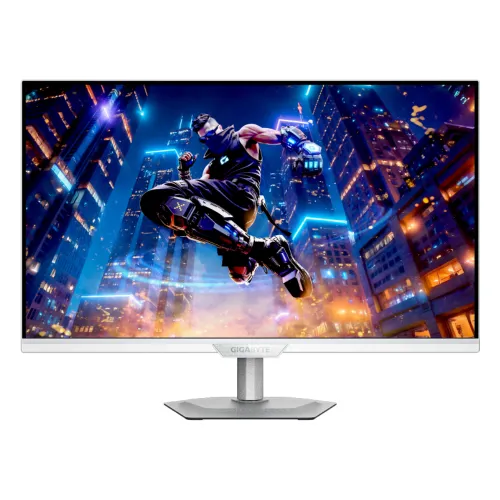
Gigabyte · M27UP ICE
27-inch 4K 160Hz SS IPS monitor with FHD 320Hz dual mode, KVM, HDMI 2.1 and USB-C 18W PD.
Price unavailable
Price range updating
No verified price is available yet. Store offers will appear when merchants publish them.
Compare store prices
No live offers for this variant
Offers will appear when merchants publish them.
Loading history…
Product story
The GIGABYTE M27UP ICE is a 27-inch 16:9 SS IPS gaming monitor with 3840 × 2160 UHD resolution. GIGABYTE specifies a dual-mode experience: 4K UHD at up to 160Hz or Full HD at up to 320Hz. It also lists 1ms GTG, VESA DisplayHDR 400, HDMI 2.1, DisplayPort 1.4 DSC, USB-C with up to 18W Power Delivery and a built-in KVM switch. Refer to the official M27UP ICE manual and regional specification for the exact mode and installation steps. The source device, cable, input and OSD work together to determine the available signal. Local price, stock, package and warranty require seller confirmation for the actual unit.
Confirm the monitor label says M27UP ICE; the white ICE finish and included regional SKU may differ from the standard M27UP. The product page lists exact M27UP ICE inputs and its 4K 160Hz mode, while the key-features page describes dual mode up to FHD 320Hz. Check the model suffix and manual for the exact regional package. Refer to the official M27UP ICE manual and regional specification for the exact mode and installation steps. The source device, cable, input and OSD work together to determine the available signal. Local price, stock, package and warranty require seller confirmation for the actual unit.
The 27-inch panel uses native 3840 × 2160 UHD resolution, providing detailed text and images at 16:9. This mode is suited to high-resolution games and desktop work. To reach 160Hz at 4K, the computer, cable, input and settings need to support the required bandwidth. Use native resolution for the sharpest display output. Refer to the official M27UP ICE manual and regional specification for the exact mode and installation steps. The source device, cable, input and OSD work together to determine the available signal. Local price, stock, package and warranty require seller confirmation for the actual unit.
GIGABYTE specifies an SS IPS panel, 1.07 billion display colors, 95% DCI-P3 and 125% sRGB, with typical 1000:1 contrast and 178-degree viewing angles. The non-glare surface helps with reflections. Gamut coverage does not guarantee calibration accuracy for every unit; calibrate for color-critical use. Refer to the official M27UP ICE manual and regional specification for the exact mode and installation steps. The source device, cable, input and OSD work together to determine the available signal. Local price, stock, package and warranty require seller confirmation for the actual unit.
Dual mode lets users select high-detail UHD at up to 160Hz or faster Full HD at up to 320Hz. The best mode depends on game, GPU and preference: UHD prioritizes fine detail, while FHD at 320Hz emphasizes frame-rate responsiveness. Select the mode using the monitor controls and verify the output mode in the PC display settings. Refer to the official M27UP ICE manual and regional specification for the exact mode and installation steps. The source device, cable, input and OSD work together to determine the available signal. Local price, stock, package and warranty require seller confirmation for the actual unit.
The manufacturer lists 1ms GTG response. Response time is a specified measurement and does not promise every pixel transition completes identically under all overdrive settings. Choose the refresh and response options that give clean motion on the actual system. Frame rate, cable and graphics output can affect perceived smoothness. Refer to the official M27UP ICE manual and regional specification for the exact mode and installation steps. The source device, cable, input and OSD work together to determine the available signal. Local price, stock, package and warranty require seller confirmation for the actual unit.
VESA DisplayHDR 400 is supported, with typical brightness listed at 350 cd/m². HDR playback depends on compatible source, content and system settings. DisplayHDR 400 is an entry HDR tier and does not indicate local dimming. Compare HDR with SDR in actual content and do not infer performance beyond the published specification. Refer to the official M27UP ICE manual and regional specification for the exact mode and installation steps. The source device, cable, input and OSD work together to determine the available signal. Local price, stock, package and warranty require seller confirmation for the actual unit.
M27UP ICE includes two HDMI 2.1 inputs and one DisplayPort 1.4 input with DSC. DSC may be required for high-bandwidth 4K refresh combinations. Use a suitable cable and GPU output, and check the selected input and signal format. GIGABYTE notes HDMI 2.1 console support up to 4K UHD 120Hz at 4:2:0. Refer to the official M27UP ICE manual and regional specification for the exact mode and installation steps. The source device, cable, input and OSD work together to determine the available signal. Local price, stock, package and warranty require seller confirmation for the actual unit.
USB-C supports DisplayPort Alternate Mode and up to 18W Power Delivery. This can provide video and modest charging for compatible devices, but is not laptop-class high-wattage charging. Confirm the host USB-C port supports video. The monitor’s KVM can switch a connected keyboard and mouse between systems when required upstream USB connections are in place. Refer to the official M27UP ICE manual and regional specification for the exact mode and installation steps. The source device, cable, input and OSD work together to determine the available signal. Local price, stock, package and warranty require seller confirmation for the actual unit.
Three USB 3.2 Gen 1 downstream ports and one upstream port are specified. Connect the USB upstream cable to a computer for hub data and KVM functions. GIGABYTE OSD Sidekick requires a USB A-male to B-male cable according to the manufacturer. Use the official manual and software for configuration. Refer to the official M27UP ICE manual and regional specification for the exact mode and installation steps. The source device, cable, input and OSD work together to determine the available signal. Local price, stock, package and warranty require seller confirmation for the actual unit.
Product materials list G-SYNC Compatible, Tactical Switch 2.0, crosshair and gaming display controls. Adaptive sync requires compatible host hardware and settings. Feature availability can vary by chosen refresh mode and firmware. The firmware and support pages may contain later revisions; check the exact product page before applying updates. Refer to the official M27UP ICE manual and regional specification for the exact mode and installation steps. The source device, cable, input and OSD work together to determine the available signal. Local price, stock, package and warranty require seller confirmation for the actual unit.
The display has two built-in 5W speakers and a headphone jack. The speakers are suitable for basic desktop audio, but room acoustics and source affect sound quality. Headphones or external speakers may be preferable for clearer dialogue, stronger bass or higher volume. Refer to the official M27UP ICE manual and regional specification for the exact mode and installation steps. The source device, cable, input and OSD work together to determine the available signal. Local price, stock, package and warranty require seller confirmation for the actual unit.
The stand supports height adjustment up to 130mm, tilt from -5 to +21 degrees, swivel ±15 degrees and clockwise pivot up to 90 degrees. A 100 × 100mm VESA mount and Kensington lock are listed. Leave clearance for pivoting and verify arm load, screw length and desk space before installation. Refer to the official M27UP ICE manual and regional specification for the exact mode and installation steps. The source device, cable, input and OSD work together to determine the available signal. Local price, stock, package and warranty require seller confirmation for the actual unit.
GIGABYTE lists a built-in power supply, typical 27W power consumption, under 0.5W power-saving use and under 0.3W off mode, with AC 100–240V at 50/60Hz. Dimensions with stand are 612 × 515 × 192mm and without stand 612 × 371 × 59mm; net weight is about 6.65kg with stand and 5.15kg without. Refer to the official M27UP ICE manual and regional specification for the exact mode and installation steps. The source device, cable, input and OSD work together to determine the available signal. Local price, stock, package and warranty require seller confirmation for the actual unit.
For PC, choose the display connection and mode that fit the task. Use 4K UHD at 160Hz for detail or FHD at up to 320Hz for supported competitive play. Confirm the graphics card, driver, cable and OSD mode, then check Windows or GPU display settings. If a mode is absent, verify the signal chain before assuming the monitor is faulty. Refer to the official M27UP ICE manual and regional specification for the exact mode and installation steps. The source device, cable, input and OSD work together to determine the available signal. Local price, stock, package and warranty require seller confirmation for the actual unit.
HDMI 2.1 supports PS5 and Xbox Series X at 4K UHD up to 120Hz in the manufacturer’s listed 4:2:0 configuration. Console output depends on game, console settings and cable. The FHD 320Hz mode is primarily relevant to PC configurations; consoles do not output 320Hz. Refer to the official M27UP ICE manual and regional specification for the exact mode and installation steps. The source device, cable, input and OSD work together to determine the available signal. Local price, stock, package and warranty require seller confirmation for the actual unit.
Advantages include 4K detail with a high refresh option, an FHD 320Hz dual mode, IPS color, HDMI 2.1, USB-C video, KVM, USB hub and adjustable stand. Trade-offs include the GPU demand of 4K high refresh, limited USB-C power at 18W, possible chroma subsampling on console 4K120 mode and reliance on game support for ultrahigh frame rates. Refer to the official M27UP ICE manual and regional specification for the exact mode and installation steps. The source device, cable, input and OSD work together to determine the available signal. Local price, stock, package and warranty require seller confirmation for the actual unit.
Inspect the panel, stand, power cable, HDMI/DisplayPort/USB cables and serial label on delivery. Keep the invoice and box during the return period. Avoid pressing on the LCD and clean with a soft microfiber cloth. Confirm accessories and any included warranty card against the seller listing and exact regional package. Refer to the official M27UP ICE manual and regional specification for the exact mode and installation steps. The source device, cable, input and OSD work together to determine the available signal. Local price, stock, package and warranty require seller confirmation for the actual unit.
Before purchase in Bangladesh, confirm live stock and price, exact M27UP ICE model/suffix, new or open-box condition, whether the ICE color matches the offer, included cable bundle, return and dead-pixel rules, delivery, and serial-specific GIGABYTE warranty provider and term. The product page lists buying regions that may not include Bangladesh; verify local service directly with seller. Refer to the official M27UP ICE manual and regional specification for the exact mode and installation steps. The source device, cable, input and OSD work together to determine the available signal. Local price, stock, package and warranty require seller confirmation for the actual unit.
GIGABYTE M27UP ICE is a 27-inch 4K 160Hz monitor with an FHD 320Hz dual mode, SS IPS, HDMI 2.1, KVM and USB-C up to 18W PD. Confirm the regional model, high-refresh source capability, cable bundle and local serial warranty before buying. Refer to the official M27UP ICE manual and regional specification for the exact mode and installation steps. The source device, cable, input and OSD work together to determine the available signal. Local price, stock, package and warranty require seller confirmation for the actual unit.
Helpful answers
Product-specific answers maintained with the catalog information.
Native resolution is 3840 × 2160 UHD on a 27-inch SS IPS panel.
It supports UHD up to 160Hz or FHD up to 320Hz for different use cases.
Yes, the specification lists two HDMI 2.1 inputs.
The USB-C port supports video and up to 18W Power Delivery.
Yes, it has KVM; connect the computer USB upstream links and peripherals.
It supports VESA DisplayHDR 400.
GIGABYTE lists HDMI support for PS5 and Xbox Series X at 4K120 in 4:2:0.
The monitor lists a 100 × 100mm VESA mounting pattern.
Ask the seller to confirm serial-specific local provider and term in writing.
Customer community
Become a merchant
Join BiponiBD, publish accurate offers and start free.