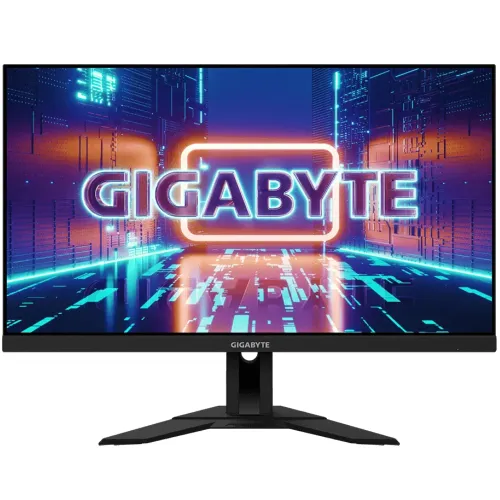
GIGABYTE M28U product overview
The GIGABYTE M28U is a 28-inch 4K UHD gaming monitor built around a Super Speed IPS panel. The manufacturer lists 3840 × 2160 resolution, a 144Hz maximum refresh rate, 1ms MPRT, VESA DisplayHDR 400, AMD FreeSync Premium Pro and a built-in KVM function. It combines high pixel density with fast refresh for gaming and detailed desktop work. Refer to the M28U user manual and the specification for the unit's exact regional mode and connection instructions. Check the complete signal chain, including the source device, selected input, cable and monitor setting, when configuring this feature. Results and availability can depend on the specific system and regional package.
Exact M28U model identification
Check the rear label and box for the exact M28U designation. M28U, M28U-EK and other similarly named GIGABYTE displays can have different regional packages or specifications. This product review is for M28U; do not assume that a listing, cable bundle, regional warranty or suffix is identical without reading the unit label and seller invoice. Refer to the M28U user manual and the specification for the unit's exact regional mode and connection instructions. Check the complete signal chain, including the source device, selected input, cable and monitor setting, when configuring this feature. Results and availability can depend on the specific system and regional package.
28-inch 4K UHD resolution
The 28-inch 16:9 panel has a native 3840 × 2160 UHD resolution. Use the native mode for sharp text and detailed images. High-resolution output at 144Hz requires a suitable graphics device, connection, cable and settings; the achievable combination can depend on chroma format and Display Stream Compression. Set the operating system to its supported native mode. Refer to the M28U user manual and the specification for the unit's exact regional mode and connection instructions. Check the complete signal chain, including the source device, selected input, cable and monitor setting, when configuring this feature. Results and availability can depend on the specific system and regional package.
SS IPS panel and image quality
GIGABYTE identifies the panel as SS IPS with 178-degree horizontal and vertical viewing angles and a 1000:1 typical contrast ratio. The matte non-glare surface helps reduce reflections, though lighting and screen position still matter. IPS viewing angles support shared viewing, but contrast and uniformity can vary between individual panels. Refer to the M28U user manual and the specification for the unit's exact regional mode and connection instructions. Check the complete signal chain, including the source device, selected input, cable and monitor setting, when configuring this feature. Results and availability can depend on the specific system and regional package.
144Hz refresh rate and response modes
The manufacturer lists 144Hz maximum on PC and 120Hz for supported console modes. Response specifications include 1ms MPRT and 2ms GTG; these are different measurement methods and do not mean every transition is completed in one millisecond. Use a compatible DisplayPort or HDMI signal and select the intended refresh rate in the graphics settings. Refer to the M28U user manual and the specification for the unit's exact regional mode and connection instructions. Check the complete signal chain, including the source device, selected input, cable and monitor setting, when configuring this feature. Results and availability can depend on the specific system and regional package.
VESA DisplayHDR 400 and brightness
The display is certified VESA DisplayHDR 400 and lists typical brightness of 300 cd/m². HDR playback also depends on the source, application, cable and system settings. HDR400 is an entry-level certification tier and does not indicate local dimming or the peak contrast of premium HDR displays. Compare SDR and HDR with content you actually use. Refer to the M28U user manual and the specification for the unit's exact regional mode and connection instructions. Check the complete signal chain, including the source device, selected input, cable and monitor setting, when configuring this feature. Results and availability can depend on the specific system and regional package.
Color coverage and bit depth
GIGABYTE lists 94% DCI-P3 and 120% sRGB color gamut with 8-bit color support. Coverage figures describe gamut, not factory calibration accuracy for every unit. For color-critical production, calibrate the individual screen and use color-managed software. Color modes, brightness and HDR settings can change the perceived image. Refer to the M28U user manual and the specification for the unit's exact regional mode and connection instructions. Check the complete signal chain, including the source device, selected input, cable and monitor setting, when configuring this feature. Results and availability can depend on the specific system and regional package.
Adaptive sync and gaming features
The M28U supports AMD FreeSync Premium Pro according to the manufacturer, alongside gaming tools such as Aim Stabilizer Sync, Black Equalizer and an on-screen display control utility. Variable refresh and strobing features have compatibility and configuration requirements and may not operate together in every mode. Consult the manual for options and avoid assuming all features work at once. Refer to the M28U user manual and the specification for the unit's exact regional mode and connection instructions. Check the complete signal chain, including the source device, selected input, cable and monitor setting, when configuring this feature. Results and availability can depend on the specific system and regional package.
HDMI 2.1 inputs and console use
Two HDMI 2.1 inputs are provided. The manufacturer describes 4K at 144Hz with 4:4:4 when DSC is enabled, or 4K at 144Hz using 4:2:0 in the stated mode. Console output is listed up to 4K UHD at 120Hz with 4:2:0. Exact signal support depends on source capabilities, settings, cable and selected color format. Refer to the M28U user manual and the specification for the unit's exact regional mode and connection instructions. Check the complete signal chain, including the source device, selected input, cable and monitor setting, when configuring this feature. Results and availability can depend on the specific system and regional package.
DisplayPort 1.4 with DSC
The DisplayPort 1.4 input supports DSC for high-bandwidth 4K gaming modes. Use a certified cable and a graphics card that supports the required resolution and refresh. If the monitor shows no image or a lower rate, check the source output, cable, graphics driver, selected input and display settings before assuming a defect. Refer to the M28U user manual and the specification for the unit's exact regional mode and connection instructions. Check the complete signal chain, including the source device, selected input, cable and monitor setting, when configuring this feature. Results and availability can depend on the specific system and regional package.
USB-C video and connectivity
One USB Type-C input supports video over USB-C for compatible devices. A USB-C connector alone does not guarantee video: the host must support DisplayPort Alt Mode or another compatible display output. The M28U specification does not list laptop charging Power Delivery, so keep the computer power adapter connected unless a separate verified source confirms charging capability. Refer to the M28U user manual and the specification for the unit's exact regional mode and connection instructions. Check the complete signal chain, including the source device, selected input, cable and monitor setting, when configuring this feature. Results and availability can depend on the specific system and regional package.
KVM switch and USB hub
The built-in KVM allows control of two connected computers with one monitor, keyboard and mouse when the required USB connections are wired and the KVM source is configured. The monitor has three USB 3.0 downstream ports; connect the specified USB upstream cable from each computer. GIGABYTE notes that the OSD Sidekick utility requires a USB A-male to B-male cable. Refer to the M28U user manual and the specification for the unit's exact regional mode and connection instructions. Check the complete signal chain, including the source device, selected input, cable and monitor setting, when configuring this feature. Results and availability can depend on the specific system and regional package.
Built-in speakers and audio output
Two built-in speakers are listed at 3W each, and a headphone output is available. Integrated speakers can handle basic desktop audio and calls, while sound level and quality depend on the room and source. Use external speakers or headphones when clearer voice, stronger bass or higher volume is needed. Refer to the M28U user manual and the specification for the unit's exact regional mode and connection instructions. Check the complete signal chain, including the source device, selected input, cable and monitor setting, when configuring this feature. Results and availability can depend on the specific system and regional package.
Ergonomics and stand adjustment
The stand supports tilt from -5 to +20 degrees and up to 130mm of height adjustment. The specification does not list swivel or pivot adjustment. Arrange the screen before use and leave adequate space for the stand. Use a separate compatible VESA arm if the installation needs rotation or greater movement. Refer to the M28U user manual and the specification for the unit's exact regional mode and connection instructions. Check the complete signal chain, including the source device, selected input, cable and monitor setting, when configuring this feature. Results and availability can depend on the specific system and regional package.
VESA mounting and dimensions
The monitor supports a 100 × 100mm VESA mount and includes a Kensington lock point. Listed dimensions are 636.5 × 534.2 × 193.6mm with stand and 636.5 × 372.3 × 63.1mm without stand; listed weights are 6.93kg and 5.18kg respectively. Verify arm load capacity and screw requirements before installation. Refer to the M28U user manual and the specification for the unit's exact regional mode and connection instructions. Check the complete signal chain, including the source device, selected input, cable and monitor setting, when configuring this feature. Results and availability can depend on the specific system and regional package.
Power requirements and consumption
The unit has a built-in power supply and accepts AC 100–240V at 50/60Hz. GIGABYTE lists up to 115W input, 0.5W standby and 0.3W powered off; actual use varies with brightness, refresh, USB devices and picture settings. Use the supplied power cable with a properly grounded outlet and follow local electrical guidance. Refer to the M28U user manual and the specification for the unit's exact regional mode and connection instructions. Check the complete signal chain, including the source device, selected input, cable and monitor setting, when configuring this feature. Results and availability can depend on the specific system and regional package.
Computer setup and supported signal
For PC gaming, connect DisplayPort or HDMI 2.1, then select 3840 × 2160 and the supported refresh in the graphics control panel. For KVM, also connect the upstream USB cables and attach keyboard and mouse to the monitor. Install GIGABYTE OSD Sidekick only with its required USB cable and obtain software from the manufacturer. Refer to the M28U user manual and the specification for the unit's exact regional mode and connection instructions. Check the complete signal chain, including the source device, selected input, cable and monitor setting, when configuring this feature. Results and availability can depend on the specific system and regional package.
Console compatibility and limits
The manufacturer lists PS5 and Xbox Series X compatibility at 4K UHD up to 120Hz in 4:2:0 mode. Console output and refresh support vary by game, console settings, cable and display mode. Check the console signal information after connecting; not every title renders at 4K or 120 frames per second. Refer to the M28U user manual and the specification for the unit's exact regional mode and connection instructions. Check the complete signal chain, including the source device, selected input, cable and monitor setting, when configuring this feature. Results and availability can depend on the specific system and regional package.
Strengths and practical trade-offs
Notable advantages include 4K resolution at high refresh, SS IPS, HDMI 2.1, KVM, USB-C video, a three-port USB hub and a height-adjustable stand. Trade-offs include modest built-in speaker output, no listed USB-C laptop charging, limited stand movement without a separate arm and the bandwidth or chroma trade-offs specified for some high-refresh modes. Refer to the M28U user manual and the specification for the unit's exact regional mode and connection instructions. Check the complete signal chain, including the source device, selected input, cable and monitor setting, when configuring this feature. Results and availability can depend on the specific system and regional package.
Bangladesh warranty and purchase checks
The product record currently states a three-year warranty, but this does not establish which Bangladesh distributor services the specific serial number or whether the offer is current. Before purchase, ask the seller to confirm sealed/new condition, exact model and suffix, included cables, return and dead-pixel terms, price, stock, delivery, warranty provider and term on the invoice. Refer to the M28U user manual and the specification for the unit's exact regional mode and connection instructions. Check the complete signal chain, including the source device, selected input, cable and monitor setting, when configuring this feature. Results and availability can depend on the specific system and regional package.