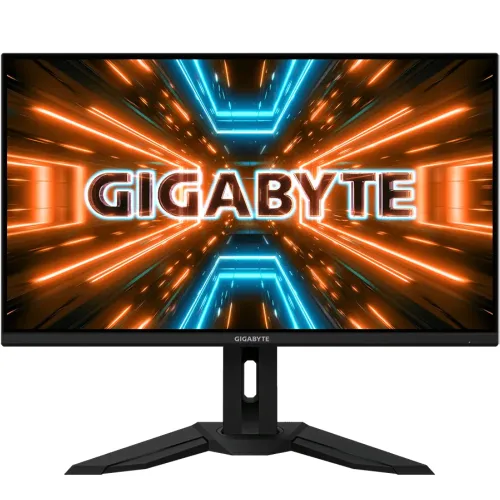
GIGABYTE M32U overview
The GIGABYTE M32U is a 31.5-inch 4K UHD gaming monitor built with an SS IPS panel. GIGABYTE specifies 3840 × 2160 resolution, 144Hz refresh, 1ms MPRT response, VESA DisplayHDR 400 and FreeSync Premium Pro. Its HDMI 2.1 inputs, DisplayPort 1.4 DSC, USB hub, USB-C and integrated KVM support a mix of gaming and multi-device desktop use. Actual performance depends on GPU, console, cable, input and selected settings. Bangladesh price, stock, bundle and serial-specific warranty require confirmation from the seller.
Confirm model and M32U family distinction
Verify the exact M32U model rather than M32UC, M32U Arm Edition or a similarly named GIGABYTE monitor. The M32U is a flat IPS display; M32UC is curved VA, and Arm Edition may have a different mounting bundle. Check the rear model code, supplied accessories and regional unit. Do not assume USB-C power delivery from a listing that only confirms USB-C input. Actual performance depends on GPU, console, cable, input and selected settings. Bangladesh price, stock, bundle and serial-specific warranty require confirmation from the seller.
31.5-inch 4K UHD workspace
The 31.5-inch 16:9 panel resolves 3840 × 2160 UHD. This delivers fine detail for 4K media, games and desktop work, though interface scaling may improve readability at normal desk distance. At 4K and 144Hz, the graphics source must provide substantial bandwidth and rendering power. Use native resolution and confirm the actual signal mode in the operating system. Actual performance depends on GPU, console, cable, input and selected settings. Bangladesh price, stock, bundle and serial-specific warranty require confirmation from the seller.
SS IPS panel and image characteristics
GIGABYTE specifies an SS IPS panel with 90% DCI-P3 and 123% sRGB coverage, 350 cd/m² typical brightness and a 1000:1 contrast ratio. The non-glare surface and 178-degree viewing angles suit shared desktop use. Gamut coverage does not guarantee calibration accuracy; use color management or a calibration instrument for color-critical output. Actual performance depends on GPU, console, cable, input and selected settings. Bangladesh price, stock, bundle and serial-specific warranty require confirmation from the seller.
144Hz refresh and response
The maximum refresh rate is 144Hz, with 1ms MPRT listed. MPRT uses a different measurement method from GTG and does not mean every pixel transition takes one millisecond. High refresh can improve motion smoothness when the PC renders enough frames. Set 3840 × 2160 and 144Hz in the source display menu; choose a response setting that avoids visible artifacts. Actual performance depends on GPU, console, cable, input and selected settings. Bangladesh price, stock, bundle and serial-specific warranty require confirmation from the seller.
Adaptive-Sync and FreeSync Premium Pro
GIGABYTE lists FreeSync Premium Pro and Adaptive-Sync support. Variable refresh can reduce tearing on compatible GPUs when frame rate changes. Enable the feature in the OSD and graphics driver, then check the game’s frame-rate range. It does not raise performance by itself, and behavior depends on the graphics card, driver, input and cable. Actual performance depends on GPU, console, cable, input and selected settings. Bangladesh price, stock, bundle and serial-specific warranty require confirmation from the seller.
DisplayHDR 400 and color gamut
VESA DisplayHDR 400 support is listed, with 350 cd/m² typical brightness. HDR input compatibility does not establish local dimming or premium HDR contrast. GIGABYTE lists 90% DCI-P3 coverage; configure HDR only when the source and content support it. Compare HDR and SDR in actual games because brightness, room lighting and image mode alter the result. Actual performance depends on GPU, console, cable, input and selected settings. Bangladesh price, stock, bundle and serial-specific warranty require confirmation from the seller.
HDMI 2.1 and DisplayPort connections
The monitor includes two HDMI 2.1 inputs and one DisplayPort 1.4 DSC input. GIGABYTE lists 4K high-refresh support subject to DSC and chroma mode. Use a high-bandwidth cable and compatible GPU port. An adapter, dock or older graphics output may limit refresh, color depth or chroma; connect directly when diagnosing signal limitations. Actual performance depends on GPU, console, cable, input and selected settings. Bangladesh price, stock, bundle and serial-specific warranty require confirmation from the seller.
USB-C video and KVM workflow
USB-C is listed as a video input and part of the KVM-capable workflow. The official spec page does not state a power-delivery wattage, so do not assume it will charge a laptop. Confirm whether the intended unit supports the desired USB-C power output with the exact regional manual or seller. The host USB-C port must support DisplayPort Alt Mode for video. Actual performance depends on GPU, console, cable, input and selected settings. Bangladesh price, stock, bundle and serial-specific warranty require confirmation from the seller.
USB hub and audio
GIGABYTE lists three USB 3.0 ports and an earphone jack. For OSD Sidekick and KVM functions, connect the USB upstream cable between the monitor and host; connect peripherals to downstream ports. The monitor has 3W × 2 built-in speakers. Select the right computer and audio output in system settings when switching sources. Actual performance depends on GPU, console, cable, input and selected settings. Bangladesh price, stock, bundle and serial-specific warranty require confirmation from the seller.
Stand adjustment and mounting
The stand supports 130mm height adjustment, tilt from -5 to +20 degrees and swivel ±30 degrees. Pivot is not listed. VESA 100 × 100mm mounting and a Kensington lock are supported. Center the large display, maintain a comfortable viewing distance and verify desk depth and monitor-arm load capacity before replacing the supplied stand. Actual performance depends on GPU, console, cable, input and selected settings. Bangladesh price, stock, bundle and serial-specific warranty require confirmation from the seller.
Console compatibility
GIGABYTE lists console refresh at up to 120Hz and notes PS5/Xbox Series X 4K UHD at 120Hz (4:2:0) over HDMI 2.1. This differs from the 144Hz PC maximum. Console mode depends on console model, game and signal settings. Check the console’s detected output rather than expecting 144Hz from a console. Actual performance depends on GPU, console, cable, input and selected settings. Bangladesh price, stock, bundle and serial-specific warranty require confirmation from the seller.
OSD Sidekick and gaming tools
OSD Sidekick provides PC software control when the monitor connects by USB upstream. GIGABYTE also lists Aim Stabilizer Sync, Black Equalizer, dashboard, crosshair, timer, counter, PiP/PbP, KVM, six-axis color control and Smart OD. These options can change image appearance; use them deliberately and check game rules before enabling overlays. Actual performance depends on GPU, console, cable, input and selected settings. Bangladesh price, stock, bundle and serial-specific warranty require confirmation from the seller.
PC setup for 4K 144Hz
For PC 4K 144Hz, connect a capable GPU through HDMI 2.1 or DisplayPort 1.4 DSC, select 3840 × 2160 and 144Hz, then enable Adaptive-Sync if desired. Use a certified cable and check the active signal. If 144Hz is missing, update the graphics driver, bypass docks and adapters, verify the input and check DSC support. Actual performance depends on GPU, console, cable, input and selected settings. Bangladesh price, stock, bundle and serial-specific warranty require confirmation from the seller.
Strengths and trade-offs
Advantages include a large 4K SS IPS panel, 144Hz refresh, HDMI 2.1, DisplayPort 1.4 DSC, FreeSync Premium Pro, KVM, a USB hub, adjustable stand and built-in speakers. Trade-offs include the graphics power needed for 4K high refresh, DisplayHDR 400 rather than advanced HDR, and unspecified USB-C power delivery on the cited regional spec page. Actual performance depends on GPU, console, cable, input and selected settings. Bangladesh price, stock, bundle and serial-specific warranty require confirmation from the seller.
Desk setup and viewing comfort
Set a comfortable viewing distance so the full 31.5-inch panel is visible without frequent head movement. Adjust height and swivel to reduce neck strain. The non-glare surface helps limit reflections, but strong light can still affect contrast. Use scaling for small text and take breaks during long sessions. Actual performance depends on GPU, console, cable, input and selected settings. Bangladesh price, stock, bundle and serial-specific warranty require confirmation from the seller.
Power, care and delivery checks
The display uses built-in power and accepts 100–240V AC at 50/60Hz; maximum consumption is listed at 140W, with 0.5W power-saving and 0.3W off modes. Provide ventilation and use the correct regional power cable. Inspect the panel, ports, stand, serial label and supplied cables at delivery; clean with a soft microfiber cloth. Actual performance depends on GPU, console, cable, input and selected settings. Bangladesh price, stock, bundle and serial-specific warranty require confirmation from the seller.
Troubleshooting KVM and signal
If KVM does not switch peripherals, connect the monitor’s USB upstream cable to each host and attach the keyboard/mouse to monitor downstream ports. Select the matching KVM input. If high refresh is unavailable, verify resolution, cable, GPU port, DSC, driver and OSD input. Test speakers and audio routing after source switching. Actual performance depends on GPU, console, cable, input and selected settings. Bangladesh price, stock, bundle and serial-specific warranty require confirmation from the seller.
Bangladesh purchase checklist
Before buying in Bangladesh, confirm price and stock, exact M32U flat IPS model (not M32UC), new condition, included HDMI/DP/USB cables and power cord, return and pixel policy, delivery, USB-C power behavior and the seller’s written serial-specific GIGABYTE warranty provider and duration. Get service terms written on the invoice; global product specs do not prove local coverage. Actual performance depends on GPU, console, cable, input and selected settings. Bangladesh price, stock, bundle and serial-specific warranty require confirmation from the seller.
Frequently asked questions
The M32U is a flat 31.5-inch 4K SS IPS monitor with 144Hz PC refresh, 1ms MPRT, HDMI 2.1, DisplayPort 1.4 DSC, FreeSync Premium Pro, KVM, USB hub and 3W × 2 speakers. Console mode is listed up to 4K/120Hz. Confirm exact regional accessories and USB-C power support before purchase. Actual performance depends on GPU, console, cable, input and selected settings. Bangladesh price, stock, bundle and serial-specific warranty require confirmation from the seller.